
Promotion Codes
Make coupons and promotion codes, let customers apply them at checkout, on a plan change or on a credit pack, and apply a discount to a workspace yourself.
A promotion code is a Stripe coupon your customers can type. The coupon says what comes off (a percentage, or a fixed amount in one currency) and for how long; the code is the text a customer enters to get it. Both live in your own Stripe account, so a coupon you make in the Stripe dashboard works the same as one you make in the console.
Note
Promotion codes need an SDK release with promotion code support. On an older
server the SDK sends the purchase again without the code and says so
(promotionCodeDropped), and the customer can still type the code on Stripe's
page.
Making a code
Before you start
- Stripe connected (Connect Stripe): coupons and codes are made in your Stripe account.
- A console role with
stripe_coupons.
Open coupons in the console
(opens the console in a new tab)1. Open Coupons
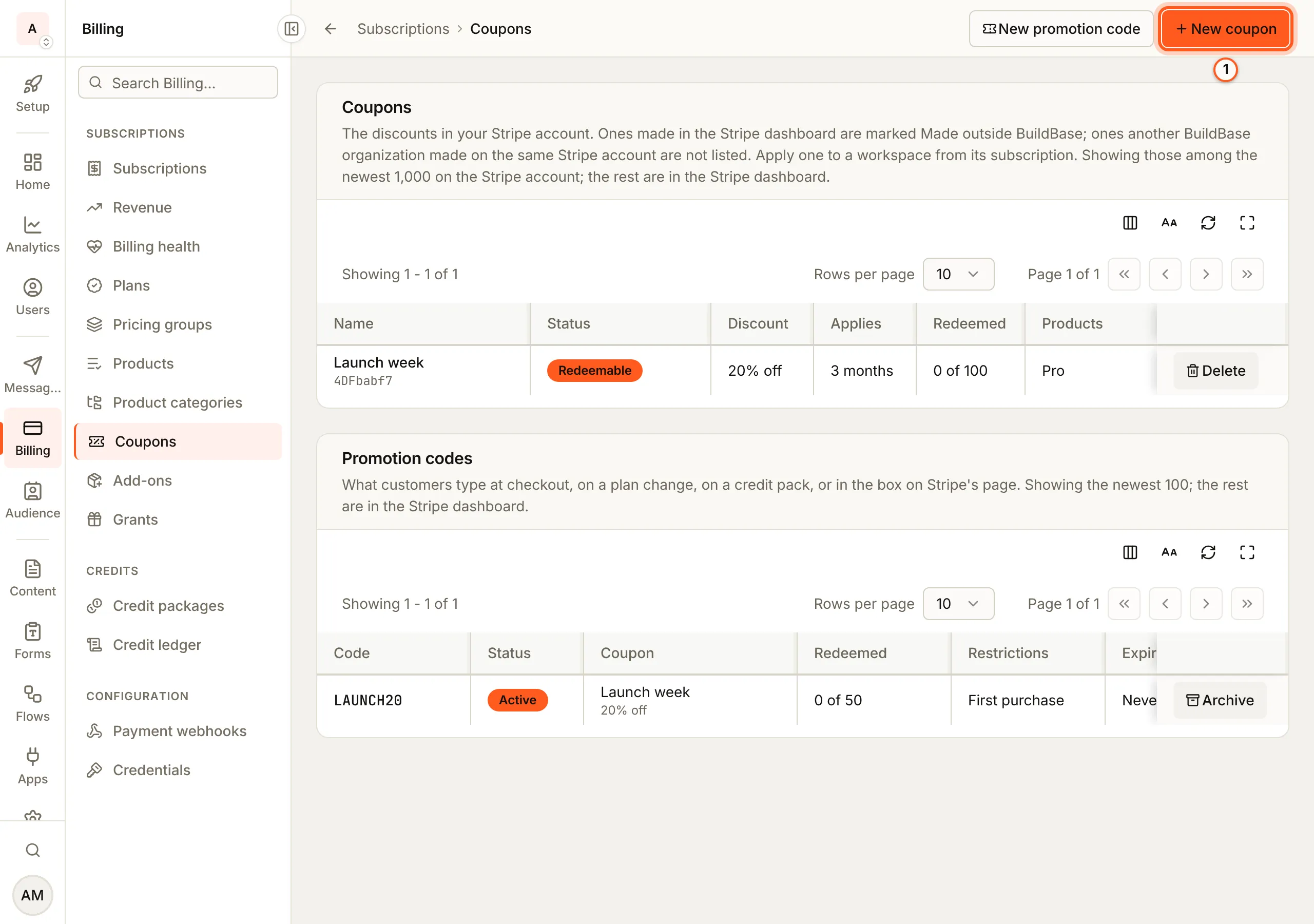
In the Billing menu choose Coupons. The page lists Coupons (what comes off) and Promotion codes (what customers type). Press New coupon.
2. Make the coupon
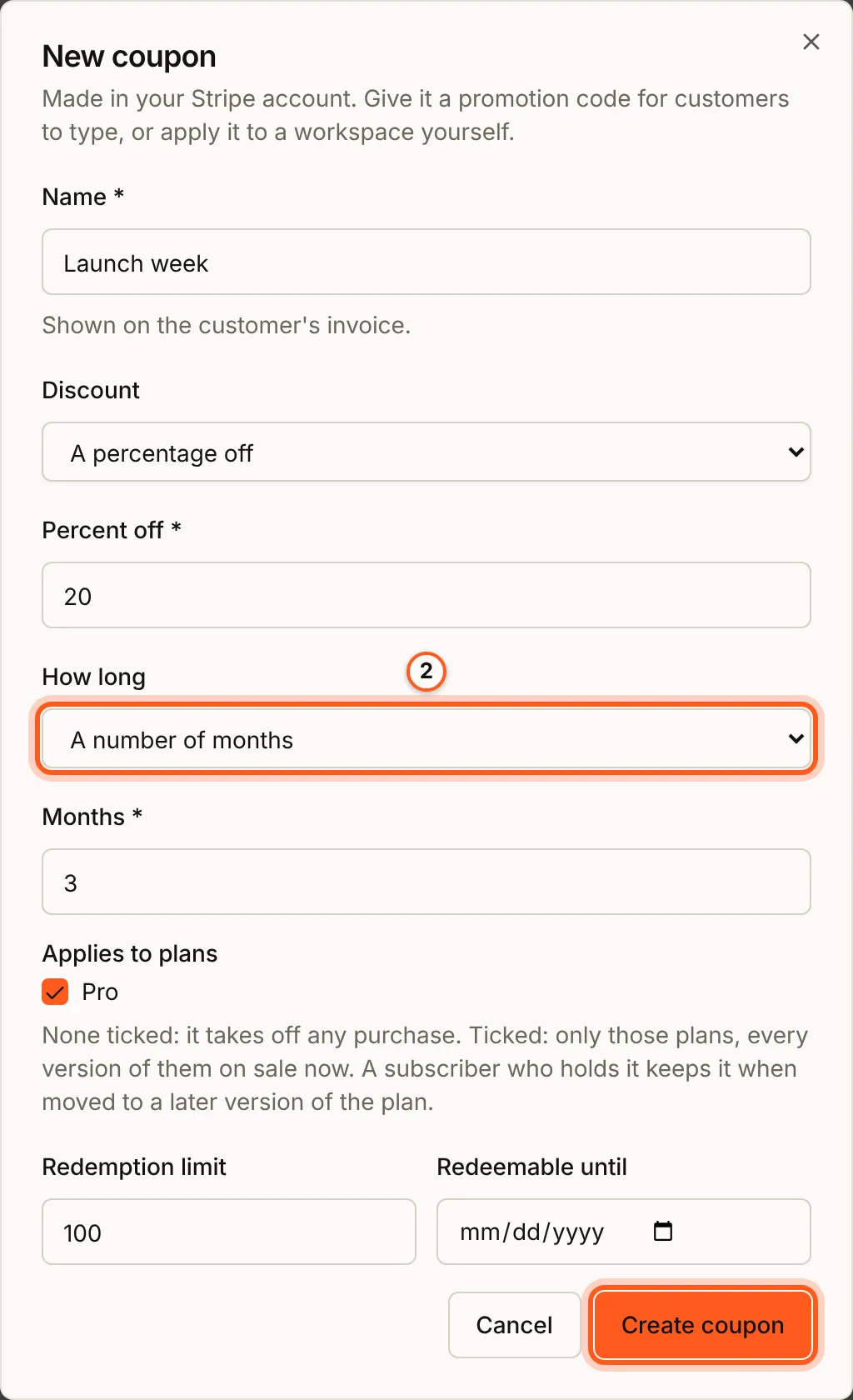
Fill Name (it is shown on the customer's invoice) and choose the Discount: A percentage off with Percent off, or A fixed amount off with Amount off and its Currency. How long is The first invoice only, A number of months with Months, or Every invoice. Under Applies to plans, tick plans to limit the coupon to them; with none ticked it takes off any purchase. Redemption limit and Redeemable until are optional. Press Create coupon.
3. Give it a code
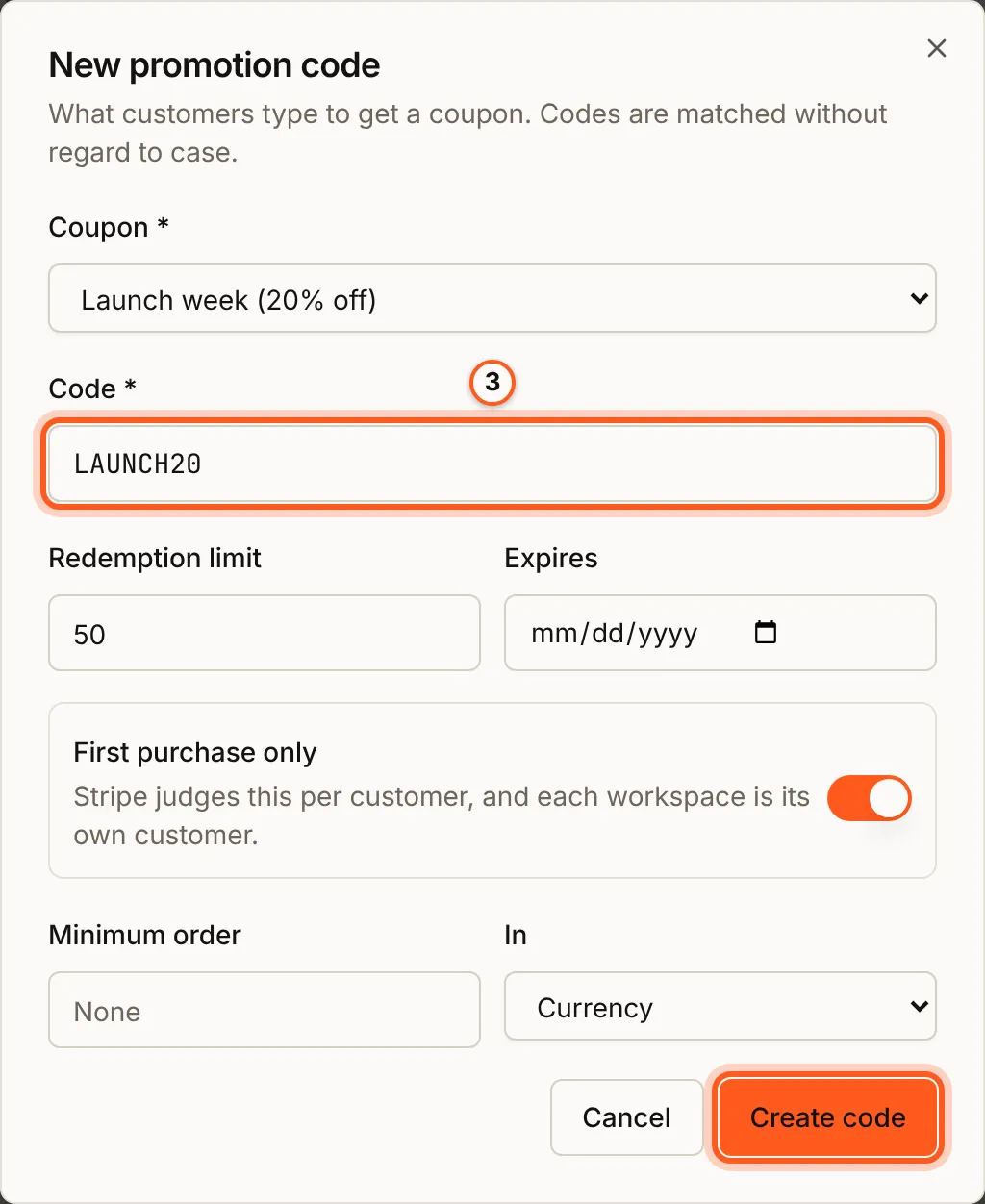
Press New promotion code. Choose the Coupon and type the Code customers will enter, such as LAUNCH20; codes are matched without regard to case. Optionally set a Redemption limit, an Expires date, First purchase only, or a Minimum order In a currency. Press Create code.
4. Taking a code or a coupon off
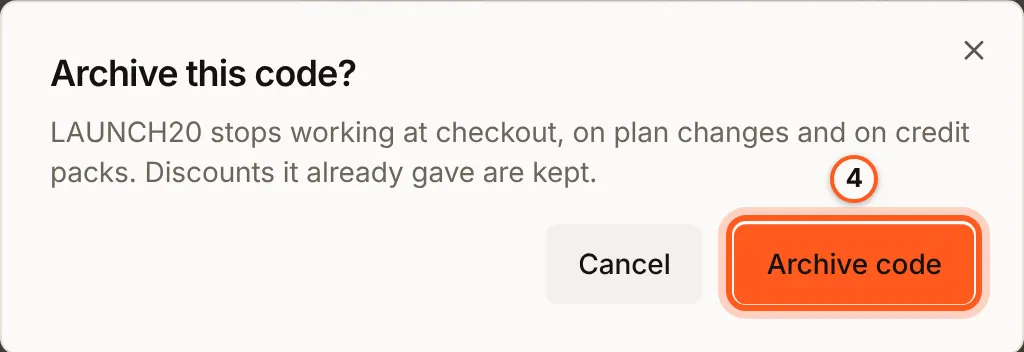
A code is archived: press Archive on its row, then Archive code. It stops working at checkout, on plan changes and on credit packs, and the discounts it already gave are kept.
A coupon is deleted rather than archived (Delete, then Delete coupon). A subscription that already holds it keeps its discount after it is deleted; nobody new can redeem it, and its codes stop working.
Check that it worked
The coupon is listed as Redeemable, with what it takes off, how long, its redemptions and the plans it applies to, and the code as Active with its coupon and restrictions.
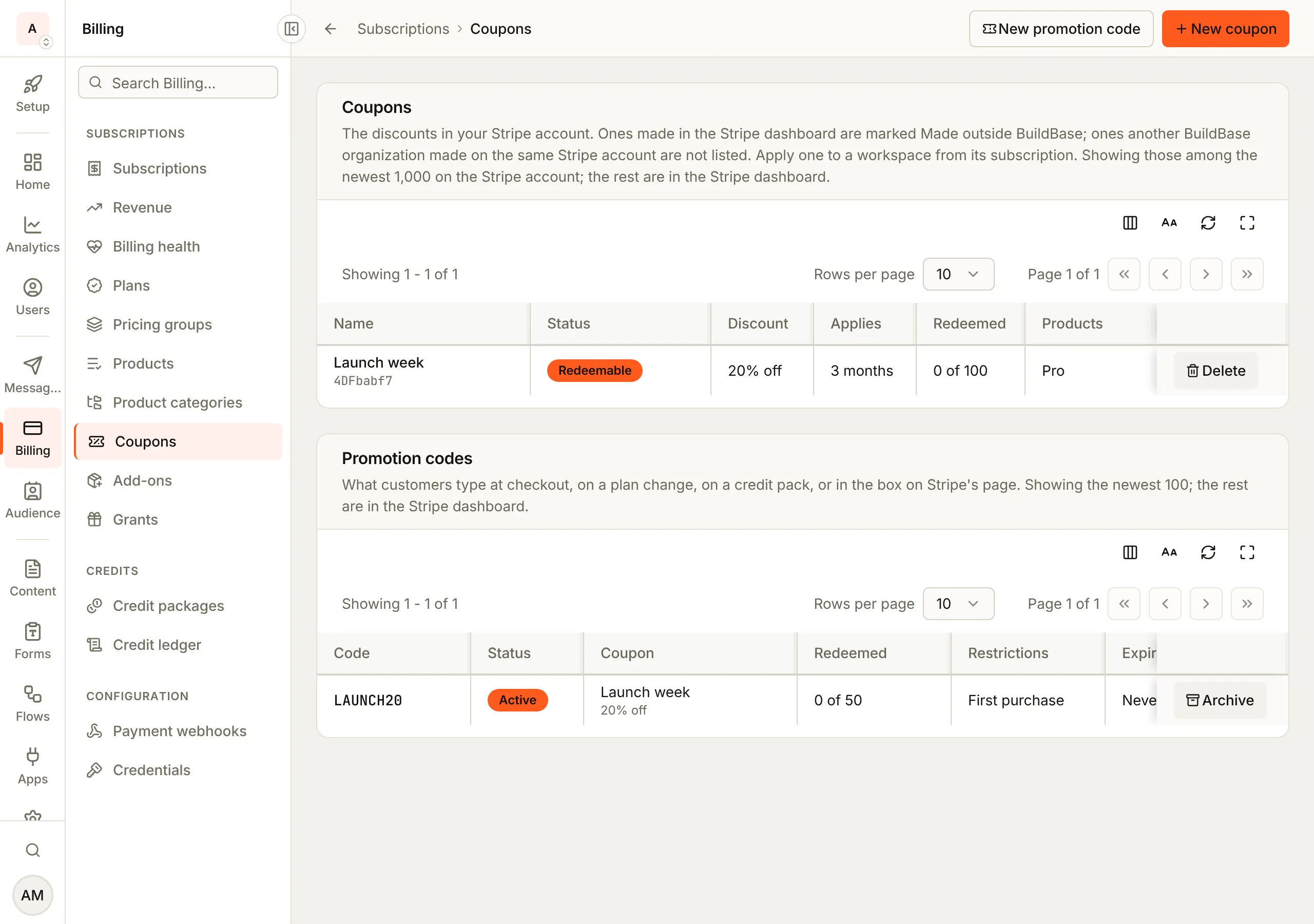
Coupons made in the Stripe dashboard are listed too, marked Made outside BuildBase.
Where a customer can use it
| Where | How |
|---|---|
| A link to your pricing | ?promo=LAUNCH20 (or ?coupon=) on a page with <PricingPage> |
| The plan picker | The code field next to the interval tabs prices every plan with the code |
| Stripe's checkout page | The code box, as before, whenever your app has not applied a code itself |
| Your own form | usePromotionCode() checks a code, then pass promotionCode with the purchase |
A code from a link carries through sign-in: the customer picks a plan on your pricing page, signs in, and the plan picker opens with the code applied.
Note
promotion on the PricingPage render prop, and its promotionCode prop: Requires @buildbase/sdk 1.0.0 or later.
import { PricingPage } from '@buildbase/sdk/react';

export default function Pricing() {
  return (
    <PricingPage
      slug="main-pricing"
      redirectBaseUrl="https://app.example.com/dashboard"
    >
      {({ plans, selectPlan, promotion }) => (
        <>
          {promotion.code && <p>Code {promotion.code} will be applied.</p>}
          {plans.map((plan) => (
            <button
              key={plan._id}
              onClick={() => selectPlan(plan._id, 'monthly', 'usd')}
            >
              {plan.name}
            </button>
          ))}
        </>
      )}
    </PricingPage>
  );
}
Turn the field in the plan picker off with ui.settings.subscription.promoCode: false.
Checking a code before anyone pays
usePromotionCode() asks the server what a code takes off one plan or credit pack. It needs no sign-in, so a public pricing page can show the discounted price. A code that does not exist is an answer (valid: false), not an error.
Note
usePromotionCode and priceWithPromotionCode: Requires @buildbase/sdk 1.0.0 or later.
import {
  formatMinorAmountIntl,
  priceWithPromotionCode,
  usePromotionCode,
} from '@buildbase/sdk/react';

function PromoField({ planVersionId, price }) {
  const [code, setCode] = useState('');
  const { check, data, loading } = usePromotionCode();
  const after = priceWithPromotionCode(data, price, 'usd');

  return (
    <form
      onSubmit={(e) => {
        e.preventDefault();
        check(code, {
          planVersionId,
          billingInterval: 'monthly',
          currency: 'usd',
        });
      }}
    >
      <input value={code} onChange={(e) => setCode(e.target.value)} />
      <button disabled={loading}>Apply</button>
      {data && !data.valid && <p>That code is not valid.</p>}
      {after != null && <p>Now {formatMinorAmountIntl(after, 'usd')}</p>}
    </form>
  );
}
The answer holds the coupon, its restrictions, and the plan's price with and without the code (amount.list, amount.discount, amount.total, in the currency's smallest unit). priceWithPromotionCode prices any other plan from the same answer, the way Stripe would; it returns null where only Stripe can tell, and the server decides when the customer buys.
The check is rate limited per visitor, because codes are guessable. Check once when the customer presses Apply, not on every keystroke.
Applying a code to a purchase
Pass promotionCode with the purchase:
const { createCheckoutSession } = useCreateCheckoutSession(workspaceId);
await createCheckoutSession({
  planVersionId,
  billingInterval: 'monthly',
  stripeOptions: { promotionCode: 'LAUNCH20' },
});

const { updateSubscription } = useUpdateSubscription(workspaceId);
await updateSubscription(planVersionId, { promotionCode: 'LAUNCH20' });

const { purchaseCredits } = usePurchaseCredits(workspaceId);
await purchaseCredits({
  creditPackageId,
  successUrl,
  cancelUrl,
  promotionCode: 'LAUNCH20',
});
getCheckoutStripeParams on the provider can return a promotionCode too. From your server, use subscription.checkout, subscription.update and credits.purchase with the same field.
- At checkout the code is applied to the Stripe session, and the box on Stripe's page is turned off for that session (Stripe takes one or the other).
- On a plan change the code goes with the change, so the prorated invoice is discounted. It replaces a code the customer applied earlier; a coupon you applied stays.
- On a credit pack, a code that makes the pack free completes with no payment, and the pack is granted. The code and the amount it took off are recorded on the credits.
When a code is refused
A code is checked before anything is created in Stripe. A code that cannot be used answers 400 with code: 'PROMOTION_CODE_INVALID' and a reason:
reason | What it means |
|---|---|
not_found | No active code has this text, or its coupon can no longer be redeemed |
currency_mismatch | The coupon takes a fixed amount off in another currency |
not_applicable | The coupon is limited to products this purchase does not include |
refused_by_stripe | Stripe's own rule: a first-purchase code for a returning customer, a minimum amount, a redemption limit |
A first-purchase-only code is judged by Stripe per Stripe customer, and each workspace is its own customer. The check reports the restriction (restrictions.firstTimeTransaction) rather than judging it.
Applying a discount to a workspace yourself
Open the workspace in the console, then Apply discount on its subscription. Pick a coupon or type a code, and give a reason; the reason is kept on the subscription's history. The new discount sits beside the ones the subscription already holds unless you tick Replace them. Remove discount takes one off. Both need create on stripe_subscription_actions, as every item of the Actions menu does; the Coupons screen has its own permission, stripe_coupons.
Either way, the subscription screen your customers see lists each discount under the plan's price, with how long it lasts.
Webhooks and events
subscription.discount_appliedandsubscription.discount_removedfire for every discount a subscription gains or loses, whoever made the change: a customer's code, an admin, the Stripe dashboard, or a discount running out. A one-time code given at checkout reduces only the first invoice and Stripe never lists it on the subscription, so it sendssubscription.discount_appliedand nosubscription.discount_removed; that announcement needscustomer.discount.createdon your Stripe webhook endpoint, which Check Stripe setup adds.subscription.createdandpayment.succeededcarrycouponIdandpromotionCodewhen a code was involved, andsubscription.upgradedandsubscription.downgradedcarry thepromotionCodesent with the change.- The plan picker reports
promo_code_applied(with the coupon id) andpromo_code_rejected(with the reason only, never what was typed) to your analytics.