
Coupons for items
Codes a buyer types at checkout for money off what your sellers list - made by you for every seller, or by a seller for their own items.
A coupon is a code a buyer types at checkout for money off one of your sellers' items. You make coupons that work on every seller's items; each seller can make their own, which work on their items only.
These coupons are for items. Codes for your own plans and credit packs are Stripe promotion codes.
Note
Arrives with selling. Coupons arrive with selling and run on the same Stripe keys: test keys in Staging for test sales, live keys in Production once live selling is open for your app.
Requires @buildbase/sdk 1.2.0 or later. <SellerCoupons>, useSellerCoupons, <CouponField>, the coupons prop of <CartSummary>, the couponCode prop of <BuyButton> and useCart().applyCoupon arrive with it.
Walkthrough
New to selling? Zero to first sale: marketplace and Zero to first sale: storefront walk the whole flow once, from Stripe keys to a refund and going live.
When to use it
A launch discount, a code for a newsletter, money off a seller's own items, or a code that also credits an affiliate.
Before you start
Selling on. A seller makes coupons once they have started selling.
Set it up in the console
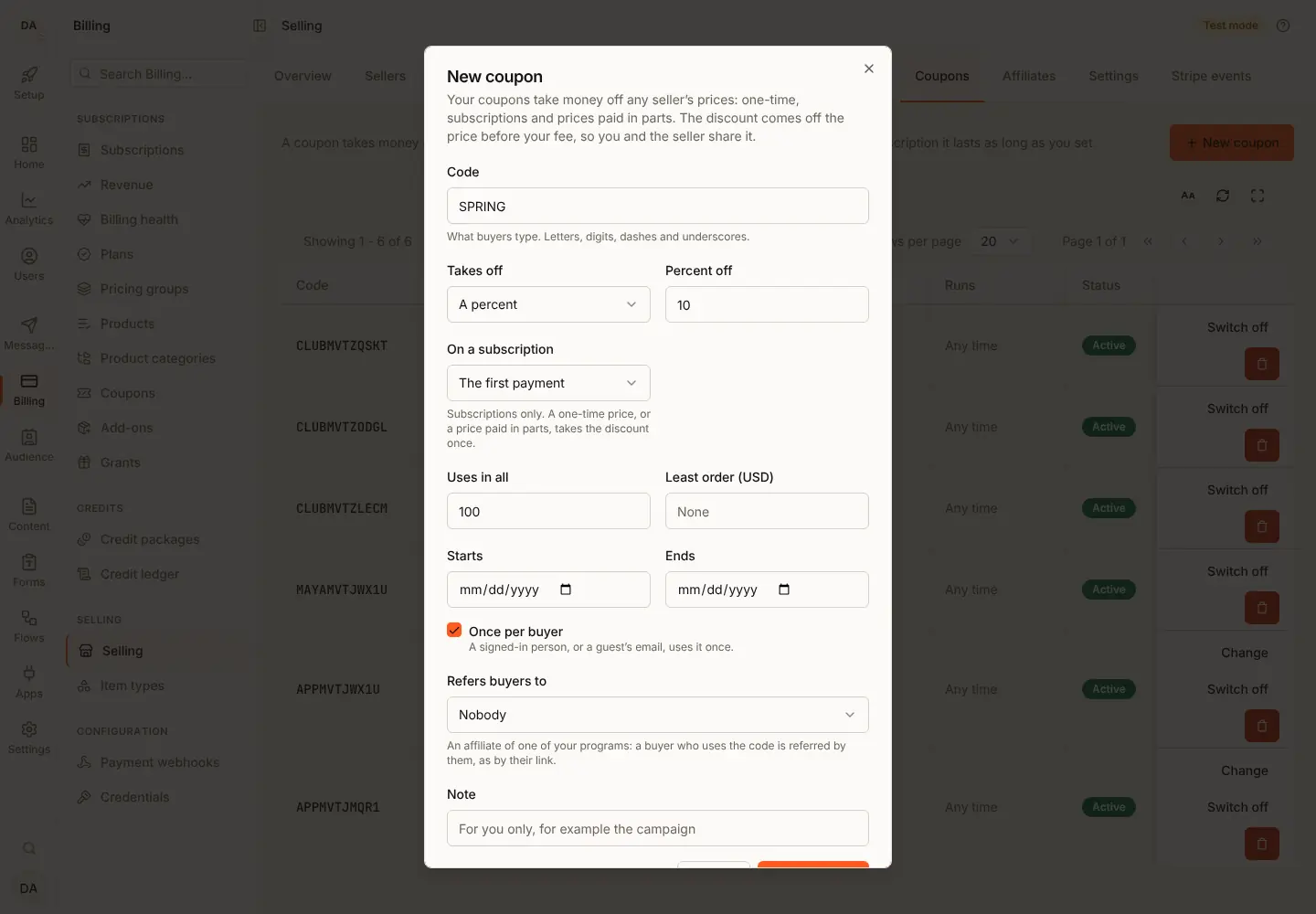
- Open Billing, Selling, Coupons and press New coupon.
- Type the code; choose percent or amount; how long it lasts on a subscription; uses in all, once per buyer, the start and end, and the least order.
- Save. It works on every seller's items unless you name some.
Marketplace and storefront
The discount comes off before your fee in both shapes, so you and the seller share it in proportion. On a subscription, the Stripe coupon is made on the account the subscription lives on: yours in the marketplace shape, the seller's in the storefront shape.
What the seller sees
<SellerCoupons>: their own coupons, on their own items only.
What the buyer sees
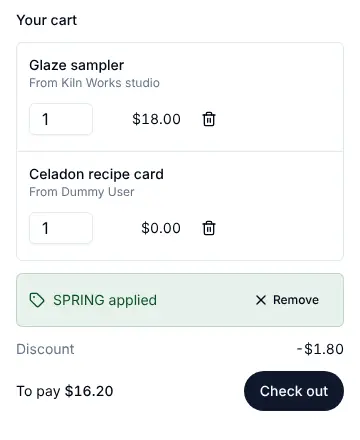
A code field in the cart (<CartSummary coupons />), the discount and what
is left to pay, or a reason the code cannot be used, in their language.
Emails and webhooks
No coupon emails or events. The order carries coupon and each line its
discount, in order.* events and the sales export.
Limits
A code is 3 to 32 letters, digits, - or _. Up to 50 items per coupon. A
repeating coupon lasts 1 to 36 periods. A cart with a subscription or a
price in parts takes no coupon (cart_coupon_mixed).
Staging and Production
A subscription's Stripe coupon is made on the account the subscription lives on, with your saved keys, the first time a subscription there uses the code.
What a coupon is
| Field | Says |
|---|---|
code | What the buyer types: 3 to 32 letters, digits, - or _, kept in upper case |
kind | percent or amount |
percentBps | For percent: basis points off each line, 1 to 10000 (10000 is 100%) |
amount, currency | For amount: minor units off, in that currency |
duration | On a subscription: once (the default), repeating or forever |
durationPeriods | For repeating: how many billing periods, 1 to 36 |
maxRedemptions | Uses in all; unset is no limit |
perBuyerOnce | One use per buyer: a signed-in person, or a guest's email |
startsAt, endsAt | When it works, as ISO 8601 date and time; unset is any time. A value that is not a date is refused with COUPON_INVALID |
minSubtotal | The least the lines it applies to must add up to, minor units |
itemIds | Only these items (up to 50); empty is every item it can apply to |
active, note | Switched on or off; a note only the coupon's owner reads |
affiliateId | An affiliate of one of the owner's own programs: the code refers buyers to them |
A percent is rounded down on each line. An amount is spread over the lines
it applies to by their size, and never takes a line below 0. A currency
on a percent coupon limits it to that currency.
The code a buyer types is trimmed and read in upper case, so spring finds
SPRING. A code is unique among the live coupons of your app. Deleting a
coupon frees its code; checkouts already holding it keep their discount.
A coupon with an affiliateId also refers the buyer to that affiliate, as
their link would, and the program decides between it and a link; see
Affiliates: coupon codes.
Who gives the discount
| Made by | Works on |
|---|---|
| You | Every seller's lines in the checkout |
| A seller | That seller's own lines only |
The discount comes off the line's price before your fee. Your fee, the seller's share and any tax are all of the price after the discount. So whoever made the coupon, you and the seller share the money off in the same proportion as the sale; neither pays the other for it.
A 10% coupon on a $50.00 line with a 10% fee: the buyer pays $45.00, your fee is $4.50 and the seller gets $40.50.
One-time prices, subscriptions and prices in parts
A coupon works on a one-time price, a subscription and a price paid in parts (a deposit, milestones or installments).
A 100% coupon, or an amount that covers the whole price, makes a single
item's checkout a free claim: the order completes at once, with no payment
page. In a cart, a line the coupon
makes free is refused (cart_free), as a free item is, and a cart that
carries a subscription or a price paid in parts takes no coupon
(cart_coupon_mixed): buy that item on its own to use one. A subscription is
never a free claim: its first payment can be 0, and Stripe's page still
saves the card for the payments after it.
On a subscription
duration says how long the discount lasts:
duration | The discount applies to |
|---|---|
once | The first payment only. A coupon made without one is this. |
repeating | The first durationPeriods payments, 1 to 36 |
forever | Every payment, for as long as the subscription runs |
A period is one billing period of the price, whatever its interval: a
weekly price's 3 periods are 3 weeks, a yearly price's are 3 years. Stripe
counts its own repeating coupons in months, so we count the periods
ourselves: each paid invoice the discount came off is counted once, and
after the last one we take the discount off the subscription, so the next
invoice is the full price. A once coupon on a price with a free trial is
counted the same way, so the trial's invoice of 0 does not spend it.
The discount is a Stripe coupon on the account the subscription lives on: yours in the marketplace shape, the seller's in the storefront shape. We make it the first time a subscription in that currency uses the coupon, and use it again after that. An amount off is in the subscription's currency.
- Your fee stays a percent of what is paid. Stripe takes it from each discounted invoice, so you and the seller share the money off in the same proportion, as on a one-time sale. With Stripe Tax, the tax is worked out on the discounted amount and the split is put right as before.
- An introductory price and a coupon together: the coupon applies on
top of the intro price. A
forevercoupon carries on to the regular price; aoncecoupon is spent on the first payment. - A move to another tier keeps the discount: Stripe keeps it on the subscription, so a percent comes off the new price and an amount off stays the same amount, for the periods it has left.
- Each payment records what the coupon took off it (
discounton the order'spayments). Refunding a renewal returns up to what was paid for it.
On a price in parts
The discount comes off the whole price once and is spread over the parts
in proportion to each part's amount, rounded down, with what rounding
leaves on the first part. Every part is charged its discounted amount;
each part shows its share (discount on parts). Your fee is taken on
each part's discounted amount, and with Stripe Tax each part's tax is
worked out on its discounted amount. duration does not apply to parts.
A 15% coupon on a $100.00 price with a 30% deposit: the deposit is $25.50 ($30.00 less $4.50) and the balance $59.50 ($70.00 less $10.50).
Not yet
A subscription with an introductory price or a set number of payments runs
on a Stripe schedule, whose phases are written when it starts. A coupon we
end ourselves cannot be taken off them, so on such a subscription a
repeating coupon, and a once coupon on a price with a free trial, are
refused (coupon_not_open). A forever coupon, and a once coupon
without a trial, work there.
Uses
Starting checkout with a code holds one use of it, so the last use cannot
go to two buyers at once. If the checkout ends unpaid, the use is given
back, for a subscription's checkout too. If it is paid (for a price in
parts, its first part), the use is kept. The least order (minSubtotal)
is measured against a subscription's first payment and against the whole
of a price in parts. redeemed counts the checkouts
holding a use and those paid with it.
In the console
Billing > Selling > Coupons lists your coupons and every seller's, each with what it takes off, how long it lasts on a subscription, its uses, when it works and whether it is on. Make a coupon with New coupon: the code, percent or amount, how long it lasts on a subscription (the first payment, a number of payments from 1 to 36, or every payment), uses in all, once per buyer, the start and end, and the least order. You can switch off or delete a seller's coupon too; changing it is the seller's, or your server's.
A coupon's code and kind stay as made; every other term can change. A change applies to checkouts started after it; a subscription keeps the terms it was bought with. On an order, each payment and each part shows what the coupon took off it. The console's Coupons resource governs the tab.
Seller coupons in your app
A seller makes their own coupons inside your app:
import { SellerCoupons } from '@buildbase/sdk/react';

<SellerCoupons subject={{ user: true }} currency="usd" />;
subject is the signed-in person ({ user: true }) or a workspace (its
id, or { workspaceId }). In a workspace, reading needs
workspace:selling:view and making, changing or deleting needs
workspace:selling:manage; pass canManage={false} to show a read-only
list. The seller must have started selling first.
To build the screen yourself, useSellerCoupons(subject) returns
coupons, create, update and remove, with pending and
actionError:
import { useSellerCoupons } from '@buildbase/sdk/react';

const { coupons, create } = useSellerCoupons({ user: true });
await create({ code: 'SPRING', kind: 'percent', percentBps: 1000 });
A seller's coupon can only name the seller's own items in itemIds.
A code at checkout
Turn on the code field in the cart:
import { CartSummary } from '@buildbase/sdk/react';

<CartSummary coupons />;
The buyer types a code and applies it. The discount and what is left to pay show under the total, and Check out sends the code. A code that cannot be used says why under the field, in the reader's language.
With your own cart page, useCart() does the same:
import { useCart } from '@buildbase/sdk/react';

const cart = useCart();
const applied = await cart.applyCoupon(code);
// applied: false when it cannot be used; the reason is cart.couponProblem
// cart.coupon: the code and what it takes off each line
// cart.discount: minor units off
cart.removeCoupon();
A guest passes { guest: true } to applyCoupon. The cart asks again
whenever its lines change, and checkout sends the applied code. If the
code stops working between the check and checkout, the cart drops it and
sets couponProblem.
For one item, pass the code to the button:
import { BuyButton } from '@buildbase/sdk/react';

<BuyButton
  itemId={item._id}
  variantId={variant.id}
  priceId={price.id}
  couponCode={code}
/>;
A code that cannot be used is refused with the reason under the button.
The order then carries coupon: { id, code, discount }, and each of its
lines its own discount.
The API
Make and change coupons:
| Who | Route |
|---|---|
| A signed-in seller | /api/v1/public/me/coupons |
| A workspace as a seller | /api/v1/public/workspaces/:workspaceId/coupons |
Each takes GET / (a page of coupons, newest first), POST / (make one),
GET /:id, PATCH /:id (every term but code and kind) and
DELETE /:id. Another seller's coupon is "not found".
Check a code before checkout. Both write nothing:
| Who | Route |
|---|---|
| A buyer | POST /api/v1/public/cart/coupon |
| A guest | POST /api/v1/guest/:orgId/cart/coupon |
The body is { code, lines }, the lines as for POST /cart/checkout (one
line for a single item). The answer is { code, problem, message, discount, currency, lines, duration, durationPeriods }: problem is null when the code can be used, and
lines lists the discount on each line it applies to, by index. A code
that cannot be used is an answer, not an error. The guest check is rate
limited like a guest checkout (GUEST_CHECKOUT_LIMITED), and checks a
once-per-buyer coupon against the guest's email only at checkout.
Pay with the code: send couponCode in the body of
POST /api/v1/public/items/:id/checkout, POST /api/v1/public/cart/checkout
or their guest twins under /api/v1/guest/:orgId.
Why a code cannot be used
| Problem | The buyer reads |
|---|---|
coupon_unknown | That code is not valid. |
coupon_inactive | That code is not valid. |
coupon_not_started | That code cannot be used yet. |
coupon_expired | That code has expired. |
coupon_used_up | That code has been used up. |
coupon_used_by_you | You have already used that code. |
coupon_min_subtotal | Add more to your order to use that code. |
coupon_not_these_items | That code does not apply to these items. |
coupon_currency | That code does not apply to this currency. |
coupon_not_open | That code does not apply to this price. |
Error codes
| Code | Status | When |
|---|---|---|
COUPON_NOT_FOUND | 404 | No coupon with that id for this owner |
COUPON_CODE_TAKEN | 409 | Another live coupon in your app has that code |
COUPON_INVALID | 422 | The coupon cannot be saved as given; problems says which field |
CHECKOUT_REFUSED | 422 | The code cannot be used at checkout; problems has path couponCode and the problem |
Sales exports
The sales export gains two columns at the end, after subscription_id:
discount (the money off the order) and coupon_code. Earlier columns
keep their places.
The export has one row per order, not per payment. For a subscription,
discount is what the coupon took off the first payment; each renewal's
discount is on the order's payments (read one order). For a price in
parts it is the discount on the whole price, which the parts share.