
Affiliates
People who send buyers to your sellers and earn a commission: programs with rate tiers, coupon codes and levels, paid by Stripe, PayPal, Wise or by hand.
An affiliate is a person in your app who shares links to your sellers' items and earns a commission on what the buyers they send pay. You run programs on every seller's items; you can let each seller run their own on theirs. Commissions are held for a while, then paid out once a day to each affiliate's own Stripe account, by PayPal, in a Wise batch file you pay, or by hand.
Note
Arrives with selling. Affiliates arrive with selling and run on the same Stripe keys: test keys in Staging for test sales, live keys in Production once live selling is open for your app.
Requires @buildbase/sdk 1.2.0 or later. captureReferral(), useAffiliate, useMyCommissions, useSellerAffiliatePrograms, <AffiliateJoin>, <AffiliateDashboard> and <SellerAffiliatePrograms> arrive with it, and <BuyButton> and <CartSummary> then send the stored referral for you.
Walkthrough
New to selling? Zero to first sale: marketplace and Zero to first sale: storefront walk the whole flow once, from Stripe keys to a refund and going live.
When to use it
When people in your app should earn for sending buyers: your own program across every seller, or programs each seller runs on their items.
Before you start
Selling on. For PayPal payouts, a PayPal Business account and a REST app with Payouts enabled; for Stripe transfers, affiliates set up an account in your app.
Set it up in the console
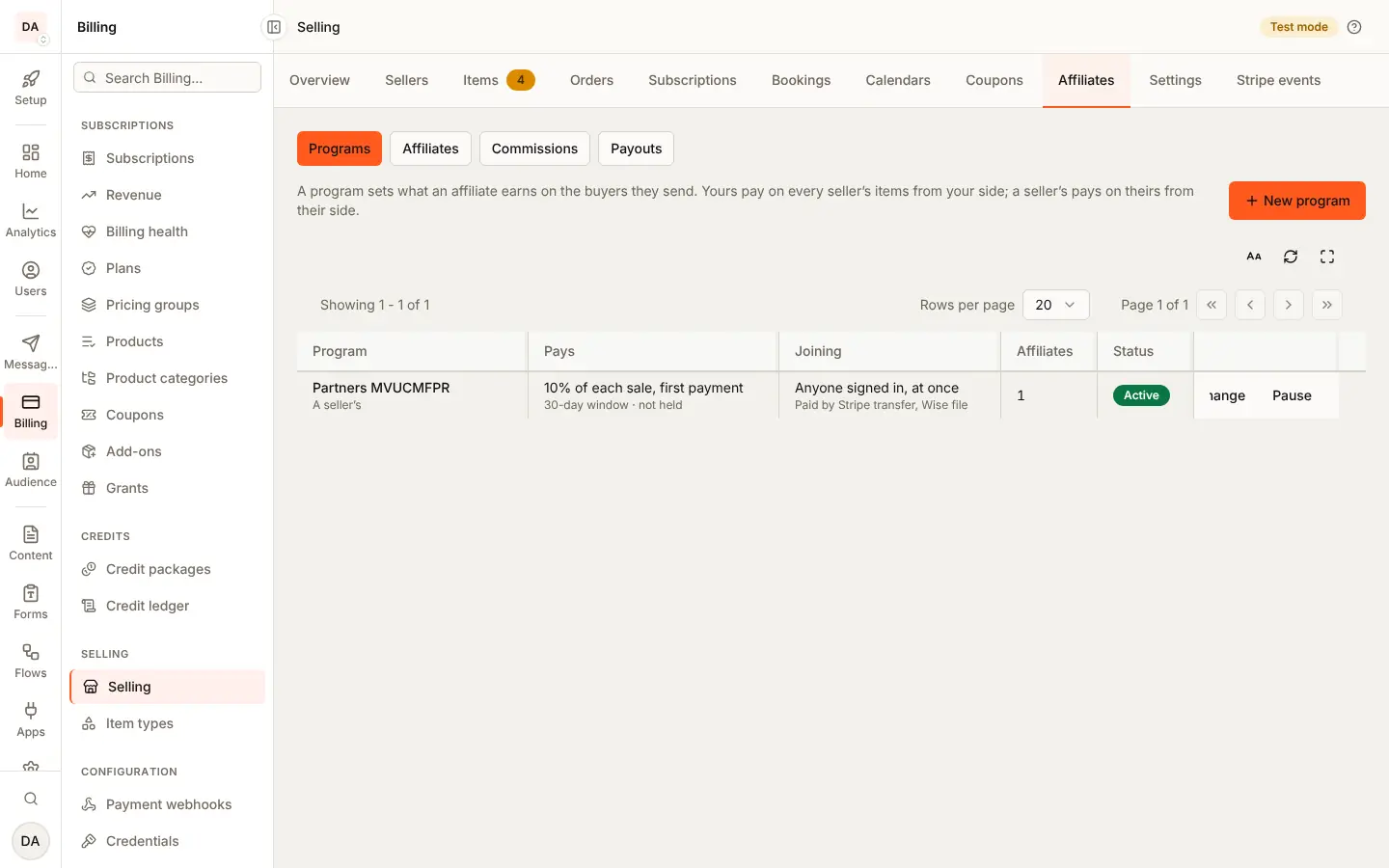
- Billing, Selling, Settings, Affiliates: turn on your own programs, and sellers' programs if you want them.
- Billing, Selling, Affiliates: make a program (rate, window, hold, who may join, payout methods), then approve people, follow commissions and payouts.
- For PayPal, Settings, PayPal for affiliates (PayPal).
Marketplace and storefront
Your program is paid from your side in both. A seller's program comes off the seller's side: in the marketplace shape their transfer is smaller, in the storefront shape the application fee is larger (who pays the commission).
What the seller sees
<SellerAffiliatePrograms>: their programs, affiliates, commissions and
payouts.
What the buyer sees
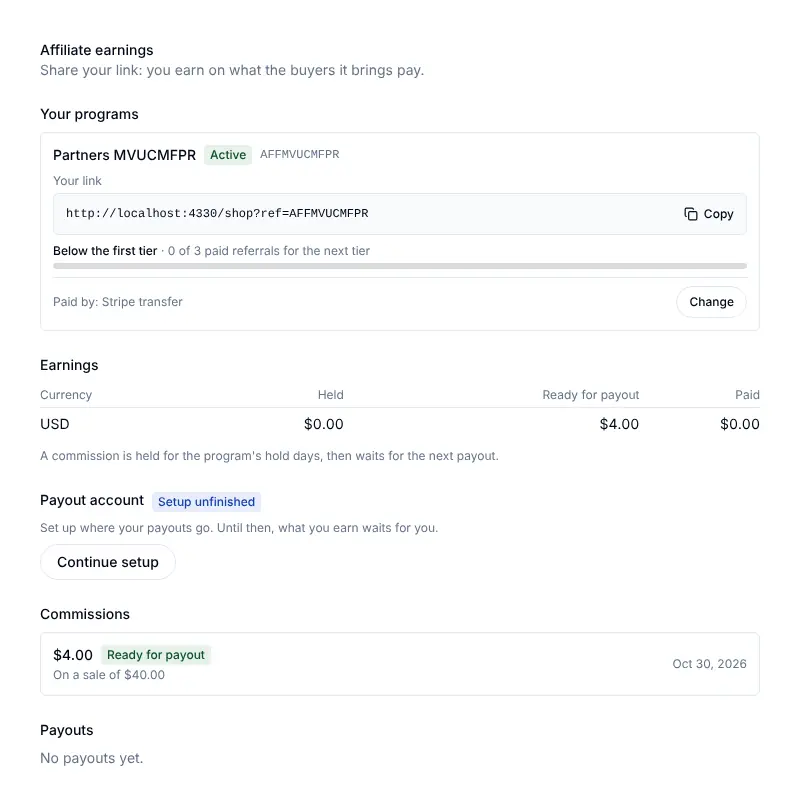
Nothing different: a link with ?ref= or an affiliate's coupon code.
captureReferral() from @buildbase/sdk/tracking keeps the referral, and
<BuyButton> and <CartSummary> send it. The affiliate sees
<AffiliateJoin> and <AffiliateDashboard>.
Emails and webhooks
The affiliate is emailed when approved, when a sale earns, when they reach
a new tier and when a payout is sent. Your server gets affiliate.joined,
affiliate.approved, commission.created, commission.paid and
commission.reversed (events).
Limits
Up to 20 programs of yours at once and 3 per seller; a click window of 1 to 365 days; a hold of 0 to 120 days.
Staging and Production
PayPal follows the environment's Stripe key: test keys, as in Staging, use PayPal's sandbox. Affiliates' Stripe accounts, like sellers', are made again in live mode when you go live in Production.
Turn it on
Both kinds of program are off until you turn them on, in the selling
settings' affiliates section:
curl -X PATCH https://api.console.buildbase.app/api/marketplace/settings/affiliates \
  -H "Authorization: Bearer $CONSOLE_TOKEN" \
  -H "Content-Type: application/json" \
-d '{ "affiliates": { "enabled": true, "sellerPrograms": true } }'| Switch | Lets |
|---|---|
enabled | Your own programs, on every seller |
sellerPrograms | Each seller run programs on their items |
Turning one off stops new joins, clicks and sales from counting for those programs. What was already earned is still paid.
What a program is
| Field | Says |
|---|---|
name, description | What affiliates read before joining |
kind | percent of each line's net, or a fixed amount per unit |
percentBps | For percent: basis points, 1 to 10000 (1000 is 10%) |
fixedAmount, currency | For fixed: minor units per unit sold, in that currency; lines in other currencies earn nothing |
recurrence | On a subscription: first (the default), all, or count |
recurringPayments | For count: how many payments earn, 1 to 36 |
windowDays | How long a click counts, 1 to 365 (30) |
holdDays | How long a commission is held before it can be paid, 0 to 120 (30) |
join | open (active at once), approval (you approve) or invite (only people you add in the console, or a seller invites) |
payoutMethod | The default way to pay: transfer, manual, paypal or wise_export |
payoutMethods | The methods an affiliate may choose from, the default first; unset is [payoutMethod] |
minPayout | The least one payout sends, minor units of each currency; unset is none |
itemIds | Only these items (up to 50); empty is every item the program covers |
active | Switched on or off |
tiers and tier* | Rate tiers: see Tiers |
codeAttribution, ... | Affiliates' coupon codes: see Coupon codes |
levels, ... | Multi-level (off): see Levels |
A line's net is its price after any coupon, before tax and shipping. A percent is rounded half up; a fixed amount is never more than the net. A free order earns nothing.
You may run up to 20 programs at once, and each seller up to 3.
Who pays the commission
| Program | Paid from |
|---|---|
| Yours | Your side. The seller's share is untouched; the commission comes out of your fee or your balance |
| A seller's | The seller's side, at the sale. It is collected with your fee and you pay it out |
A seller's program moves the commission from the seller to you at the sale: in the marketplace shape the seller's transfer is smaller, in the storefront shape the application fee is larger. It never leaves the seller nothing: a commission that would is cut to fit.
On a subscription a seller's program rides on the fee: its percent is
added to your fee on each payment it covers, then the fee drops back on
Stripe after the last one, once. A subscription with an introductory price
or a set number of payments cannot carry it yet (the referral is recorded
as refused, not_open). A price paid in parts earns as one sale, its share
paid with each part.
Carts
A cart takes one referral for
all of it, and every order it makes keeps it; each line is covered, or
not, by the program as it would be bought on its own.
| In a cart | Earns |
|---|---|
| One-time lines (marketplace shape, one page) | Once, when the page is paid. A seller's program makes that seller's transfer smaller |
| A subscription, paid per invoice (marketplace shape) | Each paid invoice the recurrence covers, the first included. A seller's program comes off the seller's transfer from each invoice (it is in the fee recorded on the payment), yours off your side. After its last covered payment the seller's transfer is back to their share less your fee |
| A price paid in parts | The line's commission spread over the parts, one commission per paid part |
| A storefront step | Per step's order, when that step is paid. A seller's program is in that step's application fee; a step left unpaid earns nothing |
A move between tiers earns nothing, on a cart's subscription too: its invoice pays the seller less your fee alone, and the program's share stays on the renewals it still covers. A refund takes back each commission's share of what it refunded, a dashboard refund divided over the cart's orders included (each order's commissions by its own share).
Joining and codes
Signed in, a person reads a program and joins it:
| Route | Does |
|---|---|
GET /api/v1/guest/:orgId/affiliate-programs/:id | An active program's terms, signed in or not |
POST /api/v1/public/me/affiliates | { programId, code?, recruitCode? }: join. Joining again answers the same row |
GET /api/v1/public/me/affiliates | The programs they joined, each with its totals by currency |
GET /api/v1/public/me/affiliates/:id | One of them |
PUT /api/v1/public/me/affiliates/:id/code | { code }: a new code; the old one stops working |
A code is 3 to 32 letters, digits, - or _, kept in upper case and
unique among your app's affiliates. Leave it out and one is made from the
person's name. A taken code is 409 AFFILIATE_REFUSED. Nobody can join a
program they run as a seller, or be added to it by its owner:
422 AFFILIATE_REFUSED with the problem affiliate_is_seller.
An affiliate is pending (waiting for approval), active, paused (new
sales earn nothing) or banned (for good: what is still waiting is
voided).
Invitations
A seller (a person or a workspace) cannot add people to their program. They
invite them, and the person decides. This is how an invite program of a
seller gets affiliates.
| Route | Does |
|---|---|
POST /api/v1/public/me/affiliate-programs/:id/invitations | The seller: { userId } or { email }, exactly one. Answers 202 { invited: true } |
POST /api/v1/public/workspaces/:workspaceId/affiliate-programs/:id/invitations | The same for a workspace, with SELLING_MANAGE |
GET /api/v1/public/me/affiliate-invitations | The person: invitations waiting for an answer (page, limit), each with the program's public terms |
POST /api/v1/public/me/affiliate-invitations/:id/accept | Joins the program, active at once. 201 with their affiliate, or 200 with the one they already had |
POST /api/v1/public/me/affiliate-invitations/:id/decline | { _id, programId, status: 'declined' } |
The seller's answer is the same whoever the body names: a person of your
app, an id or email nobody has, someone already in the program, or someone
already asked. It never carries a name or an email, and the seller cannot
list who they invited. Only a person of your app is invited (by email, only
the person whose verified email it is), and they get an email and a push
notification (the selling:affiliate_invited trigger) naming the program. Nothing
else happens until they accept: no affiliate row, no affiliate.joined or
affiliate.approved. Accepting sends both.
An invitation waits 30 days. Asking again renews an expired one; after a
person declines, asking again does nothing for 30 days. A program sends at
most 50 invitation notices a day; past that, invitations are still kept,
and the answer is the same, without a notice. Joining an invite program
with POST /api/v1/public/me/affiliates accepts a pending invitation; with
none it is still 403 AFFILIATE_REFUSED. A person's pending invitations are
declined when their account is deleted.
What a seller sees of their affiliates
A seller manages their program's affiliates by name, code and payout
destination. Whether they also see the email of an affiliate's account is
your choice under Billing > Selling > Settings > Buyers, payouts and
records (policies.affiliateContact):
- Name and code only (
hidden, the default): never the email. - Email, when the affiliate agreed (
consented): the email of an affiliate who agreed to share it, and nobody else's.
The person agrees when they join (POST /api/v1/public/me/affiliates with
shareContact: true) or accept an invitation
(POST .../affiliate-invitations/:id/accept with { "shareContact": true };
an empty body, as before, shares nothing), and can change it at any time
with PUT /api/v1/public/me/affiliates/:id/contact-consent and
{ "shareContact": false }, which hides it from the seller at once. Every
affiliate view carries contactShared. You (the console and your server)
always see the email.
Links and the referral token
A link is any page of your app with ?ref=<code>. When a visitor arrives
with one, your app asks for a referral token and keeps it first-party (a
cookie or local storage), replacing any older one: the last click wins.
const res = await fetch(
  `https://api.console.buildbase.app/api/v1/guest/${orgId}/referrals/click`,
  {
    method: 'POST',
    headers: { 'Content-Type': 'application/json' },
    body: JSON.stringify({ code }),
  }
);
const { token, expiresAt } = await res.json();
The token is signed by the platform for your app (or one environment) only.
Send it as referral with checkout:
| Checkout | Route |
|---|---|
| One item | POST /api/v1/public/items/:id/checkout |
| A cart | POST /api/v1/public/cart/checkout |
| A guest's item or cart | the same under /api/v1/guest/:orgId |
A forged, cut or expired token (past the program's window) is ignored, never
refused, so a stale cookie never blocks a sale. The click route is rate
limited per address and code, and per app; an unknown, paused or banned
code is 404 AFFILIATE_NOT_FOUND.
What earns nothing
The order keeps the referral with status: 'refused' and the reason:
| Reason | When |
|---|---|
self_referral | The buyer is the affiliate, or uses the affiliate's verified email |
buyer_is_seller | The buyer is the seller, or in the seller's workspace |
affiliate_is_seller | The affiliate is the seller, or in the seller's workspace |
affiliate_inactive | The affiliate is pending, paused or banned |
program_inactive | The program is off or gone, or its kind is switched off |
not_covered | Nothing in the order is the program's (another seller, other items) |
free_order | The order is free |
pending_cap | The affiliate has 1000 commissions waiting |
not_open | A seller's program on a scheduled subscription |
An order refunded in full because its address is outside an item's shipping regions keeps its referral but earns no commission.
The order view (console and your server) carries referral and
commission. A buyer's own view never does.
Tiers
A program can pay more as an affiliate sells more: up to 5 tiers, each a
threshold and a rate of the program's kind (percentBps for a percent
program, fixedAmount for a fixed one). Below the first threshold the
program's own rate applies. Every setting has a default, so a program with
no tiers is unchanged.
| Field | Says | Default |
|---|---|---|
tiers | [{ threshold, percentBps }] or [{ threshold, fixedAmount }], thresholds rising | none |
tierMetric | paid_referrals (each paid order once) or revenue (what they paid, before tax) | paid_referrals |
tierCurrency | For revenue, required: the currency counted; sales in others count as no revenue | none |
tierPeriod | lifetime, calendar_month, calendar_quarter or rolling_30d, all in UTC | lifetime |
tierApply | forward (the sale that reaches a tier and those after) or retroactive (the period's earlier too) | forward |
{
  "kind": "percent",
  "percentBps": 1000,
  "tiers": [
    { "threshold": 2, "percentBps": 1500 },
    { "threshold": 10, "percentBps": 2000 }
  ],
  "tierPeriod": "calendar_month"
}
Here the first sale of a month earns 10%, the second and later 15%, the tenth and later 20%. Each sale counts once, however often its payment is delivered. A tier reached is never lowered in its period; a refund lowers the count for the sales after it only, never what was already earned.
retroactive tops up each earlier commission of the period to the new
rate, once, as a commission of type tier_adjustment (its adjusts names
the commission), held like the one it tops up. It is for your own programs
only (a seller's program is 422, problem tier_retroactive_seller) and
for a fixed period (rolling_30d is tier_retroactive_rolling). The
market mostly applies tiers forward; retroactive is there for the programs
that promise it.
Your programs read the tier at each payment, so a subscription's renewal
earns at the tier reached by then. A seller's program fixes its rate at
the sale, since it is collected with your fee then. The affiliate's view
carries tier: the tier reached, the count so far and the next threshold.
Coupon codes
A coupon can name an affiliate (affiliateId, one of
the coupon owner's own programs): a buyer who enters it is referred by that
affiliate, as if they had followed their link. The order's referral
says source: 'coupon'.
| Field | Says | Default |
|---|---|---|
codeAttribution | When a link and an affiliate's coupon disagree: coupon_wins or link_wins | coupon_wins |
couponRateBps | A sale brought by the coupon earns this percent instead of the program's rate | none |
codeOnlyAttribution | The affiliate's own code typed at checkout refers them, with no discount | off |
The coupon's program decides between a coupon and a link. A code a coupon has is always that coupon. The self-referral rules apply as for a link: an affiliate buying with their own code earns nothing.
Levels
Warning
Check your local rules first. Paying people for the sales of people they recruited is regulated in many places (rules on multi-level marketing, pyramid schemes and earnings claims, such as the FTC's in the United States). This is not legal advice: it is your responsibility, as the app owner, to check the rules where you and your affiliates are before turning levels on. BuildBase only pays a level on a real customer's paid sale, and never for recruiting itself.
Off by default. With levels on, an affiliate who recruited another (the
recruit joined with their code as recruitCode, from a recruit link) earns
a share of each sale their recruit makes; with 2 levels, so does the one
who recruited them.
| Field | Says | Default |
|---|---|---|
levels | 0 (off), 1 or 2 | 0 |
levelBps | Each level's share in basis points, level 1 first | none |
levelBasis | A share of the sale's commission, or of the line's net | commission |
levelsAcknowledged | Required as true to turn levels on: you read the caution above |
Levels are for your own programs only (levels_seller_program). Turning
them on without levelsAcknowledged is 422, problem
levels_not_acknowledged; the console asks you to confirm and records who
did and when (levelsAcknowledgedBy, levelsAcknowledgedAt). Who
recruited whom is set once, at joining, and never changes; a recruit link
that would loop back is ignored. A level is paid only on a paid order, as a
commission of type level (with level 1 or 2), from your side, held and
taken back with the sale's own commission. The recruiter is never paid on
their own purchase.
Commissions
Each paid payment of an attributed line earns one commission: the first
payment, and on a subscription each later one the recurrence covers.
Paying again, or a webhook delivered twice, never earns twice.
| Status | Means |
|---|---|
pending | Earned, held until availableAt (the payment plus the hold days) |
approved | Past its hold and not refunded: waits for the next payout |
paid | Paid out |
void | Taken back before it was paid: refunded, disputed, or the affiliate banned |
reversed | Taken back in full after it was paid |
A refund takes back the commission's share of what it refunded, and all of
it on a full refund. A seller's program's share goes back with the refund.
After payout the platform reverses it from the transfer that paid it; if
the affiliate's balance cannot cover that, it is owed (a clawback row,
negative) and offset against their next payout. An open dispute holds the
order's commissions; a lost one takes them back; a won one lets them go.
Payouts
Once a day (and when you press Reconcile now) the platform approves the
commissions past their hold, then batches each affiliate's approved
commissions in one currency, by the method they chose from the program's
payoutMethods (the first when they chose none). A batch at least the
program's minPayout is sent:
transfer: one Stripe transfer from your balance to the affiliate's own account, once it is active. An empty balance leaves the batch pending with its error, and the next pass tries again.paypal: one PayPal payout from your own PayPal Business account to the email the affiliate gave. It is paid when PayPal says so.wise_export: the batch waits for you. Download the Wise batch file, pay it in Wise, and mark each batch paid.manual: the batch waits for you. Pay the affiliate your way and mark it paid with your reference.
The affiliate sets up their account from your app:
| Route | Does |
|---|---|
POST /api/v1/public/me/affiliates/payout-account | { country }: their account (made once, or a seller account they have), and a session for Stripe's embedded onboarding |
POST /api/v1/public/me/affiliates/payout-account/sync | Reads the account again |
GET /api/v1/public/me/affiliates/commissions | Their commissions, newest first |
GET /api/v1/public/me/affiliates/payouts | Their payouts |
PUT /api/v1/public/me/affiliates/:id/payout-method | { method, paypalEmail?, paypalEmailConfirm?, bank? }: how this program pays them, from what it offers |
The session's client secret goes to their browser only. Show Stripe's onboarding component with it, as for a seller.
Setting a PayPal email or bank details for a Wise file needs a recent
sign-in: an older session is answered 403 reauth_required, and the SDK
asks the person to confirm it's them, then retries.
When an affiliate changes where they are paid
A new PayPal email, or bank details other than those saved, is a change of
destination. Every change emails the account's address and writes a
marketplace_affiliate.destination_changed row to your audit log. Two
choices under Billing > Selling > Settings > Buyers, payouts and records
decide the rest:
- Confirm a new payout destination by email (on by default): the new
destination waits, and the old one stays in force, until the person
follows a one-time link mailed to the new PayPal address (to the account's
address for bank details). The link works once, for 48 hours. It opens a
page with a Confirm button, so a mail scanner that follows links changes
nothing. Your app can also confirm it with
POST /api/v1/guest/:orgId/affiliates/:id/payout-destination/confirmand{ token }. The affiliate's view shows the waiting change aspayoutDestination.pending(never the bank details themselves). - Hold payouts after a change: 72 hours (the default), 24 hours, or no
hold. From when the new destination takes effect, the payout run skips it
until the hold ends (
payoutDestination.heldUntil). What was earned waits, still approved, and is paid at the next run after it.
Payout methods
Stripe transfers reach an affiliate's own connected account, which is
opened in the countries Stripe supports. Affiliates' accounts are made with
Stripe's recipient configuration, and Stripe's cross-border payouts do not
reach accounts of that kind, so an affiliate in another country than yours
often cannot be paid by transfer. Two more methods cover them, each
off until you offer it in payoutMethods:
| Method | Why | What the affiliate gives |
|---|---|---|
paypal | Reaches people in far more countries than Stripe transfers, with nothing to set up but an email | The email of their PayPal account, twice |
wise_export | Bank payouts in many currencies at low exchange costs, paid by you in Wise from one batch file | Bank details (an IBAN, or an account number) |
PayPal
PayPal payouts come from your own PayPal Business account (fund its PayPal balance in the payout currencies), with your own REST app's credentials:
- In PayPal's developer dashboard, create a REST app with Payouts enabled, and copy its client ID and secret.
- Add a webhook to the app with the URL the console shows (your org's own
URL), for the
PAYMENT.PAYOUTS-ITEM.*events, and copy its webhook ID. - In the console, Billing > Selling > Settings > PayPal for affiliates, save the three and press Test. They are stored encrypted and never shown again.
Sandbox or live follows your Stripe key: test keys use PayPal's sandbox. Each batch is one payout of one item, keyed so a retry is the same payout. PayPal's word on it, by webhook or read each day:
| PayPal says | The batch |
|---|---|
SUCCESS | Paid; its commissions are paid |
UNCLAIMED | Still pending: the email has no PayPal account yet; PayPal holds it 30 days for them to claim |
RETURNED | failed: its commissions are approved again, and wait until the affiliate gives their PayPal again |
FAILED, BLOCKED, ... | The same, with PayPal's reason in lastError |
PayPal payouts need the platform's PayPal switch, which may be off on your installation; the console says so.
Wise
GET /api/marketplace/affiliate-payouts/wise.csv answers every pending
Wise batch as Wise's batch payment file (one row per batch: the account
holder, the amount and currency, and their bank details), and
.../:id/wise.csv one batch. Upload it in Wise, pay it, then mark each
batch paid with its Wise reference. Bank details are stored encrypted, and
every view shows only the holder, the currency and the last four
characters. A seller running Wise payouts on their own program downloads
theirs from /me/affiliate-programs/payouts/wise.csv (or the workspace
twin, with SELLING_MANAGE).
Running programs
| Who | Routes |
|---|---|
| You, in the console | /api/marketplace/affiliate-programs, /affiliates, /commissions, /affiliate-payouts |
| A signed-in seller | /api/v1/public/me/affiliate-programs |
| A workspace as a seller | /api/v1/public/workspaces/:workspaceId/affiliate-programs |
| Your server, with a key | /api/v1/server/commerce/affiliates, /commerce/commissions |
Programs take GET /, POST /, GET /:id, PATCH /:id and
DELETE /:id; in the console, POST /:id/affiliates with { userId } adds
a person, active at once. A seller cannot add people by user id: a seller's
POST /:id/affiliates answers 403 AFFILIATE_INVITE_NOT_ALLOWED, and a
seller invites people instead with POST /:id/invitations (see
Invitations). An affiliate moves with POST .../:id/approve, pause,
resume or ban (with an optional note). A manual or Wise batch is
marked paid with POST .../:id/mark-paid and { reference }. Your PayPal
set-up is GET, PUT and DELETE /api/marketplace/affiliate-payouts/paypal
and POST .../paypal/test; saving, testing and removing it need an owner or
admin. A seller reaches their
own programs, affiliates, commissions and payouts only; a workspace needs
SELLING_VIEW to read and SELLING_MANAGE to change. In the console, each
section has its own permission:
| Section | Permission | Owner or admin only |
|---|---|---|
| Programs | marketplace_affiliate_programs | |
| Affiliates | marketplace_affiliates | Ban |
| Commissions, and their CSV export | marketplace_commissions (read only) | |
| Payouts | marketplace_affiliate_payouts | Mark paid, the PayPal set-up |
GET /api/marketplace/commissions/export answers the commissions as CSV.
The sales export gains two columns at the end: affiliate_code (when the
referral earned) and commission (on the first payment).
Events
| Event | When |
|---|---|
affiliate.joined | A person joined a program (active, or waiting) |
affiliate.approved | A waiting affiliate was approved, or a paused one resumed |
affiliate.status_changed | Approved, paused, resumed, banned, or paused for good when the person deleted their account (reason: account_deleted); ids and statuses only |
commission.created | A paid payment earned a commission |
commission.paid | A batch was paid out (payout, commissionIds) |
commission.reversed | A refund, a lost dispute or a ban took part or all of one back |
A person gets an email when a seller invites them to a program. The affiliate gets an email when they are approved, when a sale earns them a commission, when they reach a new tier, when a payout is sent by PayPal (saying where to claim it), and when a payout is sent or marked paid.
Error codes
| Code | Status | When |
|---|---|---|
PROGRAM_NOT_FOUND | 404 | No program with that id for who asked |
AFFILIATE_NOT_FOUND | 404 | No affiliate, payout, referral code or invitation with that id for who asked; an invitation that expired or was already answered |
AFFILIATE_REFUSED | 403, 409, 422 | Invite only with no invitation (403); a taken code, a switch off, a state that does not allow it, an invitation to a program that is off (409); a program that cannot be saved (422, problems says which field) |
PAYOUT_METHOD_NOT_OPEN | 422 | A payout method the program does not offer, or PayPal while it is off on the platform |
AFFILIATE_INVITE_NOT_ALLOWED | 403 | A seller (a person or a workspace) adding a person to their program with POST .../:id/affiliates; a seller invites instead (POST .../:id/invitations), and only you add people directly |
Not yet
Stripe Global Payouts, Payoneer, tax forms for affiliates, levels on a seller's program, and locking a customer to the affiliate who first referred them.