
Checkout and orders
Let people in your app buy what your sellers list: one button to Stripe's checkout, stock held while they pay, and every order for you and the buyer.
A buyer pays for one of your sellers' items on Stripe's hosted checkout. Each purchase is an order: what was bought, at what price, from whom, and how the money splits between your fee and the seller. You see every order in the console; your server reads them and gets a webhook for each.
Note
Arrives with selling. Checkout arrives with selling and runs on the same Stripe keys: test keys in Staging for test sales, live keys in Production once live selling is open for your app. Fixed, free and pay-what-you-want prices can be bought once, and recurring prices as subscriptions with tiers, an introductory price or a set number of payments. A one-time price can also be paid in parts: a deposit, milestones or installments. A buyer gets messages, links, access to something in your app, a seller's manual delivery, files to download and licence keys; bundles come later.
Requires @buildbase/sdk 1.2.0 or later. <BuyButton>, useCheckout, useMyOrders, useMyOrder, useHoldings, useHasAccess, useGuestCheckout, useOrderByToken, <SellerSales>, useSales, useRefundSale, useFulfilSale, <OrderParts>, useOrderPartActions, useChargeSalePart, useSalesExport, <SellerFiles>, <HoldingFiles>, useSellerFiles, useReleases, useDownloadFile, the server's commerce actions, the commerce tools for an app's agent and the order.* and grant.* events in its catalog arrive with it; earlier versions have none of them.
Walkthrough
New to selling? Zero to first sale: marketplace and Zero to first sale: storefront walk the whole flow once, from Stripe keys to a refund and going live.
When to use it
This page covers everything after a buyer presses buy: one-time checkout, subscriptions, paying in parts, carts across sellers, refunds, fulfilment, files, licence keys and payouts. Exports are in selling.
Before you start
- Selling on, a seller who can sell, and a published item.
- Your Order page under Selling, Settings, "Your terms and policies", so buyers get a receipt.
- To sell to people without an account, "Who can buy" under Selling, Settings (guests).
- For subscriptions in the storefront shape, the Connect endpoint set up with Set it up for me, so renewals reach your app.
Set it up in the console
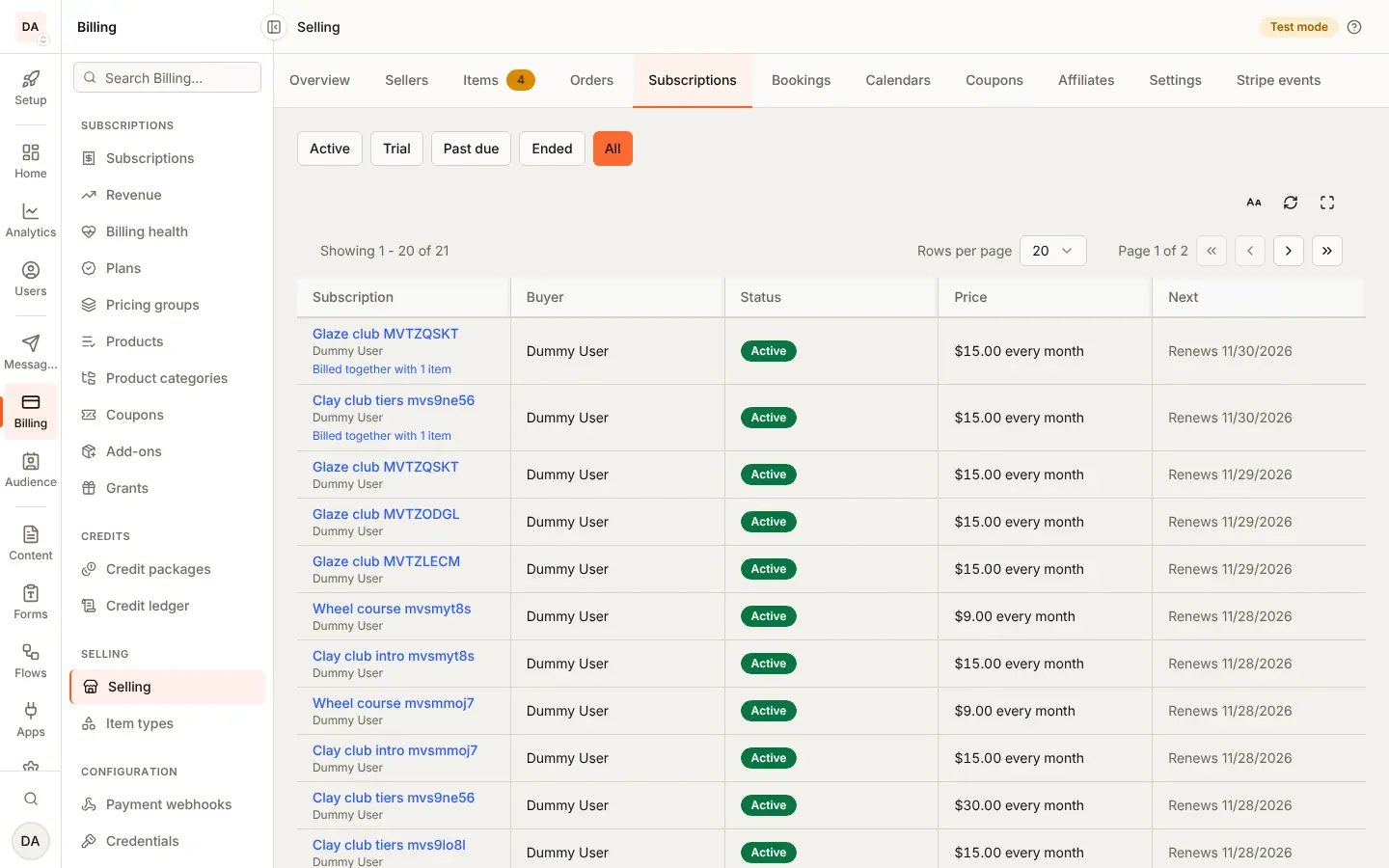
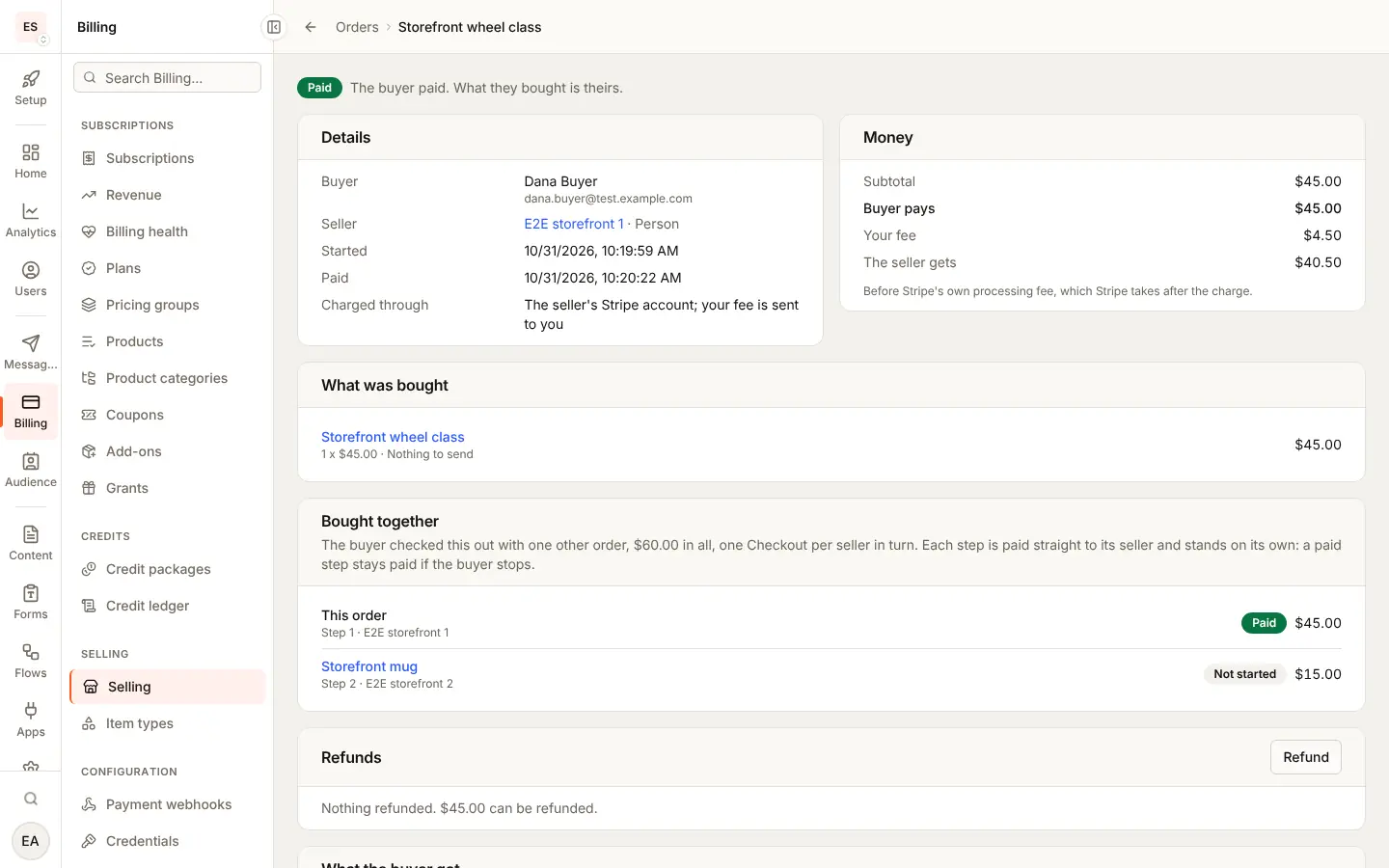
Nothing to switch on: checkout works once an item is published. You work orders under Billing, Selling: Orders (paid, partly paid, awaiting shipment, and Export CSV) and Subscriptions. Each order's page shows the split, what the buyer got, refunds, disputes, parts and shipments (in the console). Cart rules (subscriptions per cart, how one leaves a shared subscription) are under Settings, Carts.
Marketplace and storefront
| Marketplace | Storefront | |
|---|---|---|
| Stripe's page | On your account | On the seller's account |
| The money | The seller's share is transferred to them | Your fee is sent to you |
| Refunds | You only (REFUND_NOT_ALLOWED for a seller) | The seller, or you |
| Disputes | Answered in your Stripe Dashboard | Answered in the seller's |
| A subscription | Lives on your account | Lives on the seller's; its events come through the Connect endpoint |
| A cart across sellers | One page for every seller | One page per seller, in steps |
| Stripe Tax, when on | Worked out on your account | Worked out on each seller's account |
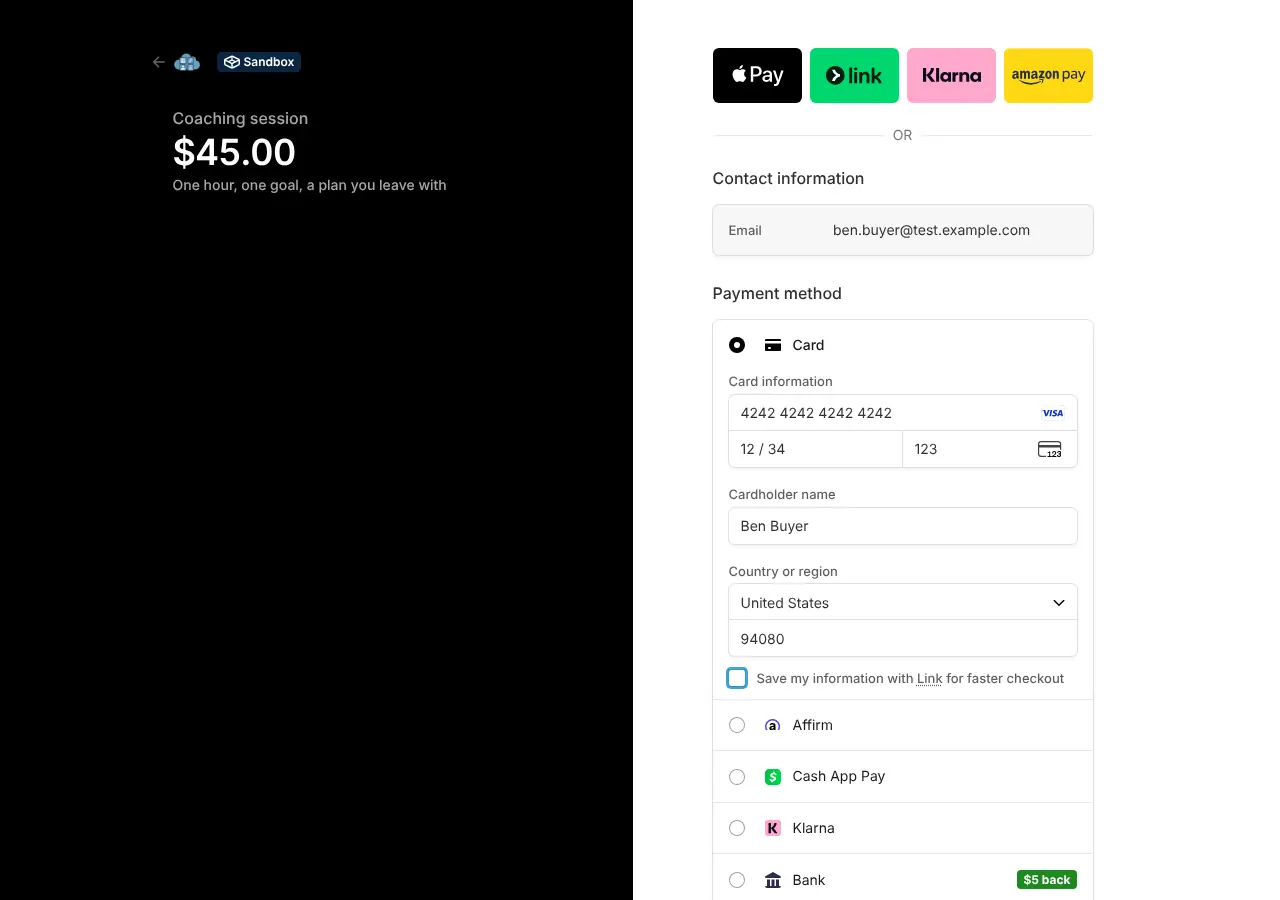
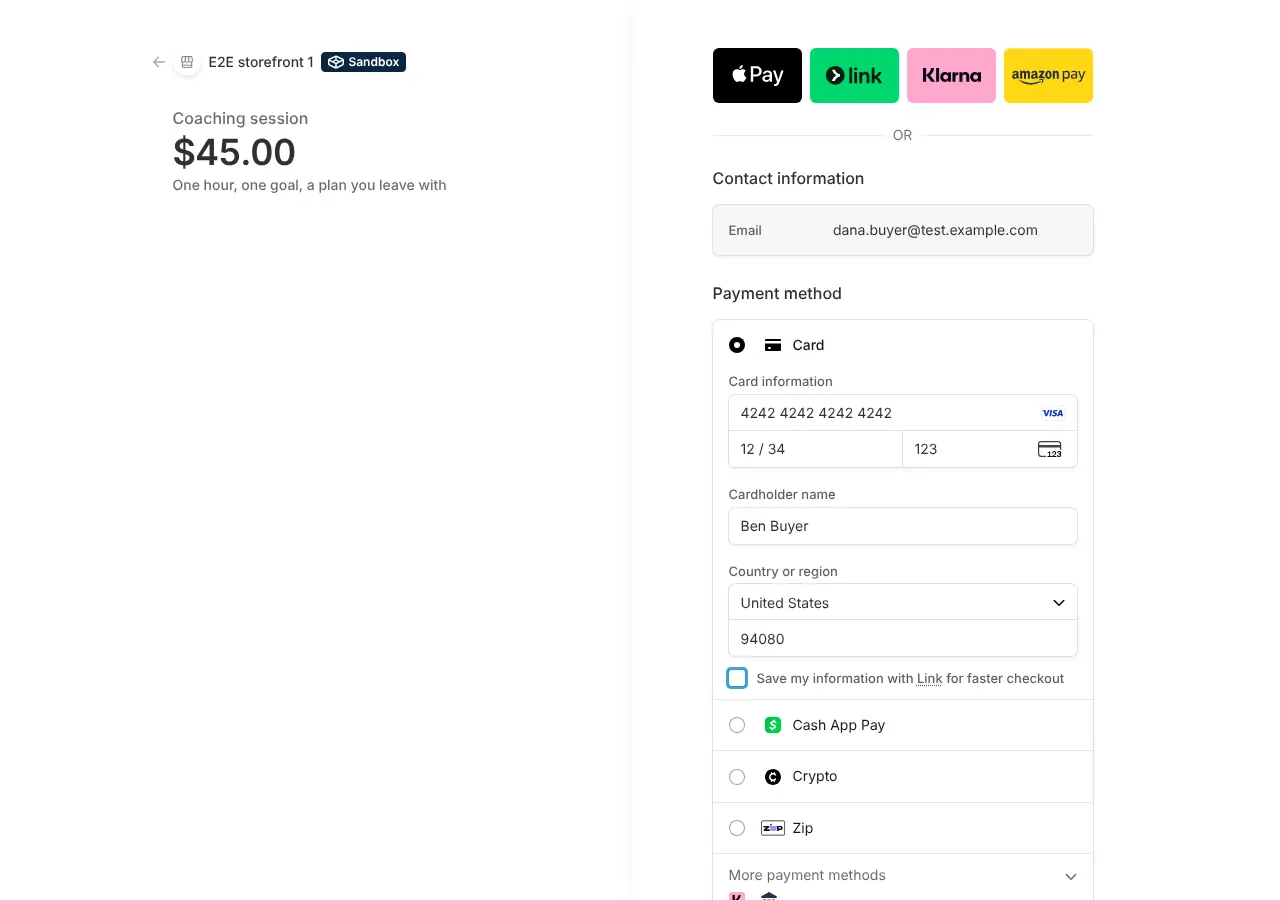
What the seller sees
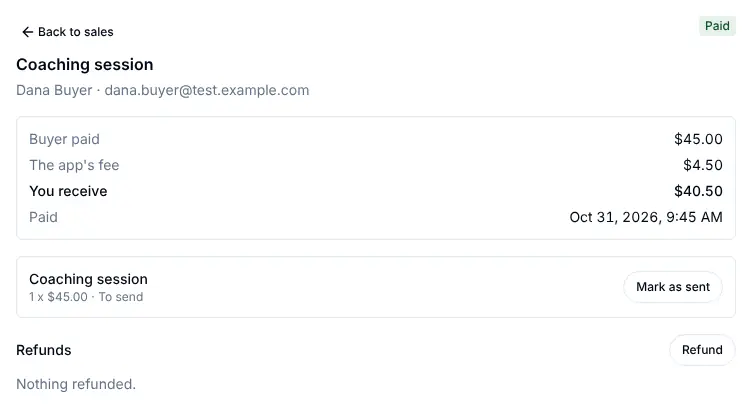
<SellerSales>: each sale, what they receive, refunds so far, Mark as
sent on a line they deliver, the payments of a subscription and the
parts of an order paid in parts, and (storefront) Refund.
<SellerSubscriptions> lists the subscriptions their items started.
What the buyer sees
Your buy button, Stripe's page, then your order page: the order, what they
got (useHoldings), their subscription (<HoldingSubscription>), their
parts (<OrderParts>) and their files and keys. A guest gets the same on
the page their receipt links to.

Emails and webhooks
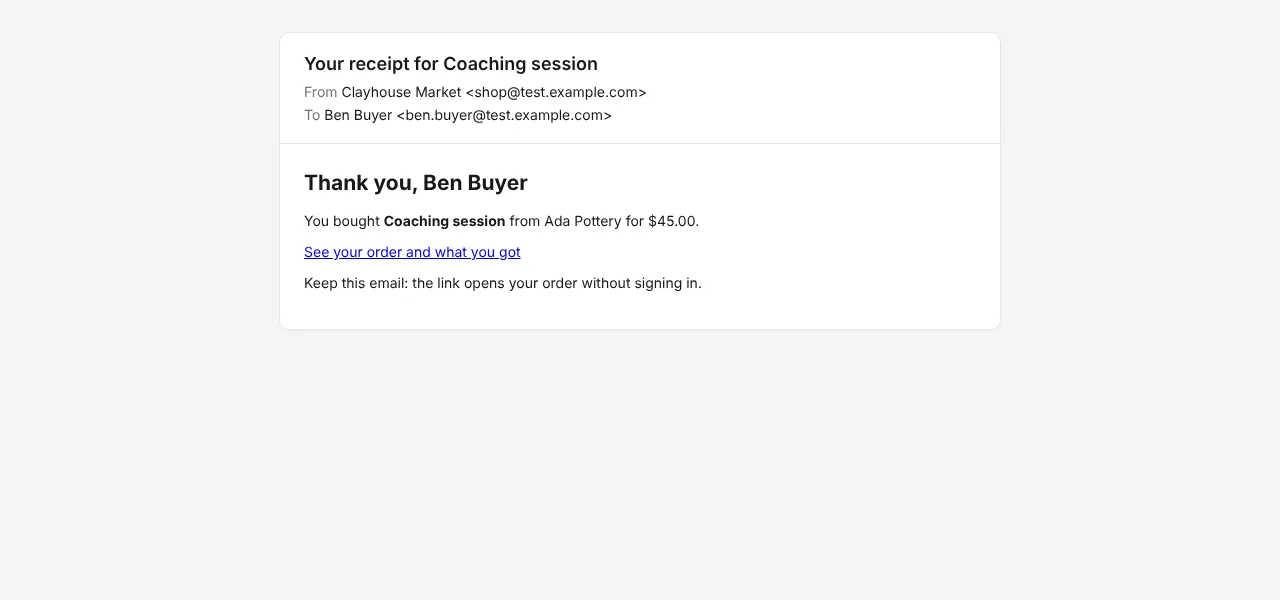
The buyer gets Order Receipt when an order is paid or claimed free (with
your order page set); shipping adds Order Shipped and Order
Delivered (shipping), and an order refused because
the item is not sold in the buyer's country sends Order Refused For
Country (item types). Your server gets the order.*,
grant.*, item_subscription.* and payout.* events in
Webhooks and Subscriptions.
Limits
| What | Limit |
|---|---|
| Stock held while paying | 30 minutes |
| Open checkouts per buyer | 5 (TOO_MANY_OPEN_CHECKOUTS), exact: of checkouts started at once, five succeed |
| Lines in a cart | 10, in one currency |
| Subscriptions in a cart | 3 unless you change it, 1 to 10 |
| Milestones on a price | 2 to 6 |
| A refused part's grace | 7 days |
| Files in a release | 20 |
| A sales export | 366 days and 10,000 orders |
Staging and Production
Make the first sale in Staging with a Stripe test card and refund it; the go-live list there counts both. Test orders do not carry over to live mode (go live).
A buy button
Each app designs its own catalog and item pages; put the button on yours. The buyer must be signed in.
import { BuyButton, usePublishedItems } from '@buildbase/sdk/react';

export function Shop() {
  const { items } = usePublishedItems({ typeKey: 'class' });
  return items.map((item) => {
    const variant = item.variants[0];
    const price = variant.prices[0];
    return (
      <div key={item._id}>
        {item.title}
        <BuyButton
          itemId={item._id}
          variantId={variant.id}
          priceId={price.id}
        />
      </div>
    );
  });
}
The button starts checkout and sends the buyer to Stripe's page. When they
have paid, Stripe sends them back to the same page with ?checkout=success,
or to successUrl if you pass one. Pass quantity for more than one, and
amount (in minor units) for a pay-what-you-want price. With free, the
button says "Get it free" and the order completes at once, with no payment
page.
Show the order where the buyer lands. useMyOrder reads an open order again
every two seconds, for up to a minute, until Stripe's payment reaches your
app:
import { useMyOrder, useMyOrders } from '@buildbase/sdk/react';

const { orders } = useMyOrders();
const { order } = useMyOrder(orders[0]?._id, { waitForPayment: true });
// order.paymentStatus: 'unpaid' until the payment lands, then 'paid'
To build the button yourself, useCheckout() returns checkout(itemId, input), which answers Stripe's page (url) and the order. Send the buyer
to url; a free claim answers url: null.
What the buyer gets
Each benefit of what they bought becomes a grant: one per benefit of the
order line, holding as many units as they bought (two seats of a class
whose option grants two each hold four). Grants are written when the order
is paid, before order.paid reaches your server.
| Benefit | What the buyer sees |
|---|---|
message | The seller's text |
link | The URL, only after paying |
access | Nothing to show: your app opens the object the benefit names |
manual | The seller's instructions, while the seller delivers by hand |
webhook_only | Nothing from BuildBase: your server acts on grant.created |
A grant opens at payment, or later by the benefit's drip (afterDays,
availableAt) or the option's pre-order date (releasesAt). A link or
access with durationDays ends that many days after it opens. A message
or link is read from the item as it is now, so a seller who fixes a link
fixes it for every buyer.
import { useHasAccess, useHoldings } from '@buildbase/sdk/react';

const { holdings } = useHoldings({ orderId });
// holdings[0]: { kind: 'link', title, state: 'available', content: { url } }

const { hasAccess } = useHasAccess('course', course.id);
state is available, not_yet (before it opens), expired or revoked,
and content is there only while it is available. useHasAccess is for
showing or hiding something in the page; before serving the object itself,
your server asks the same with its API key:
const res = await fetch(
  `${serverUrl}/api/v1/server/commerce/grants/access?userId=${userId}&resourceType=course&resourceId=${courseId}`,
  { headers: { Authorization: `Bearer ${orgId}:${apiKey}` } }
);
const { hasAccess, until } = await res.json();
Licence keys, bundles and transfers are not delivered yet: checkout
refuses an option that includes one (CHECKOUT_REFUSED, problem
benefit_not_delivered).
Guests
People can buy without an account when you let them: Billing > Selling >
Settings, "Who can buy", signed-in people and guests by email. Until you
do, a guest's checkout is refused (GUESTS_NOT_ALLOWED).
A guest gives a name and an email. Pass them to the button; the page that asks for them is yours.
<BuyButton
  itemId={item._id}
  variantId={variant.id}
  priceId={price.id}
  guest={{ name, email }}
/>
Stripe returns the guest to your page with order and token added to
the URL. The token opens that one order, without signing in:
import { orderLinkFromUrl, useOrderByToken } from '@buildbase/sdk/react';

const { order, holdings } = useOrderByToken(orderLinkFromUrl(), {
  waitForPayment: true,
});
Signed out, usePublishedItems reads your catalog without a session, so the
same shop page works for both.
When a guest later signs in with the same email, verified, their orders and
what they got become theirs: they show in useMyOrders and useHoldings
from then on. The receipt's link keeps working. When the email already
belongs to a verified person (not an agent account) at the moment the
purchase completes, it becomes theirs then, with no read of theirs needed;
a purchase made before they verified is picked up by their next read.
Guest checkouts are rate limited per address and per app, like every
request made without signing in (GUEST_CHECKOUT_LIMITED).
The receipt
Set your app's order page under Billing > Selling > Settings, "Your terms and policies",
"Order page". Every buyer, guests included, then gets a receipt from your
app's email sender when their order is paid or claimed free, linking to
that page with ?order= and ?token=. Without an order page, no receipt is
sent. Turn it off under Notifications, "Order Receipt", to send your own
on order.paid instead.
Deleting a buyer
Orders, payments, subscriptions, bookings, returns and payouts are financial records, so deleting a person keeps them and removes what identifies them. Deleting a user (from Users, or by the person deleting their own account in your app) clears their name and email on every order, subscription, booking and return, the street, city and postcode of their delivery address (the country and state stay, for tax), their return reasons, the seller's fulfilment notes to them, the links to a Checkout page or a subscription's hosted invoice (each shows their details), the machine names their licence keys were activated on, and the label files of shipments already delivered or past the longest return window. Their guest purchases go with them when their email was verified. A label provider's tracking event keeps its body only until it is applied.
A guest who never had an account is erased by email from the console:
POST /api/users/guest-erasure with { "email": "..." }. Their records stay
under one random id in place of the email.
A deleted person who sold stops selling: their seller is closed and their
live items archived, while what they are owed is still paid out. A deleted
affiliate earns nothing new; commissions already earned are still paid to
the payout account on file, which is then cleared. Your server hears both as
seller.status_changed and affiliate.status_changed, with the reason
account_deleted.
A label kept because its shipment was still on its way when the buyer was deleted goes by itself once the shipment is delivered or past the longest return window, with the daily shipping check.
Keep personal data out of an order's metadata: it is your app's own
reference, and deleting a person does not change it.
Stock while they pay
Starting checkout holds the units the buyer asked for, for 30 minutes, Stripe's shortest checkout. If they pay, the units are sold. If they leave, the hold goes back once its time runs out. A one-of-a-kind item is held for one buyer at a time; the next sees "Someone else is buying this right now." One buyer can hold at most five checkouts open.
What stops a checkout
| Code | Status | When | What to do |
|---|---|---|---|
CHECKOUT_REFUSED | 422 | Not for sale, a retired price, a quantity or amount out of range; problems says which | Fix what problems names; a retired price needs the seller to add a live one |
OUT_OF_STOCK | 409 | Not enough left | Buy fewer, or wait for the seller to restock |
BUY_OWN_ITEM | 409 | The buyer is the seller | Buy as another person; a seller cannot buy their own item |
SELLER_CANNOT_SELL | 409 | The seller cannot take sales now (paused, or Stripe needs more) | The seller finishes what <SellerHome> asks, or you resume them under Sellers |
SELLING_UNAVAILABLE | 503 | Selling is turned off for the app, or not open yet | Turn selling on under Selling; orders already paid are not affected |
TOO_MANY_OPEN_CHECKOUTS | 429 | The buyer has five checkouts open | Finish or leave an open checkout; a hold ends after 30 minutes |
REFUND_REFUSED | 422 | More than is left, an unknown line, or an order not paid; problems says which | Refund at most what is left, on a paid order, naming a real line |
REFUND_NOT_ALLOWED | 403 | A seller refunding in the marketplace shape | You refund from the console or your server |
REFUND_FAILED | 502 | Stripe made no refund; nothing was returned | Read the reason in Stripe and try again; nothing was counted |
FULFILMENT_REFUSED | 409 | Nothing on the line waits on the seller, or it is already marked sent | Nothing to do: the line needs no sending, or was already marked |
<BuyButton> shows each of these under the button, in the reader's
language.
Where the money goes
Your fee is your selling fee rule, taken on each order. In the storefront shape, Stripe charges on the seller's account and sends your fee to you. In the marketplace shape, Stripe charges on your account and sends the seller's share on. Stripe's own processing fee comes out after the charge.
Refunds
Who may refund follows who took the money:
| Shape | Who refunds |
|---|---|
| Storefront | The seller in your app, or you (the console or your server) |
| Marketplace | You only: the seller is refused with REFUND_NOT_ALLOWED |
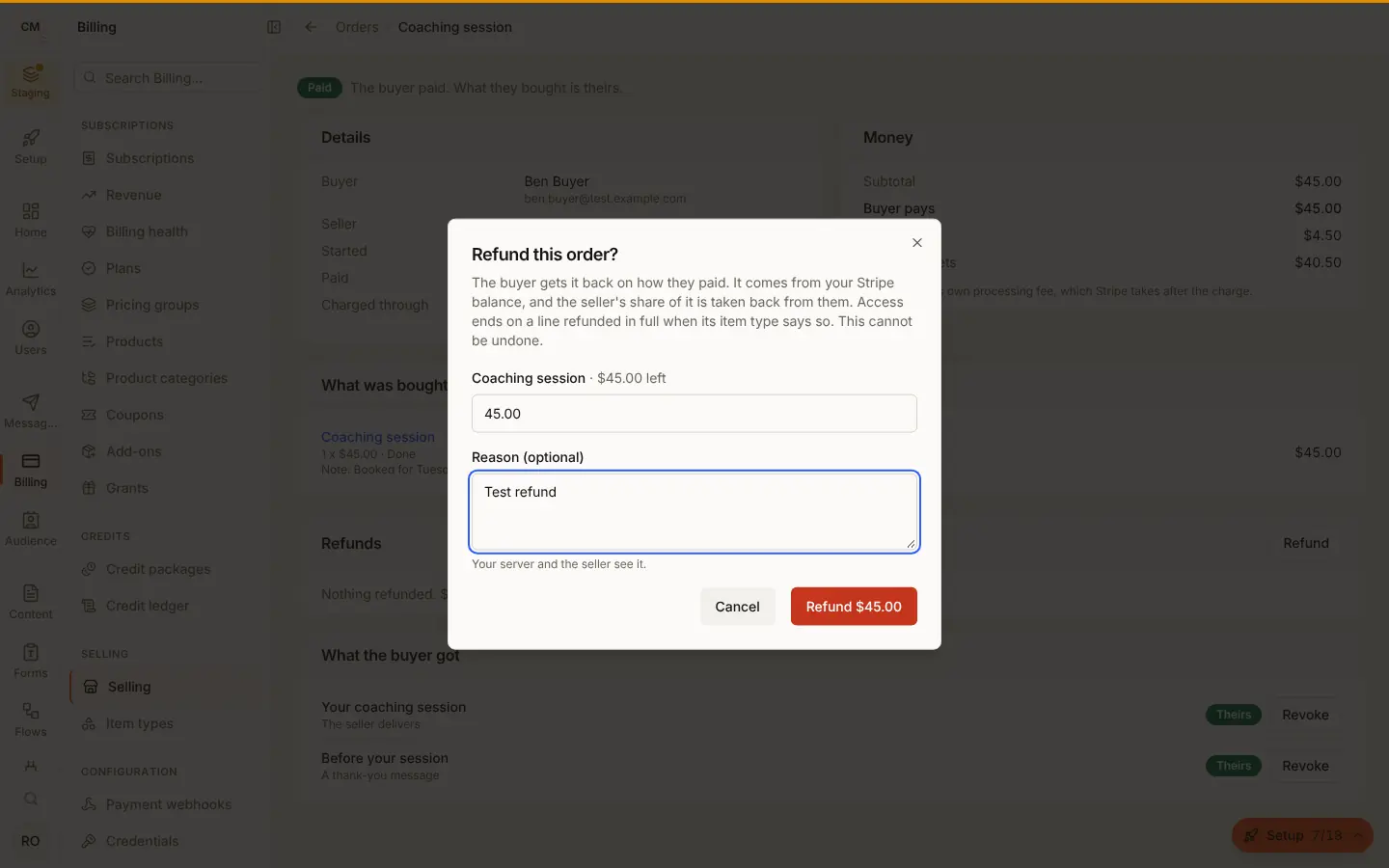
Refund any part of what is left, line by line, with a reason. The money goes back on how the buyer paid. Your fee on the refunded part goes back too, unless you chose to keep it under Billing > Selling > Settings, "When a sale is refunded":
- Storefront: the seller's Stripe balance pays the refund, and your fee on it is returned to them.
- Marketplace: your balance pays it, and the seller's share of it is taken back from them. Keeping your fee, the seller gives back all of it.
A line's money comes back goods first, then its shipping. A part refund, or a return, is of the goods: your fee and the seller's share come back as they were on the goods, and the seller keeps the shipping until the rest of the line is refunded. A line refunded in full, in one refund or several, returns exactly each part.
A line refunded in full loses what it granted when its item type says
"After a refund: take it back"; a partial refund keeps it. A refund Stripe
refuses returns nothing and is not counted (REFUND_FAILED). A refund made
in Stripe's own dashboard is recorded on the order once, by Stripe.
A subscription's renewal, or a move up a tier, is a payment of its own. A
read of one order lists them all in payments (the first, then each
renewal and change, with what was refunded of each), and a refund names
one with paymentId: { paymentId, amount }, or all that is left of it
without amount. It returns that payment's charge, your fee or the
seller's share on it in proportion, and leaves the order paid and the
subscription going; end it separately if you mean to. The refund carries
the same paymentId on the order and in order.refunded.
import { SellerSales } from '@buildbase/sdk/react';

<SellerSales subject={{ user: true }} />;
<SellerSales> is a seller's sales inside your app: each order, what they
receive, refunds so far, and on a sale's page a refund (storefront) and
Mark as sent. A subscription's sale also lists its payments, each renewal
with its own refund (storefront). useSales, useRefundSale and useFulfilSale build the same
on your own screens.
Disputes
A buyer who disputes the charge with their bank shows on the order as disputed, with the reason, until the bank decides. Answer it in Stripe's dashboard: yours in the marketplace shape, the seller's in a storefront. A lost dispute takes access back as a full refund does.
Who bears a lost dispute is yours to set under Billing > Selling > Settings > Buyers, payouts and records:
- A lost dispute on a marketplace sale (
policies.disputeLoss). Stripe takes it, and its dispute fee, from your balance, while the seller kept their transfer. Charge the seller (charge_seller, the default) reverses the seller's transfer for the sale by the disputed amount, up to what they were sent, once. Stripe's dispute fee stays yours: a reversal cannot take back more than the transfer, and a full dispute already takes all of it. If Stripe refuses the reversal (the seller's balance is short), the order readsdisputeRecovery.status: "owed", amarketplace_order.dispute_owedrow is written to your audit log, and nothing is tried again by itself: settle it with the seller. You bear it (owner_bears) leaves the seller's transfer alone. A storefront sale is unchanged: Stripe takes the dispute from the seller's own account. - Access while a dispute is open (
revokeOnOpenDispute, off by default): on, access is taken back as soon as the dispute opens, and given back if it is won; off, it is taken back only when it is lost.
The order shows what happened as disputeRecovery (status, amount,
and fee, which is always 0).
Money moved in the Stripe Dashboard. Transfers to sellers and your fees
on storefront sales live on your own Stripe account, so your account's
webhook endpoint (not the Connect one) must also send transfer.created,
transfer.updated, transfer.reversed, application_fee.created,
application_fee.refunded and charge.dispute.updated. Check Stripe
setup lists them with the rest. With them, a reversal or a fee refund you
make in the Stripe Dashboard reaches the order, for you and the seller, as
transferReversed and appFeeRefunded (Stripe's totals, in minor units),
and a marketplace sale's dispute shows its progress before it closes.
Fulfilment
A line with a benefit the seller delivers by hand (manual) waits on them:
its fulfilment is due. The seller, you or your server mark it sent, with
a note the buyer reads on their order, such as a tracking number. Each line
is marked once.
A line that ships (an item with shipping rules) waits too, and follows its shipments: in progress once one is on its way, and fulfilled once every unit is delivered.
Files
A file benefit names a release series of its seller (seriesId, such as
my-novel). The seller uploads files and puts them in a release of that
series: a version, notes for buyers and up to 20 files. A release is a draft
until the seller publishes it, and fixed after: a fix is a new release.
import { SellerFiles } from '@buildbase/sdk/react';

<SellerFiles subject={{ user: true }} seriesId="my-novel" />;- What can be sold. PDF, ZIP, EPUB, MP3, M4A, WAV, OGG, FLAC, MP4, MOV and the raster images, each checked by its bytes: a file that is not what its name says is refused. Large files go up in chunks, up to your plan's file size.
- Malware scan. Every file is scanned before it can be sold, and a
release publishes only when its files are clean. Files read
not_scannedwhere no scanner runs yet, and such a file sells only in a non-production environment such as Staging, where nothing real is charged. - Which releases a buyer gets is the benefit's
updatePolicy:latest(every release, for ever),purchased(the release they bought) oruntil(releases forupdateMonthsafter buying). - Downloads. A buyer's holding lists those releases. Each download asks
for a link that works for a few minutes and counts toward the benefit's
downloadLimit; a refund or a revoke stops it, even for a link already given. A guest downloads from their order page with its token.
import { HoldingFiles, useHoldings } from '@buildbase/sdk/react';

const { holdings } = useHoldings({ kind: 'file' });
holdings.map((h) => <HoldingFiles key={h._id} holding={h} />);
Your server does the same for a seller with /api/v1/server/commerce/files
and /api/v1/server/commerce/releases (?sellerId=). Codes:
FILES_NOT_SET_UP (this platform keeps no files for buyers yet),
RELEASE_REFUSED, RELEASE_VERSION_TAKEN, FILE_IN_USE (a release holds
it), DOWNLOAD_LIMIT_REACHED.
Licence keys
A license_key benefit gives the buyer one key per unit: a five-seat
licence is five keys. A key works while its grant does. activationLimit
caps the instances one key runs on at once (a machine, a site), and
expiresInDays ends it that many days after buying.
Your software checks a key from the customer's machine with no secret, so
LicensesApi is safe to ship in a desktop app, a CLI or a plugin:
import { LicensesApi } from '@buildbase/sdk';

const licenses = new LicensesApi({ serverUrl, version: 'v1', orgId });
const check = await licenses.activate(key, machineId);
if (!check.valid) showWhy(check.reason);
validate(key, instance?)says whether the key works now and, with an instance, whether that instance holds an activation.activatetakes one, and is the same answer again for an instance that already holds one.deactivategives one back.- Every answer is
{ valid, reason, key, item, instance }.reasonisnot_found,revoked,expired,not_yet,limit_reachedornot_activated. A key of another app and a mistyped key both readnot_found. Keys match without dashes, spaces or case. - The buyer sees their keys and the instances using them, and frees one for a new machine. A guest sees their keys on their order page.
import { HoldingKeys, useHoldings } from '@buildbase/sdk/react';

const { holdings } = useHoldings({ kind: 'license_key' });
holdings.map((h) => <HoldingKeys key={h._id} holding={h} />);
Too many checks from one place are refused with LICENSE_CHECKS_LIMITED
(429). Your server makes the same checks with
/api/v1/server/commerce/licenses/:action, and frees an activation with
POST /api/v1/server/commerce/grants/:id/deactivate ({ unit, instance }).
The console and your server see a key's last group and its activations,
never the key itself.
Subscriptions
A recurring price buys through the same BuyButton and checkout as a
one-time price: Stripe's page opens in subscription mode, and the order the
buyer pays carries subscriptionId. Each later period is paid on that
subscription, not as a new order.
import {
  HoldingSubscription,
  useItemSubscriptions,
} from '@buildbase/sdk/react';

const { subscriptions } = useItemSubscriptions();
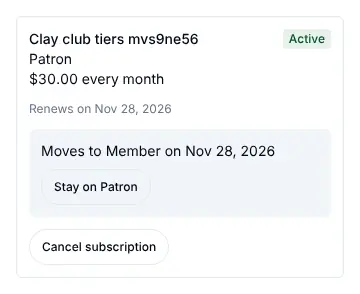
subscriptions.map((s) => <HoldingSubscription key={s._id} subscription={s} />);- What the buyer holds runs to the end of the period paid for (a day more, so a renewal that lands late shows no gap), and each paid renewal moves it on.
- A failed renewal makes the subscription
past_due. What it gives stays, in grace, while Stripe retries, and the buyer sees Stripe's page to pay it (latestInvoiceUrl). Paid, it isactiveagain; when Stripe stops retrying, it ends, and so does what it gave. - Cancel. The buyer cancels at the end of the period paid for and can undo it until then; a guest cancels from their order page. The seller, you in the console, and your server can also end one now. Nothing is refunded by a cancel; refund the order if you mean to. A subscription billed together with others cancels on its own; how is your cart setting.
- A trial (
trialDayson the price) starts with nothing charged; the first payment is taken when it ends. - An introductory price (
intro: { amount, periods }on the price) is what checkout charges first; after that many payments the regularamounttakes over. A free trial and an intro do not go together. - A set number of payments (
endAfterPayments) ends the subscription after the last one, withendReason: 'completed'anditem_subscription.ended. A cancel and a resume keep the count. - While either runs, the subscription reads
termsRunning: trueand keeps its tier. It also sayspaymentsMade,paymentsLeft(null when it runs until cancelled) andnextPeriodAmount, which<HoldingSubscription>shows ("Intro price $5.00 for the first 2 payments, then $15.00 every month", "Payment 2 of 6").
Moving between tiers
A buyer moves a subscription to another variant of the same item: up now,
with the rest of the period charged at once, and down at the next renewal.
The item type can make either one now or at_renewal
(pricing.recurring.changes, under Pricing in the item type builder).
Variants are ordered by rank, or by price when they have none.
<HoldingSubscription
  subscription={s}
  tiers={[
    { variantId: 'member', label: 'Member' },
    { variantId: 'patron', label: 'Patron' },
  ]}
/>- Before it is made,
GET /me/item-subscriptions/:id/change-preview?variantId=says up or down, when, the new price and what is charged today (dueNow), so the buyer confirms knowing the amount. - The new tier has the same billing period, currency and quantity, at a fixed price. Another period, a pay-what-you-want or free tier, or one with limited places is refused with the reason: buy it instead.
- What they hold follows the tier. A benefit both tiers give stays; one only the new tier gives is granted; one only the old tier gave ends when the move takes effect.
- A move at renewal shows as
pendingChangeuntil then. Asking for the current tier withdraws it. - A declined card on a move up changes nothing:
SUBSCRIPTION_CHANGE_NOT_PAID, with the card's reason. - Not while a renewal is unpaid (pay it first) or the subscription is set to end (keep it going first). The seller cannot move a buyer.
Your server reads and cancels them with /api/v1/server/commerce/subscriptions
(POST /:id/cancel with mode: 'at_period_end' or 'now',
POST /:id/resume, POST /:id/change with variantId, and
GET /:id/change-preview?variantId=), and gets item_subscription.created,
.renewed, .past_due, .recovered, .canceled, .resumed and
.ended, each with { subscription }, and .changed with
{ subscription, change } when a move takes effect. Codes:
SUBSCRIPTION_NOT_FOUND, SUBSCRIPTION_CHANGE_REFUSED,
SUBSCRIPTION_CHANGE_NOT_PAID. In the storefront shape the subscription
lives on the seller's Stripe account, and its events reach you through the
Connect endpoint: press Set it up for me under Selling, Settings so it
sends them.
Paying in parts
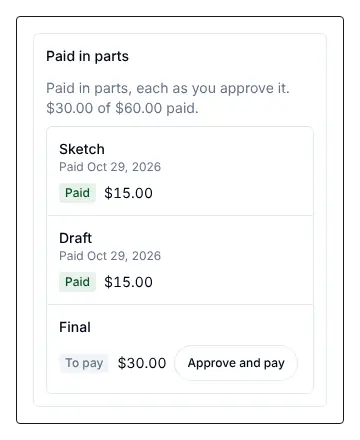
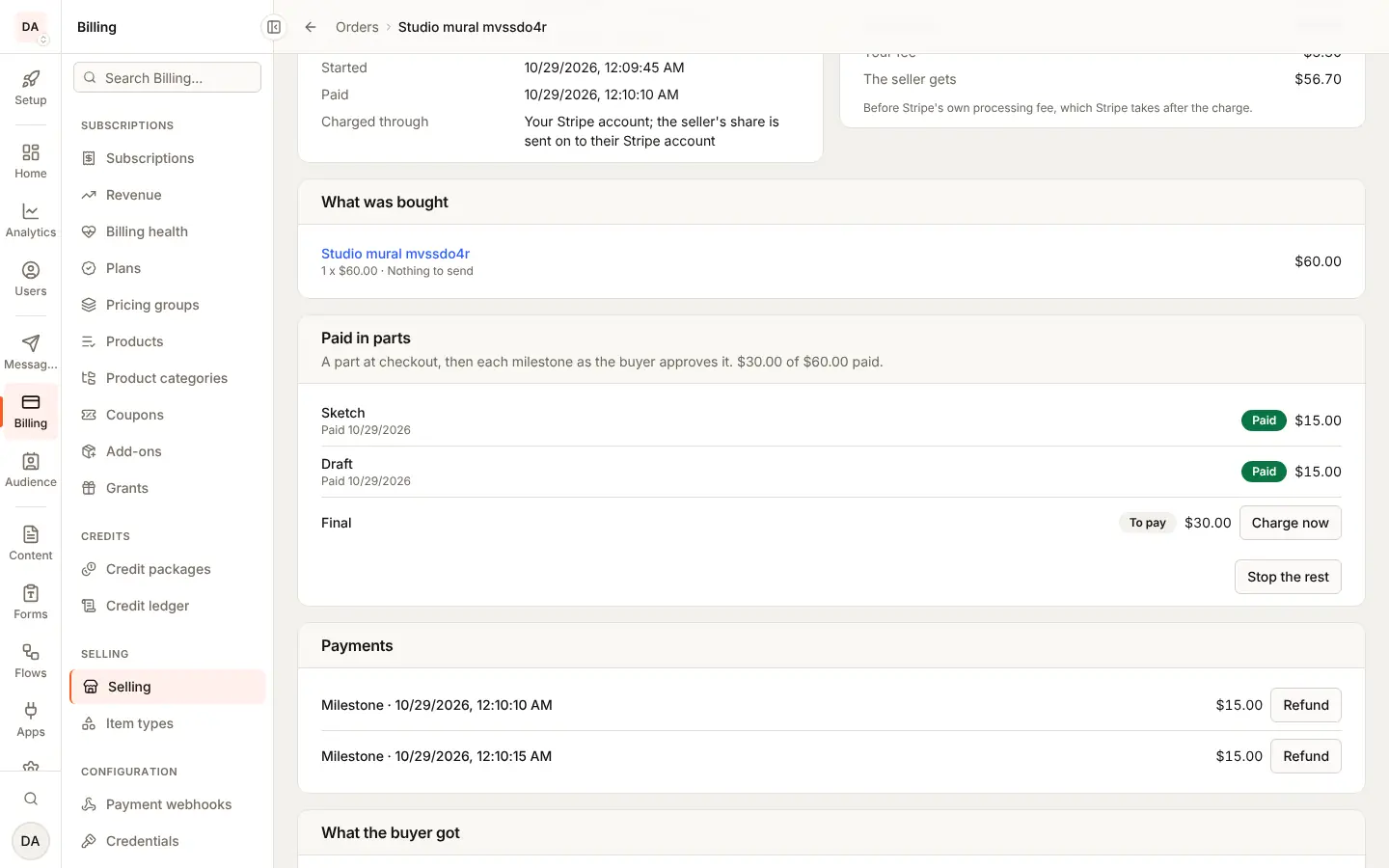
A one-time fixed price can be paid in parts, when its item type allows it (under Pricing in the item type builder, Deposits for a deposit or milestones, Payment plans for installments). The buyer pays the first part on Stripe's page, which saves their card, and each later part is charged on that card. What the order gives is theirs from the first part.
| On the price | The parts | Who takes the next one |
|---|---|---|
deposit: { percentBps } | The deposit at checkout, then the balance | The seller asks for it when the work is done |
milestones: [{ label, percentBps }] (2 to 6) | One per milestone, the first at checkout | The buyer approves each one |
installments: { count, interval } | Equal parts, any leftover cents on the first | Charged on its date by the hourly pass |
import { OrderParts, useMyOrder } from '@buildbase/sdk/react';

const { order } = useMyOrder(orderId);
return order ? <OrderParts order={order} /> : null;-
The order carries
partPlan: { kind }andparts, each with itsamount,status(due,charging,paid,failed,canceled),label,dueAtandpaidAt. It readspaymentStatus: 'partially_paid'until the last part is paid; thenorder.paidfires. -
The buyer approves a milestone with "Approve and pay" (
POST /me/orders/:id/parts/:index/pay, a guest with the order's token). The seller asks for a deposit's balance from<SellerSales>(POST /me/sales/:id/parts/1/charge, or the workspace's sales withworkspace:selling:manage). A seller never charges a milestone or an installment. Parts go in order. -
A refused card leaves the part
failed, withorder.part_failed. The buyer pays it on Stripe's page ("Pay now"), and has 7 days (graceUntil); after that, what the order gave is taken back and the parts after it are stopped. -
Each part is its own payment in
payments(deposit,balance,milestoneorinstallment) and is refunded on its own: a refund names itspaymentId. -
Your server and you in the console can charge any part now, or stop the parts not yet paid, keeping or taking back what the order gave:
POST /api/v1/server/commerce/orders/:id/parts/:index/chargeandPOST /:id/parts/stopwith{ revoke }. Reconcile now under Selling also runs the hourly pass. -
With Stripe Tax on, each part is taxed as it is paid and carries its
tax(see tax at checkout).
Code: PART_REFUSED (409) when the part is not the caller's to charge now,
with the reason.
Carts across sellers
A buyer, signed in or a guest, can pay for items from several sellers in
one checkout. Each seller gets an order of their own, all sharing a
cartId. In the marketplace shape it is one Stripe page, and once Stripe
says the money arrived, each seller is sent their share of it (their
lines, less your fee) as a Stripe transfer. In the storefront shape it is
one Stripe page per seller, in turn (steps).
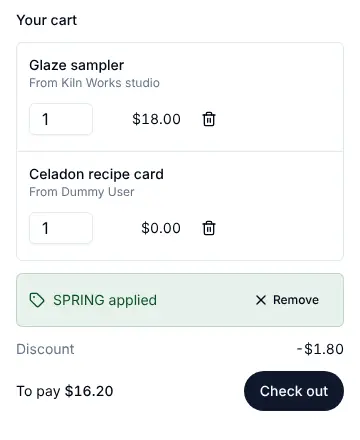
import { CartSummary, useCart, useMyCart } from '@buildbase/sdk/react';

// On your item page: put a line in this browser's cart.
const cart = useCart();
cart.add({
  itemId,
  variantId,
  priceId,
  quantity: 1,
  title: item.title,
  unitAmount: price.amount,
  currency: price.currency,
  sellerName: item.seller.displayName,
});

// On the cart page: the lines, the total and one Check out.
<CartSummary />;

// Stripe returns to the success URL with `?cart=<id>`.
const { cart: paid } = useMyCart(cartId, { waitForPayment: true });-
The cart lives in the browser until checkout (per app, up to 10 lines).
useCart().checkout(urls)callsPOST /cart/checkoutwith{ lines, successUrl, cancelUrl }and answers{ cartId, orders, url }. Callclear()once the buyer is back. -
What a cart takes: paid prices in one currency, with up to three subscriptions (billed together; the number is yours to set, 1 to 10) or one price paid in parts (never both), and Stripe Tax on or off. A refusal names its line in
problems(lines.<n>), checked before anything is held:cart_recurring_many: more subscriptions than you allow, or the same one twice;cart_recurring_interval: a subscription on another billing period than the others (subscriptions bought together renew together);cart_recurring_scheduled_many: a subscription with an introductory price or a set number of payments beside another subscription;cart_parts_many: a second price paid in parts;cart_recurring_and_parts: a subscription and a price in parts;cart_trial_mixed: a subscription that starts with a free trial, with a one-time line, or beside a subscription with another trial or none (subscriptions bought together start their trials together);cart_coupon_mixed(atcouponCode): a coupon on a cart that carries a subscription or a price in parts;cart_currency,cart_free,cart_emptyorcart_too_many.
An older platform also answered
cart_storefront,cart_tax,cart_recurringandcart_parts; these are no longer sent. -
A subscription in a cart (marketplace shape) is one Stripe page in subscription mode: the subscription's first period and every other line are on its first invoice. The subscription gets its order and its subscription, as when bought on its own, and the other lines their orders. Its seller is paid per invoice: your account keeps each invoice and sends the seller their share from it once paid (less your fee and the tax), the first invoice's other lines to their own sellers. Renewals pay the subscription's seller only. Several subscriptions in one cart are billed together.
-
A price paid in parts in a cart (marketplace shape): the page charges every other line in full and the first part, and saves the card; the later parts are charged on it as for a sale in parts.
-
With Stripe Tax on (marketplace shape), Stripe works out the tax on the one page, on your account, and each order and line records its own share of it (from Stripe's line items). Sellers are sent their share without the tax. See tax at checkout.
-
Guests, when the app sells to them (as for guests): pass the name and email you collected,
<CartSummary guest={{ name, email }} />oruseCart().checkout(urls, { name, email }). It callsPOST /api/v1/guest/:orgId/cart/checkoutand answers the cart'stokentoo; Stripe returns with?cart=<id>&token=<token>, anduseGuestCart(cartId, token, { waitForPayment: true })reads the cart back (GET /api/v1/guest/:orgId/carts/:cartIdwith the token inx-order-token), withtokens, each order's own token for its order page. Each order also sends its receipt as a guest's order does. A wrong token reads as "not found". -
Stock for every line is held before any order is opened; a line short of stock answers
OUT_OF_STOCKwith its line, and nothing is held. An abandoned cart gives every hold back. -
Bookings: a line booked by time names its
slotStart(a bundle line itsslotStarts), and every booking is held after the orders open, all or nothing; a full slot answers409 SLOT_UNAVAILABLEatlines.<n>.slotStartand holds nothing. A booking is paid once, so beside a subscription it goes on the first invoice, and beside a price in parts it is paid in full with the first part. See Booking calendars. -
Reading it back:
GET /me/carts/:cartId(useMyCart) answers the cart's orders; another person's cart is not found. The console shows the others under Bought together on each order (with each order's tax and the cart's when Stripe Tax is on, even at 0), and lists filter bycartId. A subscription bought in a cart reads Paid per invoice (payout: 'per_invoice'on the subscription), and each payment the app paid its seller from shows that transfer. An order read by your server saystaxMode: 'stripe_tax'when Stripe Tax worked out its tax. -
Refunds and disputes stay per order: refunding one seller's order takes the money back from that seller's transfer only. A dispute on the cart's charge is recorded on every order in it. A refund made in Stripe's dashboard on a cart's charge names no order, so it is divided: all of it on one order when it is exactly what is left of that one, otherwise over the cart's orders in proportion to what is left of each (a price in parts counts its first part, paid on that charge). Each seller then gives back their share from their transfer, by your fee policy, as for a refund made in the app; if that refund later fails, each seller is paid their share back. Refunding from the order keeps the choice yours. A refund of a renewal of a subscription bought in a cart takes back that invoice's transfer to its seller.
-
Referrals: the cart's
referralis read once, at checkout, and every order the cart makes carries it: each seller's order on the one page, a subscription paid per invoice, a price in parts and each storefront step. Each line earns as it would bought on its own: per paid invoice on the subscription, per part, per step. A seller's program comes off that seller's share (a smaller transfer, per invoice too, or a larger fee on a step); yours comes off your side. A refund, a dashboard refund divided over the cart included, takes back each commission's share. See Affiliates.
Several subscriptions in one cart
A cart can carry more than one subscription: up to three unless you change
it (Subscriptions per cart under Selling, Settings, Carts, 1 to 10;
carts.maxSubscriptions in the settings). They are billed together: one
Stripe subscription with an item for each, renewing on one date, on one
invoice and one card.
- What goes together: the same currency and billing period (a monthly and a yearly subscription are bought apart), the same free trial or none, and no introductory price or set number of payments (those run on a schedule of their own). No coupon, and no item that ships or that only some countries may buy, beside them. Each subscription is still an order of its own, with its own subscription, grants and refunds.
- Marketplace shape: one page for the whole cart. Each paid invoice is split by item: each subscription records its own payment (its line, its tax and any proration of its own tier move), and each seller is sent their own share of that invoice by a transfer from its charge, less your fee, keyed on the invoice and the subscription. One seller's renewal never pays another, and a seller's affiliate program earns on their item only.
- Storefront shape: one seller's subscriptions in the cart are one step, one page on their account and one subscription there. Your share of each invoice is one percent, each item's own fee weighted by what it bills, and it is set again when an item leaves or moves tier. Another seller's subscriptions are their own step.
- One card for all of them. A failed renewal makes every subscription
billed together
past_dueat once, whoever sells it; paying the invoice brings them all back. The seller's view says so. - Cancelling one leaves the others going. By default (
carts.itemCancel: 'period_end') its item leaves the shared subscription at once with nothing prorated, so the next invoice no longer bills it, and the buyer keeps what it gives to the end of the period paid for (endsAt); a resume before then puts it back. With'immediate_prorated'it ends at once and the unused part of its period is refunded on its order, its seller giving their share back as for any refund. Ending one now (the seller, you, your server) ends it at once with no refund. Cancelling the last one cancels the subscription itself, as on its own. - Moving between tiers works on the subscription's own item, with the same billing period, as for one bought alone.
- Reading it: each subscription says
groupIdand, in its own reads,siblings(each with_id,status,sellerId,itemTitle,variantLabelandendsAt); a seller sees another seller's item as there, without its title.endsAtsays when one set to end ends. The console shows Billed together with N items, and its subscriptions list filters by group. Everyitem_subscription.*event is sent per subscription and carriesgroupId. - Refunds stay per order. A refund made in Stripe's dashboard on an invoice that billed several is spread over their payments by what is left of each.
Storefront carts in steps
In the storefront shape each seller's account takes its own charge, and one charge cannot pay several accounts. So a cart is paid in steps: every order is made and its stock held when the buyer checks out, and then each order gets its own Stripe page on its seller's account, in turn (a price in parts is a step of its own, and so are a seller's subscriptions, billed together on one page). Your fee on each step is the sum of its lines' fees; Stripe Tax runs on each seller's account when on.
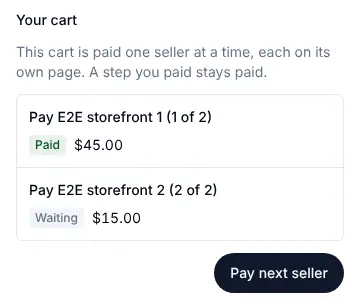
POST /cart/checkoutanswersstepsbesideurl: each withorderId,sellerName,total,status(pending,open,paidorexpired) and the open step'surl.urlis step 1's page. A step that pays several orders (a seller's subscriptions) also lists them inorderIds, and itstotalis theirs together.- After a step is paid, Stripe returns to your success URL with
?cart=<id>&step=<n>(and a guest'stoken). CallPOST /me/carts/:cartId/next(a guest:POST /api/v1/guest/:orgId/carts/:cartId/nextwith the token inx-order-token) to open the next step; it answers the cart with its steps and the open step'surl. Calling it again while a step is open answers the same page. A buyer back before Stripe's event for the step arrives is not sent to the paid page again: the call reads the open step's page from Stripe and, once paid, completes it as the event would (the event then changes nothing) before opening the next step. - Each step stands alone. A paid step stays paid if the buyer stops. A step's stock is held while the steps before it are paid, and for its own page's time once opened (up to 24 hours from checkout); a step whose hold runs out, or whose page is left unpaid, expires by itself and gives its stock back. A coupon's use is held per step.
- Bookings in steps: every step's bookings are held up front with the stock, all or nothing across the cart, and for as long as that step's stock: opening a step moves its bookings' hold with its page's. A step that expires gives its seats back; the steps already paid keep theirs.
GET /me/carts/:cartId(and the guest read) answersstepsfor such a cart, andtaxfor any cart. Each order says itscartStepandcartStepStatus, which the console shows under Bought together.- With Stripe Tax, a step of several lines records each line's share of its tax, from Stripe's line items on the seller's account.
Your server
const res = await fetch(
  `${serverUrl}/api/v1/server/commerce/orders?paymentStatus=paid`,
  {
    headers: { Authorization: `Bearer ${orgId}:${apiKey}` },
  }
);
const { docs } = await res.json();
// docs[0]: { _id, checkout, paymentStatus, buyer, seller, total, appFee, sellerAmount, lines }
GET /api/v1/server/commerce/orders/:id reads one order. Filter by
paymentStatus, checkout (open, complete, expired), seller or buyer.
The API key's role needs the Orders resource.
GET /api/v1/server/commerce/grants lists what buyers hold, filtered by
holderId, orderId, itemId, kind, status or the object
(resourceType and resourceId); /grants/:id reads one, and
/grants/access answers for one person and one object.
POST /api/v1/server/commerce/orders/:id/refund refunds { lines: [{ lineKey, amount }] } or { amount } (all that is left when both are missing), with a
reason; POST /orders/:id/lines/:lineKey/fulfil marks a line sent, with a
note. Both need update on the Orders resource, and a refund (an order's
or a return's, POST /api/v1/server/commerce/returns/:id/refund) also needs
create on Refunds (marketplace_refunds), as it does in the console.
POST /api/v1/server/commerce/grants/:id/revoke with a reason takes a
grant back at once; it gives no money back. The API key's role needs the
Grants resource, and update on it to revoke.
Retrying a write safely
A refund can take longer than your HTTP client waits: Stripe may be slow to
answer, and the refund still goes through after your client has given up.
Send an Idempotency-Key header with each commerce write, and send the same
key again when you retry it, so a retry never refunds, charges or cancels
twice:
const key = crypto.randomUUID(); // once per action, kept for its retries

const res = await fetch(
  `${serverUrl}/api/v1/server/commerce/orders/${orderId}/refund`,
  {
    method: 'POST',
    headers: {
      Authorization: `Bearer ${orgId}:${apiKey}`,
      'Content-Type': 'application/json',
      'Idempotency-Key': key,
    },
    body: JSON.stringify({ amount: 4500, reason: 'Requested by the buyer' }),
  }
);
The key is 1 to 255 printable ASCII characters (no spaces); anything else is
a 400 before anything runs. A key belongs to the API key's owner, the route
and the environment it was sent in, and is kept for 24 hours:
| You send the key again | You get |
|---|---|
After the first request finished with a 2xx | The first answer again, the same status and body, with Idempotent-Replayed: true. Nothing runs twice |
| While the first request is still running | 409 IDEMPOTENCY_IN_PROGRESS. Wait a moment and retry with the same key |
| With another body, or on another order | 422 IDEMPOTENCY_KEY_REUSED. Nothing runs. A new action takes a new key |
After the first was refused or failed (not 2xx) | It runs again: a refused or failed request keeps nothing |
A refund made under a key is made under the same id at Stripe, so a retry
after a failure never refunds twice there either. If Stripe refused that
refund, the same key answers 502 REFUND_FAILED again; send a new key to
try again. Without the header nothing changes: every request is a new one.
The server routes that take the key: an order's refund, a part's charge and
stopping the parts (/orders/:id/refund, /orders/:id/parts/:index/charge,
/orders/:id/parts/stop); a return's approve, reject and refund; a new
shipment (POST /shipments, which may buy its label); a subscription's
cancel, resume and change; a booking's cancel; an affiliate's approve,
pause, resume and ban; and a grant's revoke and deactivate. Your refunds in
the console take it too.
Through the SDK, as the signed-in person, these take it as well:
- A seller (
/me/...and/workspaces/:id/sales/...): a sale's refund, a return's approve, reject and refund, a new shipment, a part's charge, a subscription's cancel, a booking's cancel, and marking an affiliate payout paid. - A buyer (
/me/...): their own booking's cancel, which can refund (bookings.cancelMine), a part paid, and their subscription's cancel, resume and change. - A guest, with the order's token (
/guest/:orgId/orders/:id/...): the subscription's cancel, a part paid and the booking's cancel. A guest's key belongs to the order token it was sent with.
As the signed-in person
Your server can also act as one of your users, with their session, through the SDK. It sees what that person sees: their own orders and what they hold as a buyer, and their own sales as a seller.
import BuildBase from '@buildbase/sdk';

const bb = BuildBase({ serverUrl, orgId }).withSession(sessionId);

const { docs: items } = await bb.commerce.items({ typeKey: 'course' });
const start = await bb.commerce.checkout(items[0]._id, {
  variantId,
  priceId,
  successUrl: 'https://example.com/thanks',
  cancelUrl: 'https://example.com/shop',
});
// start.url: Stripe's page to send them to, or null for a free claim

const { docs: orders } = await bb.commerce.orders();
const { hasAccess } = await bb.commerce.access('course', courseId);

// As a seller: { user: true } for their own sales, or a workspace id
const { docs: sales } = await bb.commerce.sales(
  { user: true },
  { paymentStatus: 'paid' }
);
commerce also has item, order, holdings, subscriptions,
subscription, cancelSubscription, resumeSubscription,
previewSubscriptionChange, changeSubscription, sale, refundSale and
fulfilSale. Amounts are minor units. Checkout and refunds are never
retried: each call is a new one. A refund sent with an Idempotency-Key
header (retrying a write safely) can be retried
with the same key without refunding twice.
Agents
The SDK's MCP server gives an agent that acts for one of your users the same reach, as built-in tools that run under that user's session (see MCP for agents):
| Tool | Does |
|---|---|
search_items, get_item | Reads the published items and their prices |
list_my_orders, get_my_order, list_my_holdings, check_item_access, list_my_item_subscriptions | Reads what the user bought and holds |
preview_item_subscription_change | Says what a tier change would charge, changing nothing |
list_my_sales, get_sale | Reads the user's sales as a seller |
start_item_checkout, cancel_item_subscription, resume_item_subscription, change_item_subscription, fulfil_sale_line, refund_sale | Acts, and only when you expose writes (builtinTools: 'all' or include) |
The reads are in the default read-only set. An agent never pays by itself:
start_item_checkout answers Stripe's page for the user to open.
Webhooks
| Event | When |
|---|---|
order.created | A buyer started checkout: the order is unpaid, its stock held |
order.paid | It was paid, or a free claim completed |
order.refunded | Money went back to the buyer, with the refund |
order.fulfilled | A line was marked sent, with its key |
order.disputed | The buyer disputed the charge, or the dispute closed |
order.part_paid | A part of an order paid in parts was paid |
order.part_failed | The saved card was refused for a part |
order.shipped | The order shipped: its first shipment on its way (shipping) |
grant.created | A buyer was granted one benefit of what they bought |
grant.revoked | A grant was taken back, with its reason |
The order.* events carry { order } (and order.refunded the refund,
order.fulfilled the lineKey, order.part_* the partIndex): the order as your server reads it,
with your fee (appFee) and the seller's share (sellerAmount), amounts in
minor units. An order refused after payment because the item is not sold in
the buyer's country keeps its true sequence (order.paid, then
order.refunded, and for a subscription item_subscription.canceled and
item_subscription.ended), and those refund and cancel events add
reason: "buyer_country"; other refunds and cancels carry no reason. The grant.* events carry { grant }: its holder and payer,
the order line, the benefit, units, dates and, for access, the object.
In the console
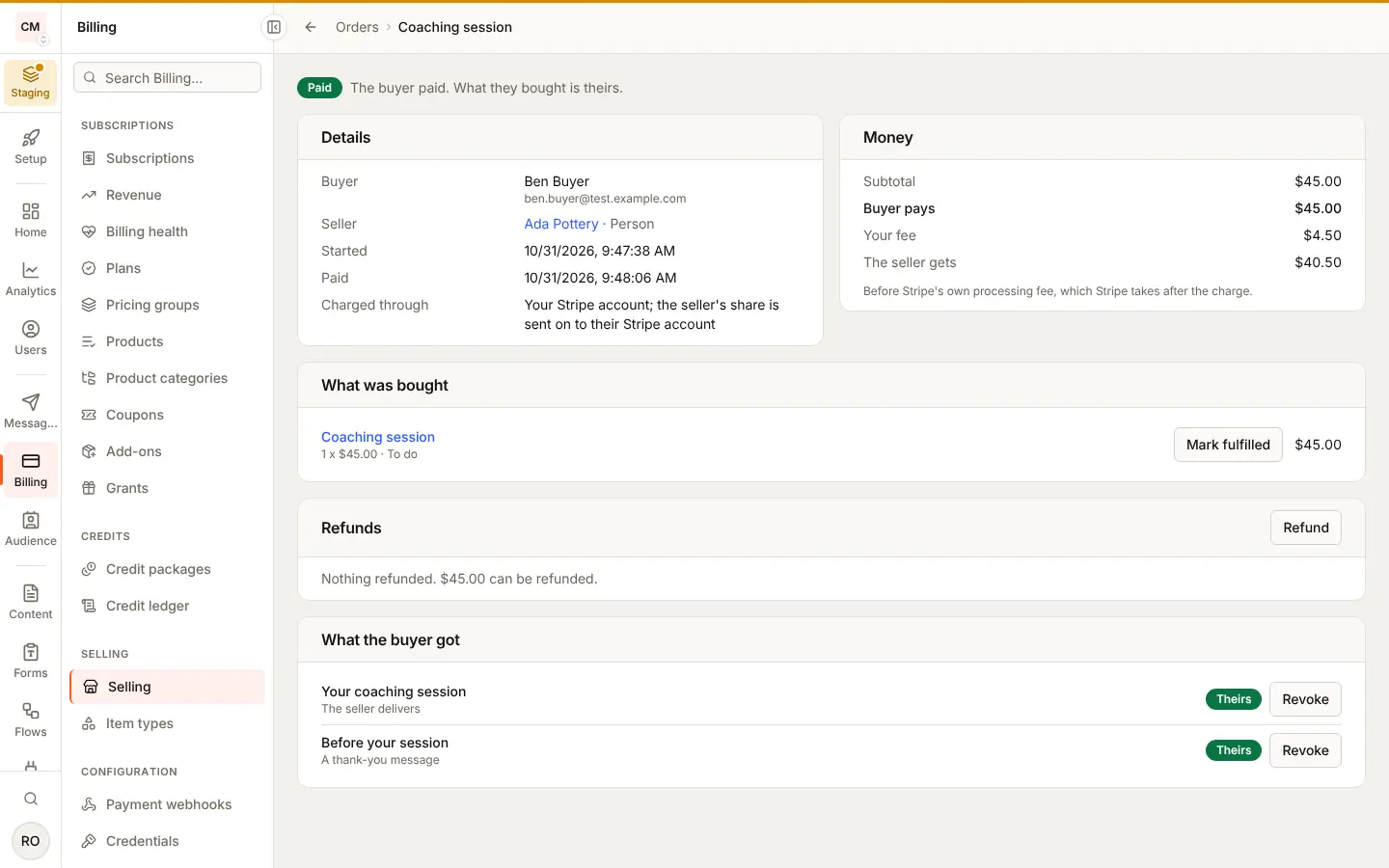
Billing > Selling > Orders lists every order, paid first, with your fee
beside each total. Each order's page shows the buyer, the seller, what was
bought, how the money split, and what the buyer got, where you can revoke a
grant with a reason only you see. It also shows each refund and refunds any
part of what is left, a dispute, and Mark fulfilled on a line the seller
delivers. A subscription's order lists its payments, each renewal refunded
on its own. An order paid in parts lists its parts, charges the next one
now, and stops the rest; the Partly paid tab lists those still being paid. A file grant shows its downloads, and an item that sells files
lists each series' releases with their malware scan. The console's Orders resource governs
the orders and Grants what the buyer got. Refunding (an order, a line, a
renewal or a return) also needs Refunds (marketplace_refunds), so a role
can work orders without sending money back; owners and admins hold all three,
and other roles only when you add them.
Payouts
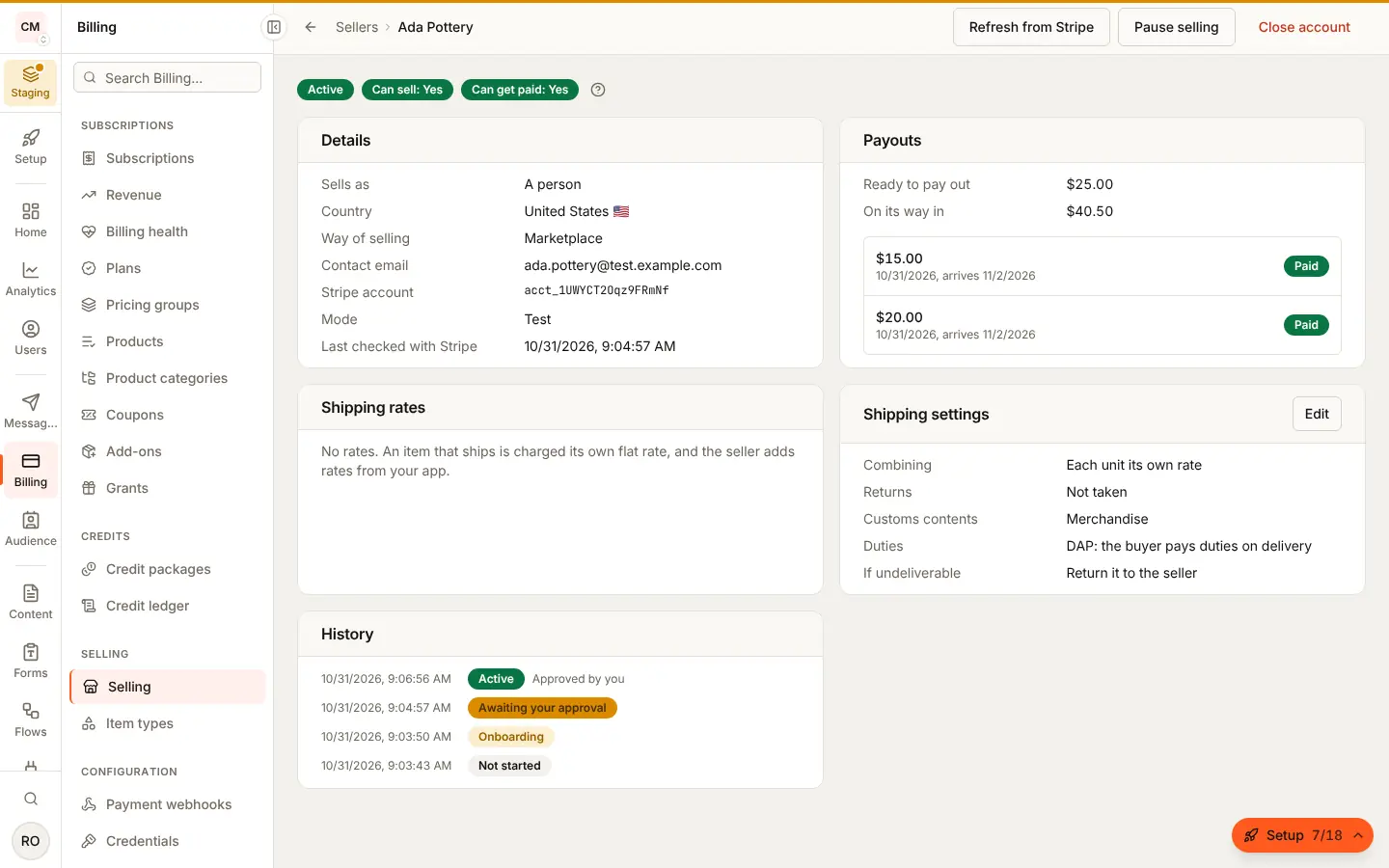
Stripe pays each seller's balance to their bank on their payout schedule.
<SellerHome> gives the seller Payouts and balance, Stripe's own
payouts component: what is ready, what is on its way, and every payout. A
workspace member without the manage permission sees it too; paying out
early is the manager's. In the console each seller's page shows their
balance and latest payouts, read from Stripe.
Your server gets payout.created when one starts, payout.paid when the
bank has it and payout.failed when the bank refused it (the money goes
back to the seller's balance), each with { payout }: its seller, amount,
currency, status, method, arrival date and, on a failure, the bank's
reason. The payout is read again from Stripe before each is sent, and its
status always matches the event's name: a paid payout that later fails sends
payout.failed, never a late payout.paid that says failed.
Missed events
Every hour BuildBase reads your sales' events back from Stripe (on each seller's account, and on yours for the marketplace shape) and processes any that never arrived, for example while your server was down for longer than Stripe retries. An event whose processing failed is tried again, three times at most. Selling, Settings shows the last pass and how many events failed; Reconcile now runs a pass at once (owners and admins). Processing an event twice changes nothing, so a pass is always safe to run.
An event from the other Stripe mode (a test event when your saved key is live, or the reverse) and an event type selling does not handle are stored as Skipped with their reason under Stripe events, and are never processed: neither a pass nor a redelivery queues them.
Selling already on?
Storefront sales arrive through your Connect endpoint, which now needs Stripe's Checkout events too. An endpoint made before checkout arrived shows as missing events under Billing > Selling > Settings, "Your sellers' Stripe events"; Set it up for me adds them.