
Add-ons
Sell extra capacity, an unlock or a pack of units on top of a plan, to a workspace or to a person, and read it back through the same entitlement checks.
An add-on is what a customer buys on top of their plan: five more projects every month, a feature for a year, a pack of 10,000 messages. You define it once as an offer. Buying it writes grants on the buyer, and grants compose with the plan into the one entitlement your code already checks. Your gates never read the add-on itself, so a workspace that bought advanced-analytics and a workspace whose plan includes it pass the same <WhenEntitled>.
Note
Requires @buildbase/sdk 1.0.0 or later. The add-on hooks, createAddOnPurchaseRedirectUrls, the entitlement gates and the addon.* events in its catalog all arrive with it; @buildbase/sdk 0.0.90 has none of them. The server and the admin API on this page work today.
import {
  createAddOnPurchaseRedirectUrls,
  formatMinorAmountIntl,
  usePurchaseAddOn,
  useWorkspaceAddOns,
  WhenEntitled,
} from '@buildbase/sdk/react';

function Analytics({ workspaceId }: { workspaceId: string }) {
  const { offers } = useWorkspaceAddOns(workspaceId);
  const { purchaseAddOn, loading } = usePurchaseAddOn(workspaceId);
  const offer = offers.find((o) => o.slug === 'analytics-unlock');

  const upsell = offer?.purchasable ? (
    <button
      disabled={loading}
      onClick={() =>
        purchaseAddOn({
          offerSlug: offer.slug,
          ...createAddOnPurchaseRedirectUrls(workspaceId),
        })
      }
    >
      Unlock analytics
      {offer.price
        ? ` for ${formatMinorAmountIntl(offer.price.amount, offer.price.currency)}`
        : ''}
    </button>
  ) : null;

  return (
    <WhenEntitled slug="advanced-analytics" fallbackComponent={upsell}>
      <AnalyticsDashboard />
    </WhenEntitled>
  );
}
Before you start
Create offers under Billing > Add-ons in the console, or with the admin
API below, and publish them. Creating an offer needs billing-add-ons on your
BuildBase plan, and live offers count against its max-add-on-offers limit.
Every item an offer grants must already be declared as a product (Billing →
Products).
In the console
Open add-ons in the console
(opens the console in a new tab)1. Make the add-on
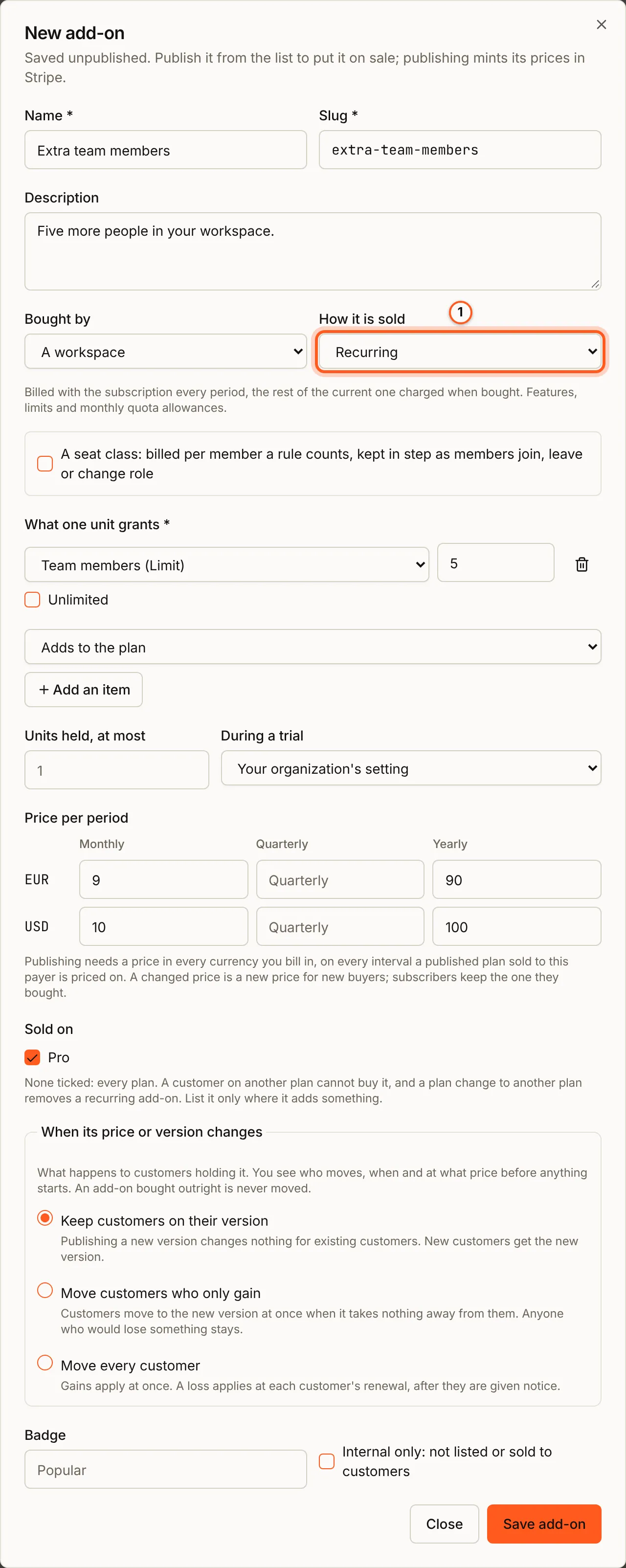
In the Billing menu choose Add-ons, then New add-on. Give it a Name and a Slug, the name a purchase uses, and say who buys it in Bought by (A workspace or A person) and how in How it is sold: Recurring, Time-boxed, Lifetime or Consumable pack (The four shapes). Under What one unit grants, press Add an item for each item, with its quantity and, for a limit, How it meets the plan (Adds to the plan or At least this, whatever the plan). A recurring add-on also asks how many units a customer may hold, what buying it during a trial does, and When its price or version changes, as a plan does. Tick the plans it is Sold on; none ticked is every plan. Give it a price in each currency, on every interval your plans are sold on, and press Save add-on. It is saved as a draft.
2. Put it on sale
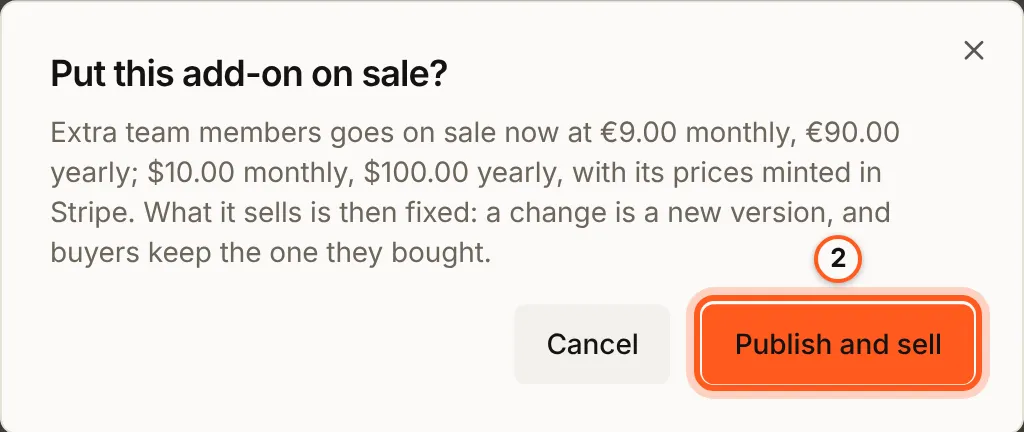
Press Publish on its row. Put this add-on on sale? names its prices; press Publish and sell. Publishing creates its prices in Stripe, and is refused with every problem listed when a price is missing (What an offer is).
3. Versions and moves
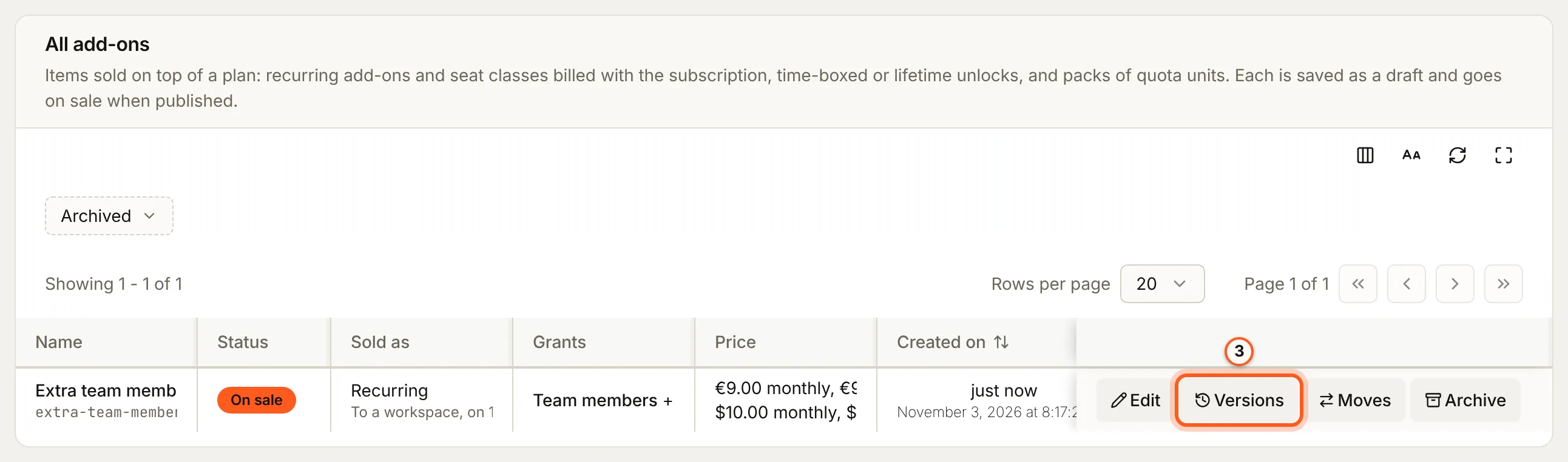
On sale, the row shows Versions and Moves. What the add-on sells is now fixed: a change to it is a new version, made from Versions, and its buyers keep the version they bought (Upgrading to a newer version). Saving a new price asks whether to move the customers on the old one, and Moves follows each move.
4. The customer buys it
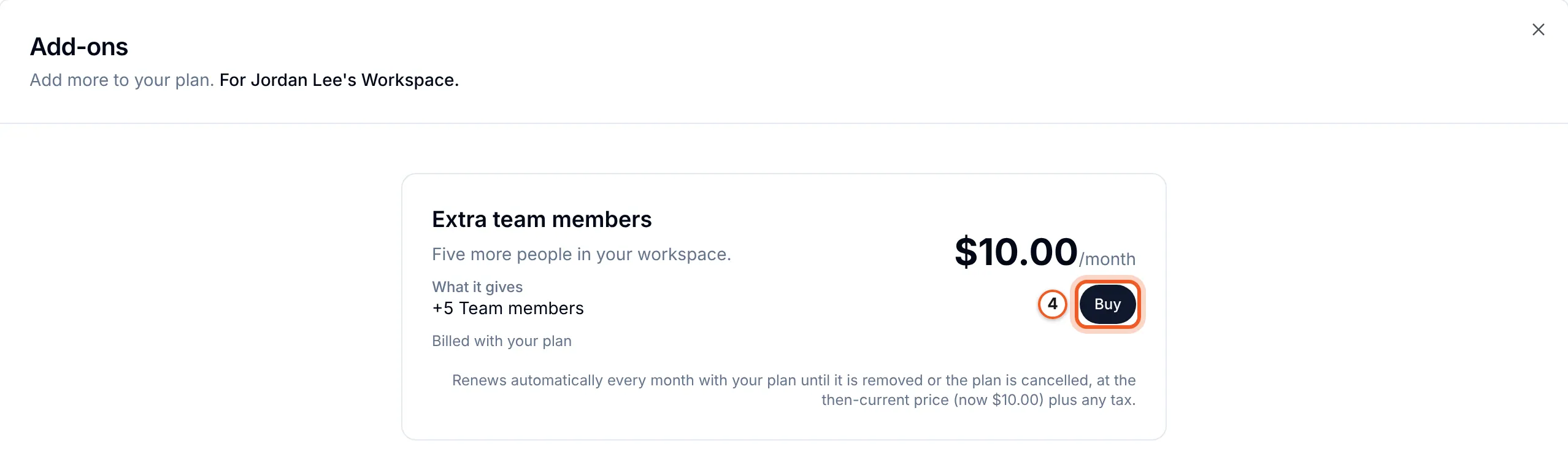
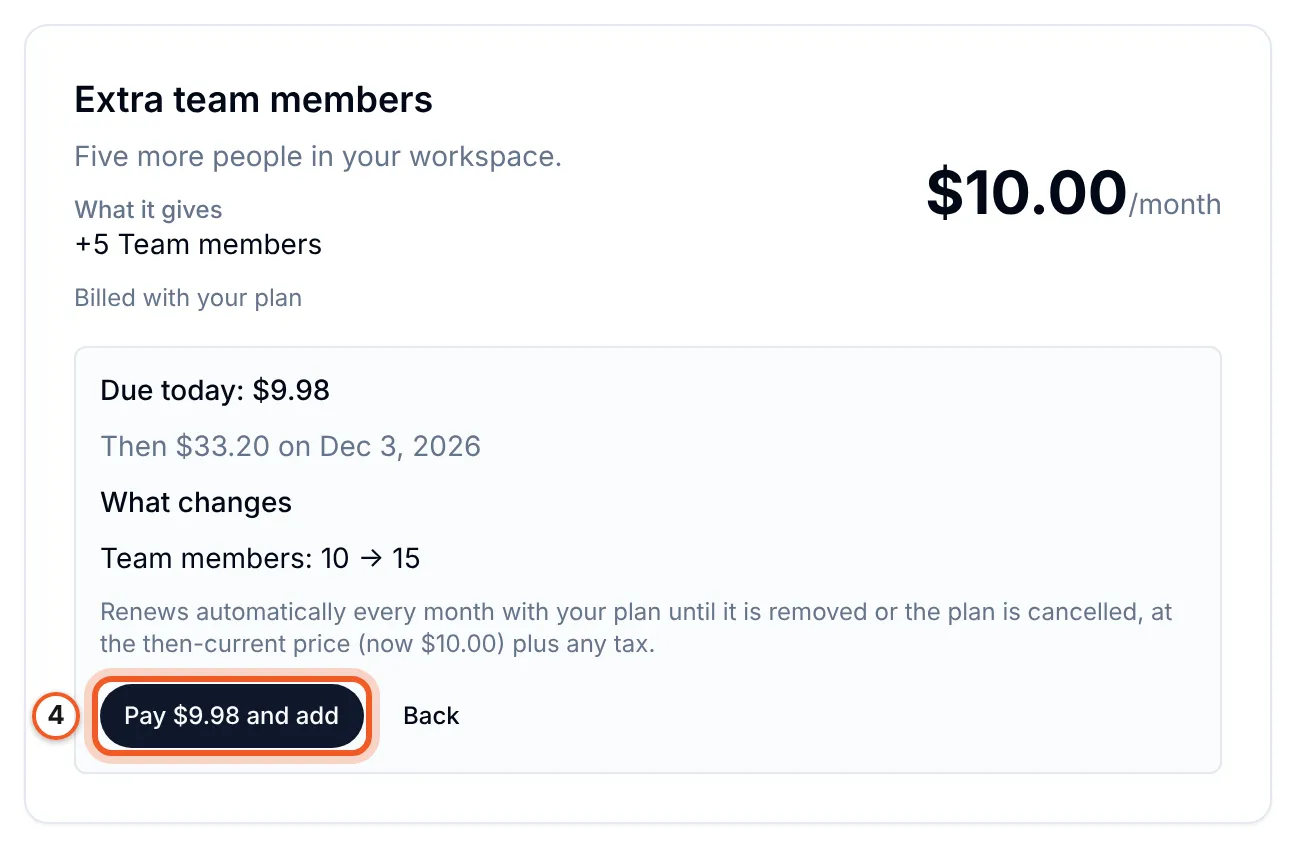
In your app, the workspace's subscription settings have Buy add-ons, which lists what is on sale to that workspace. Buy shows what is due today, the next invoice and what changes; Pay ... and add adds a recurring add-on to the subscription and charges the card on file for the rest of the period, then bills it with the plan.
5. Choose what add-ons do
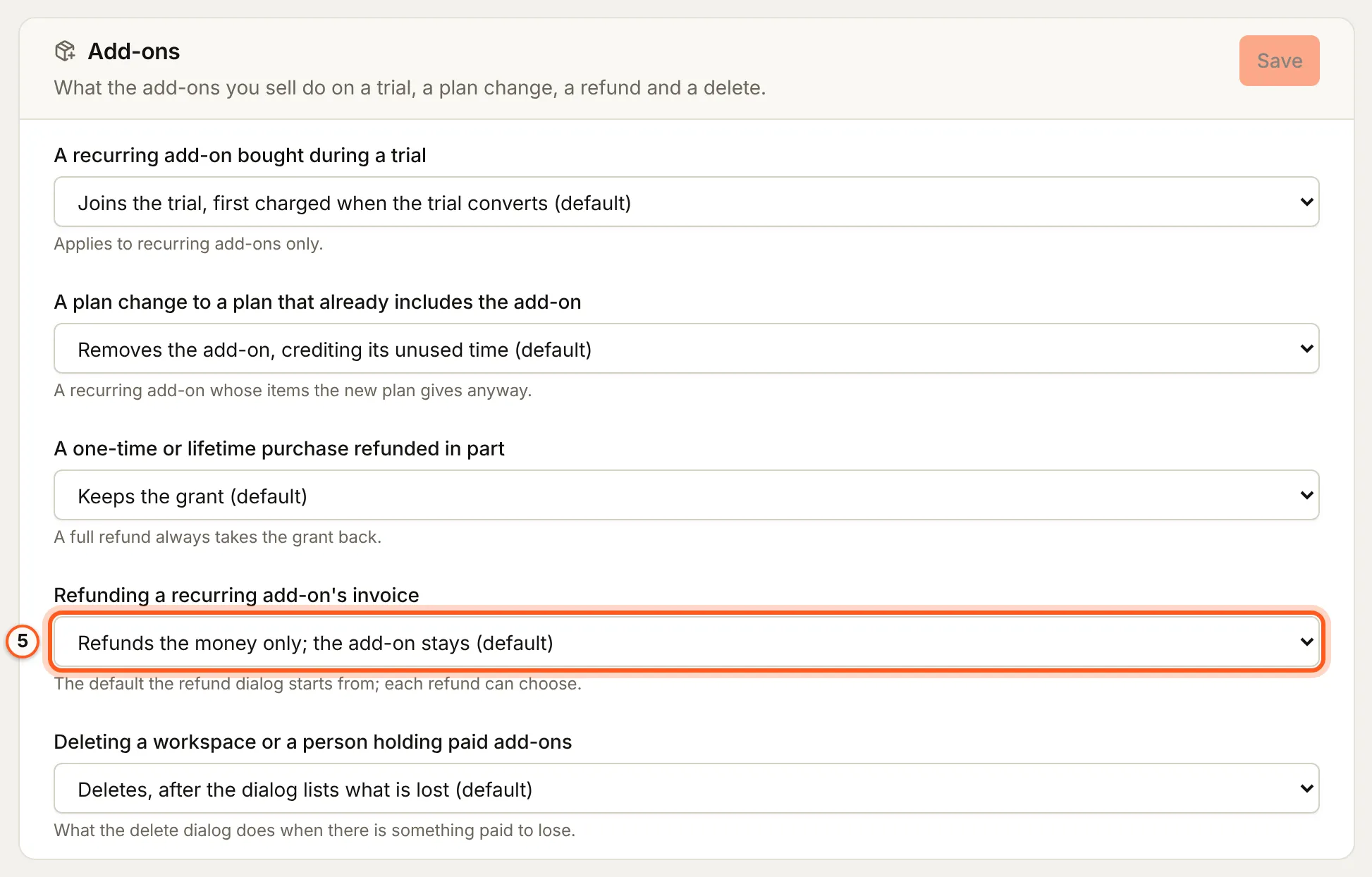
Settings > General, card Add-ons, holds your defaults: a recurring add-on bought during a trial, a plan change to a plan that already includes it, a one-time or lifetime purchase refunded in part, the refund of a recurring add-on's invoice, and deleting a workspace or a person who holds paid add-ons. Press Save on the card. Each is described under Refunds, as you see them.
6. See what was bought
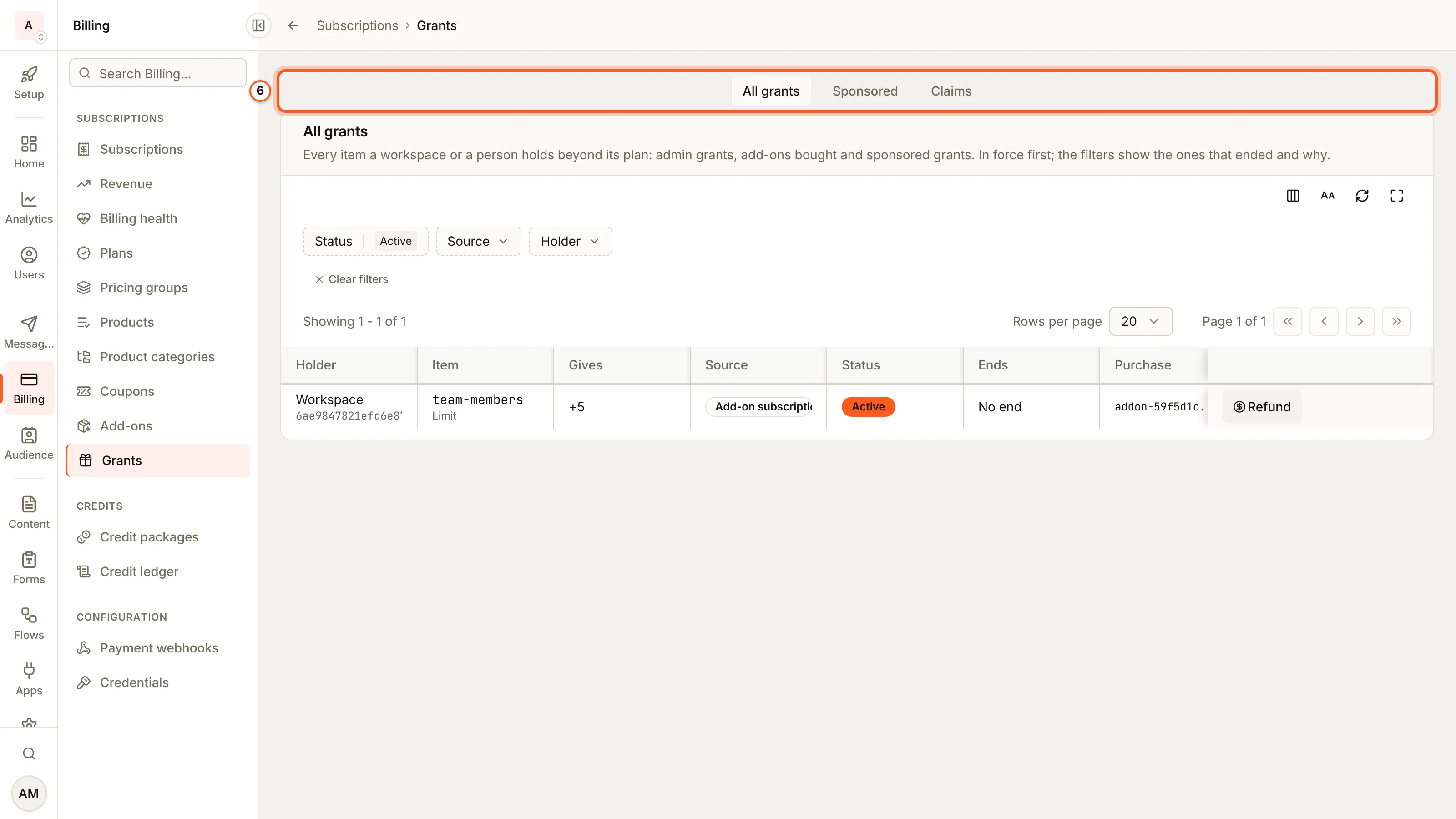
Billing > Grants lists every item a workspace or a person holds beyond its plan: All grants, Sponsored and, when you can read them, Claims. A purchase's row names the holder, the item, what it gives and the purchase.
7. Refund a purchase
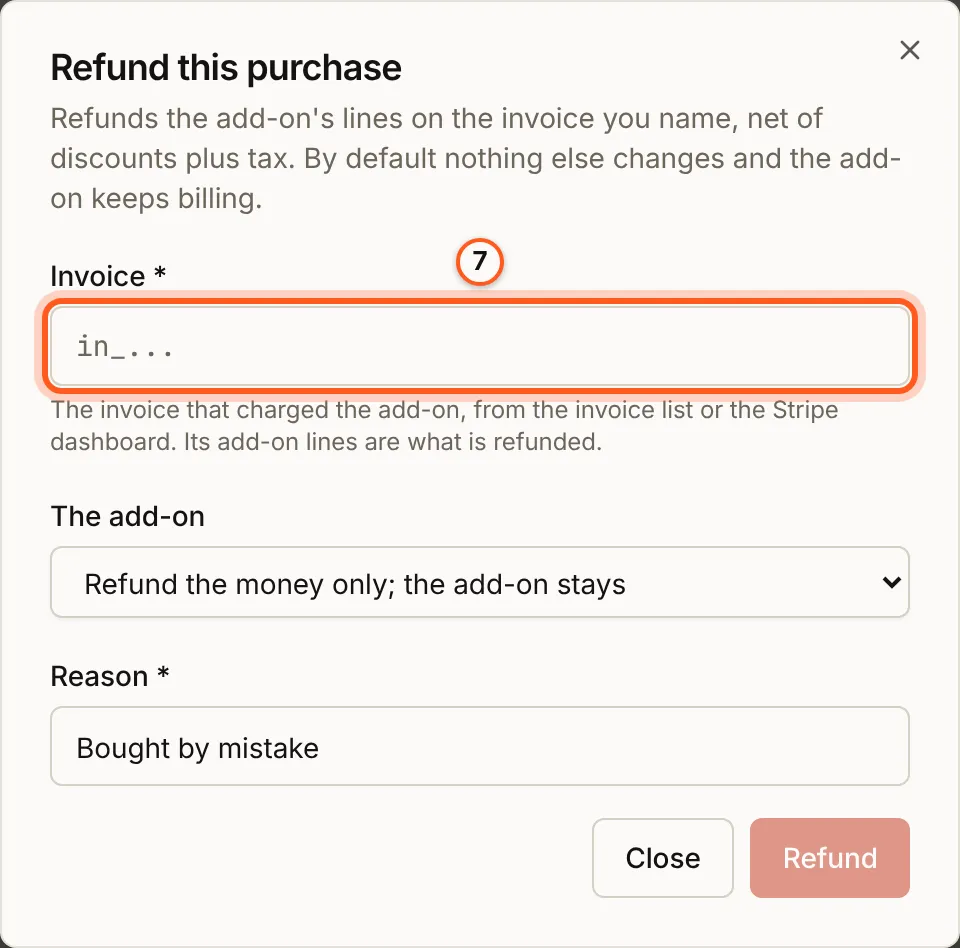
Press Refund on the purchase's row. For a recurring add-on, Refund this purchase asks for the Invoice that charged it, from the invoice list or the Stripe dashboard, and what happens to The add-on: the money only, or the add-on removed too. Give a Reason and press Refund. On a one-time or lifetime purchase lost to a dispute, Restore gives it back once Stripe says you won (Restore after a won dispute).
8. Take it off sale
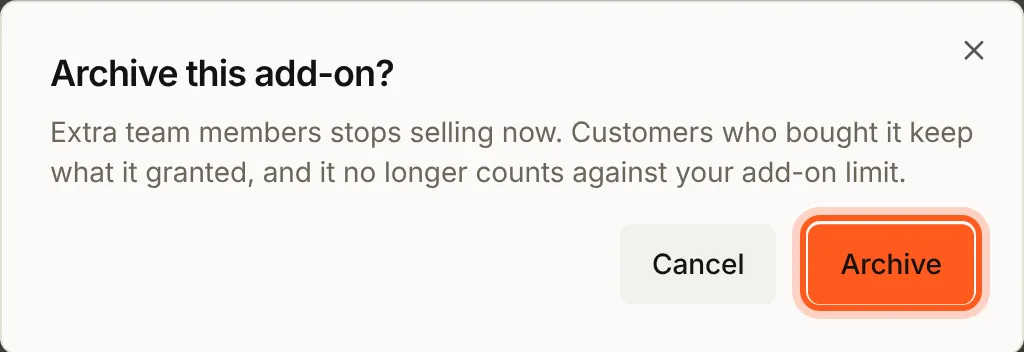
Press Archive on its row and confirm. It stops selling now; customers who bought it keep what it granted, and it no longer counts against your add-on limit.
Check that it worked
The row reads On sale, your app lists the add-on under Buy add-ons, and a purchase appears on Billing > Grants with Refund on its row. Stripe holds one product for the add-on, with its prices.
Things to watch out for
- What it sells is fixed once on sale. A change is a new version; its name, description, plans, badge and prices stay editable.
- A pack's spending order and rollover cap (
consumeOrder,rolloverCapUnits) are set through the API only. - Publishing needs a price in every currency you bill in, and a recurring add-on one on every interval a published plan is sold on.
- Restore answers
DISPUTE_NOT_WONuntil Stripe says you won, andNOT_DISPUTEDonce the grant is back. - Archiving waits for a move. While a move of its holders is open, archiving answers
VERSION_MOVE_PENDING.
What an offer is
An offer says what one unit grants, how it is sold and what it costs. A unit can grant several items at once: a "content bundle" can switch on four features in one purchase.
| Field | Meaning |
|---|---|
slug, name, description | The slug is what a purchase names; lowercase letters, digits and hyphens |
payerType | workspace (the default) or user: who buys it. See A workspace or a person |
shape | recurring, one_time, lifetime or consumable. See The four shapes |
items | Up to 20 { itemSlug, itemKind, quantityPerUnit, mode }: what one unit grants. quantityPerUnit -1 is unlimited |
pricingVariants | { currency, prices } per currency, in minor units: { oneTime }, or { monthly, quarterly, yearly } for recurring |
maxQuantity | How many units one purchase may take, and for recurring how many a subject may hold; 1 when unset, and 1 on an offer with a floor item |
maxPerSubject | How many unexpired purchases a subject may hold; defaults to 1 on lifetime |
validityDays | one_time only, and required there: how long the unlock lasts |
duringTrial | recurring only: join_trial, refuse or convert_first; unset reads your organization's setting |
appliesToPlans | Plan ids of the offer's payer type it is sold on; empty or unset is every plan. See Plan changes |
autoQuantity | recurring workspace offers only: { seatCountRule } makes it a seat class. See Seat classes |
consumeOrder, rolloverCapUnits | consumable only. See Packs of units |
includesFutureVersions | lifetime only: buyers get every later version of the offer. See Lifetime licences that include future versions |
badge, sortOrder, internalOnly | How it is shown. An internalOnly offer is never listed or sold to customers |
mode is how an item meets the plan: add (the default) stacks on top, floor raises the plan's value to at least the grant's and never lowers it. A quota takes add only.
curl -X POST https://api.console.buildbase.app/api/subscriptions/offers \
  -H "Authorization: $BUILDBASE_TOKEN" \
  -H "Content-Type: application/json" \
  -d '{
    "slug": "extra-projects",
    "name": "+5 projects",
    "shape": "recurring",
    "items": [
      { "itemSlug": "max-projects", "itemKind": "limit", "quantityPerUnit": 5, "mode": "add" }
    ],
    "maxQuantity": 10,
    "pricingVariants": [
      { "currency": "usd", "prices": { "monthly": 1000, "yearly": 10000 } }
    ]
  }'
An offer is saved unpublished. POST /api/subscriptions/offers/:id/publish puts it on sale, and refuses with every problem listed, writing nothing, unless:
- it has a price in every currency your organization bills in;
- a
recurringoffer has a price on every interval a published plan of its payer type is sold on, since it rides that plan's subscription; - no published plan bills one of its items per unit (a grant of it would not change the bill).
Publishing mints the Stripe prices, licensed and never metered, on one Stripe product per offer. If Stripe refuses them, the offer stays saved and off sale with the error stored on it (syncError), and publishing again retries only what is missing. The first publish also badges each item Add-on on your pricing page when a published plan lists it with no badge of its own.
Once an offer is on sale, what it grants is fixed: items, shape, payerType, consumeOrder, rolloverCapUnits, autoQuantity and includesFutureVersions, because buyers hold grants written from them. appliesToPlans stays editable, since it decides who may buy next and what a plan change keeps, not what was bought. A price change is a new price generation: new buyers pay the new amount, and a subscriber keeps paying the generation they bought. DELETE /api/subscriptions/offers/:id archives the offer. It stops selling, and what was bought from it stays.
The console's editor creates every shape, a seat class's rule and the plans an offer is sold on included; a pack's consumeOrder and rolloverCapUnits are set through the API. Publishing and archiving work from either.
The four shapes
| Shape | The buyer gets | Paid | Ends |
|---|---|---|---|
recurring | Units on their own subscription, renewed with it | With the plan: the prorated part now, then at every renewal | When removed (at the end of the period paid for), on a plan change that removes it, or with the plan |
one_time | A time-boxed unlock | Once, through Stripe Checkout | After validityDays |
lifetime | An unlock with no end | Once, through Checkout | Only on a refund that revokes it, a dispute or the buyer's deletion |
consumable | A pack of quota units that counts down as it is used | Once, through Checkout | When the units run out |
What each shape may grant follows from how it is paid. A quota is a monthly allowance, so only a recurring offer adds to one, and only a consumable offer sells units that count down; a one_time or lifetime price would make an allowance recur for nothing. Features and limits go on recurring, one_time and lifetime offers. A consumable offer carries quotas only.
A second purchase behaves by shape. A recurring offer bought again raises the quantity of the item already on the subscription. A second one_time purchase starts when the first one ends, so two 30-day passes make 60 days. A lifetime offer past maxPerSubject is refused before anyone pays. Consumable packs stack.
Packs of units
A consumable grant carries remaining. When your app records usage on that quota, the plan's allowance is spent first, then the packs, then overage if the plan allows it. Set consumeOrder: 'before_plan' to spend the pack before the allowance instead. The usage answer's coveredByGrants says how many units a pack covered.
remaining survives renewals, plan changes and a cancelled plan. rolloverCapUnits caps it: at each usage reset, each pack of the offer keeps at most that many units and the rest expire, and a cap of 0 ends the pack at the reset.
A workspace or a person
payerType decides who buys. A workspace's add-on is billed to the workspace and counts for everyone in it. A person's add-on (payerType: "user") is billed to their own Stripe customer and counts wherever they work, as a plan for a person does. Its items are declared with "scope": "user"; a workspace offer's with "scope": "workspace".
Every hook that names a buyer takes a workspace id, or { user: true } for the signed-in person:
import {
  createAddOnPurchaseRedirectUrls,
  usePurchaseAddOn,
  WhenUserEntitled,
} from '@buildbase/sdk/react';

function PersonalAssistant() {
  const { purchaseAddOn } = usePurchaseAddOn({ user: true });

  return (
    <WhenUserEntitled
      slug="ai-assistant"
      fallbackComponent={
        <button
          onClick={() =>
            purchaseAddOn({
              offerSlug: 'assistant-pass',
              ...createAddOnPurchaseRedirectUrls({ user: true }),
            })
          }
        >
          Add the assistant to your account
        </button>
      }
    >
      <Assistant />
    </WhenUserEntitled>
  );
}
The person's routes are the workspace routes' twins under /api/v1/public/me, with the same bodies and answers. A person's recurring add-on rides their own personal subscription, so it needs a paid personal plan.
Showing what is on sale
Two lists, for two places:
- The public catalog,
useAddOns({ currency }): every published offer, for a pricing page anyone can open. It readsGET /api/v1/public/:orgId/add-ons, which never carries a Stripe id and is cached for five minutes; a publish, an edit or an archive clears it at once. - What a subject may buy,
useWorkspaceAddOns(subject): the offers sold to that workspace or person, priced in its currency, each with the rows it alreadyheldand whether it ispurchasablenow. Any member of the workspace can read it; buying needs permission to manage the workspace's billing.
<PricingPage> reads the catalog beside the plans. Its render prop gains addOns (list, loading, error) and selectAddOn(slug), which opens the add-ons dialog on the subscription screen, signing the visitor in first. With for="user", it lists the add-ons sold to people and opens the person's own Billing.
<PricingPage slug="main-pricing" redirectBaseUrl="https://app.example.com">
  {({ plans, selectPlan, addOns, selectAddOn }) => (
    <>
      <PlanGrid plans={plans} onSelect={selectPlan} />
      {addOns.list.map((addOn) => (
        <button key={addOn.id} onClick={() => selectAddOn(addOn.slug)}>
          {addOn.name}
        </button>
      ))}
    </>
  )}
</PricingPage>
The subscription screen in workspace settings has an Add-ons section under the plan details: what the workspace holds, Buy and Cancel for a recurring add-on. It hides itself when nothing is on sale or held. Turn it off with ui.settings.subscription.addOns: false. It reports addon_purchase_started, addon_purchased and addon_cancelled to your analytics.
When an offer cannot be bought, purchasable is false and reason says why. A purchase refused for the same reason answers it in the body:
reason | Why |
|---|---|
max_per_subject_reached | The subject already holds maxPerSubject unexpired purchases of it, or a seat class |
currency_unpriced | The subject is billed in a currency the offer has no price in |
interval_unpriced | A recurring offer has no price for the interval the subscription bills on |
requires_subscription | A recurring offer, and the subject has no paid plan |
items_cap | A recurring offer would take the subscription past Stripe's 20 items |
trialing | A recurring offer during a trial, when duringTrial is refuse or convert_first |
outside_applies_to_plans | The offer names plans in appliesToPlans and the subject is on none of them |
max_quantity_reached | A recurring offer the subscription already holds at its maxQuantity; one more unit is refused with quantity_invalid |
An offer with appliesToPlans is sold only to a subject on one of the plans it names, whatever its shape: the subject's list marks it outside_applies_to_plans, and a purchase is refused with 409 and that reason before anything is charged. Use it to list an add-on only where it adds something, such as extra projects on the plans with a finite project limit. The public catalog lists every published offer either way, so a pricing page should say which plans an add-on is for.
An older server answers the add-on routes with 404, and every hook reads that as nothing on sale and nothing held, so your screens hide the section rather than show an error.
Buying
usePurchaseAddOn(subject).purchaseAddOn(request) takes the offer's slug and follows the answer for you. The body is { offerSlug, quantity?, currency?, promotionCode?, successUrl, cancelUrl, metadata?, uiMode?, returnUrl?, prorationDate? }; quantity defaults to 1 and stops at the offer's maxQuantity, and createAddOnPurchaseRedirectUrls(subject) builds return URLs that land back on the add-ons. It is never retried on its own: a purchase that failed mid-flight may still have been made.
kind | When | What the hook does |
|---|---|---|
checkout | A one-time, lifetime or consumable offer | Sends the buyer to Stripe Checkout (url) |
added | A recurring offer, and its invoice is paid | Refreshes the entitlement and the subscription |
payment_required | A recurring offer whose invoice needs the buyer to act | Opens the invoice's Stripe page (hosted_invoice_url) |
Pass { redirect: false } as the second argument to handle checkout and payment_required yourself. With ui.behavior.checkoutMode: 'embedded', a Checkout purchase opens in a dialog on your page, as a plan checkout does.
One-time, lifetime and consumable. A Stripe Checkout payment on the buyer's own customer, in the currency they are already billed in. The grant is written when Stripe says the payment completed, and the purchase gets an invoice with a PDF. A promotion code applies; a code that takes the price to zero still grants, and BuildBase sends the buyer the confirmation Stripe does not send for a $0 invoice. A delayed payment method that fails grants nothing. Starting a second checkout for the same one-time or lifetime offer closes the first, so only one can be paid.
Recurring. No Checkout: the add-on is a second item on the buyer's own subscription, charged at once for the rest of the period and then with every renewal. A card that needs no action answers added. Otherwise the answer is payment_required with the invoice and expiresAt, when Stripe drops the change if it is still unpaid. Either way the grant is written pending and becomes active when Stripe reports the invoice paid. A recurring purchase takes no promotion code (promotion_code_not_accepted).
A recurring purchase is refused, with nothing charged, when the subscription is cancelling, past due, paused, incomplete or suspended, or while a plan upgrade waits on its payment (subscription_state); when a 100% discount on the subscription would bill it at nothing (comped); and when the subscription is paid by bank debit (payment_method_not_supported) or has no payment method outside a trial (payment_method_required). The last two carry portalUrl, the billing portal opened on its card form.
Changes to one subscription are made one at a time. While an earlier change waits on its payment, a recurring purchase, a plan change and both previews are refused with 409 SUBSCRIPTION_PENDING_UPDATE (reason: "pending_update") and pendingUpdateExpiresAt, when Stripe drops that change if it is still unpaid: complete that payment or wait for it to expire. A change that waits more than about ten seconds for another one to finish is refused with 409 SUBSCRIPTION_BUSY (reason: "subscription_busy"); try it again. A recurring purchase that waits that long while another purchase of the same add-on is in flight is answered as if it had not waited: a retry of that purchase gets its own answer, and any other purchase the refusal below that names it.
A retry or a new purchase. The purchase routes take an Idempotency-Key header: send one key per purchase the buyer makes, and the same key on every retry of it. For 24 hours from the first request, as for every billing write that takes a key, the same key gets the first answer back, added or payment_required with the same purchaseId, and nothing is bought twice, while the purchase is being paid and after it is settled alike. Two keys are two purchases. The same key sent with another quantity, or for another add-on, is refused with 409 IDEMPOTENCY_KEY_REUSED. A purchase that bought nothing, because Stripe dropped it unpaid or refused it, does not hold its key: sent again, it is bought anew.
Without a key, a retry is told apart only while the purchase is in flight, until it is settled: its invoice paid and reported by Stripe, usually within seconds, or dropped unpaid. Meanwhile a purchase that asks for the same quantity of the same add-on is read as a retry of it, so two identical purchases in a row each need a key of their own. Once it is settled, the same request without a key is a new purchase.
Any other purchase of the same add-on while one is in flight is refused with 409, nothing charged, and carries the earlier purchase's purchaseId, so it is never mistaken for an answer to this one:
code | reason | When | What to do |
|---|---|---|---|
PURCHASE_SETTLING | purchase_settling | The earlier purchase is paid and is still being added to the subscription | Send the same request again after retryAfterSeconds (also the Retry-After header) |
SUBSCRIPTION_PENDING_UPDATE | pending_update | The earlier purchase waits on its payment; the answer has pendingUpdateExpiresAt | Complete that payment, or wait for it to expire |
SUBSCRIPTION_BUSY | subscription_busy | The earlier purchase was sent to Stripe and its answer has not been recorded yet | Retry the earlier purchase if it is yours, which records its answer; otherwise try later |
During a trial, the offer's duringTrial decides, else your organization's setting:
join_trial(the default): the item joins the trial, is invoiced at zero and is first charged when the trial converts.refuse: refused withtrialinguntil the plan is paid.convert_first: refused withtrialingand aconvertToPaidroute that ends the trial and pays, so your screen can offer that first.
What it costs before buying
preview(offerSlug, { quantity }) on the same hook asks what a recurring add-on would cost, without buying it: dueToday, nextInvoice, and pendingAtRenewal for seat changes that are already waiting for the renewal and are not charged with the add-on. The numbers are Stripe's own invoice preview, discounts and tax included. Send its prorationDate back on the purchase and Stripe charges exactly what the preview showed; a date older than ten minutes is ignored.
const { preview, previewData, purchaseAddOn } = usePurchaseAddOn(workspaceId);

const quote = await preview('extra-projects', { quantity: 2 });
// Show quote.dueToday.amount, then, once confirmed:
await purchaseAddOn({
  offerSlug: 'extra-projects',
  quantity: 2,
  prorationDate: quote.prorationDate ?? undefined,
  ...createAddOnPurchaseRedirectUrls(workspaceId),
});
A preview refuses what the purchase would refuse, writes nothing, and shares the plan-change preview's rate limit. A one-time offer has no preview: its price is on the offer.
Cancel and decrease
Only a recurring add-on is cancelled by the buyer. useCancelAddOn(subject).cancelAddOn(grantId), with the id of a held row, takes the item off the subscription now, with no proration: nothing is credited and nothing more is billed. What was paid keeps counting until removeAt, the end of the period, and the grant ends then. Cancelling again answers the same removal.
To take some units off rather than all of them, call the decrease route with how many to remove:
curl -X POST "https://api.console.buildbase.app/api/v1/public/workspaces/$WORKSPACE_ID/billing/add-ons/$GRANT_ID/decrease" \
  -H "x-session-id: $SESSION_ID" \
  -H "Content-Type: application/json" \
  -d '{"quantity": 1}'
The item is lowered now, again without proration, and the units taken off keep counting until the period ends. Removing every unit is a cancel. The answer has previousQuantity, quantity and removeAt. Both routes need permission to manage the workspace's billing; a person's are under /api/v1/public/me/billing/add-ons/:grantId/. They refuse, before anything changes in Stripe, a row that is not a recurring add-on (not_recurring), one still waiting on its payment (purchase_pending), more units than are held (quantity_invalid), a seat class (seat_class), and any change while a purchase's payment is pending on the subscription (pending_update).
A retry, and a second tab. Both routes take an Idempotency-Key header: send one key per press and the same key on every retry of it, and for 24 hours the same key gets the first answer back, so a retry after a lost answer takes nothing more off. A key does not stop two tabs, each showing 3 units and each taking 1 off. Send expectedQuantity, the units the screen showed held, in the body ({"quantity": 1, "expectedQuantity": 3}, or {"expectedQuantity": 3} on a cancel): a change asked from units another change moved first is refused with 409 quantity_changed and changes nothing, so read the add-on again and ask from what it holds now. Without the field a request is taken as before. A cancel sent again once the add-on is leaving answers that removal, whatever count it carries.
One-time, lifetime and consumable purchases are not cancelled; an operator refunds them.
Upgrading to a newer version
What a published offer sells changes through a new version: POST /api/subscriptions/offers/:id/versions drafts one from the version on sale, and publishing it puts it on sale in place of the last. Buyers of a one-time or lifetime add-on keep the version they bought. Nothing moves them: they can upgrade to the version on sale, paying the difference, when they choose to.
What it costs. The new version's price for the units they hold, in the currency they pay in, less what they paid for the version they hold, and never less than zero. What they paid is what their purchase actually charged before tax: after its promotion code, less any refund. A purchase paid in another currency, or one with no amount on record, is credited nothing, and the quote says so. When the new version costs no more than they paid, the upgrade is free and made at once, still only when they ask; the difference is not refunded. An upgrade of an upgrade credits both payments.
What they get. The new version's items, for the same number of units. A lifetime unlock stays lifetime. A one-time pass keeps its start and takes the new version's term from it, as if they had bought that version then; a pass whose new term would already be over is refused (term_ended).
Ask what it costs first. Any row of the purchase names it, and a row listed with upgradeAvailable: true in the subject's offer list has a newer version on sale that grants it something more. A version that only takes something away, or changes nothing the row holds (only its price), is not offered there; the quote still answers for it, with its losses in changes:
curl "https://api.console.buildbase.app/api/v1/public/workspaces/$WORKSPACE_ID/billing/add-ons/$GRANT_ID/upgrade" \
  -H "x-session-id: $SESSION_ID"
The answer has from and to (versionId, version), units, currency, and in minor units fullPrice, paid (amount, currency, or null), credit, creditReason (paid, currency_differs or amount_unknown) and amountDue, with free, the upgraded pass's expiresAt (null for a lifetime unlock), and changes: one line per item that differs, { kind, effect, code, slug, name, from, to }, losses first (feature_granted, limit_raised, limit_lowered, term_extended, ...).
Then buy it with the same route as a POST, with an id you generate once per click:
curl -X POST "https://api.console.buildbase.app/api/v1/public/workspaces/$WORKSPACE_ID/billing/add-ons/$GRANT_ID/upgrade" \
  -H "x-session-id: $SESSION_ID" \
  -H "Content-Type: application/json" \
  -d '{"requestId": "upgrade-7f3a91c2", "successUrl": "https://app.example.com/billing", "cancelUrl": "https://app.example.com/billing"}'
The body is { requestId, successUrl, cancelUrl, uiMode?, returnUrl?, metadata? }, and takes no promotion code: the credit is the discount. With something due, the answer is kind: "checkout", a Stripe Checkout session for amountDue on the add-on's own Stripe product, with an invoice that says what was upgraded. With nothing due, it is kind: "upgraded" with the new purchaseId and grantIds. Sending the same requestId again answers the same session, or the same upgrade once made. Opening an upgrade closes every other open checkout for that add-on, so only one can be paid. Both routes need permission to manage the workspace's billing; a person's are under /api/v1/public/me/billing/add-ons/:grantId/upgrade. A refusal is a 404 or 409 with a code, listed under Add-on upgrades; asked again once upgraded, the answer is 409 ADDON_UPGRADE_ALREADY_CURRENT.
When the payment completes, the new version's rows start and the purchase's old rows end, with statusReason upgraded and the new purchase in metadata.upgradedTo. The new rows start first, so the holder is never left with neither, and the entitlement is recomputed once both have moved. The new rows carry the upgrade in metadata.upgrade (both versions, the full price, the credit and the amount charged), and the subject's subscription history records it when it has a subscription. A payment whose purchase ended before it landed (refunded, disputed, expired or upgraded by another payment) grants nothing and is refunded in full. A bank payment still settling holds the upgrade until it lands.
A licence that includes future versions is never upgraded by paying: every later version reaches it at no charge (see Lifetime licences that include future versions). Its rows are never listed with upgradeAvailable, and the quote and the purchase answer 409 ADDON_UPGRADE_INCLUDED. That holds when its holder opted out too, with optedOut: true in the answer: opting back in brings the licence to the current version for nothing.
Upgrading into a version that sells the promise buys the promise with it. A lifetime licence bought from a version without includesFutureVersions and upgraded to one with it holds that version as its new buyers do: the quote says includesFutureVersions: true, and the upgrade's rows record the promise and its policy (futureVersions, with the version paid for as purchasedVersion). Each later version then reaches the licence, and from then on it is never upgraded by paying. An upgrade whose payment lands after a later version reached the other licences is brought to that version at once. Taken back by a refund or a dispute, the upgrade gives back the version it replaced as that was bought, without the promise.
An upgrade refunded or disputed. The upgrade's payment is refunded and disputed as any purchase's is, and its rows follow the refund rules. What the holder bought outright before it is never lost with it:
- When a refund revokes the upgrade (a full refund, a partial one your
partialRefundsetting or the operator'sgrant: "revoke"revokes), or a dispute of its payment opens, the upgrade's rows end and the version they replaced comes back: its rows are active again, withmetadata.upgradeRevertednaming the refund or dispute and when. Both move together, the old rows first, so the holder is never left with neither.addon.revokednames the rows given back (restoredGrantIds) and their purchase (restoredPurchaseId), and the history row of the refund lists the rows. - A partial refund with
grant: "reduce"lowers the upgrade by the refunded share of its units, rounded up. While at least one unit is left, the upgrade keeps counting at the lower quantity and nothing is given back. When no unit is left, which anyreducedoes on a one-unit upgrade, its rows end and the version it replaced comes back, as on a revoke. - When you win the dispute, the upgrade comes back and the version it replaced ends
upgradedagain. A dispute you lose leaves things as they were when it opened. - A row the version it replaced has lost since (its own purchase refunded in full, or in part under a
revokesetting, disputed, or a pass whose term has ended) is not given back. - Revoking a free upgrade (
grant: "revoke") gives back the version it replaced the same way.
The purchase it replaced, refunded after the upgrade. Its rows had already ended with the upgrade, so its refund or dispute takes nothing back, and the upgrade's rows keep counting. To take the add-on away as well, refund the upgrade's payment with grant: "revoke" (or revoke a free upgrade): its rows end, and the version it replaced stays ended, since its own purchase was refunded. To keep part of it, grant the items by hand as an operator grant.
Refunds, as you see them
Refunds are yours to give, from the console or the admin API, never the buyer's.
In the console, every purchased row has a Refund button: on Billing > Grants, under a workspace's subscription, and on a person's Billing tab in their user record. Rows carry what happened to them: Refunded, Partly refunded, Disputed, Dispute won. The same refund is POST /api/subscriptions/grants/:id/refund under an org API token:
curl -X POST https://api.console.buildbase.app/api/subscriptions/grants/$GRANT_ID/refund \
  -H "Authorization: $BUILDBASE_TOKEN" \
  -H "Content-Type: application/json" \
  -d '{"reason": "Bought the wrong pass", "idempotencyKey": "refund-7f3a91c2", "grant": "revoke"}'
reason and a key you generate once per refund are required; retrying with the same key never refunds twice. What else it takes depends on what was bought:
| Purchase | Refunded | What happens to the grant |
|---|---|---|
| One-time or lifetime | amount in minor units on its own payment, or all that is left | grant: keep, revoke, or reduce (the refunded share of the units). Without it, a full refund revokes and a partial one follows your setting |
| Consumable | The same | The refunded share of the units bought is taken back, rounded up, at most what is left |
| Bought with a 100% code | Nothing to refund | grant: "revoke" only; nothing is sent to Stripe |
| Recurring | invoiceId: that invoice's lines for this add-on, net of discounts, plus their tax | Nothing, unless alsoRemove is now (the units come off at once) or period_end; it defaults to your setting |
A recurring add-on is refunded by invoice because its charges are lines on renewal and plan invoices, and the purchase's own first invoice may be a $0 trial invoice. Refunding it changes nothing on its own: the item keeps billing and the grant stays, as on Stripe.
A refund made in the Stripe dashboard follows the same rules: a one-time or lifetime purchase refunded in full is revoked, a partial refund follows your setting, a pack loses its share, and a recurring add-on is only flagged. A dispute revokes a one-time or lifetime unlock and the whole rest of a pack, and leaves a recurring add-on alone. When you win the dispute, BuildBase gives the unlock or the pack back by itself once Stripe sends charge.dispute.closed, which your Stripe webhook endpoint must send (Check Stripe setup on the payment setup page lists it). Restore in the console, or POST /api/subscriptions/grants/:id/restore with a reason, is for a dispute that closed before your endpoint sent that event: it answers 409 DISPUTE_NOT_WON until Stripe says you won, and 409 NOT_DISPUTED once the grant is already back.
The defaults live under Settings > General, card Add-ons:
| Setting | Values | Decides |
|---|---|---|
duringTrial | join_trial (default), refuse, convert_first | A recurring purchase during a trial, unless the offer sets its own |
partialRefund | keep (default), revoke | A one-time or lifetime purchase refunded in part |
refundAlsoRemoves | no (default), now, period_end | What the refund of a recurring add-on's invoice also does |
deleteWithGrants | warn (default), block | Deleting a workspace that holds paid add-ons: block answers 409 PAID_GRANTS_PRESENT |
whenPlanIncludes | remove (default), keep, block | A plan change to a plan that already includes the add-on. See Plan changes |
Deleting a workspace ends its grants, refunds nothing and forfeits what is left in its packs; the delete dialog lists them first, so refund before deleting if you mean to.
Lifetime licences that include future versions
A lifetime offer can promise its buyers every later version of it. Set includesFutureVersions: true on the offer before it is published, or on a draft version (PATCH /api/subscriptions/offers/:id/versions/:versionId) before you publish it. Every other shape refuses it: a recurring add-on follows its price generations, a one-time pass ends and a pack is spent. Once a version is on sale the promise is part of what it sold: an edit answers 409 VERSION_REQUIRED, and it is part of the version's termsHash. Each row a purchase writes records it, with the policy the buyer was sold (futureVersions on the row), so a policy written later reaches new buyers only. An upgrade into a version that sells it records it the same way, and a licence that holds it is never upgraded by paying.
When you publish a new version of the offer (POST /api/subscriptions/offers/:id/versions/:versionId/publish), every licence sold with the promise takes it, unless its holder opted out:
- Gains only. An item the new version adds is added, and a value it raises is raised. A value it lowers, or an item it no longer grants, keeps what the holder has, so no feature, limit or quota a holder has ever drops.
-1(unlimited) is never lowered. Aflooritem is raised to anadditem of at least as much, and anadditem is never replaced by afloor, which can give less on a large plan. - On the purchase's own rows. Each row takes the merged terms and the new version (
offerVersion,terms,termsSource: "future_versions"). An item the version adds is a new row of the same purchase, on the same payment, so a refund or a dispute finds it with the rest. Nothing is charged and nothing is sent to Stripe: the licence was bought outright. - Never automatic. Published from a console session, the new version reaches the licences at once. Published with an API key or the blueprint, it waits as
awaiting_confirmationuntil an admin confirms it in the console, on the add-on's Moves page, which shows who it reaches and what each item does before anything is given. A move that could not be made (or was cancelled) is started from the same page. The publish answers it infutureVersionsMove:outcome(started,awaiting_confirmation,queuedorfailed),moveId,stateandholders. Archiving the offer, or that version, answers409 VERSION_MOVE_PENDINGuntil it is complete or cancelled. Publishing the version on sale again (to retry a Stripe price) reaches nobody new. - Once per licence and version. A licence never takes a version older than the one it holds, and a step that is retried, or runs twice, writes nothing twice.
The holder chooses. The billing manager of a workspace, or the person who bought it, opts a licence out of later versions, or back in, with any of its rows:
curl -X POST "https://api.console.buildbase.app/api/v1/public/workspaces/$WORKSPACE_ID/billing/add-ons/$GRANT_ID/future-versions" \
  -H "x-session-id: $SESSION_ID" \
  -H "Content-Type: application/json" \
  -d '{"optOut": true}'
A person's is POST /api/v1/public/me/billing/add-ons/:grantId/future-versions. Opting out keeps everything the licence holds now and takes no later version. Opting back in ({"optOut": false}) brings the licence at once to the newest version an admin confirmed for every holder, never to one still waiting for confirmation. The answer has purchaseId, optedOut, changed (false when that was already the choice), caughtUp and futureVersions. It refuses, with reason, a row of no licence here (404 grant_not_found), a purchase sold without the promise (409 future_versions_not_included) and a licence that is no longer held, refunded, disputed or revoked (409 not_held). The offer list marks each held row of such a licence with futureVersions: included, optedOut, the version it holds and the policy it was sold under. The offer itself carries includesFutureVersions: true on the list and in the public catalog when the version on sale sells it.
What happens to the licence, as its policy states it:
| Event | Outcome |
|---|---|
| The offer is archived, or no new version | The holder keeps the last version they got. Nothing is taken away |
| A full refund | Every row of the purchase is revoked, the rows later versions added included |
| A partial refund | Your partialRefund setting, or the operator's choice (keep, revoke or reduce), as for any lifetime purchase. reduce lowers the terms the licence holds now |
| A dispute lost | Revoked, as a full refund |
| A dispute won | Restored, and brought at once to the version the other licences hold now |
| The payment lands after a version reached the others | Brought to that version as soon as it is paid |
Nothing is ever refunded, credited or reversed on its own: a refund is yours to give, as for any purchase. When a new version has reached every licence it can, version_move.completed fires with kind: "future_versions", the offer, and futureVersions: the version given (offerVersionId, version) and what one unit of it grants (items). Each licence took those items merged into its own terms.
Grants, and how they compose with the plan
A grant is one item held beyond the plan. A purchase writes one row per item it grants, and so do the two other sources: a plan's ownerGrants and memberGrants (a workspace plan giving a person something, see Family and group plans), and an operator's grant.
The entitlement is the plan plus every grant that counts now, one active row inside its window (startsAt, expiresAt, removeAt):
- A feature grant switches the feature on.
- A limit grant adds to the plan's ceiling (
add) or raises it to at least the grant (floor). Unlimited on either side stays unlimited. - A quota grant adds to the allowance of every period. A pack does not: it is spent as usage is recorded, as above.
useEntitlement and the gates read the result. source reads add or floor where a grant decided the slug, and expiresAt is when the earliest grant behind the answer ends. See Entitlement checks.
Grants outlive what they do not depend on. One-time, lifetime and consumable grants survive every plan change, a cancellation and a move to Free, because they were paid for on their own. A recurring grant lives with its subscription: it ends when the subscription is deleted, is held while the subscription is suspended for a failed payment or paused, and comes back when it is paid or resumed.
useGrants(subject) lists what a workspace or person holds now, every source, for display: the item (itemSlug, and itemName, its name in your catalog, to show in place of the slug), quantity, remaining, expiresAt, removeAt on a recurring add-on that is leaving (cancelled, decreased, or taken off by a plan change), and sponsor for a grant a workspace pays for. It reads GET /api/v1/public/workspaces/:workspaceId/grants or GET /api/v1/public/me/grants. Show it on a billing screen; gate on the entitlement, never on this list.
Plan changes
A recurring add-on is an item on the subscription, so a plan change decides what happens to it in the same Stripe update that changes the plan, and the plan-change preview shows the decision first.
- On the same billing interval the add-on stays as it is, at its price and quantity.
- On another interval it is re-priced to the new interval at the price generation it was bought at, quantity kept, so a price edit made since never reaches the subscriber. The change is refused with
400 PLAN_CHANGE_BLOCKED_BY_ITEM, naming the add-on (itemId,itemName), only when that generation has no price on the new interval in the subscription's currency. - To a plan outside its
appliesToPlansit is removed, whateverwhenPlanIncludessays. - To a plan that already includes it
whenPlanIncludesdecides. An add-on adds nothing on the new plan when every feature it grants is already on there, everyaddlimit or quota it grants is already unlimited, and everyflooritem is already met. Thenremove(the default) takes it off,keepleaves it billing, andblockrefuses the change with400 PLAN_CHANGE_BLOCKED_BY_ADD_ON, naming the add-on, until the customer cancels it. An add-on that still adds something, such as five more projects on a plan with a finite project limit, stays and stacks.
A removal rides the plan change's own proration. On an upgrade or an interval switch the add-on comes off in the same update, its unused time is credited on the plan change's invoice, and its grants end once the change applies. On a downgrade, where the customer keeps the current plan's features until a later date, it comes off in the downgrade's own update with nothing credited, and its grants keep counting until that same date (removeAt). Either way the grants end with statusReason included_in_plan or outside_applies_to_plans, and addon.revoked carries that reason. A plan change that does not go through removes nothing.
The plan-change preview, usePreviewSubscriptionChange(subject).preview(planVersionId, options) over POST /api/v1/public/workspaces/:workspaceId/subscription/preview (/api/v1/public/me/subscription/preview for a person), answers addOns beside the amounts: repriced, each add-on moved to the new interval's price (itemId, offerSlug, name, quantity, priceId), and removed, each add-on the change takes off with its reason, its removeAt (null when it ends with the change) and its capabilities, every item it grants as { itemSlug, itemKind, quantity }, so your confirm step can say what the customer loses. Under block the preview answers the same 400 before any amount. In the SDK it is typed as ISubscriptionChangeAddOns on ISubscriptionChangePreview from 1.0.0, the same release that adds usePreviewSubscriptionChange; on 0.0.90 and earlier, call the endpoint and read it from the answer.
Price and version changes
A subscriber keeps the price generation and the version of a recurring add-on they bought until a version move takes them to a newer one (the version move events in Webhooks follow each holder). Each held row in useWorkspaceAddOns(subject) names the version it holds as version, a number: the one it was bought on, or a move's since. It is absent when the row records no version.
A move that takes something away, a higher price or a newer version that grants less, is told ahead, and the subscription read shows it until it takes effect. GET /api/v1/public/workspaces/:workspaceId/subscription and GET /api/v1/public/me/subscription answer scheduledAddOnChanges beside the plan's scheduledVersionChange: at most one entry per add-on, the one noticed last, soonest first, and [] when nothing is scheduled. Each entry has:
| Field | What |
|---|---|
moveItemId | The holder's step of the move |
offerId, offerName | The add-on |
kind | offer_generation for a new price, offer_version for a newer version |
fromVersion, toVersion | The version numbers it moves between; null for a new price, which keeps the version |
effectiveAt | The renewal it takes effect at, at least the move's notice period after noticeSentAt |
class | loss, or mixed when it also gives something |
stage | scheduled, or applied once Stripe bills the new price from effectiveAt; the add-on is held as it was until then |
price | currency, interval, quantity (the units held), and from and to per unit in the currency's smallest unit, or null |
changes | What changes, losses first, as the version move events list it |
A move that only gives more, a lower price or more granted, is applied at once and never shows. An older server leaves scheduledAddOnChanges and version out. The Add-ons section of the subscription screen shows both: the version on a held add-on, and under it what changes and from when. Their typings and that display need @buildbase/sdk 1.0.0 or later.
Operator grants
Give a workspace or a person an item over whatever plan they hold, for a pilot, a support gesture or a deal you closed by hand. In the console, open the workspace's Actions menu and choose Grant an item. Over the API:
curl -X POST https://api.console.buildbase.app/api/subscriptions/grants \
  -H "Authorization: $BUILDBASE_TOKEN" \
  -H "Content-Type: application/json" \
  -d '{
    "subject": { "type": "workspace", "id": "66f0c1d2e3a4b5c6d7e8f901" },
    "itemSlug": "max-projects",
    "itemKind": "limit",
    "quantity": 20,
    "expiresAt": "2026-12-31T23:59:59Z",
    "note": "Pilot for the Q4 rollout",
    "idempotencyKey": "grant-pilot-q4-01"
  }'
note and the key are required, and a retried key answers the row already written. Without expiresAt the grant has no end. DELETE /api/subscriptions/grants/:id with a reason revokes it, and GET /api/subscriptions/grants?subjectType=workspace&subjectId=... lists a subject's grants of every status. A grant is not a role: it never changes what a person may do in the workspace, only what the plan allows.
Events
Each add-on event names its subject, and carries workspaceId too for a workspace. See Webhooks.
| Event | When | Key fields |
|---|---|---|
addon.purchased | A purchase is paid: a Checkout completes, or a recurring item's invoice is paid; or an upgrade is made | offerSlug, shape, quantity, purchaseId, grantIds, amountPaid, currency, promotionCode, expiresAt, cause (purchase or upgrade), upgrade |
addon.changed | A recurring add-on's quantity moved | offerSlug, previousQuantity, quantity, cause (purchase or subscription_item) |
addon.expired | A time-boxed unlock reached its end | offerSlug, itemSlug, grantIds, expiredAt |
addon.revoked | Grants were taken back | offerSlug, grantIds, reason (refunded, item_removed, payment_not_completed, included_in_plan, outside_applies_to_plans, ...), unitsTakenBack, and on an upgrade taken back restoredGrantIds and restoredPurchaseId |
An upgrade to a newer version fires addon.purchased once, when its rows start, with cause: "upgrade" and upgrade: fromPurchaseId, fromGrantIds (the rows it ended), fromVersion, toVersion, fullPrice, credit and amountDue, in minor units. The rows it ends fire no addon.revoked.
addon.changed fires once per offer: for an increase when its invoice is paid, and for a decrease or a change made on the Stripe subscription when it is reconciled. A cancelled recurring add-on fires addon.revoked with item_removed at its removeAt, not when the cancel is made. One a plan change removes fires it with included_in_plan or outside_applies_to_plans when its grants end: once the change applies, or at removeAt on a downgrade.
@buildbase/sdk 0.0.90 and earlier list none of the four addon.* events in their catalog, so there isWebhookEvent('addon.changed') answers false and a handler that drops unknown names drops them. From 1.0.0, the catalog lists them.
On your server and in agents
bb.addOns on the server SDK does for a workspace what the hooks do: list(workspaceId, { currency }), purchase(workspaceId, request), cancel(workspaceId, grantId) and grants(workspaceId).
The MCP server's get_add_ons and get_grants are read-only. purchase_add_on is not in the default read-only set, because it moves money: expose it with builtinTools: 'all' or by naming it in include. See MCP for agents.
Seat classes
A seat class is a second kind of seat sold beside the plan's own, such as a price for each member with the editor role on top of the plan's seats. It is a recurring workspace offer with autoQuantity: { seatCountRule }: its quantity is the number of members the rule counts, kept in step as members join, leave or change role, not a number anyone picks.
{
  "slug": "editor-seats",
  "name": "Editor seats",
  "payerType": "workspace",
  "shape": "recurring",
  "items": [],
  "autoQuantity": { "seatCountRule": { "includeRoles": ["editor"] } },
  "pricingVariants": [
    { "currency": "usd", "prices": { "monthly": 1500, "yearly": 15000 } }
  ]
}
seatCountRule takes the plan's seat-counting fields: includeRoles, excludeRoles, excludeBlocked (default true) and includePendingInvitations (default true). It counts people only; an agent never takes a seat. The rule is checked on save as a plan's is: no role both included and excluded, and an includeRoles that names at least one role. A seat class must be recurring and sold to a workspace, since a person's plan has no seats. It may grant no item (items: []), because what it sells is the seat, and autoQuantity is fixed once it is on sale. Its price is one flat amount per member, never tiered.
It is bought like any recurring add-on, purchaseAddOn({ offerSlug: 'editor-seats', ... }) with the same refusals and the same preview, at the quantity its rule counts now: the request's quantity and the offer's maxQuantity do not apply. It is bought once. When the subscription already holds it, the list marks it max_per_subject_reached and a purchase is refused with 409 and that reason; while its rule counts nobody, a purchase is refused with 409 quantity_invalid. An offer that grants no item writes no grant, so the answer's grantId is null.
From then on every member change moves it in the same update as the plan's own seat item, prorated onto the next invoice as seats are. At zero members the item is deleted, and it does not come back by itself: buy it again once the rule counts someone. A seat class has no cancel and no decrease: called on a grant of one, they answer 409 seat_class. A plan change outside its appliesToPlans removes it like any recurring add-on; whenPlanIncludes never does, since it grants nothing a plan could include.
Selling it per agent
Agents that join a workspace are counted on agent-identities-per-workspace, never as seats. Selling more of them one at a time is a recurring offer on that limit:
{
  "slug": "extra-agents",
  "name": "+1 agent",
  "payerType": "workspace",
  "shape": "recurring",
  "items": [
    {
      "itemSlug": "agent-identities-per-workspace",
      "itemKind": "limit",
      "quantityPerUnit": 1,
      "mode": "add"
    }
  ],
  "maxQuantity": 50,
  "pricingVariants": [
    { "currency": "usd", "prices": { "monthly": 900, "yearly": 9000 } }
  ]
}
The prices are an example of yours, not BuildBase's. Declare agent-identities-per-workspace as a workspace-scope limit and give each plan its included number, say 2 on Team. A Team workspace that buys three units can hold five agents. Adding a sixth agent to the workspace answers 402 PLAN_LIMIT_REACHED with upgradeTarget: "workspace" and limitSlug: "agent-identities-per-workspace", so your screen can offer one more unit:
const { purchaseAddOn } = usePurchaseAddOn(workspaceId);

await purchaseAddOn({
  offerSlug: 'extra-agents',
  quantity: 1,
  ...createAddOnPurchaseRedirectUrls(workspaceId),
});
Buying again raises the quantity of the same item, so the workspace pays for one line, not one per agent. The quantity is what the workspace bought: it does not move by itself when an agent joins or leaves. When agents go, take units off with the decrease route; they count until the end of the period already paid for.
Next steps
- Entitlement checks - The answer a grant composes into, and the gates.
- Apps installed into a workspace - Counting installs, and selling more of them.
- Family and group plans - A workspace plan that grants every member something of their own.
- Webhooks - Every event and its payload.