
Item options
Sizes, colours and other option axes on an item - the seller defines the values once and each combination is its own variant, with its own price and stock.
An item's options are its axes, such as Size (S, M, L) and Colour (Red, Blue). The seller defines each axis and its values once; every combination is a variant with its own prices and stock, labelled from its values ("M / Red"). The buyer picks a value per axis instead of a variant.
Note
Arrives with selling. Options arrive with selling and run on the same Stripe keys: test keys in Staging for test sales, live keys in Production once live selling is open for your app.
Requires @buildbase/sdk 1.2.0 or later. The options section of <ItemEditor>, <OptionPicker>, useOptionSelection and the optionValues prop of <BuyButton> arrive with it.
Walkthrough
New to selling? Zero to first sale: marketplace and Zero to first sale: storefront walk the whole flow once, from Stripe keys to a refund and going live.
When to use it
A T-shirt in sizes and colours, a print in sizes and finishes: anything where the buyer picks a value per axis and each combination has its own price and stock.
Before you start
An item type with Option axes on and at least two variants per item (the Physical starter has it on).
Set it up in the console
Billing, Item types, the type's version, Variants and stock: turn on Option axes and allow two or more variants, then publish. Each item's axes and values show on its page under Billing, Selling, Items.
Marketplace and storefront
No difference: options choose a variant, and the variant's price is charged as the shape charges.
What the seller sees
The options section of <ItemEditor>: axes, values, and a price and stock
per combination.
What the buyer sees
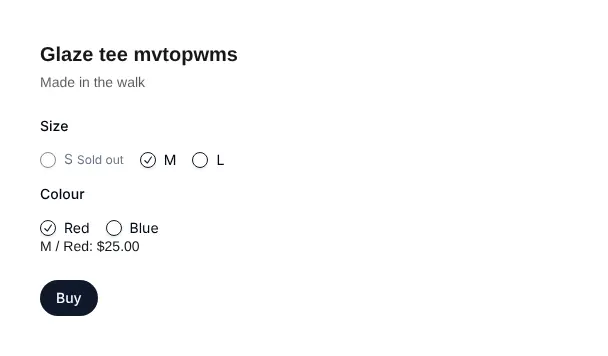
<OptionPicker>, one choice per axis, with a combination that cannot be
bought disabled and the reason.
Emails and webhooks
None of their own. The order line keeps its options, and the sales
export has an options column.
Limits
Up to 3 axes and 20 values each; retire a sold value rather than remove it.
Staging and Production
Nothing of its own.
Turning options on
Options are switched on per item type: in the console,
Billing > Item types, the type's version, Option axes under Variants
(optionAxes: true). An item's axes and values, retired ones badged, show on
its page under Billing > Selling > Items. The type must allow at least two
variants. The "Physical product" starter has it on.
The item
{
  "options": [
    {
      "id": "size",
      "name": "Size",
      "values": [
        { "id": "s", "label": "S" },
        { "id": "m", "label": "M" }
      ]
    },
    {
      "id": "colour",
      "name": "Colour",
      "values": [
        { "id": "red", "label": "Red" },
        { "id": "blue", "label": "Blue" }
      ]
    }
  ],
  "variants": [
    {
      "id": "m-red",
      "optionValues": { "size": "m", "colour": "red" },
      "prices": [
        { "id": "p-m-red", "currency": "usd", "mode": "fixed", "amount": 2500 }
      ],
      "stock": { "mode": "counted", "available": 10 }
    }
  ]
}- Up to 3 axes, 20 values each, and no more variants than the type allows.
Axis and value ids are up to 16 letters, digits,
-or_. - Each variant names one value per axis; each combination appears once. The grid may be partial: a combination the seller does not make is left out.
- The server writes each variant's
labelfrom its values, in axis order. - Each price has its own id across the item (
duplicate_price_idotherwise), because a sale is recorded by price id.
Changing options after a sale
A value or an axis that sold variants use stays. Removing a sold value is
refused (option_value_in_use): retire it instead (retired: true), which
stops new sales of its combinations and keeps the orders as sold. Removing
an axis that tells sold variants apart is refused (option_axis_in_use).
Renaming a value relabels the item; orders keep the label they were sold
with.
| Code | Means |
|---|---|
options_not_allowed | The item type has no option axes |
too_many_options | More than 3 axes |
duplicate_option_name | Two axes with one name |
no_option_values | An axis with no values |
duplicate_option_value | Two values of an axis with one label or id |
missing_option_value | A variant without a value for an axis |
unknown_option | A variant names an axis the item does not have |
unknown_option_value | A variant names a value its axis does not have |
duplicate_option_combination | Two variants on one combination |
duplicate_price_id | One price id on two variants |
option_value_in_use | Removing a value sold variants use; retire it instead |
option_axis_in_use | Removing an axis that tells sold variants apart |
Buying by options
Checkout, a cart line and a guest checkout take optionValues (axis id to
value id) instead of variantId; priceId may be left out when the
combination has one live price.
{
  "optionValues": { "size": "m", "colour": "red" },
  "successUrl": "https://example.com/thanks",
  "cancelUrl": "https://example.com/tee"
}
A combination that does not exist is refused with CHECKOUT_REFUSED,
problem unknown_option_combination; one on a retired value, or with no
live price, with option_combination_unavailable; one sold out with
OUT_OF_STOCK. The order line keeps the options it was bought with
(options), and the sales export has an options
column.
import {
  BuyButton,
  OptionPicker,
  useOptionSelection,
} from '@buildbase/sdk/react';

function Tee({ item }) {
  const choice = useOptionSelection(item);
  return (
    <>
      <OptionPicker
        item={item}
        selection={choice.selection}
        onSelect={choice.select}
      />
      {choice.variant && choice.price && !choice.problem && (
        <BuyButton
          itemId={item._id}
          variantId={choice.variant.id}
          priceId={choice.price.id}
          optionValues={choice.selection}
        />
      )}
    </>
  );
}
<OptionPicker> disables a value that cannot be bought with the other
choices and says why: sold out, or unavailable.
Errors
A refused request answers { error, message, code }, with problems naming
the axis, value or variant. The console shows the message; the SDK shows
each code in the reader's language.
code | What the person sees | What to do |
|---|---|---|
ITEM_INVALID | The options problem, such as a variant without a value for an axis (codes in the table above) | Fix each entry in problems; retire a sold value rather than removing it |
ITEM_TYPE_INVALID | Options make variants: allow at least 2 per item (options_need_variants) | Raise the type's variants to 2 or more before turning Option axes on |
CHECKOUT_REFUSED | The combination does not exist, or cannot be bought now (problems[0].code) | Pick another combination; the seller adds a live price or un-retires the value |
OUT_OF_STOCK | Not enough left for this order | Pick another combination, or wait for the seller to restock |
ITEM_STATE_CONFLICT | This item changed meanwhile. Reload it and try again | Reload the item and try again |