
Booking calendars
Sell a time on a seller's calendar: weekly hours, slots and seats, held at checkout, confirmed on payment, and moved or cancelled within the seller's rules.
A booking item sells a time on the seller's calendar: a coaching call, a lesson, a class with a few seats, a room for an hour. The seller sets their hours once; buyers see the open slots, pick one at checkout, and the slot is theirs once the order is paid.
Note
Arrives with selling. Bookings arrive with selling and run on the same Stripe keys: test keys in Staging for test sales, live keys in Production once live selling is open for your app.
Requires @buildbase/sdk 1.2.0 or later. The slot picker, the seller's availability editor and the booking hooks arrive with it.
Walkthrough
New to selling? Zero to first sale: marketplace and Zero to first sale: storefront walk the whole flow once, from Stripe keys to a refund and going live.
When to use it
Coaching calls, lessons, classes with a few seats, a room by the hour: anything sold as a time on the seller's calendar.
Before you start
An item type in the Book a time checkout mode (the Appointment starter), selling on, and a seller who can sell.
Set it up in the console
- Billing, Item types: start from Appointment, or set Checkout and buyers to Book a time, and publish.
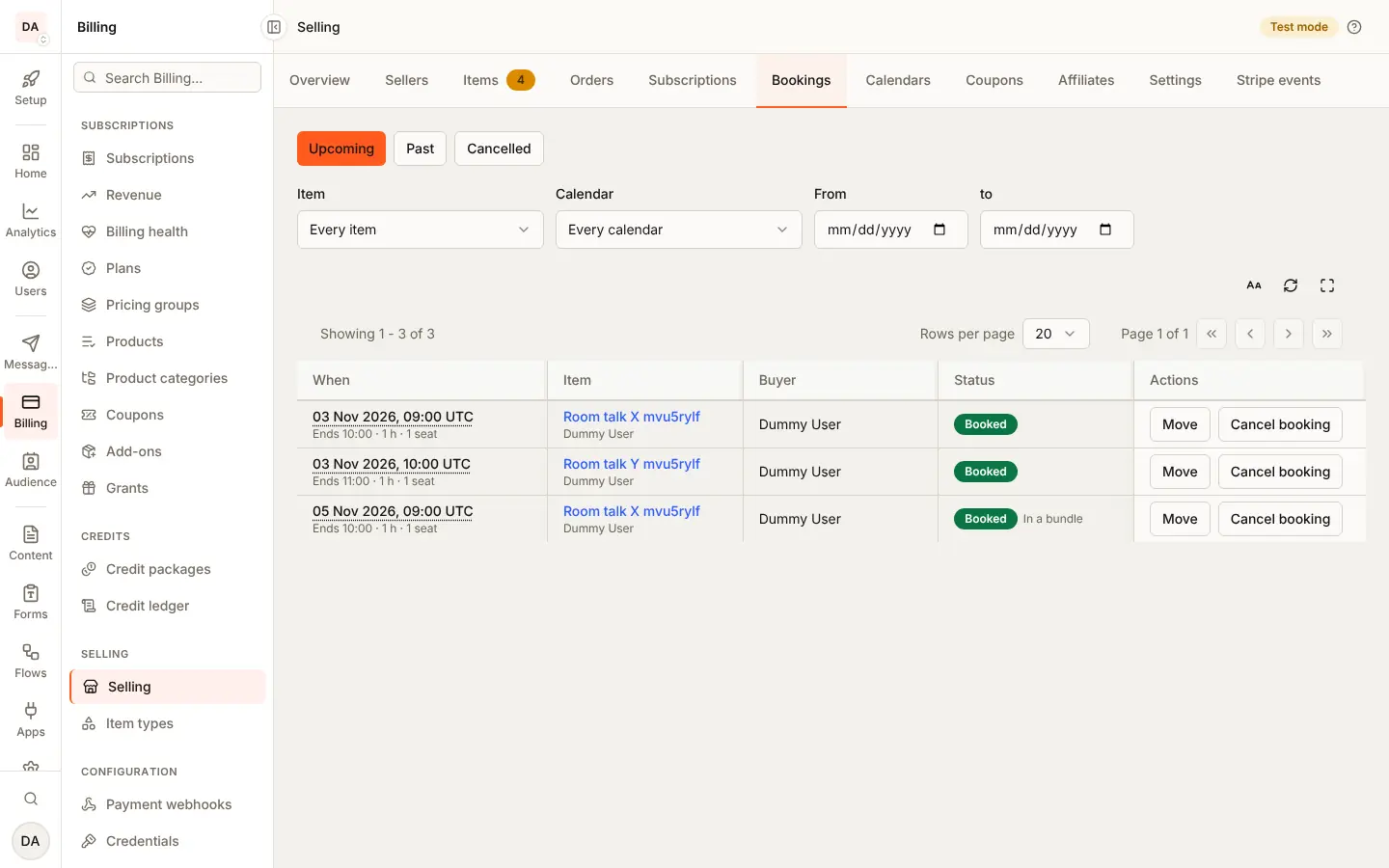
- Watch bookings under Billing, Selling, Bookings and shared calendars under Calendars. Cancel, move or mark attendance from a booking.
Marketplace and storefront
A buyer cancels within the seller's rules in both shapes. A seller may
cancel (with a full refund) only in the storefront shape; in the
marketplace shape that is yours (cancel_needs_app_owner). Moving a booking
is open to the seller in both.
What the seller sees
Their hours and rules (<BookingAvailabilityEditor> in the item form),
<SellerCalendars> for shared calendars, and <SellerBookings> to cancel,
move and mark attendance.
What the buyer sees
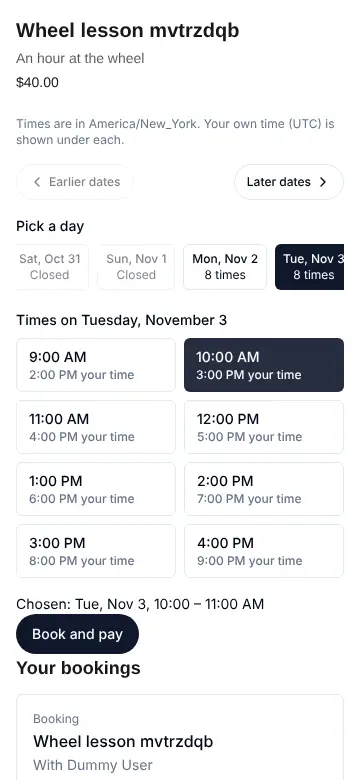
<SlotPicker>: the open slots in their own zone, one picked before paying,
then the booking with its calendar file and links for Google Calendar and
Outlook.
Emails and webhooks
The seller gets New Booking; the buyer and the seller get Booking
Cancelled and Booking Moved; the buyer gets Booking Reminder.
Your server gets booking.confirmed, booking.cancelled,
booking.rescheduled and booking.updated
(events and notices).
Limits
One slots read covers at most 31 days; booking types sell one-time prices only, with no stock of their own.
Staging and Production
Nothing of its own: bookings follow their orders.
The item type
Bookings are an item type checkout mode: Book a
time (checkoutMode: "booking"). The Appointment starter has it on. A
booking type:
- has no stock (
booking_stock_none): the calendar's seats are its stock; - sells at one-time prices only (
booking_one_time_only): no subscriptions, deposits or payment plans; - cannot include other items (
booking_no_bundle); a bundle may include a booking item (see In a bundle).
The calendar
Every item of a booking type carries one calendar, booking
(booking_required without it; any other item refuses one with
booking_not_allowed): its own, as below, or a seller's
shared calendar. Its variants are price tiers of the same slot, or
of a longer one (see Longer bookings).
{
  "booking": {
    "timeZone": "America/New_York",
    "slotMinutes": 60,
    "bufferMinutes": 15,
    "minNoticeMinutes": 720,
    "maxDaysAhead": 60,
    "seatsPerSlot": 1,
    "weekly": {
      "mon": [{ "from": "09:00", "to": "17:00" }],
      "wed": [
        { "from": "09:00", "to": "12:00" },
        { "from": "14:00", "to": "18:00" }
      ]
    },
    "exceptions": [{ "date": "2027-12-24", "windows": [] }],
    "buyerCancel": { "minutesBefore": 1440, "refund": "full" },
    "buyerReschedule": { "minutesBefore": 120, "maxTimes": 2 },
    "reminders": [{ "minutesBefore": 1440 }, { "minutesBefore": 60 }]
  }
}| Field | Means |
|---|---|
timeZone | The seller's IANA time zone. Hours and dates are wall times there |
slotMinutes | 5 to 720, in steps of 5 |
bufferMinutes | Kept free after each slot, 0 to 240 |
minNoticeMinutes | The soonest a slot can be booked, up to 30 days |
maxDaysAhead | The furthest ahead, 1 to 365 days; 60 when unset |
seatsPerSlot | Buyers per slot, 1 to 1000; 1 when unset. A checkout's quantity takes that many |
weekly | Up to 6 windows a day, mon to sun, HH:MM to HH:MM (24:00 ends at midnight) |
exceptions | Up to 200 dates with other hours, or none ([]) |
buyerCancel | Until how many minutes before the start a buyer may cancel, and the refund (full or none) |
buyerReschedule | Until when a buyer may move the booking, and how many times |
reminders | Up to 3 reminders to the buyer, each 15 minutes to 7 days before; unset is one a day before |
Leave buyerCancel or buyerReschedule out (or null) and buyers cannot
do it; the seller and you still can. A variant's most per checkout
(quantity.max) is at most seatsPerSlot.
Slots start at each window's start and step by slotMinutes + bufferMinutes; a slot must end inside its window. They step in real time,
so on the night clocks go back a window has an hour more of slots, and on
the night they go forward an hour fewer. A window that opens in the skipped
hour opens after it.
Problem codes, at booking.<field>: invalid_time_zone,
invalid_slot_length, invalid_buffer, invalid_notice,
invalid_days_ahead, invalid_seats, invalid_window, windows_overlap,
too_many_windows, invalid_exception, duplicate_exception,
too_many_exceptions, invalid_cancel_rule, no_hours,
invalid_reminder, too_many_reminders, duplicate_reminder.
Longer bookings
A variant can last several slots of the grid in a row: set bookingSlots
on it, 1 to 12 (1 when unset). On a grid of 45-minute slots with a
15-minute buffer, a variant with "bookingSlots": 2 is a 105-minute
session: two slots and the buffer between them. Every slot of the run is
inside one window of one day, and takes its seats: a 2-slot booking at
09:00 holds seats on the 09:00 slot and the next one.
{
  "variants": [
    {
      "id": "single",
      "prices": [
        { "id": "usd", "currency": "usd", "mode": "fixed", "amount": 6000 }
      ],
      "stock": { "mode": "none" }
    },
    {
      "id": "double",
      "bookingSlots": 2,
      "prices": [
        { "id": "usd", "currency": "usd", "mode": "fixed", "amount": 11000 }
      ],
      "stock": { "mode": "none" }
    }
  ]
}
Refusals, at variants.<id>.bookingSlots: invalid_booking_slots (not 1 to
12), booking_slots_too_long (no window of the calendar is long enough),
booking_slots_not_allowed (the item is not booked by time).
Checkout, its hold, payment, an unpaid end, a cancel, a move, a full refund
and a lost dispute take or give every slot of the run together: if one
slot of the run is full, none is taken and the checkout gets
SLOT_UNAVAILABLE. The booking's end, the order line's and the calendar
file's are the end of the whole run.
Showing the open slots
GET /api/v1/public/items/:id/slots?from=2027-06-01T00:00:00Z&to=2027-06-15T00:00:00Z
GET /api/v1/guest/:orgId/items/:id/slots{
"itemId": "6a1b...",
"timeZone": "America/New_York",
"slotMinutes": 60,
"calendarId": null,
"from": "2027-06-01T00:00:00.000Z",
"to": "2027-06-15T00:00:00.000Z",
"slots": [
{
"start": "2027-06-07T13:00:00.000Z",
"end": "2027-06-07T14:00:00.000Z",
"remaining": 1
}
]
}from defaults to now and to to 14 days later; one read covers at most
31 days. Slots inside the notice, beyond the days ahead, or full are left
out. On a shared calendar calendarId names it, and a slot booked through
any of its items is full here too.
Seats are counted by time, not by the slot's start. After a seller
changes a grid (its hours, an item's own slot length, a buffer or the
zone), a booking made on the old grid keeps the time it covers: a new
slot that overlaps it, with the buffers the grid keeps free before and
after each slot, counts that booking's seats, so on a 1-seat calendar it
is not listed, and a checkout or a move onto it gets 409 SLOT_UNAVAILABLE. Each slot is named by its start, a UTC instant; show it in the
buyer's or the seller's zone as you like.
Add variantId for a variant that lasts several slots: the answer then
lists only the starts where its whole run fits and has the seats, with
each end at the end of the run, and says "variantId" and
"bookingSlots". Without it, the answer is for one slot ("variantId": null, "bookingSlots": 1).
Checkout
A checkout of a booking item names the slot's start, slotStart:
{
  "variantId": "session",
  "priceId": "usd",
  "slotStart": "2027-06-07T13:00:00.000Z",
  "successUrl": "https://example.com/thanks",
  "cancelUrl": "https://example.com/coach"
}| Refusal | Means |
|---|---|
422 CHECKOUT_REFUSED, slot_required | A booking item needs slotStart |
422 CHECKOUT_REFUSED, slot_not_bookable | slotStart on an item that takes no bookings |
422 CHECKOUT_REFUSED, slot_invalid | Not a slot of the calendar |
422 CHECKOUT_REFUSED, slot_too_soon | Inside the notice, or past |
422 CHECKOUT_REFUSED, slot_too_far | Beyond the days ahead |
409 SLOT_UNAVAILABLE | Someone took the last seat; pick another time |
Checkout holds the slot's seats while Stripe's page is open, as it holds
stock: two buyers at the last seat get one booking and one
SLOT_UNAVAILABLE. A checkout that ends unpaid gives the seats back. Once
the order is paid (or claimed free) the booking is confirmed and
booking.confirmed is sent. A payment that arrives after its checkout
ended still confirms the booking, even if the slot filled meanwhile, or
its time now overlaps a booking made before the seller changed the slot
length, a buffer or the hours; it is then marked overbooked for the
seller to sort out.
The order line carries its booking (lines[].booking: bookingId,
start, end, timeZone, status), and the sales export
a booking_start column: every booked start of the order, a bundle's
included ones after their line's, joined with "; ".
Shared calendars
Two items can sell the same time: a wheel lesson and a glazing lesson in one studio, a call of 30 minutes and one of 60 with the same coach. The seller makes a shared calendar, the grid and its seats, and each item names it instead of carrying a grid of its own:
{
  "booking": {
    "calendarId": "6a1d...",
    "minNoticeMinutes": 720,
    "buyerCancel": { "minutesBefore": 1440, "refund": "full" },
    "reminders": [{ "minutesBefore": 60 }]
  }
}
The calendar holds timeZone, slotMinutes, bufferMinutes,
seatsPerSlot, weekly and exceptions, and a name. Each item keeps
its own sales rules: minNoticeMinutes, maxDaysAhead, buyerCancel,
buyerReschedule, reminders, and its variants' bookingSlots (a longer
variant is a run of the calendar's slots). The seats are the calendar's: a
slot booked through one item is taken for every item on it, and two
buyers at its last seat through two items get one booking.
Refusal, at booking.<field> | Means |
|---|---|
booking_grid_on_calendar | An item on a calendar sets a grid field itself |
calendar_not_found | No such calendar |
calendar_other_seller | The calendar is another seller's |
calendar_too_many_items | The calendar already has 50 items |
calendar_switch_in_use | The item has bookings to come: it keeps its calendar for now |
booking_seats_cap | A seat cap above the calendar's seats, or on an item's own grid |
An item with bookings to come cannot change calendars by a save; its bookings stay where they were counted. To bring them along, move them onto the calendar. A seller keeps up to 20 calendars.
| Who | Routes |
|---|---|
| The seller | /me/calendars and /workspaces/:id/calendars (SELLING_VIEW to read, SELLING_MANAGE to change) |
| Your server | /api/v1/server/commerce/calendars, any seller's (sellerId in the body to make one), items grant |
| The console | /api/marketplace/calendars, marketplace_calendars grant: read, and PATCH /:id/settings |
Each takes GET / (a page, page and limit), POST /, GET /:id,
PUT /:id (the name and whole grid) and DELETE /:id; the console reads
them and changes only their settings. A calendar reads back with its seller and the items on it
(items: id, title, status).
Refusal, 422 CALENDAR_REFUSED | Means |
|---|---|
| a grid code, at its field | invalid_time_zone, invalid_slot_length, ... as for an item's own grid |
invalid_name | A name of 1 to 80 characters |
too_many_calendars | The seller already keeps 20 |
calendar_in_use | A change of zone, slot length or a buffer while a booking on it has not ended, or a narrower capacity model |
calendar_seats_in_use | Fewer seats than a slot to come already has taken |
calendar_has_items | A delete while items are booked on it |
Another seller's calendar is 404 CALENDAR_NOT_FOUND. Hours and dated
exceptions may change at any time; a booking already made stands, and
its time stays taken. A
booking on a shared calendar says so (calendarId), and a booking list
narrows to one calendar with calendarId.
Capacity on a shared calendar
A shared calendar's seats are one pool by default. Studios, clinics and
rental desks share them differently, so the calendar has a setting,
capacityModel:
capacityModel | How its items share a slot's seats |
|---|---|
shared_pool (default) | One pool: any item takes any seat |
item_caps | The pool, and each item at most its own seatsCap of it. Room A with 6 seats, the wheel lesson capped at 4 and the glazing lesson at 6: wheel buyers take at most 4, the rest is any |
exclusive | The first booking on a slot locks it to its item until every seat is given back: a room booked for a lesson is not booked for a party at the same time |
An item on the calendar sets seatsCap (at most the calendar's
seatsPerSlot; an item without one may take the whole pool). Any booking
item may set seatsPerUnit (default 1): each unit sold takes that many
seats, so a family ticket of 4 takes 4 seats a unit and a checkout of 2
takes 8. The slots an item reads say what is left for it, in its own
units (remaining), and the seats beside (seats); a booking says the
seats it holds (seatsTaken).
While bookings on the calendar have not ended, its capacity model changes
only to shared_pool; any other change is refused with
calendar_in_use, since an item's share and a slot's lock are only
counted from when the model asks for them.
The calendar's other settings: moveConflicts (below) and
bookingLimits. All three are optional in PUT /:id, and a save that
leaves one out keeps it, so an older client's save of the grid changes
none of them. The console sets them with PATCH /:id/settings.
Buffers and limits
bufferMinutes is kept free after each slot; bufferBeforeMinutes before
it. Both are part of the grid: the first slot of a window starts after
the buffer before, and two slots are the buffer after plus the buffer
before apart. With hours from 09:00, 30 minute slots, 10 after and 15
before, the slots start at 09:15, 10:10, 11:05.
bookingLimits caps the bookings taken on one local day or week, in the
calendar's time zone ({ "perDay": 4, "perWeek": 12 }; a week runs Monday
to Sunday). An item's limits count its own bookings; a shared calendar's
count every booking on it, through any item. Each booking counts once,
whatever its seats. A day at its limit offers no slots, and a checkout or
a move onto it is refused with 409 SLOT_UNAVAILABLE, problem code
booking_limit_reached. A booking at 23:30 counts on its local day even
where the clocks change that night or UTC has moved to the next date.
Moving bookings onto a shared calendar
An item with bookings to come can move onto a shared calendar, bringing them along: from its own grid, or from another calendar of the same seller. First the preview, which reads only:
POST /me/items/:id/booking/calendar-move/preview
{ "calendarId": "6a1d..." }
It answers each booking to come with where it would land:
outcome | Means |
|---|---|
fits | Its slots are slots of the calendar, with the seats for it (by the calendar's capacity model, counted with the ones before it) |
over_capacity | Its slots are there, but not its seats |
off_grid | Its time is not a slot of the calendar (another slot length, hours or buffer) |
and canMove. Then the move, the same body without /preview. A
booking off_grid always refuses the move. A booking over_capacity
refuses it too, unless the calendar's moveConflicts is overbook
(default refuse): then it moves and is marked overbooked for the
seller to sort out. A refused move answers 409 CALENDAR_MOVE_CONFLICTS
with problems naming each booking (calendar_move_off_grid,
calendar_move_over_capacity) and the preview; nothing changes.
While a move runs, the item's checkouts and booking moves answer
409 BOOKING_CALENDAR_MOVING. A move that stops halfway (a deploy, a
crash) is finished by sending it again with the same calendar: each
booking is taken on the new calendar, moved, then given back on the old
one, once. When it is done the item is booked on the calendar, keeping its
own rules, and each moved booking sends booking.updated with
change: "calendar".
| Who | Routes |
|---|---|
| The seller | /me/items/:id/booking/calendar-move and /workspaces/:id/items/:id/booking/calendar-move (SELLING_MANAGE), each with /preview |
| Your server | /api/v1/server/commerce/items/:id/booking/calendar-move, items grant (the preview reads, the move updates) |
| The console | /api/marketplace/items/:id/booking/calendar-move, marketplace_items and marketplace_calendars grants |
In a cart
A cart takes booking lines: each
names its slotStart, as a single checkout does, and a bundle line its
slotStarts.
{
  "lines": [
    {
      "itemId": "6a1b...",
      "variantId": "session",
      "priceId": "usd",
      "slotStart": "2027-06-07T15:00:00.000Z"
    },
    {
      "itemId": "6a1e...",
      "variantId": "session",
      "priceId": "usd",
      "slotStart": "2027-06-07T16:00:00.000Z"
    }
  ],
  "successUrl": "https://example.com/thanks",
  "cancelUrl": "https://example.com/cart"
}
Every booking is held after the stock, in cart order, all or nothing: if
one slot is full the whole cart is refused with 409 SLOT_UNAVAILABLE at
lines.<n>.slotStart, and nothing stays held. Two lines on one slot of a
calendar take its seats twice. Payment confirms every booking; a cart left
unpaid gives every seat back. A slot's problem (slot_required,
slot_invalid, ...) names its line the same way.
- With a subscription in the cart: a booking is paid once, so it goes on the subscription's first invoice as a one-time line, and that invoice's payment confirms it.
- With a price paid in parts: the booking is paid in full on the same page as the first part.
- In the storefront shape (a cart paid in steps), every step's bookings are held when the buyer checks out, with the stock, all or nothing. A later step's bookings are held while the steps before it are paid; opening its page moves its bookings' hold with its stock's. A step that expires, or whose page is left unpaid, gives its seats back on its own; the steps already paid keep theirs.
- A coupon's check before checkout reads the prices only; the slots are checked when the cart checks out.
In a bundle
A bundle may include a booking item. Its checkout
takes a start for each included booking item, by the bundle's item
benefit id:
{
  "variantId": "kit",
  "priceId": "usd",
  "slotStarts": { "lesson": "2027-06-07T13:00:00.000Z" },
  "successUrl": "https://example.com/thanks",
  "cancelUrl": "https://example.com/kit"
}
The buyer reads each included item's open slots from that item's own
GET /items/:id/slots; a bundle's includes say which are booked by time
(bookable). Problems are at slotStarts.<benefitId>: slot_required,
slot_invalid, slot_too_soon, slot_too_far, and slot_not_bookable
for a start given for anything else. A full slot is 409 SLOT_UNAVAILABLE
there, and the checkout holds nothing.
- Seats. Bundles bought times the included quantity. A bundle that
includes more than a slot's seats of an item cannot be published
(
bundle_item_booking_seats). - The order. The booking is on the line's component
(
lines[].components[].booking, with itsbenefitId). - Changes. The buyer cancels or moves it by the included item's rules,
but a cancel refunds nothing: the bundle has one price
(
inBundle: true, and the buyer'sactions.refundisnone). A full refund of the bundle line, or a lost dispute, cancels its bookings that have not started.
The booking
{
  "_id": "6a1c...",
  "orderId": "6a1b...",
  "itemTitle": "Coaching call",
  "start": "2027-06-07T13:00:00.000Z",
  "end": "2027-06-07T14:00:00.000Z",
  "timeZone": "America/New_York",
  "calendarId": null,
  "benefitId": null,
  "inBundle": false,
  "seats": 1,
  "status": "confirmed",
  "overbooked": false,
  "rescheduled": 0,
  "cancelledBy": null,
  "calendarUrl": "https://api.example.com/api/v1/guest/.../calendar.ics?token=..."
}
status is held (checkout open), confirmed, cancelled or expired.
calendarUrl downloads the booking as a calendar file (.ics) that any
calendar app opens; its token opens that file only. A confirmed booking
also carries addToCalendar: links that add it to Google Calendar and
Outlook on the web. The buyer's view adds
actions: whether they may cancel or move it now, and what a cancel
refunds.
Cancelling and moving
| Who | Cancel | Move |
|---|---|---|
| The buyer | Within buyerCancel; refunds the line in full or not at all, as the rule says, in both shapes | Within buyerReschedule |
| The seller, storefront | Any time before the start; refunds the line in full | Any time before the start |
| The seller, marketplace | Refused (cancel_needs_app_owner): you are the merchant | Any time before the start |
| You (console) or your server | Any time before the start; refunds in full unless refund: false | Any time before the start |
A booking that has started, or is not confirmed, does not change
(booking_past, booking_not_active). Other refusals are
cancel_not_allowed, cancel_window_closed, reschedule_not_allowed,
reschedule_window_closed, reschedule_limit and
reschedule_into_cancel_window, all as 422 BOOKING_CHANGE_REFUSED.
When buyers may cancel (buyerCancel), a buyer or guest cannot move a
booking to a time that starts inside the cancel window: with a 24-hour
cancel window, a move to a slot 20 hours away is refused with
reschedule_into_cancel_window, so a move never carries a booking past
the point where it could still be cancelled. The seller, you and your
server may move it there.
The other way round, a buyer may still move a booking that is already
inside its cancel window (the move window is often shorter), but the
cancel stays closed after the move, wherever it lands: with a 24-hour
cancel window and a 2-hour move window, a booking 3 hours away can be
moved to next week, and a buyer's cancel of it is then refused with
cancel_window_closed (its actions read "cancel": false). A move
cannot reopen a cancel, and its refund, that the time it held had
already closed. A move by the seller, you or your server leaves the
buyer's cancel to follow the new time (unless a buyer's own move had
already closed it), and you and your server may always cancel and
refund. A move needs a free slot of the item
(409 SLOT_UNAVAILABLE otherwise); the seller, you and your server may
move a booking inside the notice.
A cancel answers the booking and the refund it made. If Stripe refuses the
refund the booking stays cancelled and the answer says refundFailed;
refund the order from Orders.
A full refund of the line, or a lost dispute, cancels a booking that has
not started (cancelledBy: "system") and frees its seats.
| Who | Routes |
|---|---|
| The buyer | GET /me/bookings, GET /me/bookings/:id, POST /me/bookings/:id/cancel, POST /me/bookings/:id/reschedule, GET /me/bookings/:id/calendar.ics |
| A guest | GET /api/v1/guest/:orgId/orders/:id/booking, POST .../booking/cancel, POST .../booking/reschedule, with the order token in x-order-token |
| The seller | /me/sales/bookings and /workspaces/:id/sales/bookings: list, one, cancel, reschedule |
| Your server | /api/v1/server/commerce/bookings: list, one, cancel, reschedule |
Attendance
Once a confirmed booking has started, the seller, you and your server
may mark whether the buyer came: PUT .../bookings/:id/attendance with
{ "attendance": "attended" }, "no_show", or null to clear it. It is
a record only: nothing is refunded or charged. A booking that has not
started is refused with attendance_too_early. The booking reads back
with attendance and attendanceAt, and sends booking.updated with
change: "attendance".
A move takes { "slotStart": "..." }; a cancel takes an optional
reason, and from you or your server refund: false. A booking keeps
its length when it moves.
A list narrows by status, itemId, calendarId, from and to (by start), pages
with page and limit (at most 100), and sorts by start with sort:
start, soonest first (the default), or -start, latest first. from
and to are times, such as 2027-06-01T00:00:00Z; one that is not
answers 400 with path naming it.
Events and notices
| Event | When |
|---|---|
booking.confirmed | The order was paid or claimed free |
booking.cancelled | Cancelled, with cancelledBy and the refund made (or null) |
booking.rescheduled | Moved, with the slot it left (previous) and who moved it (movedBy) |
booking.updated | Changed in place: change is attendance or calendar (moved onto a shared calendar with its item, previousCalendarId), with updatedBy |
The seller gets a New Booking email (and push) on each confirmed booking; the buyer and the seller get Booking Cancelled and Booking Moved. The buyer's receipt names the booked time and links the calendar file. Turn any of them off under Notifications.
Reminders
Before each confirmed booking the buyer gets a Booking Reminder email,
signed in or a guest, at each of the calendar's reminders. It names the
time in the seller's zone, and in the buyer's own zone too when a
signed-in buyer's is known and differs; it links the calendar file, and a
guest's links their order when you have set your app's order page under
Selling, Settings. A signed-in buyer also gets a push.
- Unset
remindersis one a day before (the Appointment starter's calendars);[]sends none for that item. - A reminder whose time has already gone by when the booking is made (a booking for tomorrow morning, with a reminder a day before) is skipped, never sent late.
- Each reminder is sent once. If several fall due together, the one nearest the start is sent.
- A move starts the reminders again from the new time; a cancel or an ended checkout stops them.
- They go out within five minutes of their time. Your organization's notification email and push switches apply; there is no webhook event for a reminder.
Not in this release
Waiting lists, syncing with an outside calendar (Google, Outlook), choosing a room or a person for a booking by itself, a refund or a fee for a no-show, and refunding a time a bundle included on its own.