
Shipping
Sell physical items: rates at checkout, the address on Stripe's page, labels, tracking and customs through your EasyPost or Shippo account, and returns.
An item that ships asks the buyer for an address on Stripe's page and charges a shipping rate the buyer picks there. The seller then ships the order in one or more shipments, each with a carrier and tracking number, and the buyer is told when it ships and when it arrives.
Note
Arrives with selling. Shipping arrives with selling and runs on the same Stripe keys: test keys in Staging for test sales, live keys in Production once live selling is open for your app.
The screens require @buildbase/sdk 1.2.0 or later. <ShippingRatesEditor>, <ShipOrder>, <OrderTracking>, <OrderReturns>, useShipments, useShippingQuote, useReturns, useSellerShipments and useSellerReturns arrive with it; earlier versions have none of them, and their webhook catalog does not list order.shipped, shipment.updated, return.requested or return.updated. The routes on this page also work from your app or your server directly.
Walkthrough
New to selling? Zero to first sale: marketplace and Zero to first sale: storefront walk the whole flow once, from Stripe keys to a refund and going live.
When to use it
Anything physical: rates at checkout, an address on Stripe's page, one or more shipments with tracking, and returns.
Before you start
An item type or item with shipping rules (the countries it ships to). For bought labels and live tracking, your own EasyPost or Shippo account.
Set it up in the console
- Billing, Item types: give the type shipping rules under Checkout and buyers, and publish.
- Billing, Selling, Settings, Shipping labels: save your EasyPost key and webhook secret to buy labels (a Shippo token is saved through the API, see Shippo); shipping by hand needs nothing.
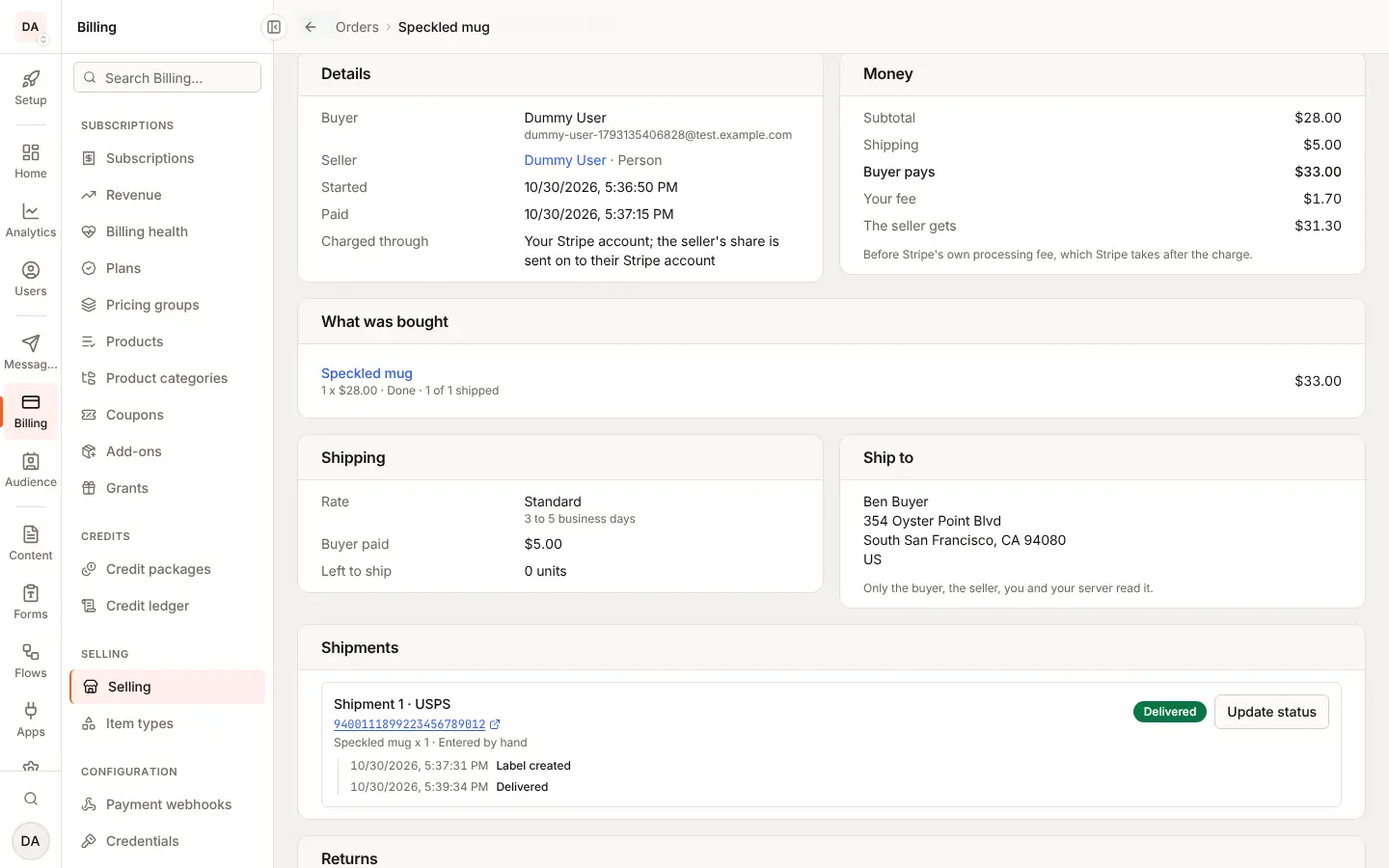
- Ship from an order's page under Orders (the Shipping, Shipments and Returns cards), or list what waits with Awaiting shipment. A seller's rates show on their page under Sellers.
Marketplace and storefront
The address is asked on Stripe's page in both shapes. Who may refund a return follows the shape, as any refund.
What the seller sees
<ShippingRatesEditor> for their rates, and <ShipOrder> to ship a sale.
What the buyer sees
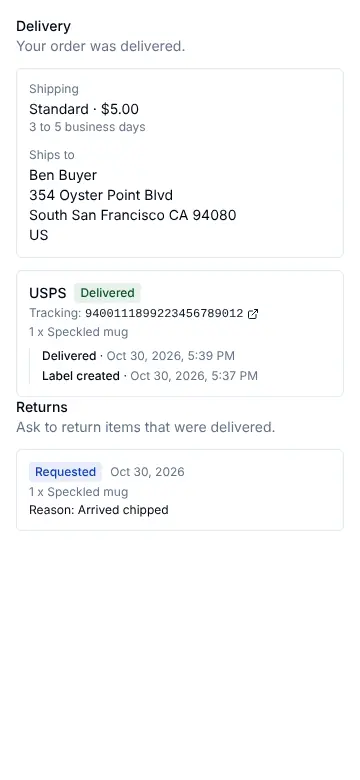
The address and rate on Stripe's page, then <OrderTracking> and
<OrderReturns> on their order page.
Emails and webhooks
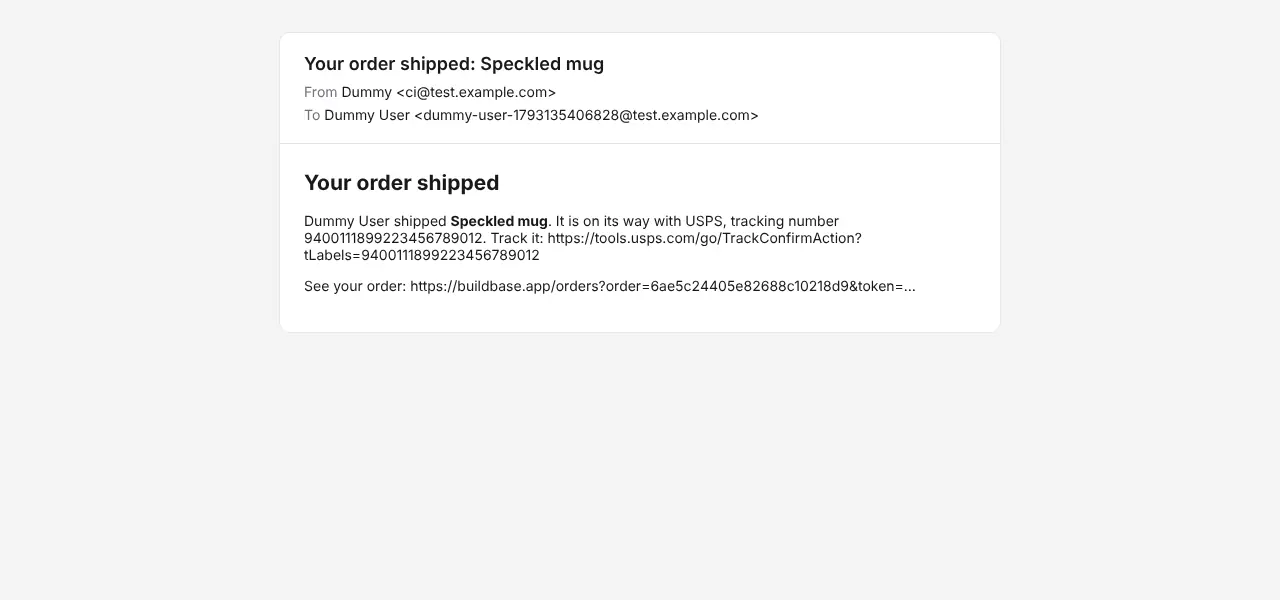
The buyer gets Order Shipped, Order Delivered and Return
Approved. Your server gets order.shipped, shipment.updated,
return.requested and return.updated (webhooks).
Limits
What is not shipped yet is listed under Not yet.
Staging and Production
Your EasyPost or Shippo key is saved apart from your Stripe keys: save
a live one yourself in Production when you go live there. Dev and Staging
take test keys only (EasyPost EZTK..., Shippo shippo_test_...) and
refuse a production key, which would buy real postage for test orders.
What ships
An item ships when it, or its item type, has
shipping rules: the countries it ships to (ISO 3166-1, US), optionally the
regions within them (ISO 3166-2, US-WA) for goods only some states may
receive, a flat rate per unit, and whether the buyer may collect it. An
item's own rules stay within its type's.
{
  "shipping": {
    "countries": ["US", "CA"],
    "regions": ["US-WA", "US-OR"],
    "flatRate": 500
  }
}
A one-time price ships. A subscription or a price paid in parts is sold
without shipping for now, and a cart that ships an item cannot also carry a
subscription (cart_shipping_subscription). A free claim is shipped at no
charge and asks no address.
Shipping rates
A seller keeps up to 5 rates, each a name, an amount per order in one currency, the countries it covers, a delivery estimate in business days, an optional "free over" amount, or a pickup:
{
  "name": "Standard",
  "amount": 500,
  "currency": "usd",
  "countries": ["US", "CA"],
  "minDays": 3,
  "maxDays": 5,
  "freeOver": 5000
}| Who | Routes |
|---|---|
| The seller | GET, POST /api/v1/public/me/shipping-rates; GET, PUT, DELETE /me/shipping-rates/:id |
| A workspace seller | the same under /api/v1/public/workspaces/:workspaceId/shipping-rates (SELLING_VIEW, SELLING_MANAGE) |
| Your server | /api/v1/server/commerce/shipping-rates, any seller's (a create names sellerId) |
| The console | GET /api/marketplace/shipping/rates?sellerId= |
A rate is saved whole; an order keeps a copy of the one it was sold with, so
an edit or a delete never changes an order. A refusal answers 422
SHIPPING_RATE_REFUSED with problems.
At checkout
Checkout offers the seller's rates in the order's currency that cover the countries every line ships to, cheapest first, as Stripe Checkout shipping options, and asks for an address in a country every offered rate covers:
- Free over compares the subtotal after discount of the lines that ship. At or over the amount, that rate is 0.
- Pickup is offered only when every line that ships may be collected. A pickup keeps no address.
- No rate in the currency: the items' own flat rates times the quantity, as one "Shipping" option.
- Lines that share no country are refused with
shipping_no_common_country; a seller with no rate that fits,shipping_no_rate(422CHECKOUT_REFUSED, atshipping).
With Stripe Tax on, Stripe taxes the shipping as well.
The order records the rate the buyer picked once Checkout completes:
shipping (minor units, inside total), shippingRate and
shippingAddress. The shipping is spread over the lines that ship, in
proportion to their subtotal, so a refund of a line returns its share. It
goes to the seller, who ships: in the marketplace shape the seller's share
then includes a rate not known until the buyer picks it, so the seller is
paid by a transfer after the charge rather than with it.
The address is read only by the buyer, the order's seller, you and your server.
Carts across sellers
A cart in the marketplace shape is one Stripe page, so it offers one option, "Shipping (2 sellers)": the sum of each seller's cheapest rate that is not a pickup. Each order keeps its own part and pays it to its seller. A storefront cart pays each seller on their own page, with their own rates.
Regions
Stripe's page cannot refuse a state, so the address is checked against each
line's regions once paid. An address outside them refunds the order in full,
once (shippingRefused: true), tells the buyer by email, and its seller is
not paid. Nothing ships.
With affiliates
An order bought through a referral earns on the lines' net, before tax and shipping, so the rate the buyer picks never changes the commission, and free-over reads the same subtotal with or without one. A seller's program still comes off the seller's side when the seller is paid after the charge: the transfer is their share with the shipping in it, less your fee and the commission, as a destination charge would send. In a storefront cart each step's page offers its seller's rates, and the commission rides on that step's application fee; the shipping goes to the seller. An order refunded for its region earns no commission. A refund takes back a commission's share measured against the line's total, shipping in it, so a full refund takes back all of it.
Shipments
The seller, you or your server ship a paid order in one or more shipments. Each names the units of each line it carries (every unit left when none are named) and either:
- By hand (
provider: "manual", always on): the carrier and tracking number, a tracking link (made for USPS, UPS, FedEx, DHL, Canada Post, Royal Mail and Australia Post when none is given,https://only), and the label as a PDF uploaded with the seller's files first (labelFileId). The status moves by hand. - A label bought from EasyPost (
provider: "easypost"), on your own EasyPost account (below): the address it ships from and the parcel (weightOz, and inches). The rate asked for bycarrierandservice, or the cheapest, is bought; tracking moves the status.
curl -X POST "$SERVER/api/v1/public/me/sales/$ORDER/shipments" \
  -H "x-session-id: $SESSION" -H 'content-type: application/json' \
-d '{"carrier":"USPS","trackingNumber":"9400111899223","labelFileId":"<pdf file id>"}'| Who | Routes |
|---|---|
| The seller | GET, POST /me/sales/:id/shipments; POST /me/sales/:id/shipments/:shipmentId/status; GET .../label |
| A workspace seller | the same under /workspaces/:workspaceId/sales/:id/shipments |
| Your server | GET /api/v1/server/commerce/shipments?orderId=, POST (names orderId), GET /:id, POST /:id/status, GET /:id/label (the marketplace_orders grant) |
| The console | /api/marketplace/orders/:id/shipments, and the same status and label routes |
A shipment's status is label_created, in_transit, out_for_delivery,
delivered, returned, failure or cancelled. Returned and cancelled are
final; delivered may only become returned; the same status again changes
nothing. A provider's shipment moves with its tracking and may only be
cancelled by hand (its label is refunded at the provider). A refusal
answers 422 SHIPMENT_REFUSED with problems (shipment_quantity,
shipment_status, label_not_pdf, nothing_to_ship), and an unknown one
404 SHIPMENT_NOT_FOUND. One shipment of an order is made at a time: a
second request while a label is being bought answers 409
SHIPMENT_REFUSED with shipment_in_progress; try it again once the first
answers. A label purchase the provider did not answer (a timeout, an error
on its side) keeps its shipment, and the next request for the order buys it
again under the same key, so a label is never bought twice. One nobody
retries is settled by the daily shipping pass: it asks EasyPost, without
buying, what it holds for that shipment, and keeps the label it finds or
frees the units when there is none. A Shippo purchase is left for you to
check in your Shippo account, and is never bought again.
The order follows its shipments:
- The first shipment with a tracking number, or on its way, moves the lines
that ship from
duetoin_progressand sendsorder.shipped, once. The buyer is emailed (and, signed in, notified) with the tracking. - A line whose every unit is in delivered shipments is fulfilled, which
sends
order.fulfilled. When the last parcel is delivered, the buyer is emailed.
Reading one order returns its shipments, and each line that ships its
shipped units. A guest reads them with their order link, as the rest of
the order.
Labels through your EasyPost account
Labels are bought on your own EasyPost account, never BuildBase's. Under
Selling, Shipping, save your EasyPost API key and the secret of a webhook
you create in EasyPost pointing at the address shown there
(/api/webhooks/shipping/easypost/<your app id>, with the environment's id
inside an environment). Both are encrypted at rest and never shown again.
curl -X PUT "$SERVER/api/marketplace/shipping/provider" \
  -H "Authorization: Bearer $TOKEN" -H 'content-type: application/json' \
  -d '{"easypostApiKey":"EZTK...","easypostWebhookSecret":"..."}'
EasyPost's tracking events are verified against the secret, stored under
their id and processed once; a repeat changes nothing. A daily read of each
shipment still on its way catches anything a webhook missed. When this
platform has not turned EasyPost on, or no key is saved, a label purchase
answers 503 SHIPPING_PROVIDER_UNAVAILABLE, and shipments by hand work as
always.
Weight and brackets
A rate has a basis: flat (the default, its amount per order), or
brackets by weight (grams), subtotal (minor units, after discount) or
items (units). Up to 10 brackets, each amount up to upTo, the last
open-ended (upTo: null). Any basis but carrier may add perItem per
unit and is free at freeOver.
{
  "name": "By weight",
  "amount": 0,
  "currency": "usd",
  "countries": ["US"],
  "basis": "weight",
  "brackets": [
    { "upTo": 500, "amount": 500 },
    { "upTo": 2000, "amount": 900 },
    { "upTo": null, "amount": 1500 }
  ],
  "perItem": 0
}
The weight is each variant's weightGrams, plus the item type's
shipping.packagingGrams per unit (0 by default), times the units. A
variant may also give its sides in dimsMm for a carrier's parcel. When a
seller has a rate by weight and a line has no weight, checkout is refused
before anything is held with shipping_weight_missing at lines.<n>, and
the seller should add the weight.
Combining
When a seller has no rate in the order's currency, the items' own flat
rates are charged, combined as the seller sets (combine):
combine | One order of a $4 mug (additional $1.50) and two $9 bowls |
|---|---|
sum (the default) | Each unit at its rate: $4 + $9 + $9 = $22 |
highest_plus_additional | The dearest unit once, then each other unit's additionalRate (its rate when it has none): $9 + $1.50 + $9 = $19.50 |
flat_per_order | The dearest rate once: $9 |
additionalRate is part of an item's (or its type's) shipping rules. A
seller's settings are read and saved at GET/PUT /me/selling/shipping
(a workspace's at /workspaces/:workspaceId/selling/shipping, under the
selling permissions), by the app's server at
/api/v1/server/commerce/shipping-settings/:sellerId, and in the console at
/api/marketplace/shipping/sellers/:id. Each part may be sent alone:
{
  "combine": "highest_plus_additional",
  "returns": {
    "enabled": true,
    "windowDays": 30,
    "labelPaidBy": "seller",
    "autoRefundOn": "none"
  },
  "customs": {
    "contentsType": "merchandise",
    "incoterm": "DAP",
    "nonDelivery": "return"
  }
}
Carrier rates and why the address comes first
A rate with basis: "carrier" charges the carrier's own price for the
parcel from the rate's origin to the buyer's address, among carriers
and services (empty is any), with the seller's markup (markupBps, then
markupFixed):
{
  "name": "Carrier",
  "amount": 0,
  "currency": "usd",
  "countries": ["US", "CA"],
  "basis": "carrier",
  "carrier": {
    "carriers": ["USPS", "UPS"],
    "services": [],
    "markupBps": 1000,
    "markupFixed": 50,
    "fallbackAmount": 1200,
    "origin": {
      "name": "Maya Pottery",
      "line1": "1 Kiln Rd",
      "city": "Seattle",
      "state": "WA",
      "postalCode": "98101",
      "country": "US"
    }
  }
}
Stripe's hosted page cannot work out a shipping price while the buyer types an address: it offers fixed options only. So the address comes first. Your page asks for at least the country and postal code, then asks for a quote with the same lines checkout will send:
curl -X POST "$SERVER/api/v1/public/items/$ITEM/shipping-quote" \
  -H "x-session-id: $SESSION" -H 'content-type: application/json' \
  -d '{"variantId":"mug","priceId":"usd","quantity":1,"address":{"country":"US","postalCode":"94080"}}'
A cart asks at POST /api/v1/public/cart/shipping-quote with lines, and a
guest at /api/v1/guest/<app id>/items/:id/shipping-quote and
/cart/shipping-quote. The answer is each option (the carrier and service
in carrier and service, cheapest first, up to 3 per carrier rate by
default), each seller's options, and a quoteToken, good for 30 minutes.
Show the options, then start checkout with "shippingQuote": "<quoteToken>".
Stripe's page offers the quoted options as fixed amounts and takes an
address in the quoted country only.
The token is signed and names the lines and the address it was priced for:
a changed amount, other lines or an expired token is refused with 422
SHIPPING_QUOTE_INVALID before anything is held, and your page asks for a
new quote. Prices from the provider are reused for 15 minutes for the same
parcel and address. Without a quote, a carrier rate offers its
fallbackAmount, or is left out, and checkout with only carrier rates and no
fallback answers shipping_quote_required.
Once paid, the address Stripe collected is compared to the quoted country
and postal code. A different one is flagged on the order
(shippingQuoteMismatch: true) for the seller to decide, or, when you set
quote.mismatch to refund, the order is refunded in full once and nothing
ships.
Within the quoted postal code, the street address paid for is then checked
against the quoted one: both are verified with your connected label provider
(EasyPost or Shippo address verification) and compared in their normal form
(case, punctuation, spacing and a ZIP+4 do not count; a part the quote was
asked without, such as the city, is not compared). When they differ, the
seller's choice applies (addressMismatch in their shipping settings, which
the app server's PUT /api/v1/server/commerce/shipping-settings/:sellerId
also takes). A null choice follows your default, set under
Billing > Selling > Settings:
addressMismatch | What happens |
|---|---|
flag_hold (default) | The order reads shippingQuoteMismatch and shippingAddressHeld, and no shipment is made until the seller sends confirmAddress: true with it (otherwise 409, problem code address_held) |
requote | The carrier is asked again for the verified address, for the carrier and service paid for. A cheaper rate refunds the difference, once; a dearer one is recorded as owed (shippingAddressCheck.difference) and held as flag_hold is. Charging the difference is the seller's to arrange |
ignore | Nothing; the address is not checked |
Nothing is refunded by this check except a re-quote's cheaper difference. A
provider that cannot answer leaves the addresses compared as typed, and a
difference is held, never refunded. The result is on the order as
shippingAddressCheck (outcome, action, difference, currency).
Orders quoted before this compare the house number only, as before.
The provider settings also hold quote.carrierOptionsMax (1 to 5)
and quote.ui, address_first, the only one built: working out prices on Stripe's page as the address is typed needs Stripe's Elements checkout, which no SDK component offers yet, so stripe_dynamic is refused (422).
Returns
A seller takes no returns until they turn them on (returns.enabled). A
buyer then asks to return units of a delivered order within
returns.windowDays (30 by default) of its delivery:
curl -X POST "$SERVER/api/v1/public/me/orders/$ORDER/returns" \
  -H "x-session-id: $SESSION" -H 'content-type: application/json' \
  -d '{"lines":[{"lineKey":"1","quantity":1}],"reason":"Chipped"}'
A guest asks at /api/v1/guest/<app id>/orders/:id/returns with the
order's token in x-order-token. Leaving out lines returns every unit
delivered and not already in a return. A line is in one return at a time:
a second request for it answers 409 RETURN_REFUSED. Before delivery, past
the window, or with returns off, the request is refused with
return_window_closed or returns_off.
The seller (/me/sales/:id/returns/:returnId/approve, a workspace's under
/workspaces/:workspaceId/sales), the app owner
(/api/marketplace/orders/:id/returns/...) or the app's server
(/api/v1/server/commerce/returns/:id/approve) approves it, which makes its
shipment back (direction: "return"): by hand with a carrier, tracking
number or the seller's own PDF label, or a return label bought on your
provider account by sending provider, to (where it goes back) and
parcel. The buyer is emailed with how to send it. A return can also be
rejected, which frees its lines.
| Status | Means |
|---|---|
requested | The buyer asked |
approved | The seller agreed; its shipment back is made |
in_transit | Its shipment back is on its way |
delivered | It arrived back |
refunded | Refunded, once, under the refund id return-<id> |
rejected | The seller said no |
A refund (.../refund) returns the units' share of their lines, not the
shipping, less the return label when returns.labelPaidBy is buyer. Who
may refund follows your app's shape, as any refund. With
returns.autoRefundOn: "delivered", a return refunds by itself once its
shipment back is delivered.
Customs
A label for a parcel that crosses a border is bought with a customs
declaration built from the lines it carries: each line's net per unit as
its value, its weight, and the variant's (or the item's) customs:
{
  "customs": {
    "hsCode": "6912.00",
    "originCountry": "PT",
    "description": "Ceramic mug"
  }
}
hsCode is 6 to 10 digits, description at most 50 characters (the item's
title when unset), and the origin country is required. The seller's
customs settings say what the parcel holds (contentsType: merchandise
by default, gift, documents, sample, returned_goods, other; a
shipment may override it), who pays duties (incoterm: DAP, the buyer, by
default, or DDP, the seller) and what happens to a parcel that cannot be
delivered (nonDelivery: return or abandon). A line with no weight or
origin refuses the label with invalid_customs at lines.<lineKey>, and
nothing is bought. A return label across a border declares
returned_goods.
Shippo
Shippo works as EasyPost does, on your own account: save your Shippo API token under Selling, Shipping, and choose the one provider your app buys labels through:
curl -X PUT "$SERVER/api/marketplace/shipping/provider" \
  -H "Authorization: Bearer $TOKEN" -H 'content-type: application/json' \
  -d '{"shippoApiKey":"shippo_test_...","provider":"shippo","quote":{"mismatch":"flag"}}'
Saving the token makes a webhook address of its own,
/api/webhooks/shipping/shippo/<app id>/<random token>, shown in the
answer (shippoWebhookUrl): add it in Shippo as a track_updated webhook.
The random token in it is what lets Shippo's deliveries in; anything
else answers 404. A delivery's body is never applied as sent: the tracker it
names is read again from Shippo with your token, and only Shippo's answer
moves the shipment. Labels, return labels, customs and carrier quotes then go
through Shippo, and a daily read of each shipment still on its way catches
anything a webhook missed. A label asked for through the other provider
answers 409. When this platform has not turned Shippo on, it answers 503
SHIPPING_PROVIDER_UNAVAILABLE.
Webhooks
| Event | When |
|---|---|
order.shipped | The first shipment with tracking, or on its way: { order, shipment } |
shipment.updated | A shipment's status or tracking changed: { shipment, order, previousStatus } |
return.requested | A buyer asked for a return: { return, order, previousStatus: null } |
return.updated | A return was approved, rejected, shipped back, delivered or refunded: { return, order, previousStatus } |
In the console
The console reads an order with its address, rate and shipments
(GET /api/marketplace/orders/:id), ships it or moves a shipment through
the routes above, and lists "Awaiting shipment"
(GET /api/marketplace/orders?shipping=awaiting): paid orders with a line to
ship and nothing on its way. The order's page under Billing, Selling,
Orders shows the Ship to address, the rate, a Shipments card
(Add a shipment, and each shipment's status moved by hand) and a
Returns card. A seller's page under Sellers shows their shipping
rates and settings.
Not yet
Shopping one parcel across several providers, insurance, a parcel in more than one box, shipping on a subscription, duties charged at checkout, working out carrier prices on Stripe's page as the address is typed, and pickup scheduling.