
Managing Subscriptions from the Console
Change a plan, comp it, extend or end a trial, apply a discount, pause or re-sync a subscription for a customer, from the console or the admin API.
When a customer asks for a longer trial, a discount or a free month, your team can do it from the BuildBase console instead of the Stripe dashboard. Open User management > Workspaces > Workspaces and the workspace's row, or, for a person's own plan, the Billing tab of their user record, and use its Actions menu. Every action follows the same rules as a change the customer makes. It's recorded in the subscription's history, with who did it and why.
curl -X POST https://api.console.buildbase.app/api/subscriptions/actions/trial/extend \
  -H "Authorization: $BUILDBASE_TOKEN" \
  -H "Content-Type: application/json" \
  -d '{
    "workspaceId": "66f0c1d2e3a4b5c6d7e8f901",
    "trialEnd": "2026-11-30T23:59:59Z",
    "reason": "Waiting on their security review"
  }'
Each menu item is also a route under /api/subscriptions/actions/, so your own internal tools can do the same with an org API token. See Admin API for tokens.
Before you start
To use the menu, a console role needs create on the
stripe_subscription_actions resource. It's a permission of its own, so a
support role can read every subscription without being able to comp one (give
it for free). Grant it under Settings > Roles. Checkout link also
needs create on subscription_plan_versions, which its route checks.
Act on a subscription, step by step
Open workspaces in the console (opens the console in a new tab)1. Open the workspace
In the left rail choose Users, then Workspaces under Workspaces. The list shows each workspace's Subscription; press View on the one you want. The Billing > Subscriptions list does not link to the workspace, so start here.

2. Open the Actions menu
On the workspace page, the Subscription card shows the plan, its status and what it includes. Press Actions. An action the subscription's state does not allow is greyed out, with the reason under it.
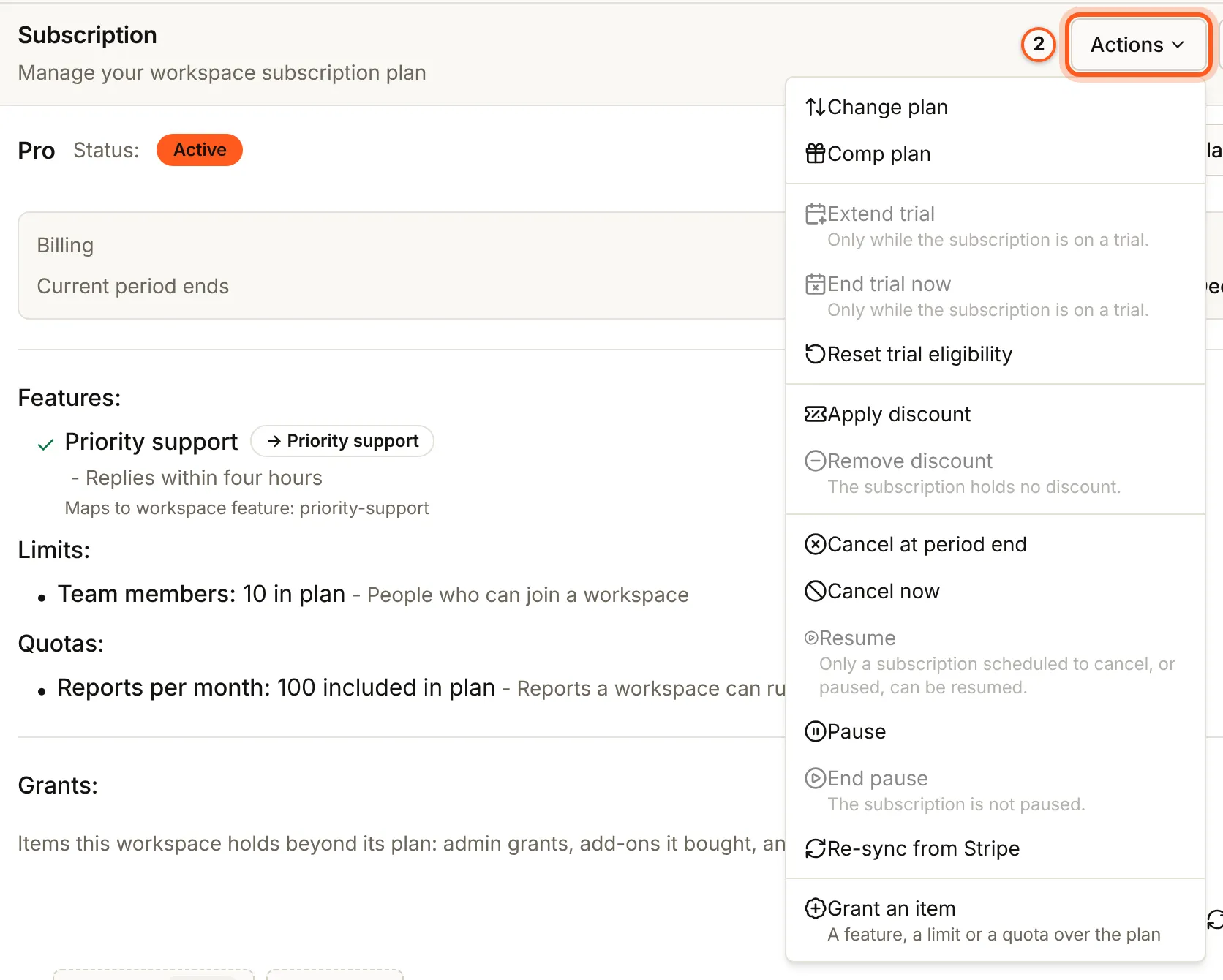
3. Change plan
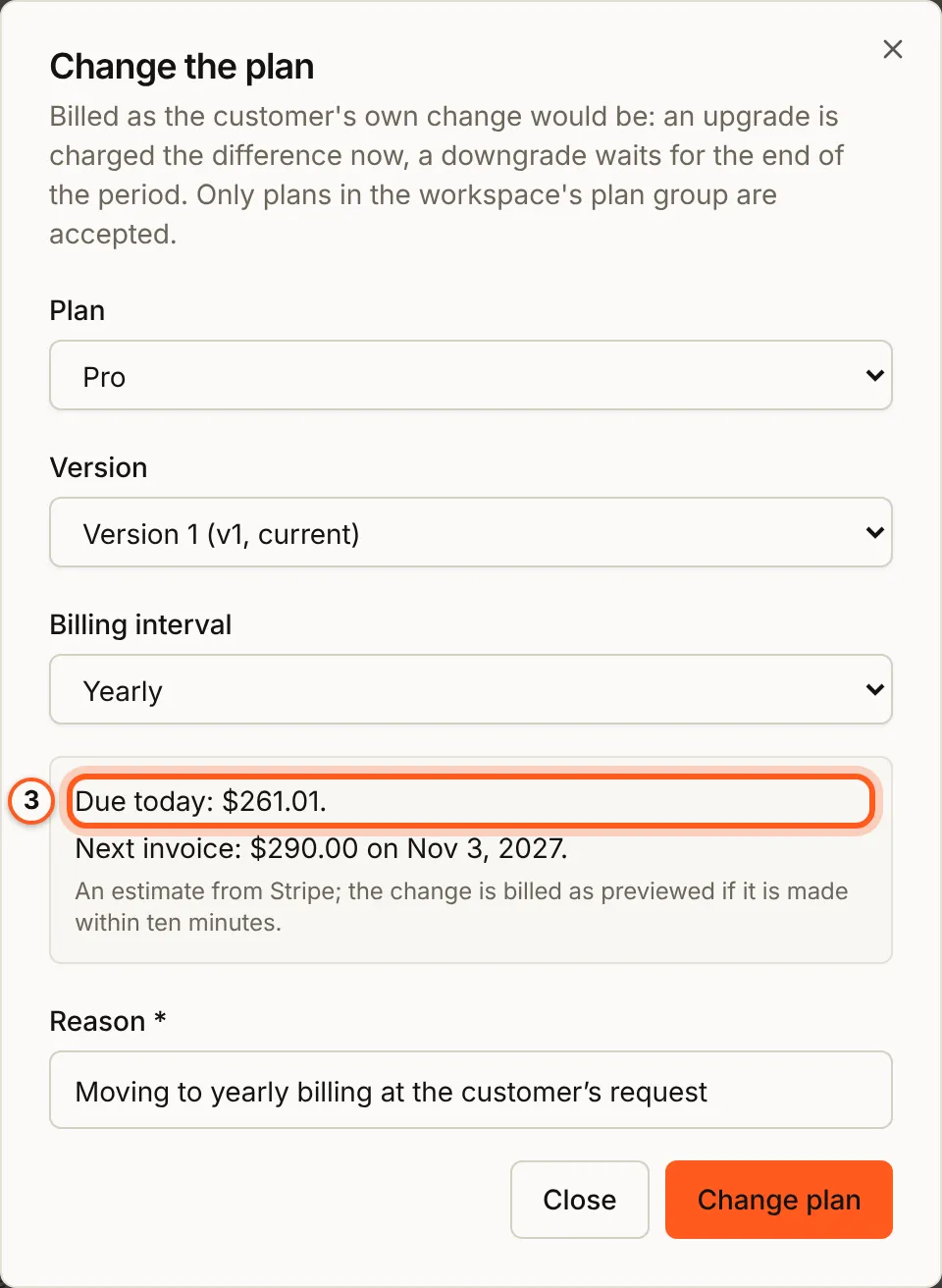
Choose the Plan, its Version and the Billing interval, and press Preview the change: Stripe works out what is due today and the next invoice. Give a Reason and press Change plan. Only plans in the workspace's pricing group are accepted.
4. Comp plan
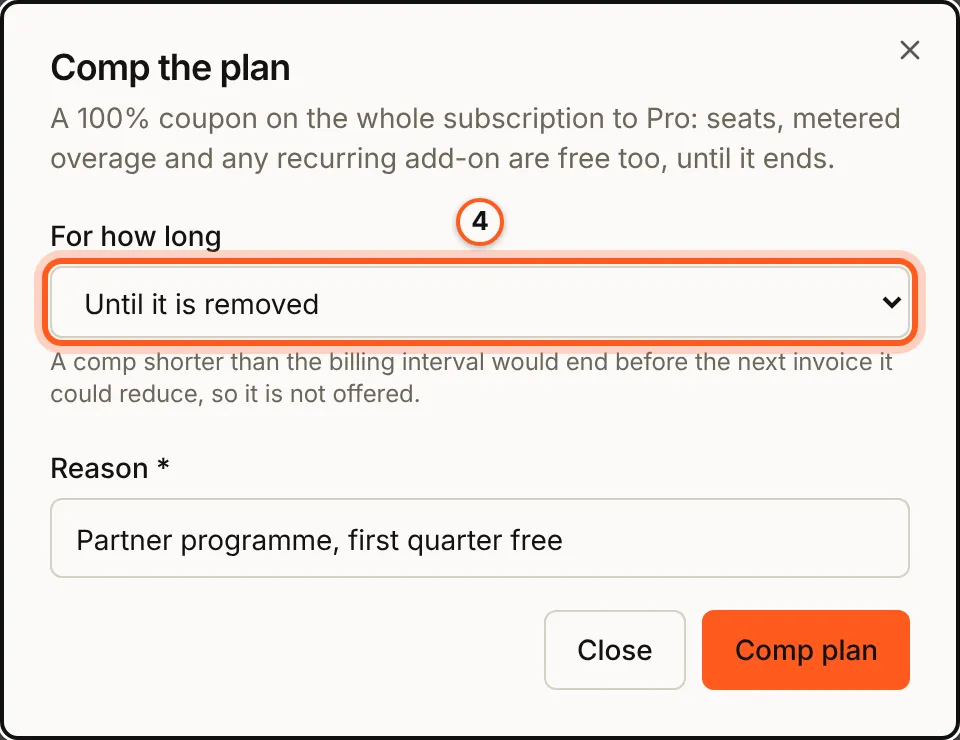
For how long is Until it is removed or a number of months; a comp shorter than the billing interval is not offered. Give a Reason and press Comp plan.
5. Apply discount
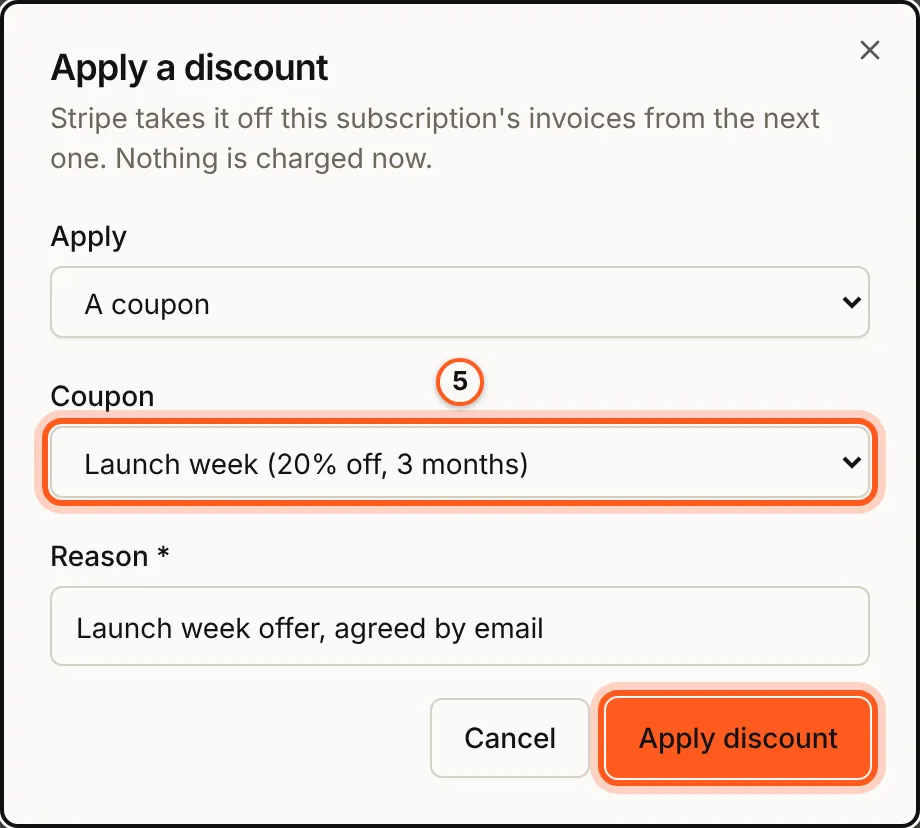
Under Apply choose A coupon or A promotion code, then the Coupon or the code. When the subscription already holds a discount, Replace them swaps them for the new one; off, the new one sits beside them. Give a Reason and press Apply discount. Stripe takes it off from the next invoice; nothing is charged now.
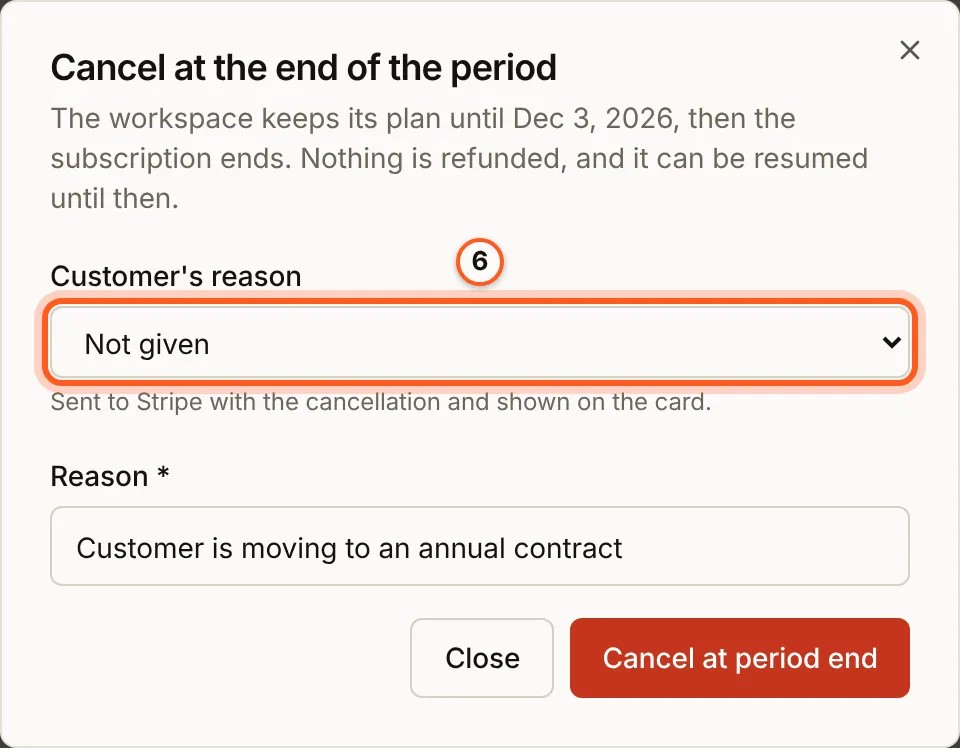
6. Cancel at period end
The workspace keeps its plan until the paid period ends; nothing is refunded, and Resume undoes it until then. Pick the Customer's reason (sent to Stripe), give your Reason and press Cancel at period end.
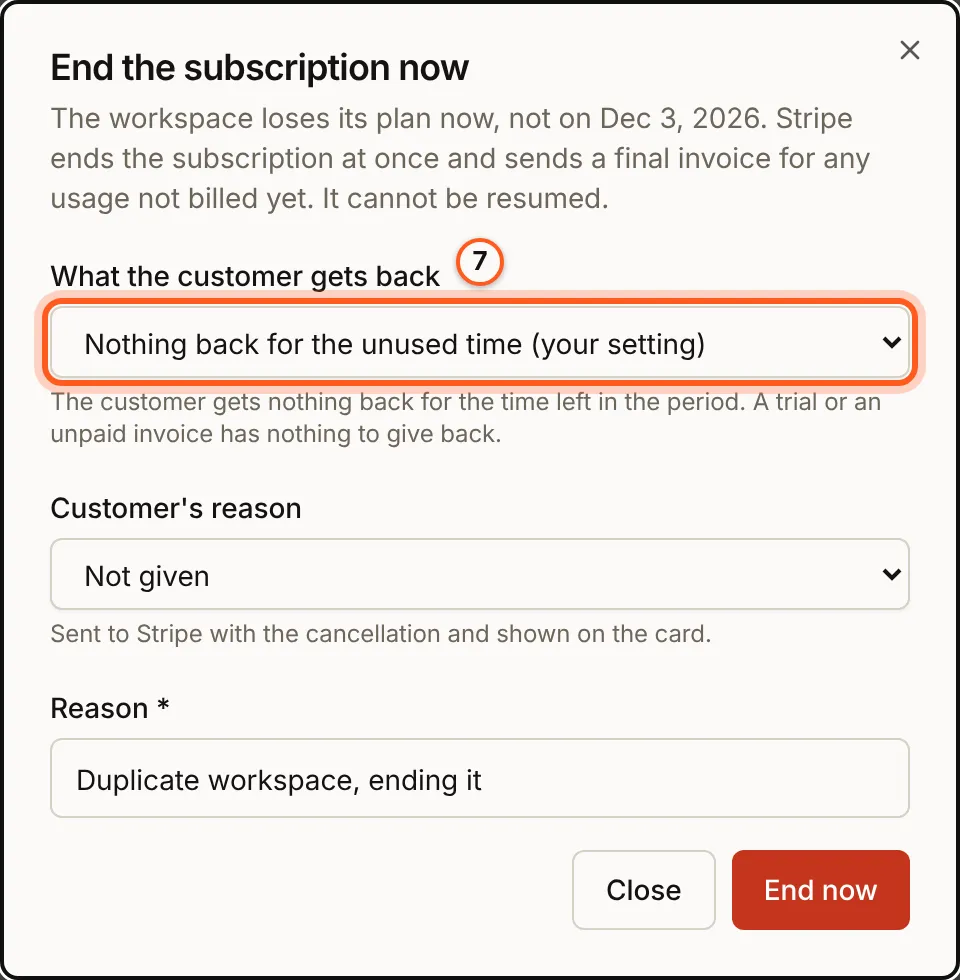
7. Cancel now
What the customer gets back starts on your setting under Settings > General, card Cancellation. Stripe ends the subscription at once and sends a final invoice for usage not billed yet; it cannot be resumed. Press End now.
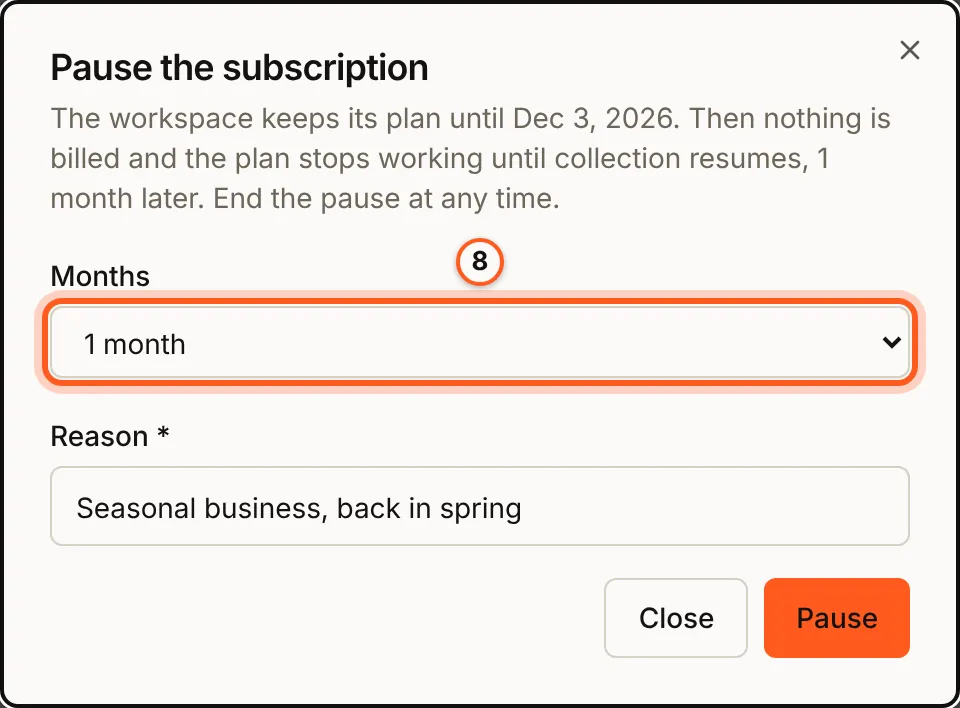
8. Pause
Choose how many Months. The pause starts when the paid period ends; nothing is billed and the plan stops working until it ends. End pause ends it early.
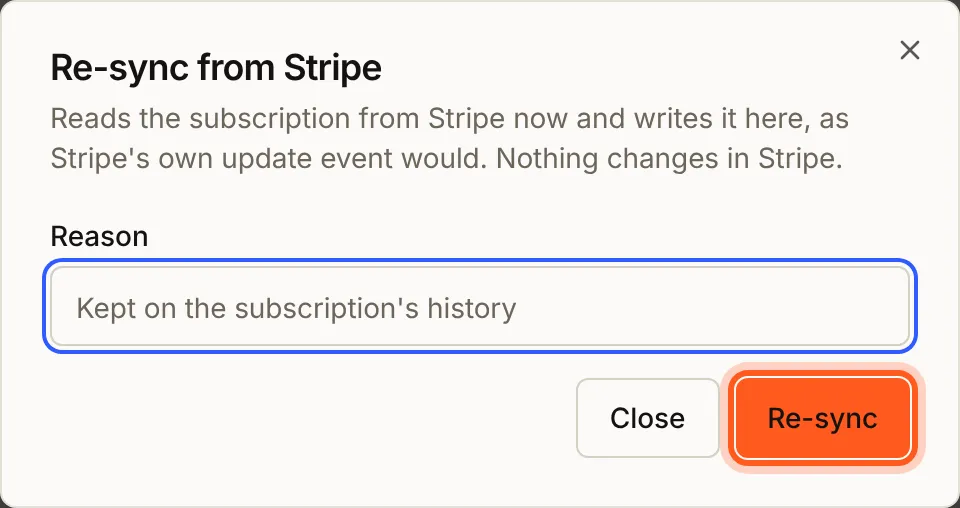
9. Re-sync from Stripe
When the console and Stripe disagree, Re-sync from Stripe reads the subscription from Stripe and writes it here, as Stripe's own update event would. Nothing changes in Stripe, and the reason is optional.
10. Grant an item
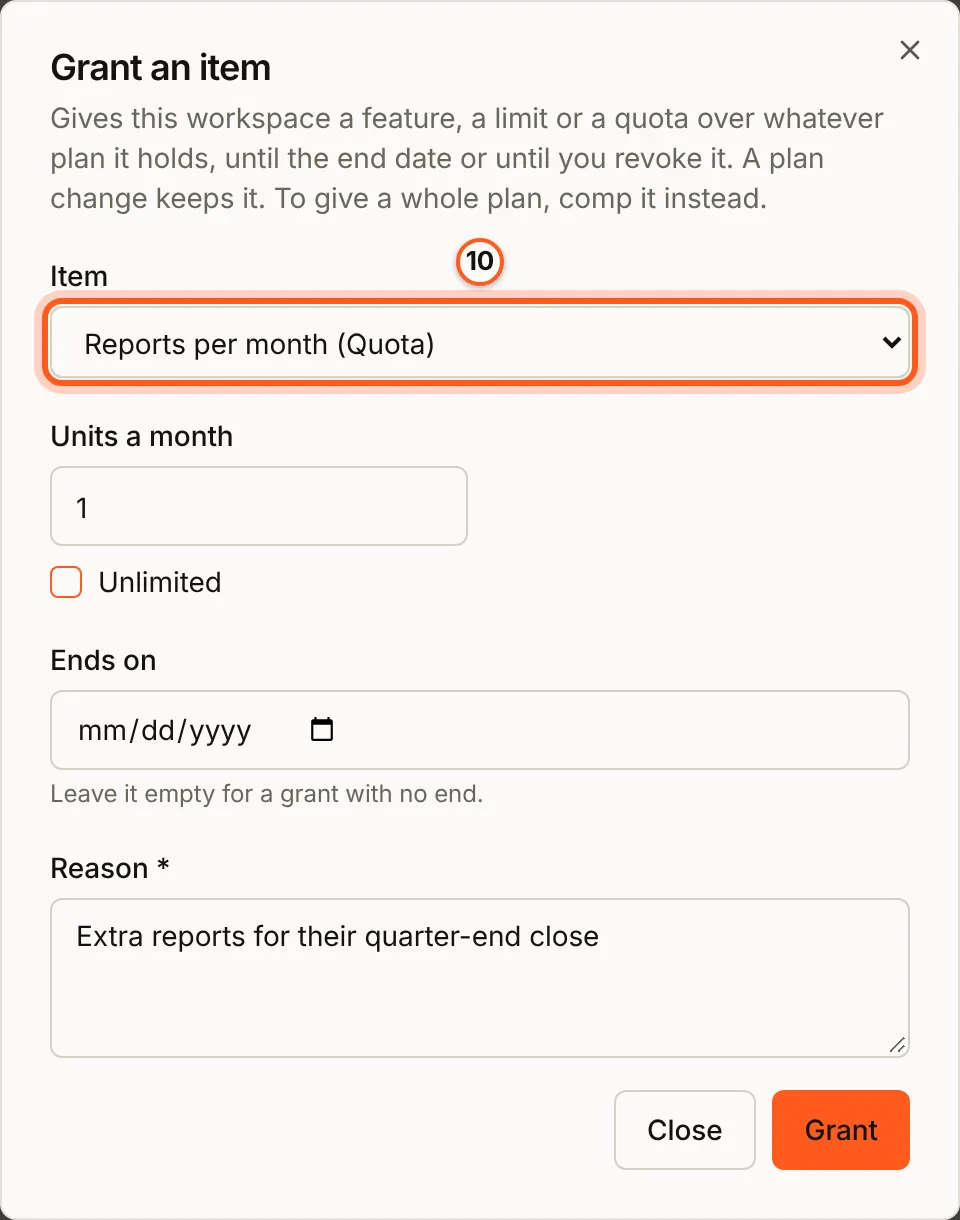
Choose the Item, how much (here Units a month for a quota, or Unlimited), an optional Ends on date and a Reason, and press Grant. A plan change keeps the grant; to give a whole plan, comp it instead.
11. Send a checkout link
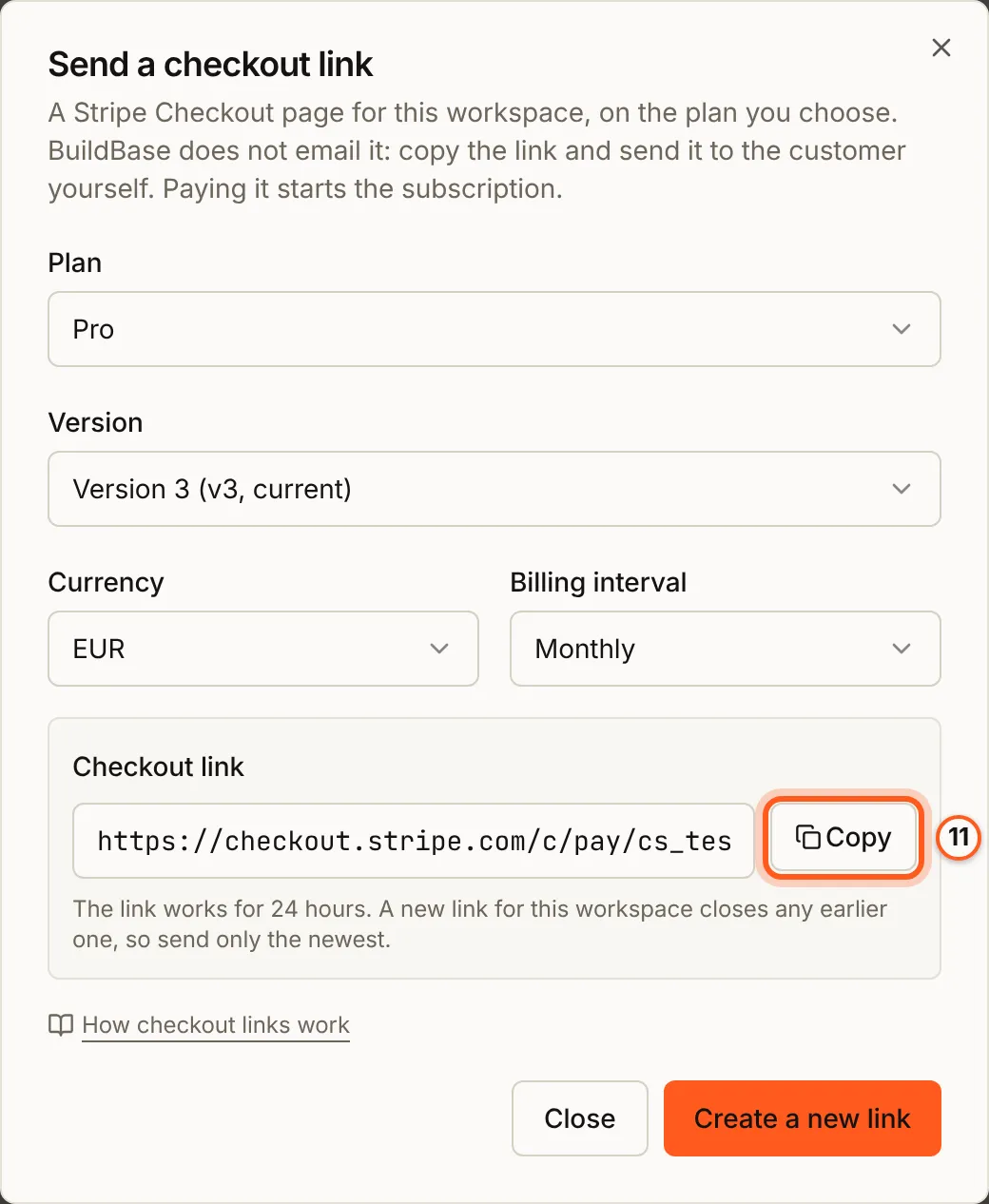
For a workspace with no Stripe subscription, Checkout link makes a Stripe Checkout page for the plan you choose. Choose the Plan, its Version, the Currency when the version has more than one, and the Billing interval, and press Create link. Copy the link with Copy and send it to the customer yourself: BuildBase does not email it. When they pay, the subscription starts as if they had subscribed from your app.
- Only plans sold to workspaces are offered. A person checks out only as themselves, from their own billing page, so a person's record has no Checkout link.
- A plan you archived is refused with "This plan is no longer offered. Choose another plan." Unarchive it first. A version in no pricing group, such as one written for a single deal, still gets a link.
- The link works for 24 hours. A new link for the workspace closes any earlier one, so send only the newest.
- After paying, the customer returns to your app: the page set under Settings > General, card After checkout, else your app's own address. When you have neither, the dialog says the customer lands on a default page.
The same link is POST /api/organizations/payment/stripe/checkout/create-session with workspaceId, planVersionId, and optionally billingInterval, currency, successUrl and cancelUrl.
Check that it worked
Each action adds a row to the workspace's Subscription history, with what changed, who did it, from where, and the reason.
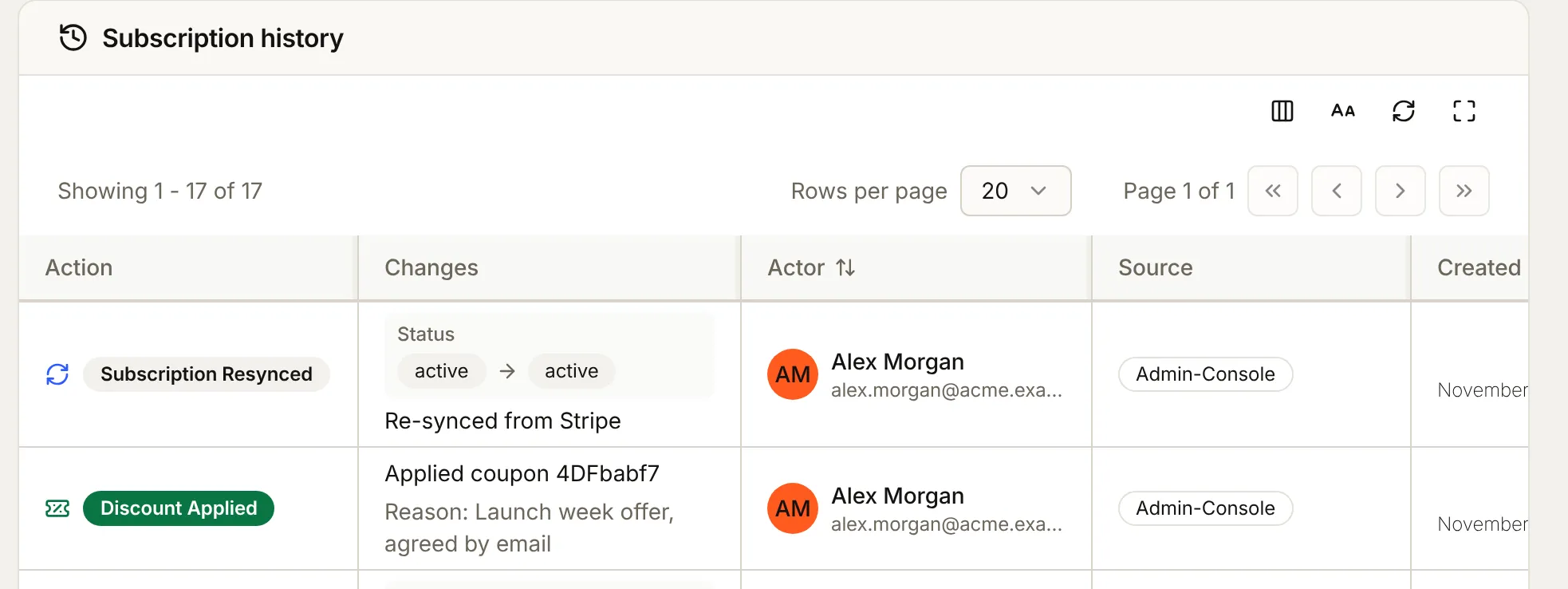
A person's own plan has the same Actions on the Billing tab of their user record.
The actions
Each menu item does one thing to the subscription. The route is the same action over the API.
| Menu item | Route | What it does |
|---|---|---|
| Change plan | change-plan | Moves the subscription to another plan version exactly as the customer's own change would: an upgrade is charged now, a downgrade waits for the end of the period |
| Comp plan | comp | Gives the plan for free: a 100% coupon on a real Stripe subscription, forever or for 1 to 36 months |
| Extend trial | trial/extend | Moves the trial's end later, at most 365 days out. Nothing is invoiced |
| End trial now | trial/end | Ends the trial. With a card on file, the plan is billed and goes active. Without one, it ends as the plan's trial settings say |
| Reset trial eligibility | trial/reset-eligibility | Lets the customer trial again. The person is the workspace's owner unless userId names someone else |
| Apply discount | discount/apply | Adds a coupon (couponId) or a promotion code (promotionCode). It sits beside the subscription's other discounts, or replaces them with replace |
| Remove discount | discount/remove | Removes one discount. discountId names it when there are several |
| Cancel at period end | cancel | Cancels when the paid period ends. Nothing is refunded |
| Cancel now | cancel-now | Ends the subscription at once, and it cannot be resumed. Stripe sends a final invoice for usage not billed yet. refund is none, prorated_credit or prorated_refund; left out, your choice under Settings > General, card Cancellation applies, and the menu starts on it. See Ending a subscription now |
| Resume | resume | Undoes a cancellation before the period ends |
| Pause | pause | Pauses a monthly subscription for months, starting when the paid period ends. Works even if you don't let customers pause |
| End pause | unpause | Ends a pause now |
| Re-sync from Stripe | resync | Reads the subscription from Stripe and updates BuildBase to match, using the same handler a Stripe webhook runs. Nothing is written to Stripe |
| Checkout link | /api/organizations/payment/stripe/checkout/create-session | Makes a Stripe Checkout link for a workspace with no Stripe subscription, for you to send. Paying it starts the subscription. A person can't be sent one (SELF_CHECKOUT_ONLY) |
| Grant an item | /api/subscriptions/grants | Gives a feature, a limit or more quota on top of the plan. See Operator grants |
Every route under /api/subscriptions/actions/ takes:
workspaceId, orsubject: { "type": "user", "id": "..." }for a person's own plan- a
reasonof up to 500 characters, required on all but Resume, End pause and Re-sync
You can't comp a person who has no plan yet (SELF_CHECKOUT_ONLY). A person's own plan only starts with a checkout they do themselves, so comp a plan they already hold.
Before you change a plan
Check the cost first. change-plan/preview shows what a change would charge before anything moves. It's the same preview the customer sees: what's due today, the next invoice, and for a downgrade, the date it takes effect. Send its prorationDate back on change-plan, and the change is charged exactly as the preview showed.
To move a subscriber onto a newer version of the same plan, change their plan to it here. A coupon limited to that plan keeps applying after the move.
Comps
A comp gives a customer a paid plan for free. It's always a real Stripe subscription with a 100% coupon, never a paid plan with nothing in Stripe behind it.
- On a workspace that already pays, the comp coupon replaces every discount it had, and the history names the ones it replaced.
- On a workspace with no plan, or on Free, it creates the subscription with the coupon and no card. Stripe makes it active, with a paid invoice of zero.
Until it ends, a comp covers the whole subscription: seats, metered overage (usage billed past the plan's allowance) and recurring add-ons included. A comp shorter than the plan's billing interval, such as six months on a yearly plan, would end before the next invoice it could cover, so it's refused with COMP_SHORTER_THAN_INTERVAL.
What the guard refuses
The rules about a subscription's state apply to your team just as they do to the customer, and there's no way around them. Two refusals come up most:
- Two changes at once. A subscription takes one change at a time. A change that waits more than a few seconds for another to finish is refused with
409 SUBSCRIPTION_BUSY. - A change still waiting on its payment. Say an upgrade is waiting for the customer to confirm the payment with their bank (3-D Secure). Until it's paid, a plan change, a trial extend or end, a discount and a comp are all refused with
409 SUBSCRIPTION_PENDING_UPDATE. Otherwise Stripe would throw the waiting change away and void its invoice. Cancel and resume still go ahead.
See Error codes.
The history
Every action writes one row to the subscription's history: the action, whether it came from the console or the API, the person or token that took it, and the reason. The workspace's subscription card shows it, and GET /api/subscriptions/logs/workspace/:workspaceId reads it.
What you do sends the same notices as the customer's own change would:
- an extended trial sends
subscription.trial_extended, by email, push, webhook and Slack - a discount applied or removed sends
subscription.discount_appliedorsubscription.discount_removedto your webhooks
There are 239 events in the catalog.
The other billing screens
The console's billing area has more for support and finance:
- Revenue - monthly recurring revenue (MRR), customers by status, churn, trial conversion and cash, from your own data. See Revenue and billing health.
- Grants - what each workspace and person holds beyond its plan, with revoke and refund. See Add-ons.
- Coupons - coupons and promotion codes. See Promotion codes.
- Credit ledger - every credit purchase, spend, grant, expiry and refund, with the balance after it. See Credits.
- Payment webhooks - each Stripe event your account sent, with its customer and amount. Check Stripe setup under Billing > Credentials finds the events your endpoint misses. See Failed payments.
Next steps
- Failed payments - Chasing a failed payment (dunning), the card-expiring notice and Stripe's recovery switches.
- Add-ons - Refunds and grants.
- Billing overview - What the customer sees on their side.