
Credits and usage overview
Add consumption-based billing with credit packages, balance tracking, and usage limits.
BuildBase provides a credit system for consumption-based billing. Use CreditStorePage to sell credit packages, useCreditBalance to show the balance, and useConsumeCredits to deduct credits when users perform actions.
import { useConsumeCredits, useCreditBalance } from '@buildbase/sdk/react';

function AIGenerator({ workspaceId }) {
  const { balance } = useCreditBalance(workspaceId);
  const { consumeCredits } = useConsumeCredits(workspaceId);

  const handleGenerate = async () => {
    try {
      await consumeCredits({ amount: 10, description: 'AI generation' });
    } catch (err) {
      if (err.code === 'INSUFFICIENT_CREDITS') {
        alert(`Need 10 credits, only ${err.available} available`);
      }
    }
  };

  return (
    <div>
      <p>{balance?.available} credits remaining</p>
      <button onClick={handleGenerate}>Generate (10 credits)</button>
    </div>
  );
}
Before you start
Create a credit package in the console first: Billing > Credit packages, then New credit package. The Billing section lists it once Stripe is connected (Billing), and a package is priced in your billing currencies, so set those first under Settings > General, card Billing currencies. Credit packages are a feature of your BuildBase plan, which also sets how many you may keep.
openCreditStore()
Opens the credit purchase UI from anywhere in your app - ideal for "Buy Credits" buttons or insufficient-credits error handlers:
import { useSaaSAuth } from '@buildbase/sdk/react';

function BuyCreditsButton() {
  const { openCreditStore } = useSaaSAuth();
  return <button onClick={() => openCreditStore()}>Buy Credits</button>;
}
CreditStorePage
For a dedicated credits page, use the headless CreditStorePage component. It fetches credit packages and handles purchase logic; you render the UI through the required children render prop:
import { CreditStorePage } from '@buildbase/sdk/react';

function BuyCredits() {
  return (
    <CreditStorePage>
      {({ loading, error, packages, selectPackage }) => {
        if (loading) return <p>Loading packages...</p>;
        if (error) return <p>{error}</p>;

        return (
          <div className="grid grid-cols-3 gap-4">
            {packages.map((pkg) => (
              <button key={pkg._id} onClick={() => selectPackage(pkg._id)}>
                Buy {pkg.creditAmount} credits - {pkg.name}
              </button>
            ))}
          </div>
        );
      }}
    </CreditStorePage>
  );
}
selectPackage(packageId) opens the workspace settings Credits tab for authenticated users, or triggers sign-in first (set redirectBaseUrl on CreditStorePage for the unauthenticated flow). The render prop also receives refetch() and an optional notes string from the API.
Conditional components
Show different UI based on the credit balance:
import {
  WhenCreditsAvailable,
  WhenCreditsExhausted,
  WhenCreditsLow,
} from '@buildbase/sdk/react';

function CreditGate({ children }) {
  return (
    <>
      <WhenCreditsExhausted>
        <p>
          No credits. <a href="/credits">Buy more</a>
        </p>
      </WhenCreditsExhausted>

      <WhenCreditsLow threshold={10}>
        <p>Running low on credits.</p>
      </WhenCreditsLow>

      <WhenCreditsAvailable min={1}>{children}</WhenCreditsAvailable>
    </>
  );
}| Component | Renders when |
|---|---|
WhenCreditsAvailable | Balance at or above min (default 1) |
WhenCreditsExhausted | Balance is 0 |
WhenCreditsLow | Balance at or below threshold |
Hooks
Each hook takes a subject: a workspace id for that workspace's wallet, or { user: true } for the signed-in person's own (see A person's own wallet).
| Hook | What it returns |
|---|---|
useCreditBalance(subject) | balance (available, held, totalGranted, totalConsumed, totalExpired, totalRefunded, autoTopUp), loading, error, refetch |
useConsumeCredits(subject) | consumeCredits({ amount, description, idempotencyKey }) |
useReserveCredits(subject) | reserve, settle(holdId, { amount }), release(holdId) |
useCreditAutoTopUp(subject) | settings, update, resume, acceptVersion, addPaymentMethod, loading, saving, accepting, error, acceptError, refetch |
useExpiringCredits(subject, days) | Credits expiring within N days |
usePurchaseCredits(subject) | Start Stripe Checkout for credit packages |
useCreditTransactions(subject) | Transaction history |
held is what open holds keep out of available, and autoTopUp is the automatic top-up's switch, threshold and any pause; an older server sends neither.
useReserveCredits and useCreditAutoTopUp need @buildbase/sdk 1.0.0 or later; the other hooks here work on 0.0.90 too.
A person's own wallet
Besides each workspace's wallet, every signed-in person has one of their own, apart from any workspace. Pass { user: true } where a hook takes a workspace id, and subject={{ user: true }} to CreditStorePage:
import { useCreditBalance } from '@buildbase/sdk/react';

function MyCredits() {
  const { balance } = useCreditBalance({ user: true });
  return <span>{balance?.available ?? 0} credits</span>;
}
The settings dialog shows it as Credits in the account group, beside the person's own Billing (the account-credits screen), where your app sells plans to people and has a credit package on sale. A plan sold to a person grants no credits yet, so they buy packages into it; see Users and workspaces. Server-side, bb.me.credits.* is the same set of calls without the workspace id. All of it needs @buildbase/sdk 1.0.0 or later.
Server-side
Consume credits from your backend for operations you control server-side:
import BuildBase from '@buildbase/sdk';

const bb = BuildBase({ serverUrl, orgId, getSessionId });

try {
  await bb.credits.consume(workspaceId, {
    amount: 50,
    description: 'Batch export',
    // A string, or left out: a null key is refused with 400.
    idempotencyKey: req.headers.get('x-request-id') ?? undefined,
  });
} catch (err) {
  if (err.code === 'INSUFFICIENT_CREDITS') {
    return Response.json({ error: 'Not enough credits' }, { status: 402 });
  }
}
Reserve, then settle
An AI call or an agent run does not know what it will cost until it ends. Consuming after the fact means either reserving in your own code or letting the balance run short halfway through a job. A hold takes the estimate out of the balance up front and closes at the real cost.
Note
useReserveCredits and the server's bb.credits.withHold: Requires @buildbase/sdk 1.0.0 or later.
import { useReserveCredits } from '@buildbase/sdk/react';

const { reserve, settle, release } = useReserveCredits(workspaceId);

const hold = await reserve({ amount: 40, idempotencyKey: `agent-${jobId}` });
try {
  const used = await runAgent(jobId);
  await settle(hold.holdId, { amount: used });
} catch (err) {
  await release(hold.holdId);
  throw err;
}- Reserve takes the estimate out of
availablenow, as a consume would, and answers 402INSUFFICIENT_CREDITSwhen it is not there. The sameidempotencyKeyagain answers the hold the first reserve opened. - Settle closes the hold at what the work cost. Less than held: the rest comes back to the balance. More: the extra is taken too, or 402 when it is not there, with the hold left open. Zero: a release. Settling the same hold for the same amount again answers the first settle.
- Release gives the hold back whole: the work was not done.
- Expiry. A hold that is not settled is released when its
ttlSecondsrun out: 900 by default, 60 to 86400. A settle after that answers 409HOLD_NOT_OPENwithstatus: 'expired', and the credits are already back. - The balance read and the credit gates are already net of open holds.
balance.heldsays how much is held, and the credits screen shows it.
Held credits come back to the bucket they were taken from. A bucket that expired, or was refunded, while its credits were held does not take them back: that part expires instead, because a hold does not extend the life of the credits it holds.
On your backend, withHold does the reserve, the settle and the release around your work, and charges a hold that expired mid-work with a plain consume, so work done is still charged:
const { result, settlement } = await bb.credits.withHold(
  workspaceId,
  { amount: 40, ttlSeconds: 600, idempotencyKey: `agent-${jobId}` },
  async () => {
    const run = await runAgent(jobId);
    return { cost: run.creditsUsed, ...run };
  }
);
Pass onExpired: 'throw' to get the 409 instead of the consume. Each hold fires credit.reserved and then credit.settled or credit.released to your webhooks and workflows, and a settle also fires credit.consumed with what was spent, so anything built on consumes sees held work too.
The hold and bucket routes
The hooks and WorkspaceApi (settleCreditHold, releaseCreditHold, getCreditHolds, getCreditBuckets) call these. Each workspace route has a twin for a person's own wallet under /api/v1/public/me/credits/..., with the same body and answer.
| Method | Workspace path | Permission | Body or query |
|---|---|---|---|
POST | /api/v1/public/workspaces/{workspaceId}/credits/reserve | Record usage | amount (at least 1), ttlSeconds, description, idempotencyKey, metadata |
POST | /api/v1/public/workspaces/{workspaceId}/credits/holds/{holdId}/settle | Record usage | amount (0 or more), description, metadata |
POST | /api/v1/public/workspaces/{workspaceId}/credits/holds/{holdId}/release | Record usage | None |
GET | /api/v1/public/workspaces/{workspaceId}/credits/holds | View billing | status, page, limit |
GET | /api/v1/public/workspaces/{workspaceId}/credits/buckets | View billing | status, source, page, limit |
A member without the permission is refused 403. In an app that requires a plan, a reserve for a workspace with none is refused 402 PLAN_REQUIRED. description is 1 to 500 characters and metadata an object of at most 10 keys.
Reserve answers the hold and the balance after it:
{
  "holdId": "6650f...",
  "amount": 40,
  "status": "held",
  "expiresAt": "2026-11-08T10:15:00.000Z",
  "available": 160,
  "held": 40
}
with replayed: true when the same idempotencyKey answered an earlier reserve.
Settle answers holdId, reserved, settled, returned (back in available), expired (would have come back, but its bucket expired meanwhile), extra (taken beyond the hold) and balanceAfter.
Release answers holdId, amount, status, reason, returned, expired and balanceAfter.
Both carry replayed: true when they answer an earlier settle or release of the same hold. The refusals of all three:
| Status | code | When |
|---|---|---|
402 | INSUFFICIENT_CREDITS | Not enough available for the reserve, or for a settle above the hold. Carries available and requested |
404 | HOLD_NOT_FOUND | The wallet has no hold with that id |
409 | HOLD_NOT_OPEN | The hold is already settled, released or expired. Carries its status |
The lists are pages, newest first: { docs, totalDocs, limit, page, totalPages, hasNextPage, hasPrevPage }, 20 a page by default and at most 100.
- A hold in
docshas_id,amount,status(held,settling,settled,releasedorexpired),expiresAt,allocations(the buckets it took from, each{ bucket, amount }), and once closedsettledAmount,returnedAmount,expiredAmount,extraAmount,releaseReason(released,expired,admin,desyncorsubject_deleted),settledAtorreleasedAt, besidedescription,metadata,idempotencyKey,createdAtandupdatedAt. Filter withstatus, one of those five. - A bucket is one lot of credits:
_id,source(plan_grant,credit_pack_purchase,admin_grantorrefund),status(pending,active,expiredorconsumed),creditAmount(what it started with),remaining,expiresAt,activatedAt,creditPackage,grantedBy,metadata,createdAtandupdatedAt. Filter withstatusandsource.
curl "https://api.console.buildbase.app/api/v1/public/workspaces/$WORKSPACE_ID/credits/buckets?status=active&limit=50" \
  -H "x-session-id: $SESSION_ID"
Auto top-up
Note
useCreditAutoTopUp: Requires @buildbase/sdk 1.0.0 or later.
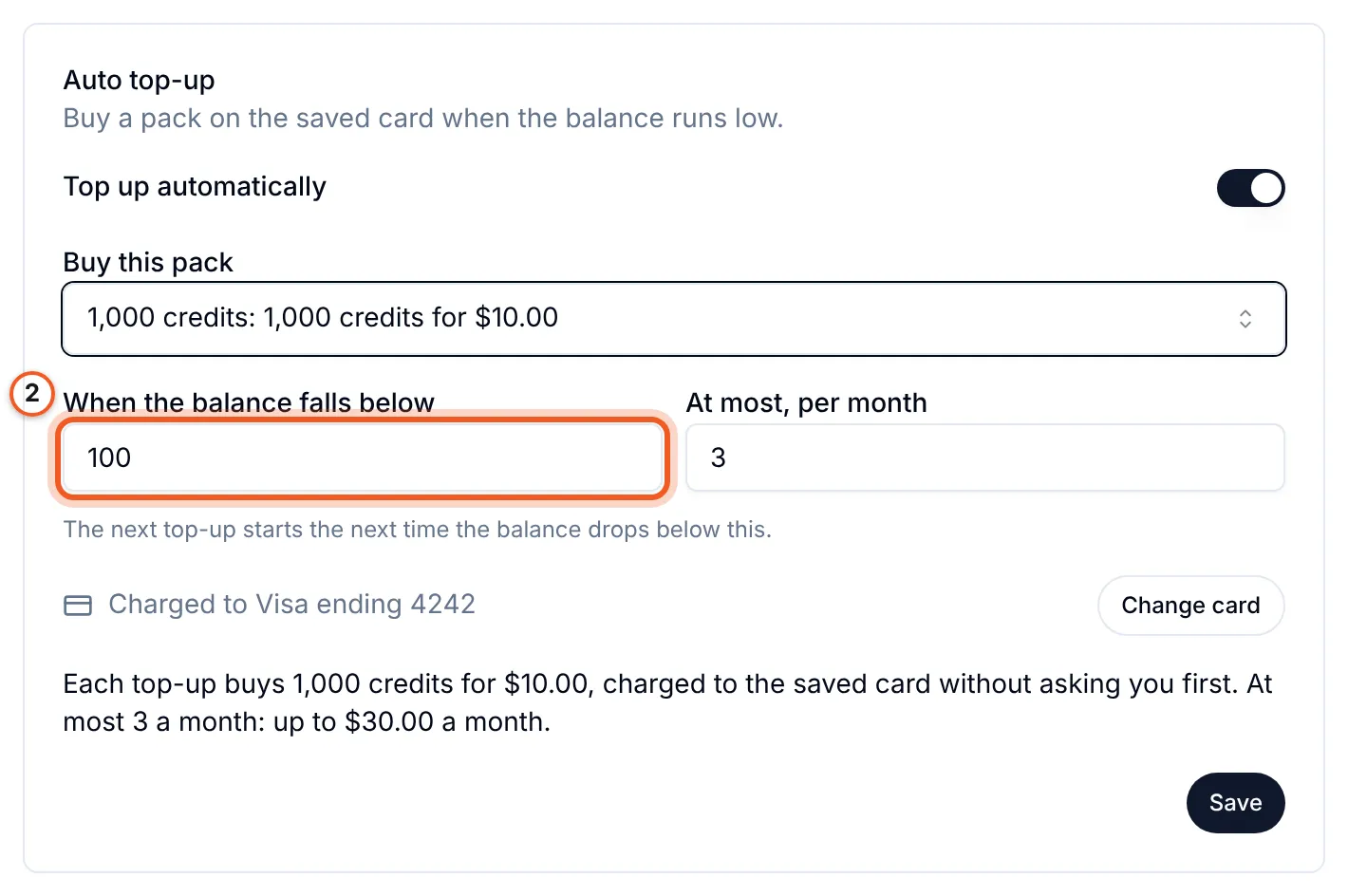
A workspace can buy its next pack before it runs out. Set a threshold, a pack and a cap on top-ups per month, and when a spend takes the balance under the threshold, the pack is bought on the saved card and its credits land a moment later.
import { useCreditAutoTopUp } from '@buildbase/sdk/react';

const { settings, update, resume, addPaymentMethod } =
  useCreditAutoTopUp(workspaceId);

await update({
  enabled: true,
  threshold: 100,
  creditPackageId: pack._id,
  monthlyCap: 3,
});- One top-up per crossing. Any write that lowers the balance can start one: a consume, a reserve, a settle for more than was held, an expiry. The first to see the crossing takes it, and its id keys the charge, so a retry never charges twice. A balance back over the threshold by the time the charge runs buys nothing.
- The card. The one saved for top-ups (
addPaymentMethodopens Stripe's page that saves a card without charging it), else the customer's default, else the card the subscription is charged on, else any card on the customer. A pack bought by hand saves its card for the next top-up too. - Declines back off an hour, six hours and a day, and pause on the fourth in a row (
payment_failed). A new card, a pack bought by hand orresume()clears the count. - 3-D Secure. A card that asks for it cannot be charged unattended, so the owner is sent a checkout for the same pack (
payment.action_requiredwithkind: 'credit_top_up'); no other top-up runs until it is paid or a day passes. - Pauses name a
pausedReason:monthly_cap(lifts on the 1st, or when the cap is raised),dunning(while a subscription payment is in its final stages, see Failed payments; lifts when it is paid),no_payment_method,currency_unavailable,package_unavailable,tax_requires_checkout,payment_failedandterms_changed(the pack's credits, price or validity changed since the payer agreed to them; nothing is charged, and choosing the pack again, or another, agrees to its terms and lifts it). - Tax. A saved-card charge does not compute tax yet, so an organization that collects tax gets 409
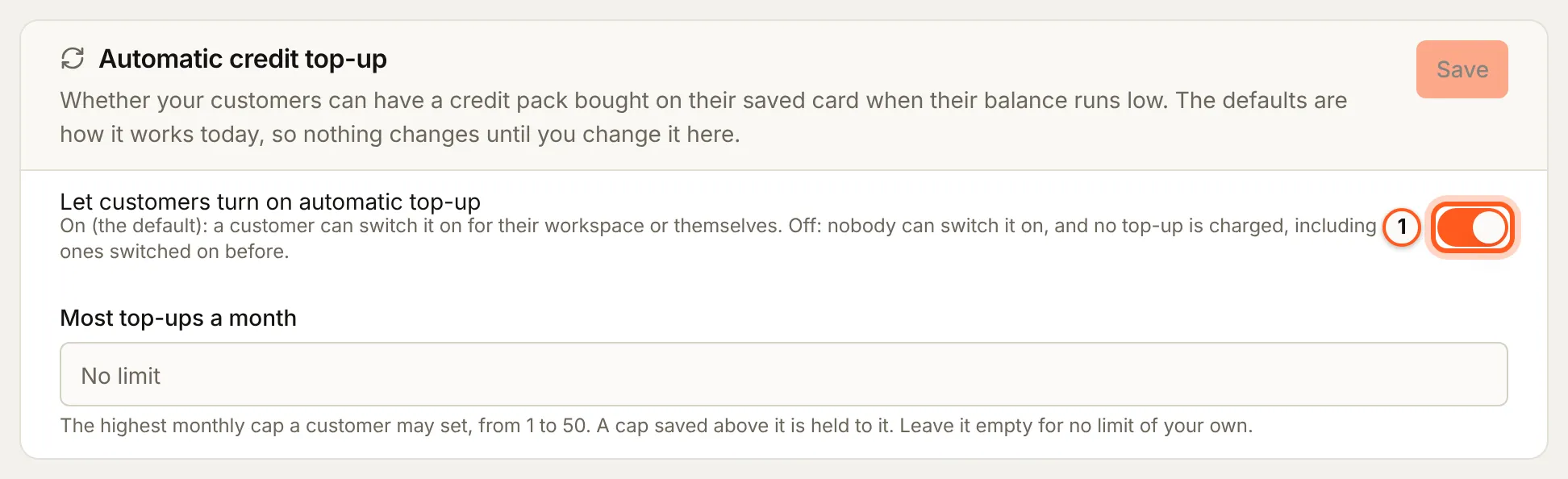
TAX_REQUIRES_HOSTED_CHECKOUTon switching it on; its workspaces buy packs through checkout. - Your setting. Under Settings > General, card Automatic credit top-up, you choose whether customers may switch it on at all (on by default) and the most top-ups a month their cap may allow (no limit of your own by default). Off: switching on is refused with 403
AUTO_TOP_UP_OFF, and no top-up is charged, including ones switched on before. A cap above your limit is refused with 400MONTHLY_CAP_ABOVE_LIMIT, and a cap saved before you set the limit is held to it.
Step by step
Open organization settings in the console
(opens the console in a new tab)-
Your setting. Under Settings > General, card Automatic credit top-up, leave Let customers turn on automatic top-up on, set Most top-ups a month if you want a limit of your own, and press Save.
-
The customer switches it on. In your app's Credits screen, the Auto top-up card: Top up automatically, Buy this pack, When the balance falls below and At most, per month, then Save. The card says what each top-up charges and to which card.
-
What you see. On the workspace's page in the console, the Auto top-up card shows its threshold, pack, cap and state, with Turn off, or Resume for a paused one.

A spend that takes the balance under the threshold then adds a Purchased row to Billing > Credit ledger with the pack's credits.
Switching on with no card saves the setting paused until one is added. Refusals carry a code: AUTO_TOP_UP_INCOMPLETE (no threshold or pack), CREDIT_PACKAGE_NOT_FOUND and PACKAGE_CURRENCY_UNAVAILABLE (400). Your webhooks and workflows get credit.threshold_crossed when a top-up starts, credit.top_up_failed when one does not charge, and credit.purchased with autoTopUp: true when it lands; the owner is emailed on the first decline and on any pause. The credits screen in the settings dialog shows the same as a card, behind ui.settings.credits.autoTopUp.
Refunds and disputes
When money for a credit pack goes back to the buyer, the pack's credits go with it. What was already spent stays spent: only credits still in the pack are taken.
- A refund (
charge.refunded) takes back the same share of the pack as the share of the charge refunded, rounded up. A second partial refund takes only the difference, so nothing is taken twice. - A dispute opened (
charge.dispute.created) takes back the whole pack's remaining credits, less what refunds of the same charge took already, since Stripe withdraws the disputed amount at once. - A dispute closed in your favour (
charge.dispute.closedwith the money kept: won, an inquiry closed, or prevented) gives back what the dispute took, once, as new credits that expire when the pack's would have. A pack that has expired since gets nothing back. A lost dispute keeps them taken.
Your Stripe webhook endpoint must send charge.refunded, charge.dispute.created and charge.dispute.closed for this to happen; Check Stripe setup under Billing > Credentials says whether it does.
Next Steps
- Quotas - Enforce usage limits per plan.
- Spend caps - Let a customer cap the overage a quota may bill.
- Feature Flags - Gate features by plan or user.