
Let your users connect VS Code to your app
Give your users a one-click VS Code install for your app's MCP server, with the mcp.json entry beside it, and make sure VS Code can register and sign in.
This page is part of Agent-ready apps: it covers what you do so that your own users can connect VS Code, in GitHub Copilot's agent mode, to the app you built with BuildBase. Your app serves MCP with @buildbase/sdk, and each user signs in on your hosted sign-in page and approves VS Code as themselves.
Note
Want to manage BuildBase itself from your AI? See Use BuildBase in VS Code, in BuildBase in your AI tools.
The examples use https://app.example.com/api/mcp, the default path createAgentStack serves, and the name acme.
Before you share the URL
-
Let agents register themselves. VS Code registers its own client the first time it connects. Turn on Let agents register themselves with a base client in Set up agent access.
-
Serve MCP on HTTPS. VS Code connects from the user's machine, so a staging server on a company network works for people on that network; your public users need a public URL.
-
Check it the way a client does:
npx buildbase agent doctor --url https://app.example.com/api/mcp
Give your users one click
VS Code documents an install link: vscode:mcp/install? and the server's entry, name included, as URL-encoded JSON.
vscode:mcp/install?%7B%22name%22%3A%22acme%22%2C%22type%22%3A%22http%22%2C%22url%22%3A%22https%3A%2F%2Fapp.example.com%2Fapi%2Fmcp%22%7DOn a web page, wrap it in https://vscode.dev/redirect?url= and the link URL-encoded once more, so a browser that does not follow vscode: still gets there. buildMcpInstallLinks() and npx buildbase agent install --url <mcp-url> build both for your URL.
Put the manual entry next to the button, for users who edit files themselves. In .vscode/mcp.json (VS Code's format uses servers and "type": "http"):
{
  "servers": {
    "acme": { "type": "http", "url": "https://app.example.com/api/mcp" }
  }
}
From a terminal:
code --add-mcp '{"name":"acme","type":"http","url":"https://app.example.com/api/mcp"}'What your users see
- A trust prompt the first time a server from outside the workspace starts, and none for a server in a trusted workspace's
.vscode/mcp.json. - Your sign-in page, in their browser, then your consent screen naming VS Code and the scopes it asks for.
- Approvals before every tool your server does not mark
readOnlyHint: true. The SDK's built-in tools are read only by default.
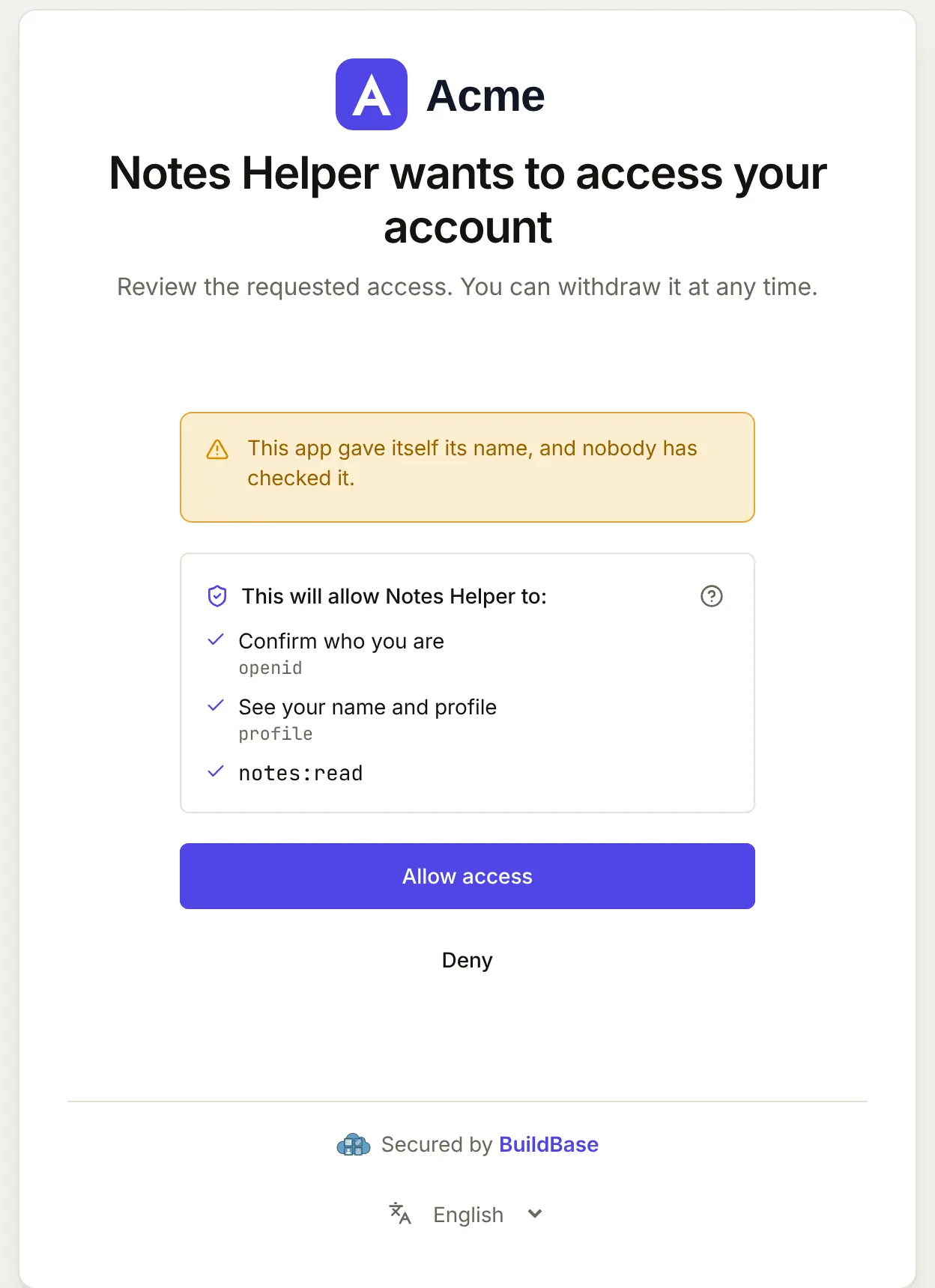
When VS Code connects, your user approves it on your consent screen. Here it is for an agent that registered itself:
What differs in VS Code
- Managed policies. On Copilot Business and Enterprise, the organization's MCP servers in Copilot policy must be on, and it is off by default. A company can also allowlist MCP servers centrally, and local settings cannot override that. Tell enterprise users to ask their administrator for both.
- Two file formats.
.vscode/mcp.jsonusesservers; the portable.mcp.jsonand~/.copilot/mcp-config.jsonusemcpServers. Snippets copied into the wrong one are ignored. - Fixed client id. If you would rather not allow self-registration, a user can add
"oauth": { "clientId": "<id>" }to the entry, and VS Code asks for the secret with the Set Client Secret CodeLens.
If something goes wrong
| What your user sees | Why | What to do |
|---|---|---|
| Sign-in never opens, or fails at once | Let agents register themselves is off, or no base client | Turn it on with a base client in agent access |
| The server does not start | A restricted workspace, or a managed allowlist without your URL | Trust the workspace, or have their administrator allow your URL |
| The entry is ignored | mcpServers in .vscode/mcp.json, or no "type": "http" | Use the snippet for that file |
| An error in a tool call | Your server answered an error | MCP: List Servers > the server > Show Output shows what your server sent |
Related
- Connect an agent to your app: every client on one page, the MCP Registry, and agents in code.
- Let your users connect Cursor to your app and Let your users connect Cline to your app.
- Use BuildBase in VS Code: the same client in BuildBase in your AI tools.
- VS Code's own reference: MCP configuration.
Frequently asked questions
- Can I put an install button for VS Code on my own docs?
- Yes. VS Code documents a vscode:mcp/install link with the server entry as URL-encoded JSON, and a vscode.dev redirect that wraps it for a web page. buildMcpInstallLinks() in the SDK renders it for your URL.
- Does VS Code need my app to allow self-registration?
- Yes, unless you give your users a client id. VS Code registers its own client the first time it connects, so turn on Let agents register themselves with a base client.
- Which of my tools will VS Code ask about?
- Every tool not marked readOnlyHint. Mark your reads read only and your changes as they are, so users approve what matters and nothing else.