
Let your users connect ChatGPT to your app
Get your app's MCP server ready for ChatGPT custom MCP servers, choose how ChatGPT registers, and give your users the steps to add it and sign in.
This page is part of Agent-ready apps: it covers what you do so that your own users can connect ChatGPT to the app you built with BuildBase. Your app serves MCP with @buildbase/sdk, and each user signs in on your hosted sign-in page and approves ChatGPT as themselves.
Note
Want to manage BuildBase itself from your AI? See Use BuildBase in ChatGPT, in BuildBase in your AI tools.
The examples use https://app.example.com/api/mcp, the default path createAgentStack serves, and the name Acme.
Before you share the URL
-
Serve MCP on public HTTPS. ChatGPT connects from OpenAI's servers, on the web, so a server on
localhost, a private network or behind a VPN is out of its reach. ChatGPT expects Streamable HTTP, whichcreateAgentStackserves. -
Choose how ChatGPT gets a client in Set up agent access. ChatGPT runs OAuth 2.1 with PKCE and tries, in order, a client metadata document, then registering itself, then a client you created:
- Let agents register themselves, with a base client, is enough on its own.
- Let agents identify themselves by a metadata document lets ChatGPT use its first choice.
-
Add search and fetch if you want deep research. ChatGPT's deep research and company knowledge call two read-only tools named
searchandfetch:defineSearchFetchToolsin MCP and agents gives your app both. -
Check it the way ChatGPT does:
npx buildbase agent doctor --url https://app.example.com/api/mcp
What your users do
Put these steps on your own help page, with your URL:
- On chatgpt.com, open Plugins, choose the + button, then Add custom MCP server.
- Enter
Acme, a short description, and under Connectionhttps://app.example.com/api/mcp. - Choose OAuth for authentication, review the warning, then create it.
- Sign in on your sign-in page and approve ChatGPT on your consent screen.
Full custom MCP servers are for ChatGPT Business, Enterprise and Edu, on the web; on Business only admins and owners add one, and on a workspace an admin may need to allow them first. Pro connects with read and fetch permissions only, according to OpenAI's help center.
What your users see
- Your sign-in page, with your branding and the sign-in methods you turned on.
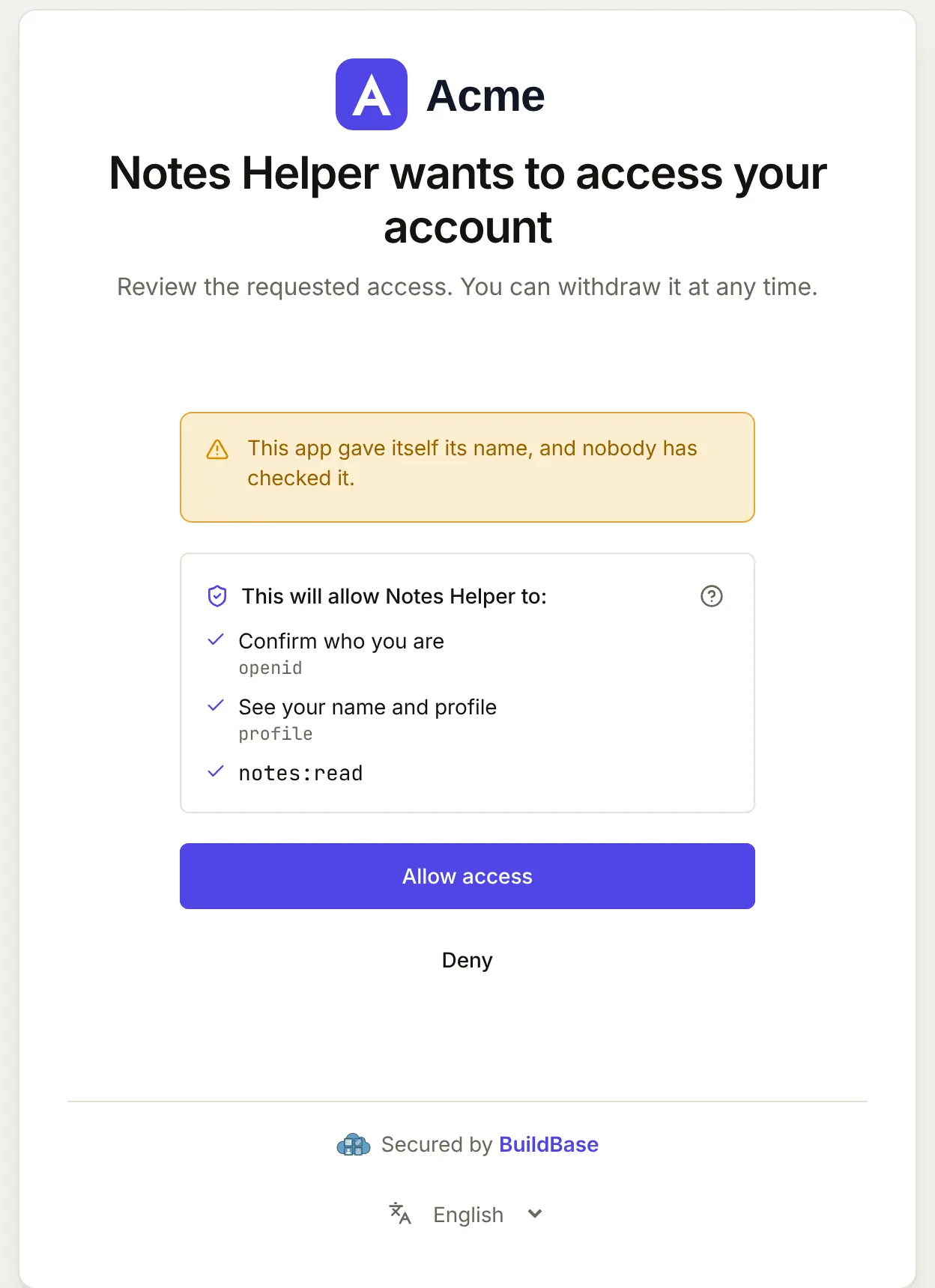
- Your consent screen. It names ChatGPT and the scopes it asks for. A self-registered agent chooses its own name, so it is shown as unverified.
- Tool calls. Mark read tools
readOnlyHint: trueand changesdestructiveHintas they are; a user on a read-only plan can still use the tools that only read.
When ChatGPT connects, your user approves it on your consent screen. Here it is for an agent that registered itself:
What differs in ChatGPT
- No install link. Your page gives the URL and the steps above.
- Refreshing tools. ChatGPT keeps the tool list from when it connected. After you change your tools, users choose Refresh on the plugin and start a new conversation.
- Listing is separate. A custom MCP server needs no review.
npx buildbase agent listing --url <mcp-url>writes OpenAI's submission checklist from your running server if you want to apply for a listing.
If something goes wrong
| What your user sees | Why | What to do |
|---|---|---|
| It cannot connect | The endpoint is not public HTTPS | Serve it on public HTTPS; check it with the doctor or MCP Inspector |
| Sign-in fails before your page opens | No way for ChatGPT to get a client | Turn on self-registration (or metadata documents) in agent access |
| New tools do not appear | ChatGPT kept the old list | Refresh the plugin, then a new conversation |
| Deep research does not use your app | No search and fetch tools | Add them with defineSearchFetchTools |
| ChatGPT sees fewer tools than you defined | Tools that need a scope the token lacks are hidden | Ask for the scope at sign-in, or drop requiredScopes from the tool |
Related
- Connect an agent to your app: every client on one page, the MCP Registry, and agents in code.
- Let your users connect Claude to your app and Let your users connect Codex to your app.
- Use BuildBase in ChatGPT: the same client in BuildBase in your AI tools.
- OpenAI's own guides: connect from ChatGPT and authentication.
Frequently asked questions
- Which redirect URL does ChatGPT use?
- https://chatgpt.com/connector_platform_oauth_redirect when your authorization server supports RFC 9207 issuer identification, otherwise https://chatgpt.com/connector/oauth/ followed by a callback id. A self-registered client brings its own redirect URL, so you add nothing by hand.
- Do I need search and fetch tools?
- Only for ChatGPT's deep research and company knowledge, which call two read-only tools named search and fetch. defineSearchFetchTools in the SDK gives your app both.
- Which ChatGPT plans can connect to my app?
- According to OpenAI's help center, full custom MCP servers are for Business, Enterprise and Edu, on the web; Pro connects with read and fetch permissions only.