
Let your users connect Claude Code to your app
Give your users the one Claude Code command that adds your app's MCP server, the shared .mcp.json for a team, and what to check before you publish it.
This page is part of Agent-ready apps: it covers what you do so that your own users can connect Claude Code to the app you built with BuildBase. Your app serves MCP with @buildbase/sdk, and each user signs in on your hosted sign-in page and approves Claude Code as themselves.
Note
Want to manage BuildBase itself from your AI? See Use BuildBase in Claude Code, in BuildBase in your AI tools.
The examples use https://app.example.com/api/mcp, the default path createAgentStack serves, and the name acme.
Before you share the URL
-
Let Claude Code get a client. It registers its own client the first time it connects: turn on Let agents register themselves, with a base client, in Set up agent access.
-
Check it the way a client does:
npx buildbase agent doctor --url https://app.example.com/api/mcp
What your users do
Put this on your own help page, with your URL:
claude mcp add --transport http acme https://app.example.com/api/mcpThen run /mcp inside Claude Code, choose acme, and sign in in the browser it opens. claude mcp login acme does the same from the shell.
For a team, a .mcp.json at the repository root (what --scope project writes):
{
  "mcpServers": {
    "acme": { "type": "http", "url": "https://app.example.com/api/mcp" }
  }
}
What your users see
- Your sign-in page in their browser, with your branding and sign-in methods.
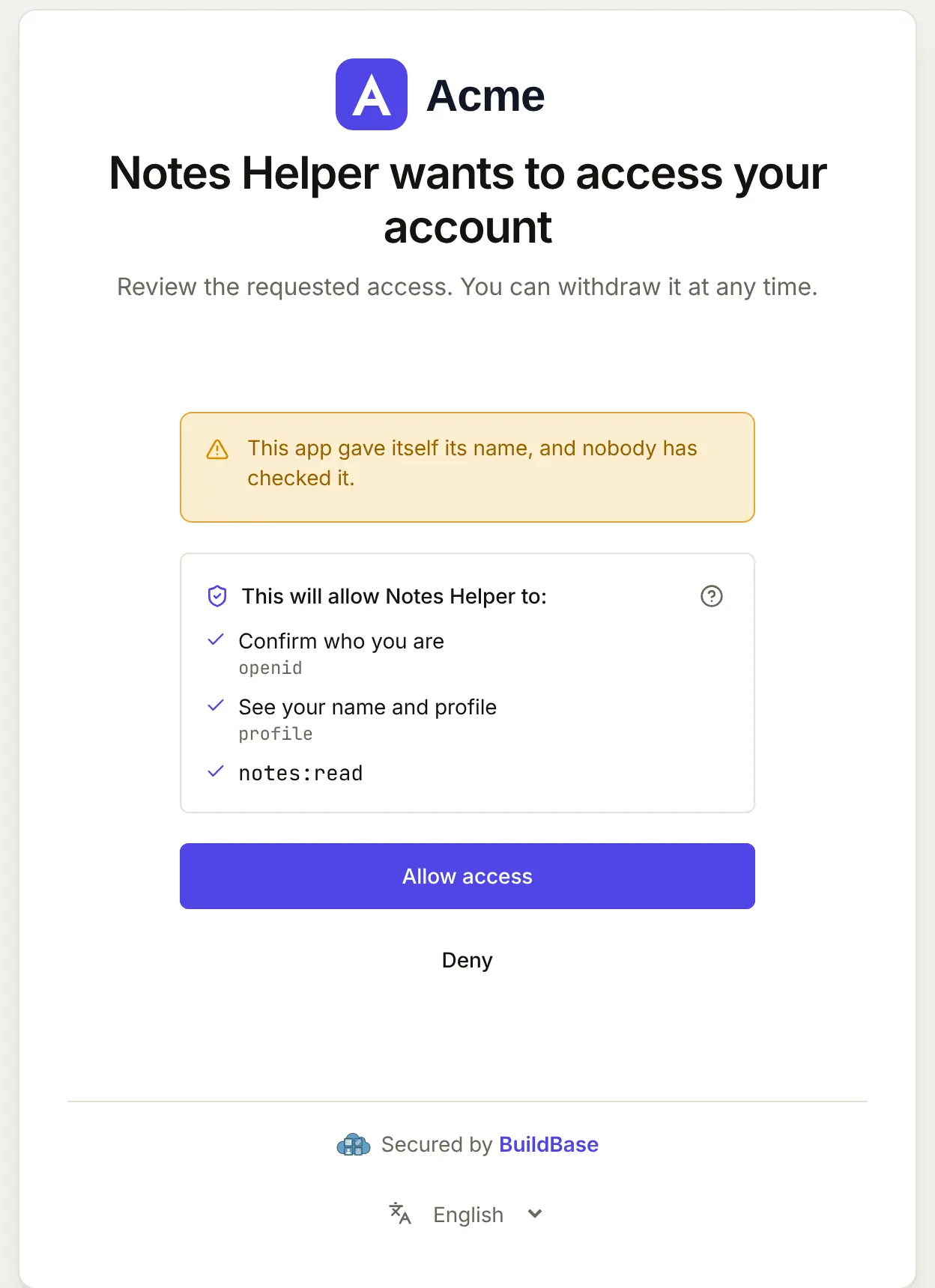
- Your consent screen, naming the client and the scopes it asks for. A self-registered agent chooses its own name, so it is shown as unverified.
- Tool permissions. Claude Code asks before each tool call unless the user allowed it. Mark read tools
readOnlyHint: trueand changesdestructiveHintas they are.
When Claude Code connects, your user approves it on your consent screen. Here it is for an agent that registered itself:
What differs in Claude Code
- It runs locally. No public HTTPS needed for your own tests: point it at
http://localhost:3000/api/mcpwhile you develop. - Large answers are cut. Claude Code warns above 10,000 tokens of tool output and caps it at 25,000 by default (
MAX_MCP_OUTPUT_TOKENS). Page long lists rather than returning them whole. - Headers for scripts. A user's script or CI job can send a token with
--header "Authorization: Bearer ..."; for a person, OAuth is the way, so never ask a user to paste a token.
If something goes wrong
| What your user sees | Why | What to do |
|---|---|---|
claude mcp list shows Needs authentication | They have not signed in yet | /mcp, then choose acme |
The server fails to start from .mcp.json | The entry has no "type": "http" | Add "type": "http" beside the url |
| Sign-in fails before your page opens | Self-registration is off, or no base client | Turn it on with a base client in agent access |
| Answers are cut off | A tool returned more than the output cap | Return pages, not whole lists |
| Claude Code sees fewer tools than you defined | Tools that need a scope the token lacks are hidden | Ask for the scope at sign-in, or drop requiredScopes from the tool |
Related
- Connect an agent to your app: every client on one page, the MCP Registry, and agents in code.
- Let your users connect Codex to your app and Let your users connect Cursor to your app.
- Use BuildBase in Claude Code: the same client in BuildBase in your AI tools.
- Anthropic's own guide: MCP in Claude Code.
Frequently asked questions
- Does my server need to be public for Claude Code?
- No. Claude Code runs on the user's own computer, so it reaches any address that computer can, including localhost while you develop. Your users need the public URL, of course.
- How does a user sign in?
- They run /mcp in Claude Code and choose your server, or claude mcp login with its name. Their browser opens your hosted sign-in page and your consent screen.
- Can I ship the server in my own repository for my team?
- Yes. A .mcp.json at the repository root, with "type" set to "http", adds it for everyone who opens the project; each person signs in as themselves.