
Make your app agent ready
Serve the discovery files, sign-in and tools AI agents look for from one SDK config, and check your app the way agent readiness scanners do.
This page is part of Agent-ready apps: making the app you build with BuildBase ready for your own users' AI agents. An agent-ready app lets an AI agent find out what it does, sign a person in and call its tools, with nobody pasting a key. With @buildbase/sdk most of it is one config: createAgentStack serves your MCP server, the sign-in metadata and the discovery files from your own domain.
Note
Want to manage BuildBase itself from your AI? That is the other track, BuildBase in your AI tools: connect Claude, ChatGPT, Cursor or another AI tool to BuildBase's own MCP server, at BuildBase in your AI tools.
// lib/agent.ts
import { createAgentStack } from '@buildbase/sdk/mcp';

export const agent = createAgentStack({
  serverUrl: process.env.NEXT_PUBLIC_BUILDBASE_SERVER_URL!,
  orgId: process.env.NEXT_PUBLIC_BUILDBASE_ORG_ID!,
  siteUrl: 'https://app.example.com',
  site: {
    name: 'Acme',
    description: 'Render on-brand images from templates.',
    documentationUrl: 'https://docs.example.com',
  },
  secret: process.env.SYSTEM_SECRET!,
  mcp: {
    representativeQueries: ['render my Open Graph image', 'list my templates'],
  },
  discovery: {
    robots: { contentSignals: { search: true, aiInput: true, aiTrain: false } },
    llmsTxt: '# Acme\n\n> Render on-brand images from templates.\n',
    security: { contact: 'mailto:[email protected]' },
    sitemap: { urls: ['/', '/pricing', '/templates'] },
  },
});
Before you start
An MCP server set up as in MCP and agents, and
Agent readiness turned on in the console (Set up agent
access). Parts of this page need the next
release of the SDK: mcp.representativeQueries, poppy.json, the A2A 1.0
card, discovery ETags, WebMCP through document.modelContext and Web Bot Auth
signing.
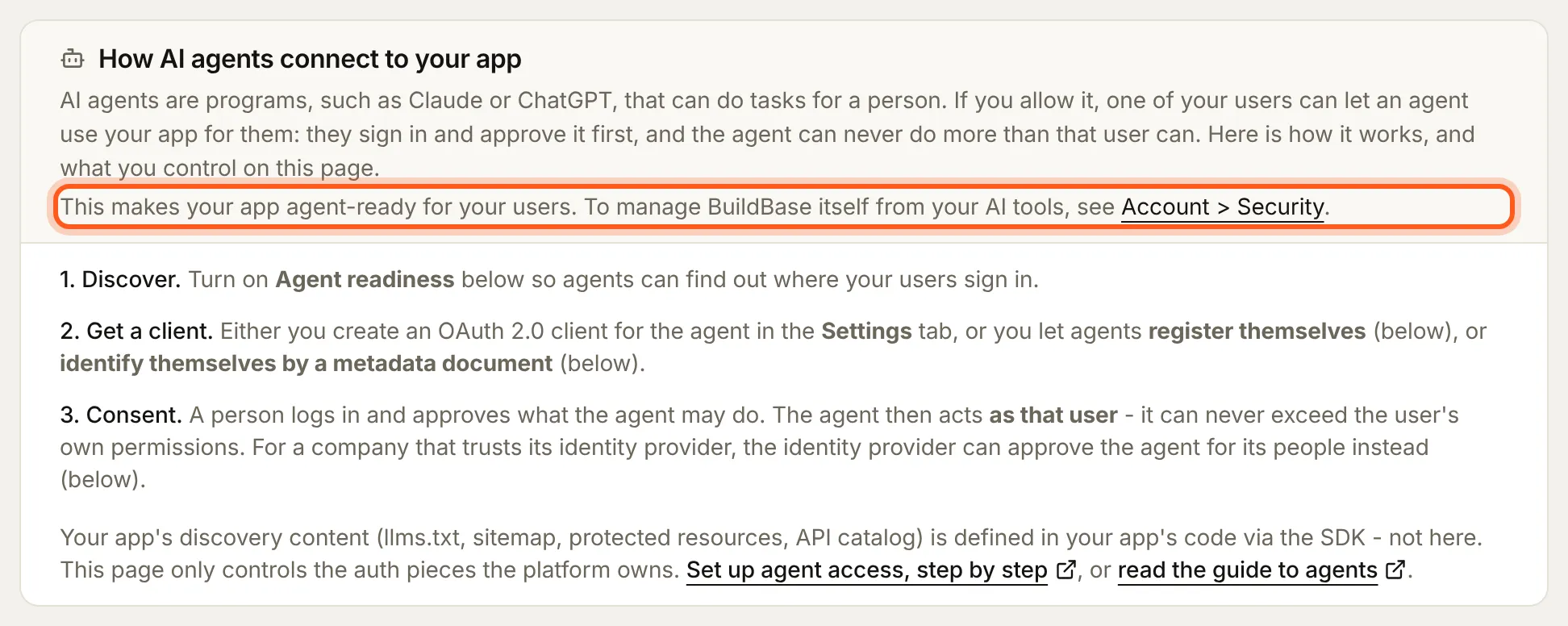
Agent readiness is under User management > Access > Authentication. It is for your app's users, and it says so: to connect your own AI tool to BuildBase instead, its note points you to Security, in your avatar menu.
What agents look for
Scanners such as isitagentready.com read your site as an agent does. Each check, and what answers it:
| Check | What serves it | Where you set it |
|---|---|---|
| robots.txt, AI bot rules, Content Signals | robots.txt | discovery.robots: aiBots (allowed by default) and contentSignals |
| Sitemap | sitemap.xml | discovery.sitemap.urls, or keep your own generator |
| Link header | Link on your pages | Middleware, step 2 |
| llms.txt | llms.txt | discovery.llmsTxt |
| Markdown for agents | Accept: text/markdown answered with Markdown | Step 3 |
| MCP server card, AI catalog (ARD) | <mcp-path>/server-card, /.well-known/ai-catalog.json | Derived from mcp and site |
| OAuth discovery, protected resource | RFC 8414 and RFC 9728 metadata | Derived; BuildBase runs the authorization server |
| auth.md | /auth.md, and agent_auth on the authorization server | Generated; turn on registration by email, step 4 |
| Agent skills, API catalog | /.well-known/agent-skills/, /.well-known/api-catalog | discovery.skills; the API catalog lists your MCP server, and discovery.apiCatalog replaces that list |
| A2A agent card | /.well-known/agent-card.json | Served by default; discovery.a2aCard |
| Personal Agent Protocol | /.well-known/poppy.json | Served by default; discovery.personalAgent |
| WebMCP | Tools your page registers | Step 5 |
| Web Bot Auth, DNS-AID | Your own bot's keys; DNS records | Optional, steps 6 and 7 |
1. Serve the files
One route answers every discovery file. In the Next.js App Router:
// app/.well-known/[...path]/route.ts
import { agent } from '@/lib/agent';

export const GET = agent.serveAgentPath;
export const OPTIONS = agent.serveAgentPath;
Put the same two lines in app/robots.txt/route.ts, app/llms.txt/route.ts, app/auth.md/route.ts, app/sitemap.xml/route.ts and app/security.txt/route.ts. Each answer carries CORS, a cache lifetime and an ETag, so an agent polling a file gets 304 when nothing changed. Outside Next.js, agent.resolvePath(path) returns the document or null; send its contentType, cacheControl, vary and every entry of headers.
2. Advertise them on every page
Agents read a Link header before anything else. buildDiscoveryLinkHeader is pure, so it runs in edge middleware:
// middleware.ts
import { NextResponse } from 'next/server';
import { buildDiscoveryLinkHeader } from '@buildbase/sdk';

const LINK = buildDiscoveryLinkHeader({
  serverUrl: process.env.NEXT_PUBLIC_BUILDBASE_SERVER_URL!,
  orgId: process.env.NEXT_PUBLIC_BUILDBASE_ORG_ID!,
  siteUrl: 'https://app.example.com',
  site: { name: 'Acme' },
});

export function middleware() {
  const res = NextResponse.next();
  res.headers.set('Link', LINK);
  return res;
}
Where a route can import the stack, agent.linkHeader is the same value with the API catalog, the MCP server card and the AI catalog added.
3. Answer agents in Markdown
An agent asking for your home page with Accept: text/markdown should get Markdown, at a fraction of the tokens. A server-rendered page picks the variant with negotiateMarkdown(accept, { html, markdown }), which sets Vary: Accept; wantsMarkdown(accept) answers the question alone, for a rewrite to a Markdown route of your own. A static export cannot negotiate: on Cloudflare, turn on Markdown for Agents for the zone.
4. Let agents register by a person's email
An agent that knows only someone's email address can ask for access in their name. In the console, open User management > Access > Authentication > Agent readiness, turn on Let agents register with a person's email and pick one of your clients of the Agent type with Device code on.
The agent posts the address to the registration endpoint and shows the person a code. They sign in on your sign-in page as that address, type the code and approve; the agent then gets a token through your application token URL, as for any agent. Only the person whose confirmed address it is can approve, and no account is created. Your authorization server's metadata gains an agent_auth block and your generated /auth.md points agents to it. There is nothing new to code. If you write /auth.md yourself (discovery.authMd), start it with an H1 naming auth.md, such as # Acme auth.md, or readers skip it.
5. Offer tools in the browser (WebMCP)
An agent in the user's browser can call actions your page registers. Register on page load and unregister on unmount:
'use client';

import { useEffect } from 'react';
import { provideWebMcpTools } from '@buildbase/sdk';

import { searchTemplates } from '@/lib/templates';

export function TemplateTools() {
  useEffect(() => {
    const controller = new AbortController();
    provideWebMcpTools(
      [
        {
          name: 'search_templates',
          description: 'Search Acme templates by keyword.',
          inputSchema: {
            type: 'object',
            properties: { query: { type: 'string' } },
            required: ['query'],
          },
          execute: ({ query }: { query: string }) => searchTemplates(query),
        },
      ],
      { signal: controller.signal }
    );
    return () => controller.abort();
  }, []);
  return null;
}
provideWebMcpTools uses document.modelContext, the API current browsers expose, and falls back to the older navigator.modelContext. In browsers without WebMCP it does nothing. Treat every input as untrusted, and register read-only tools unless an action is safe for any agent the user runs.
6. Sign your own bot's requests (optional)
Only for an app that itself calls other sites, such as fetching images by URL. Publish your keys and sign each request, and Cloudflare and others can tell your bot from an impersonator:
import { signWebBotAuthRequest } from '@buildbase/sdk';

const privateKey = JSON.parse(process.env.WEB_BOT_AUTH_PRIVATE_KEY!); // an Ed25519 JWK
// In createAgentStack: discovery: { webBotAuth: { signingKeys: [privateKey] } }

const headers = await signWebBotAuthRequest({
  url,
  signatureAgent: 'https://app.example.com',
  privateKey,
});
await fetch(url, { headers });
The directory at /.well-known/http-message-signatures-directory lists only the public half of each key and is signed with it, as Cloudflare requires.
7. Publish DNS records (optional)
DNS for AI Discovery cannot be served over HTTP. buildDnsAidRecords(agent.config) returns the _agents records for your DNS provider; publish them and sign the zone with DNSSEC.
Check it works
npx buildbase agent doctor --url https://app.example.com/api/mcp --site https://app.example.comThe doctor checks the MCP sign-in chain and every file above by the shape scanners require. Then scan your domain at isitagentready.com.
| The scanner says | What to do |
|---|---|
1 interface missing required "url" | Upgrade the SDK: earlier releases wrote the A2A card's interface in a shape no version of A2A defines |
entry 0 is missing displayName | Upgrade the SDK, so the AI catalog entry has a display name |
missing the expected Auth.md heading | Your own authMd needs an H1 naming auth.md |
agent_auth metadata was not found | Step 4 |
Site does not support Markdown for Agents | Step 3 |
DNS-AID ... records not found | Step 7 |
The commerce checks (x402, MPP, UCP, ACP, AP2) appear for sites with prices and are left out of the score.
Watch out for
- A static export serves only the files it writes. A catch-all route needs every path listed in
generateStaticParams, or the file is a 404 on your host. - The A2A card names
siteUrlas its endpoint unless you setdiscovery.a2aCard.serviceUrlto the A2A server you run. - Discovery files are public. Never put a secret, an internal URL or a user's data in
llmsTxt, a skill orextraPaths.
Next steps
- MCP and agents: tools, the token mint, every option.
- Connect an AI agent to your app: Claude, ChatGPT, Cursor and the MCP Registry.
- Set up agent access: the console side, with screenshots.