
Use BuildBase in Windsurf
Add BuildBase's MCP server to Windsurf, now documented as Devin Local, in mcp_config.json, sign in as yourself, and manage your organization from Cascade.
This page is part of BuildBase in your AI tools: it connects Windsurf's agent to BuildBase's own MCP server so you can manage your BuildBase organization from your editor. Windsurf signs you in as yourself with OAuth, and the agent never sees your organization's secrets.
Note
Want your own app to be agent-ready? See Let your users connect Windsurf to your app, in Agent-ready apps.
Windsurf's MCP documentation now redirects to Devin's, where the desktop agent is called Devin Local. The steps below follow that documentation.
What you need
- Windsurf (Devin Local). Its MCP docs state no plan requirement. On a team, an admin may control which MCP registries are offered.
- A BuildBase console account. Windsurf signs in on BuildBase's sign-in page with your console email address.
- An organization whose AI agents setting is not Off (choose what agents may do).
Add the server
Add an entry to mcp_config.json: ~/.config/devin/mcp_config.json for every project (%APPDATA%\devin\mcp_config.json on Windows), or .devin/mcp_config.json in one project.
{
  "mcpServers": {
    "buildbase-console": {
      "url": "https://api.console.buildbase.app/mcp",
      "transport": "http"
    }
  }
}
transport is optional; http is Streamable HTTP, which BuildBase's server speaks. There is no install link. Then open the Customize page (from the agent sidebar), choose the MCPs tab, and check that buildbase-console is listed under This computer.
Sign in
The first time the agent uses the server, Windsurf opens BuildBase's sign-in page in your browser. It registers its own client with BuildBase, so there is no client id to fill in.
- Sign in with your console account and your usual second step.
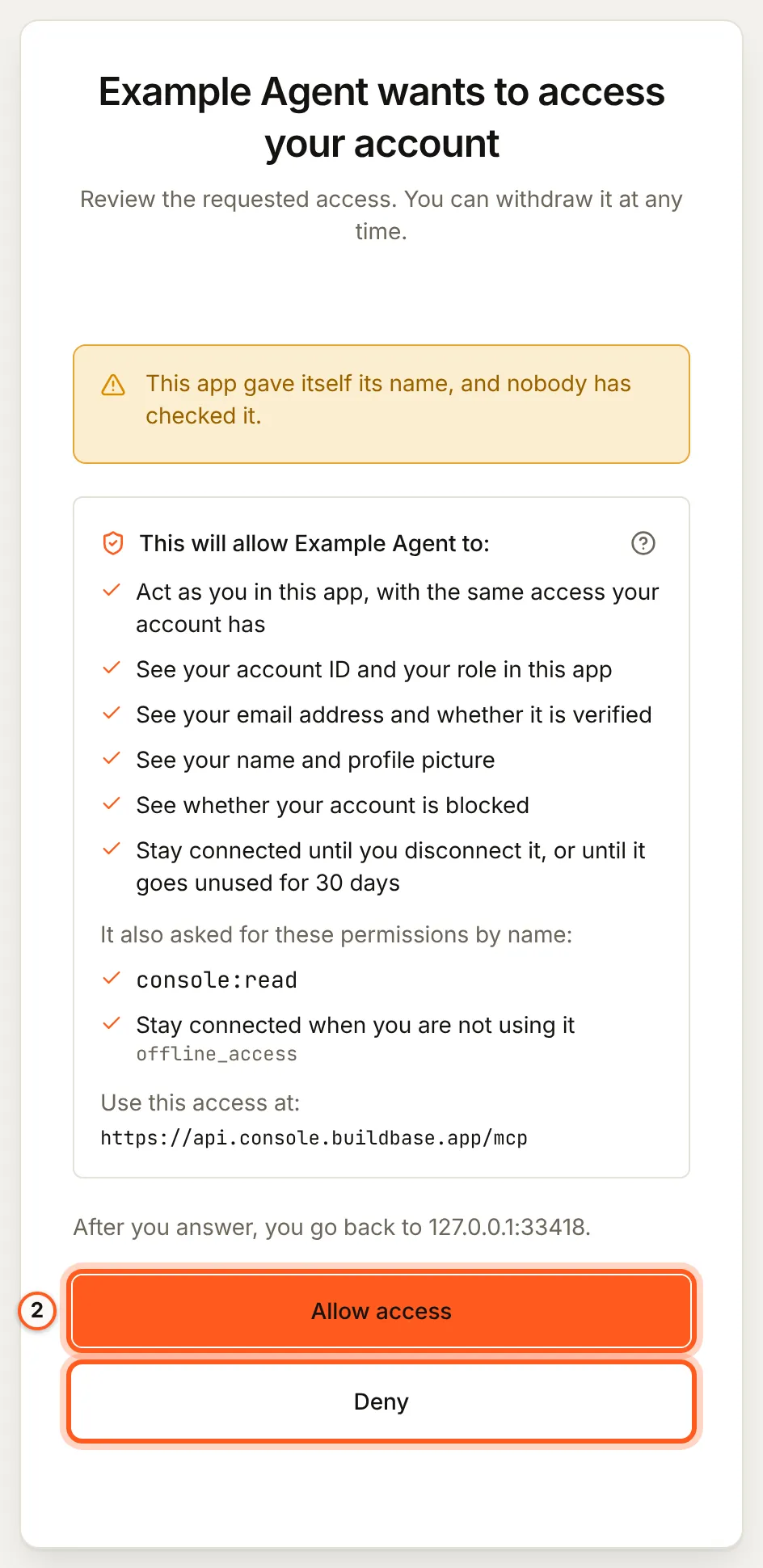
- Read the consent screen: it names the tool and the scopes it asks for,
console:readandconsole:writeto start. Approve it.
When a task needs more, such as an export or a delete, the agent is told which scope is missing and the sign-in page opens again so you can approve just that one (what an agent asks for).
What you see when you connect
Once you have signed in, BuildBase shows the consent screen in your browser. It names the tool, lists the scopes it asks for and the server the access is for, and changes nothing until you choose Allow access. Here it is for a tool that registered itself:
Use it from the agent
Ask, for example:
- "Which BuildBase organizations am I in, and what may agents do in each?"
- "Read the BuildBase docs on magic links and add magic-link sign-in to this app."
- "Write a blueprint for our email templates and forms, and show me the plan."
More, with what each one asks you to approve: example prompts.
What differs in Windsurf
- Approvals. By default the agent asks before calling any MCP tool. You can allow single tools or servers in its MCP permissions: allow the read tools at most, and keep
console_write,console_destructive_change,create_organdblueprint_applyon approval. - Approvals of a change. Where Windsurf can ask you a question itself, the change BuildBase wants to make is shown to you and nothing happens unless you approve it. Otherwise the agent states the change and confirms it with a one-time code (what stays with you).
- Its own session. Each MCP client keeps its own sign-in. Signing in from Windsurf does not sign in Devin CLI or another tool, and disconnecting one leaves the others.
- Project config is shared.
.devin/mcp_config.jsonis meant to be committed. It holds only the URL, never a token, so each teammate still signs in as themselves.
If something goes wrong
| What you see | Why | What to do |
|---|---|---|
| The server shows Needs authentication | Its sign-in expired or was never finished | Choose Authenticate, which clears the stored sign-in and opens the browser again |
| The server is not under This computer | The file is not in a path Windsurf reads, or the JSON does not parse | Check the path and the JSON, then reopen the MCPs tab |
| The agent says the organization does not let agents in | Its AI agents setting is Off, or your agent is blocked there | An owner or admin changes it under Security, AI agents |
| Every change is refused | The organization is Read only, or you did not grant console:write | An owner or admin sets Read and change; then approve console:write when asked |
To disconnect, remove the entry and disconnect the agent in BuildBase, which ends its session at once.
Related
- BuildBase in your AI tools: the server, its tools, and what stays with you.
- Use BuildBase in Cursor and Use BuildBase in VS Code.
- Let your users connect Windsurf to your app: the same client in Agent-ready apps.
- Devin's own guide: MCP in Devin Local.
Frequently asked questions
- Why do the Windsurf docs open Devin's site?
- Windsurf's MCP documentation now redirects to Devin's, where the desktop agent is called Devin Local. The MCP setup on this page follows that documentation.
- Do I need an API key for Windsurf?
- No. Windsurf runs the OAuth sign-in for a remote server, so you sign in to BuildBase as yourself in your browser. An API key is only for a job with nobody to sign in.
- Will Windsurf change things in BuildBase without asking?
- By default the agent asks before calling any MCP tool. Keep that for the change tools, and keep your organization at Read only if no agent should change it.