
Use BuildBase in Cline
Add BuildBase's MCP server to Cline as a remote server, authorize it in the browser as yourself, and keep auto-approve off for changes.
This page is part of BuildBase in your AI tools: it connects Cline, in your editor or on the command line, to BuildBase's own MCP server so you can manage your BuildBase organization while you code. Cline signs in as you and never sees your organization's secrets.
Note
Want your own app to be agent-ready? See Let your users connect Cline to your app, in Agent-ready apps.
What you need
- Cline in your editor or the Cline CLI. Cline's docs name no plan for remote servers.
- A BuildBase console account, and an organization whose AI agents setting is not Off (choose what agents may do).
Add the server
In the editor, open Cline's MCP servers view and its Remote Servers tab, or edit cline_mcp_settings.json directly (the CLI keeps it at ~/.cline/data/settings/cline_mcp_settings.json):
{
  "mcpServers": {
    "buildbase-console": {
      "type": "streamableHttp",
      "url": "https://api.console.buildbase.app/mcp",
      "disabled": false,
      "autoApprove": []
    }
  }
}
Keep "type": "streamableHttp": without it Cline falls back to the older SSE transport, and BuildBase's server is a Streamable HTTP server.
Sign in
In the Cline CLI, the add-server wizard offers Authorize OAuth, which opens BuildBase's sign-in page in your browser.
- Sign in with your console account and your usual second step.
- Approve Cline on the consent screen. It asks for
console:readandconsole:writeto start; an export or a delete asks again for just that scope (what an agent asks for).
What you see when you connect
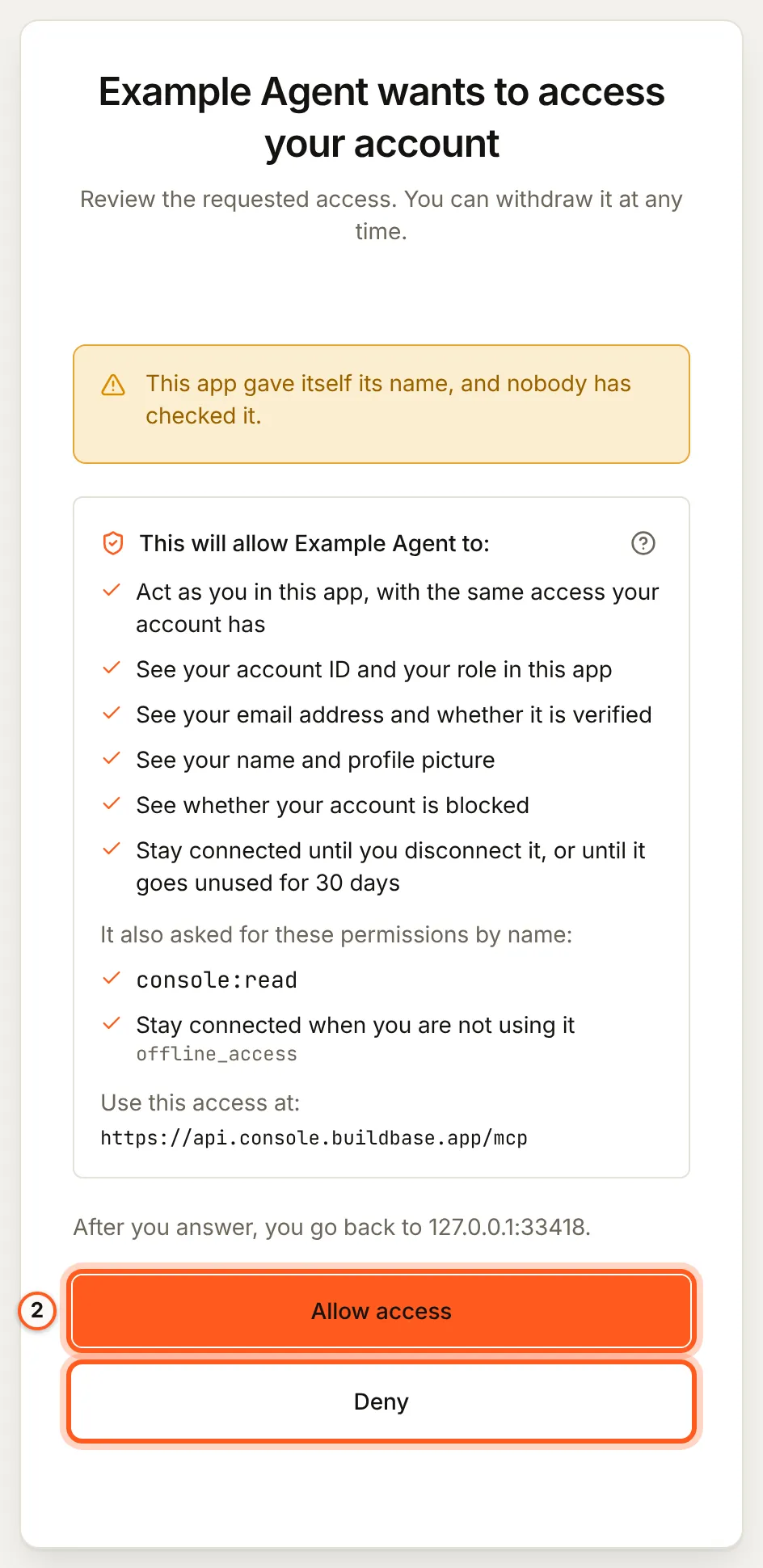
Once you have signed in, BuildBase shows the consent screen in your browser. It names the tool, lists the scopes it asks for and the server the access is for, and changes nothing until you choose Allow access. Here it is for a tool that registered itself:
Use it
Ask, for example:
- "Which environment variables does this Next.js app need for my Acme organization? Write them into
.env.examplewith the secrets left blank." - "Search the BuildBase docs for how to gate a feature on a plan, and show me the hook to use."
- "Create a feature flag
new-checkout, off, in staging."
More, with what each asks you to approve: example prompts.
What differs in Cline
autoApproveis per tool. A tool listed there runs without asking. Keep it empty, or list only read tools such aslist_orgs,console_get,search_docsandfetch_doc. Never listconsole_write,console_destructive_change,create_orgorblueprint_apply.- Approvals of a change. When BuildBase needs your approval for a change, the agent states it and confirms it with a one-time code unless Cline can ask you itself (what stays with you). Read the change before you let Cline send it.
- Timeouts. A long blueprint plan or export can outlast Cline's MCP timeout; raise it in the server's settings.
If something goes wrong
| What you see | Why | What to do |
|---|---|---|
| The server stays red or disconnected | The entry has no "type": "streamableHttp", so Cline uses SSE | Add the type and restart the server |
| No sign-in starts | The authorization was not run | Use Authorize OAuth for the server |
| Calls time out | A long plan or export outlasts the MCP timeout | Raise the timeout for the server |
| Every change is refused | The organization is Read only, or you did not grant console:write | An owner or admin sets Read and change; approve console:write |
| You want to see what Cline loaded | The settings file and the view can differ | Run cline config mcp --json |
To disconnect, remove the server from Cline and disconnect the agent in BuildBase.
Related
- BuildBase in your AI tools: the server, its tools, and what stays with you.
- Use BuildBase in VS Code and Use BuildBase in Cursor.
- Let your users connect Cline to your app: the same client in Agent-ready apps.
- Cline's own guide: configuring MCP servers.
Frequently asked questions
- Why does Cline not connect when I paste the URL into the settings file?
- Without "type": "streamableHttp", Cline treats a remote entry as the older SSE transport. BuildBase's server speaks Streamable HTTP, so set the type.
- Which BuildBase tools are safe to auto-approve?
- Only tools that read, such as list_orgs, console_get and search_docs. Leave console_write, console_destructive_change, create_org and blueprint_apply out of autoApprove so Cline asks you each time.
- Does Cline see my organization's secrets?
- No. BuildBase's server never hands an agent a secret, even one it creates. Cline acts with your role and reads what you can see in the console, minus credentials and sign-in settings.