
Use BuildBase in Lovable
Add BuildBase's MCP server to Lovable as a custom connector, authorize it as yourself, and let Lovable set up your organization while it builds.
This page is part of BuildBase in your AI tools: it connects Lovable to BuildBase's own MCP server so that, while Lovable builds your app, it can read and set up your BuildBase organization. Lovable signs in as you and never sees your organization's secrets.
Note
Want your own app to be agent-ready? See Connect an agent to your app, in Agent-ready apps.
What it is for
Connected to BuildBase, Lovable can look things up and set your organization up while it writes the code:
get_env_templategives the environment variables your app needs, with your organization's id filled in and every secret left for you.search_docsandfetch_docread the BuildBase docs, so Lovable uses the SDK the way it is documented.- With your approval of the scope, it can create a feature flag or a form, or plan a blueprint for the organization the app needs.
Lovable's docs say a connection is used while building only, never in the published app. The app itself uses @buildbase/sdk with its own keys, as the Lovable guides set it up.
What you need
- A Lovable account on any plan. Lovable's docs say custom MCP servers are on every plan.
- A workspace where custom MCP servers are not turned off by an admin.
- A BuildBase console account, and an organization whose AI agents setting is not Off (choose what agents may do).
Add the connector
-
In Lovable, open Connectors, choose Add custom, then MCP server.
-
Enter a name, such as
BuildBase, and the URL:https://api.console.buildbase.app/mcp -
Keep OAuth, the default, and choose Add & authorize.
Sign in
Lovable opens BuildBase's sign-in page. Sign in with your console account and your usual second step, then approve Lovable on the consent screen. It asks for console:read and console:write to start; an export or a delete asks again for just that scope (what an agent asks for).
What you see when you connect
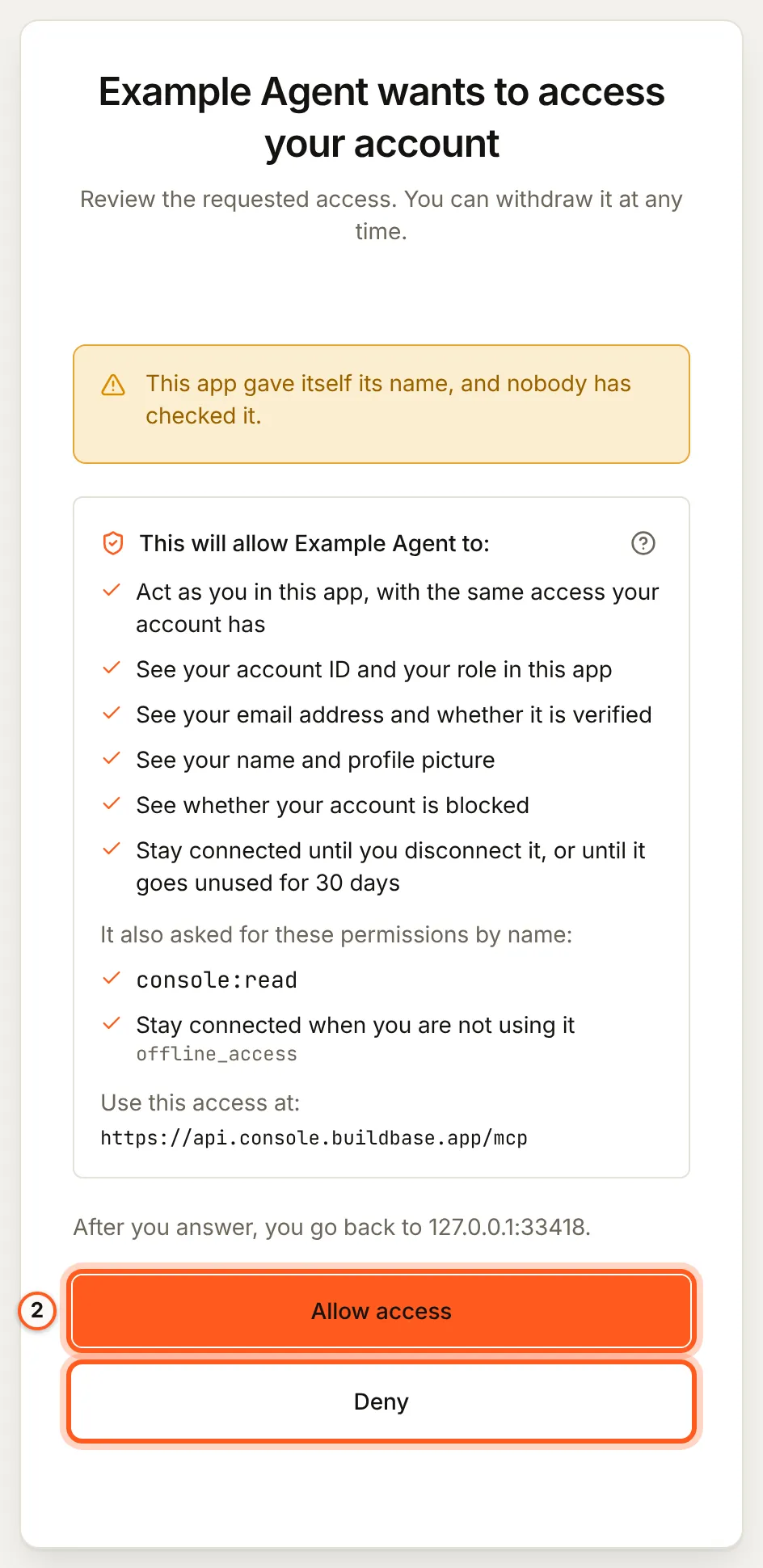
Once you have signed in, BuildBase shows the consent screen in your browser. It names the tool, lists the scopes it asks for and the server the access is for, and changes nothing until you choose Allow access. Here it is for a tool that registered itself:
Use it
Ask, for example:
- "Add BuildBase sign-in to this app. Get the environment variables for my Acme organization from BuildBase."
- "Read the BuildBase docs on paid plans and add an upgrade button to the settings page."
- "Create a BuildBase form for the contact page and post the page's form to it."
What differs in Lovable
- Per user, while building. Each person in a workspace connects and signs in as themselves, and the connection never reaches the published app.
- Authentication options. Lovable also offers a bearer token or API key and no auth. With an organization API key Lovable acts as that key, not as you; keep OAuth.
- Approvals of a change. When BuildBase needs your approval for a change, the agent states it and confirms it with a one-time code unless Lovable can ask you itself (what stays with you). Read it before Lovable goes on.
- Secrets stay out of the chat. Set your sign-in client's secret in the app's environment yourself, never in the prompt.
If something goes wrong
| What you see | Why | What to do |
|---|---|---|
| MCP server is greyed out | A workspace admin turned custom MCP servers off | Ask the admin to turn them back on |
| Lovable says the organization does not let agents in | Its AI agents setting is Off, or your agent is blocked | An owner or admin changes it under Security, AI agents |
| Every change is refused | The organization is Read only, or you did not grant console:write | An owner or admin sets Read and change; approve console:write |
| The published app cannot reach BuildBase | The connection serves Lovable only, never the app | Set the app's environment from get_env_template and its secrets |
To disconnect, remove the connector in Lovable and disconnect the agent in BuildBase.
Related
- BuildBase in your AI tools: the server, its tools, and what stays with you.
- Use BuildBase in Bolt and Use BuildBase in v0.
- Add BuildBase to Lovable's instructions or skills and add paid plans to a Lovable app: the paste-prompt guides.
- Lovable's own guide: custom MCP.
Frequently asked questions
- Which Lovable plans can add a custom MCP server?
- Every plan, according to Lovable's docs. Only the static IP option is for Enterprise, and BuildBase's server does not need it.
- Can my published Lovable app use these tools?
- No. Lovable's docs say a connection is used while building only, never in the published app. Your app talks to BuildBase through the SDK with its own keys.
- Why is MCP server greyed out?
- A workspace admin turned custom MCP servers off. Ask them to turn it back on.
- Does everyone in my workspace share the connection?
- No. Lovable keeps connections per user, so each person signs in to BuildBase as themselves.