
Use BuildBase in Gemini CLI
Add BuildBase's MCP server to Gemini CLI with one command, sign in as yourself in the browser, and manage your organization from the terminal.
This page is part of BuildBase in your AI tools: it connects Gemini CLI to BuildBase's own MCP server so you can manage your BuildBase organization from the terminal. Gemini CLI signs in as you and never sees your organization's secrets.
Note
Want your own app to be agent-ready? See Let your users connect Gemini CLI to your app, in Agent-ready apps.
What you need
- Gemini CLI on an account that can still use it. Google's docs say Gemini CLI was replaced by Antigravity CLI for unpaid and Google One users on 18 June 2026.
- A local browser for the sign-in. Gemini CLI's OAuth sign-in does not work on a headless machine (with an API key is the way there).
- A BuildBase console account, and an organization whose AI agents setting is not Off (choose what agents may do).
Add the server
From a terminal:
gemini mcp add --transport http buildbase-console https://api.console.buildbase.app/mcpOr by hand in settings.json, with httpUrl:
{
  "mcpServers": {
    "buildbase-console": {
      "httpUrl": "https://api.console.buildbase.app/mcp"
    }
  }
}
In Gemini CLI, url means the older SSE transport, so a server added with url does not connect.
Sign in
The first time Gemini CLI connects, BuildBase answers that it needs a sign-in, and Gemini CLI finds the sign-in page from that answer and opens it in your browser.
- Sign in with your console account and your usual second step.
- Approve Gemini CLI on the consent screen. It asks for
console:readandconsole:writeto start.
To sign in again, for example to approve a new scope, run /mcp auth buildbase-console inside Gemini CLI (what an agent asks for).
What you see when you connect
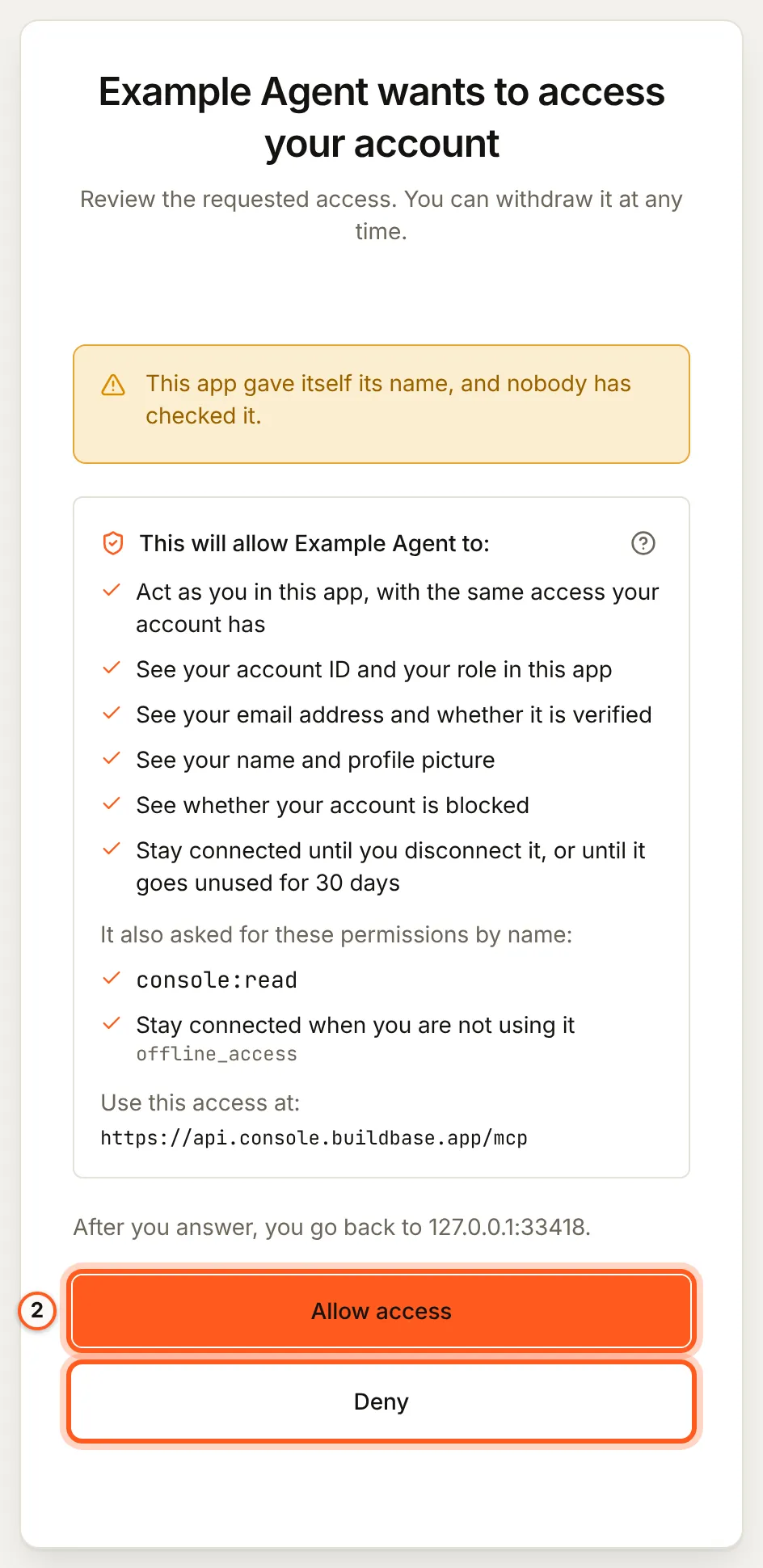
Once you have signed in, BuildBase shows the consent screen in your browser. It names the tool, lists the scopes it asks for and the server the access is for, and changes nothing until you choose Allow access. Here it is for a tool that registered itself:
Use it
Ask, for example:
- "List my BuildBase organizations and what agents may do in each."
- "Which environment variables does a Next.js app need for Acme?"
- "Create a feature flag
beta-dashboard, off, in staging."
More, with what each asks you to approve: example prompts.
What differs in Gemini CLI
-
Keep
trustoff. A server entry with"trust": trueskips every tool confirmation. Leave it out for BuildBase, so Gemini CLI asks before each change. -
Limit the tools.
includeToolsorexcludeToolsin the server entry choose which tools Gemini CLI loads, for example only the read tools:{ "mcpServers": { "buildbase-console": { "httpUrl": "https://api.console.buildbase.app/mcp", "excludeTools": ["console_destructive_change", "blueprint_apply"] } } } -
Approvals. When BuildBase needs your approval for a change, Gemini CLI shows it in the terminal where it can ask you questions; otherwise the agent states the change and confirms it with a one-time code (what stays with you).
On a headless machine
With no browser to sign in, use one of your organization's API keys as a header:
gemini mcp add --transport http --header "Authorization: Bearer $BUILDBASE_API_KEY" buildbase-console https://api.console.buildbase.app/mcpThe key works only in its own organization, within its role and the organization's AI agents setting (connect with an API key).
If something goes wrong
| What you see | Why | What to do |
|---|---|---|
| The server never connects | It was added with url, which Gemini CLI reads as SSE | Use httpUrl, or add it again with --transport http |
| No browser opens for the sign-in | The machine has no local browser | Sign in on a machine with one, or use an API key header |
| Gemini CLI says the server needs authentication | The sign-in was not finished or has ended | Run /mcp auth buildbase-console |
| A change is refused for the organization | Its AI agents setting is Read only or Off | An owner or admin changes it under Security, AI agents |
| You cannot tell why a call failed | Gemini CLI's own output is short | Start it with --debug, and check /mcp list or gemini mcp list |
To disconnect, remove the server from settings.json and disconnect the agent in BuildBase.
Related
- BuildBase in your AI tools: the server, its tools, and what stays with you.
- Use BuildBase in Claude Code and Use BuildBase in Codex.
- Let your users connect Gemini CLI to your app: the same client in Agent-ready apps.
- Google's own guide: MCP servers with Gemini CLI.
Frequently asked questions
- Should I use httpUrl or url in settings.json?
- Use httpUrl. In Gemini CLI, httpUrl means Streamable HTTP, which is what BuildBase's server speaks, while url means the older SSE transport.
- Can I sign in on a server with no browser?
- Not with Gemini CLI's own sign-in, which needs a local browser. On a headless machine, connect with an organization API key in a header instead.
- Is Gemini CLI still available on my account?
- Google's docs say unpaid and Google One users were moved to Antigravity CLI on 18 June 2026. If your account was moved, Gemini CLI is no longer the tool to use.