
Use BuildBase in Junie
Add BuildBase's MCP server to Junie, JetBrains' coding agent, in mcp.json, authorize it as yourself, and manage your organization from your JetBrains IDE.
This page is part of BuildBase in your AI tools: it connects Junie, JetBrains' coding agent in JetBrains IDEs and on the command line, to BuildBase's own MCP server so you can manage your BuildBase organization while you code. Junie signs you in as yourself with OAuth, and the agent never sees your organization's secrets.
Note
Want your own app to be agent-ready? See Let your users connect Junie to your app, in Agent-ready apps.
JetBrains AI Assistant takes a remote MCP server by URL too, but its docs describe no OAuth sign-in, so it cannot sign you in to BuildBase as yourself. Use Junie in the same IDE.
What you need
- Junie, in a JetBrains IDE or as Junie CLI. Its MCP docs state no plan requirement.
- A BuildBase console account. Junie signs in on BuildBase's sign-in page with your console email address.
- An organization whose AI agents setting is not Off (choose what agents may do).
Add the server
Add an entry to ~/.junie/mcp/mcp.json for every project, or to .junie/mcp/mcp.json at the root of one project:
{
  "mcpServers": {
    "buildbase-console": {
      "url": "https://api.console.buildbase.app/mcp"
    }
  }
}
Junie CLI and Junie in JetBrains IDEs read the same file. There is no install link.
Sign in
- Run
/mcp.buildbase-consoleshows Authorization required. - Select it and choose Authorize. BuildBase's sign-in page opens in your browser. Junie registers its own client, so there is no client id to fill in.
- Sign in with your console account and your usual second step, and approve Junie on the consent screen. It asks for
console:readandconsole:writeto start. - Back in
/mcp, the status reads Active.
When a task needs more, such as an export or a delete, Junie is told which scope is missing and you approve just that one (what an agent asks for).
What you see when you connect
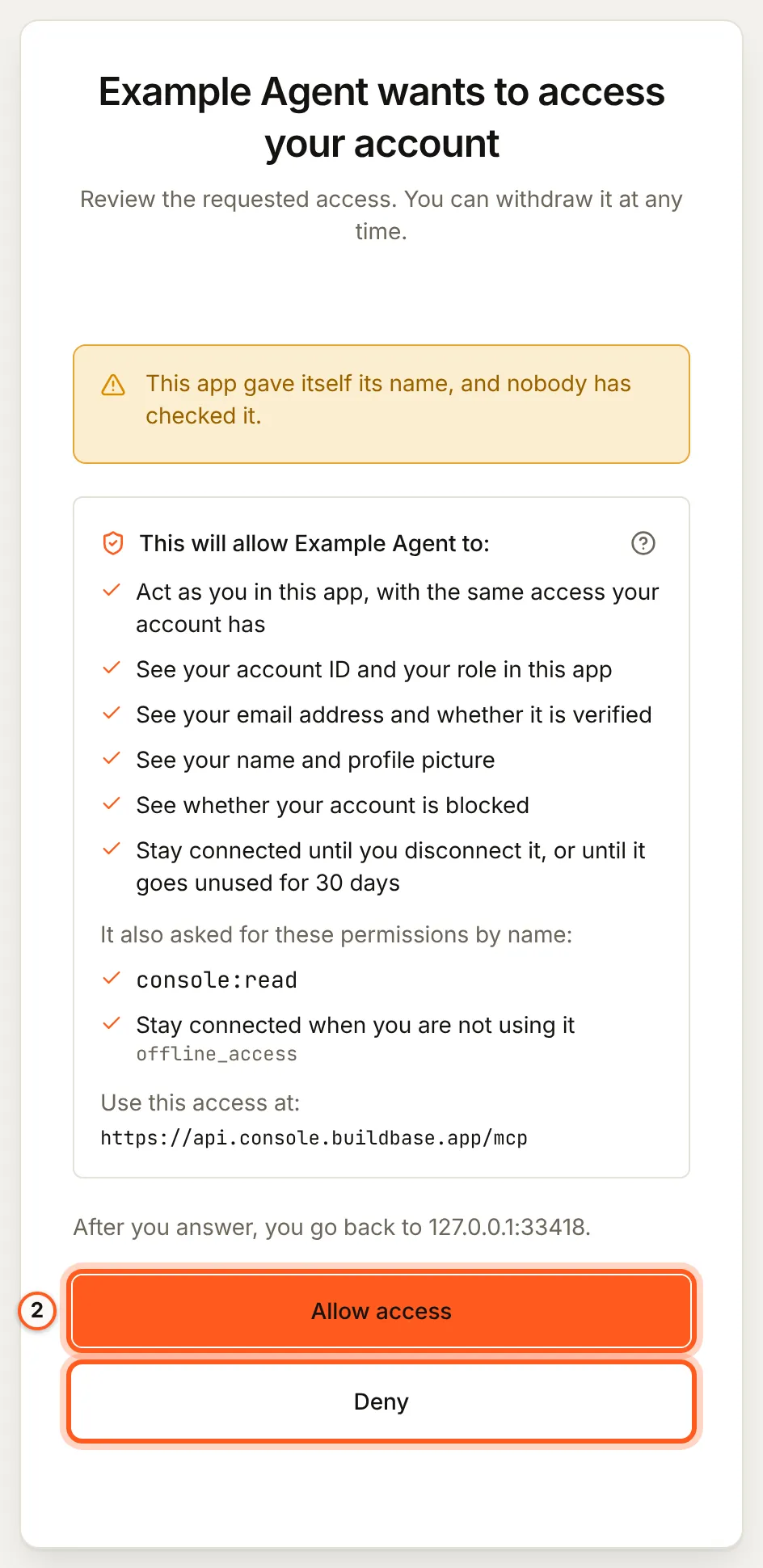
Once you have signed in, BuildBase shows the consent screen in your browser. It names the tool, lists the scopes it asks for and the server the access is for, and changes nothing until you choose Allow access. Here it is for a tool that registered itself:
Use it from Junie
Ask, for example:
- "Which environment variables does this Next.js app need for Acme? Write
.env.example." - "Read the BuildBase docs on workspaces and add a workspace switcher to this app."
- "Create the feature flags this branch reads, off, in staging."
More, with what each one asks you to approve: example prompts.
What differs in Junie
- Timeouts. Junie waits 60 seconds for a reply. A large blueprint plan or apply can take longer; add
"timeout": 300000(five minutes, in milliseconds) to the entry. - Approvals of a change. Where Junie can ask you a question itself, the change BuildBase wants to make is shown to you and nothing happens unless you approve it. Otherwise the agent states the change and confirms it with a one-time code (what stays with you). Read each one before you accept it.
- Project file.
.junie/mcp/mcp.jsoncan be committed. It holds only the URL, so each teammate authorizes as themselves. - Your code is in reach.
get_env_templatenever fills in a secret: copy your client secret from the console into.env.localyourself.
If something goes wrong
| What you see | Why | What to do |
|---|---|---|
| Authorization required stays after you sign in | The browser sign-in did not finish | Choose Authorize again and complete the consent screen |
Failed or Inactive in /mcp | A wrong entry, a failed sign-in, or no network | Fix the entry, then select it and choose Reconnect |
| A BuildBase call times out | It took longer than 60 seconds | Raise timeout on the entry |
| The agent says the organization does not let agents in | Its AI agents setting is Off, or your agent is blocked there | An owner or admin changes it under Security, AI agents |
| Every change is refused | The organization is Read only, or you did not grant console:write | An owner or admin sets Read and change; then approve console:write when asked |
To disconnect, remove the entry and disconnect the agent in BuildBase, which ends its session at once.
Related
- BuildBase in your AI tools: the server, its tools, and what stays with you.
- Use BuildBase in Claude Code and Use BuildBase in Zed.
- Let your users connect Junie to your app: the same client in Agent-ready apps.
- JetBrains' own guide: Junie MCP configuration.
Frequently asked questions
- Why Junie and not JetBrains AI Assistant?
- AI Assistant takes a remote MCP server by URL, but its docs describe no OAuth sign-in, so you cannot sign in to BuildBase as yourself there. Junie's docs describe the browser sign-in, so Junie is the way to use BuildBase in JetBrains IDEs.
- Is the setup the same in Junie CLI and in the IDE?
- Yes. Junie CLI uses the same MCP configuration as Junie in JetBrains IDEs, the mcp.json file in .junie/mcp.
- What if a BuildBase tool takes longer than a minute?
- Junie waits 60 seconds for a reply by default. Set timeout on the entry, in milliseconds, between 1000 and 3600000, for example for a large blueprint plan.