
Set up your monday.com app
Where each monday.com key is, where each BuildBase URL goes, and how to check the connection works.
Setting up takes two trips: copy four keys from monday.com into BuildBase, then paste BuildBase's URLs back into your monday.com app. The console walks you through the second trip step by step, in the order monday.com's Developer Center asks for them.
Before you start
A monday.com app (create one in the Developer Center if you have none yet), and a BuildBase plan that includes the monday.com integration. You connect it in the BuildBase console.
1. Open your app in the Developer Center
In monday.com, click your profile picture, then Developers. The Developer Center opens in a new tab. Open your app, or create one.
2. Copy the keys into BuildBase
In the BuildBase console, open Apps > monday.com and click Connect monday.com. Every field says where its value is.
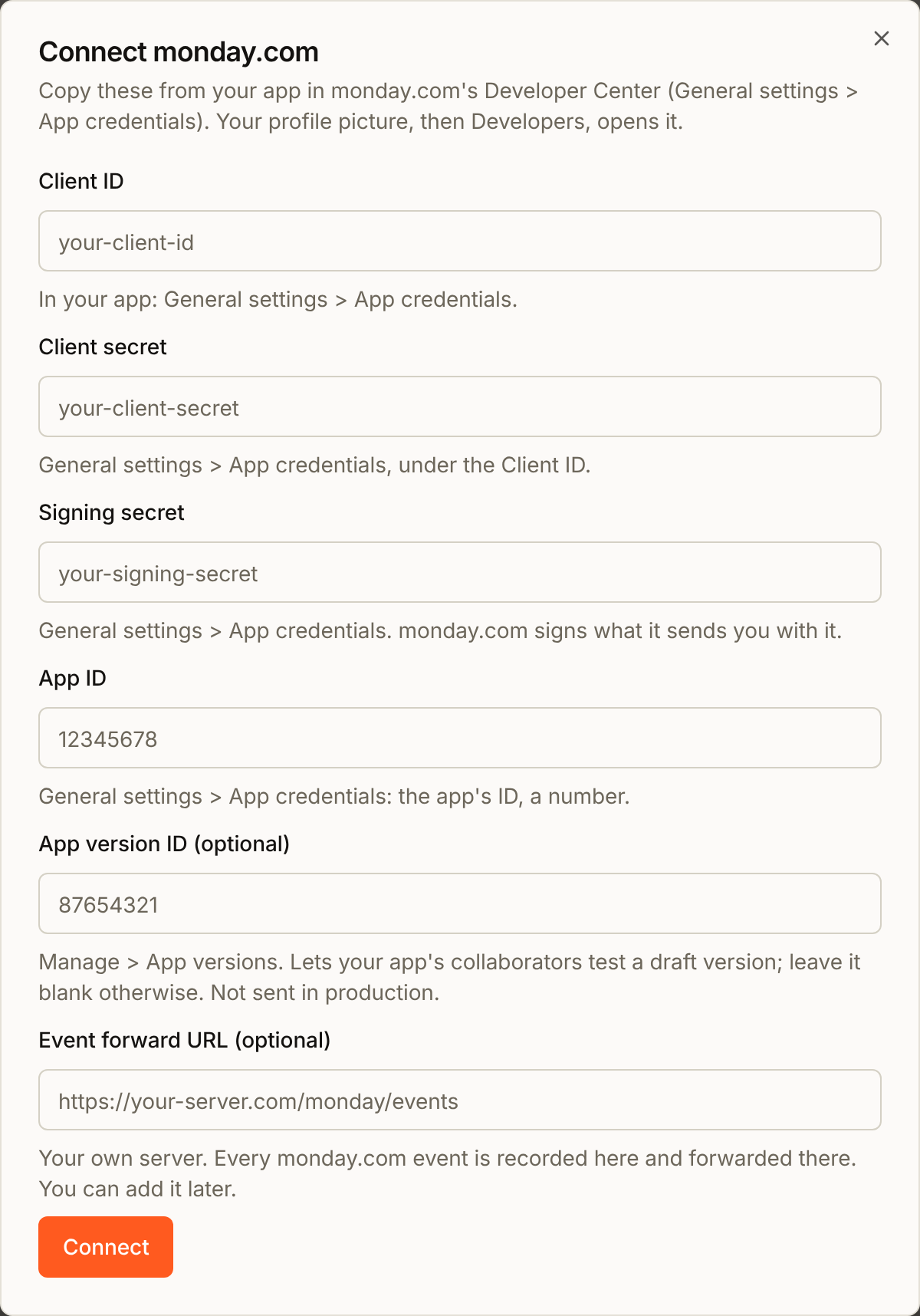
| Field | Where it is in monday.com | Required |
|---|---|---|
| Client ID | General settings > App credentials | Yes |
| Client secret | General settings > App credentials | Yes |
| Signing secret | General settings > App credentials | Yes |
| App ID | General settings > App credentials | Yes |
| App version ID | Manage > App versions | No |
| Event forward URL | Your own server, not monday.com | No |
Leave App version ID blank unless your app's collaborators test a draft version. BuildBase never sends it in production. The Event forward URL is where BuildBase forwards each monday.com event. You can add it later.
3. Paste BuildBase's URLs into your app
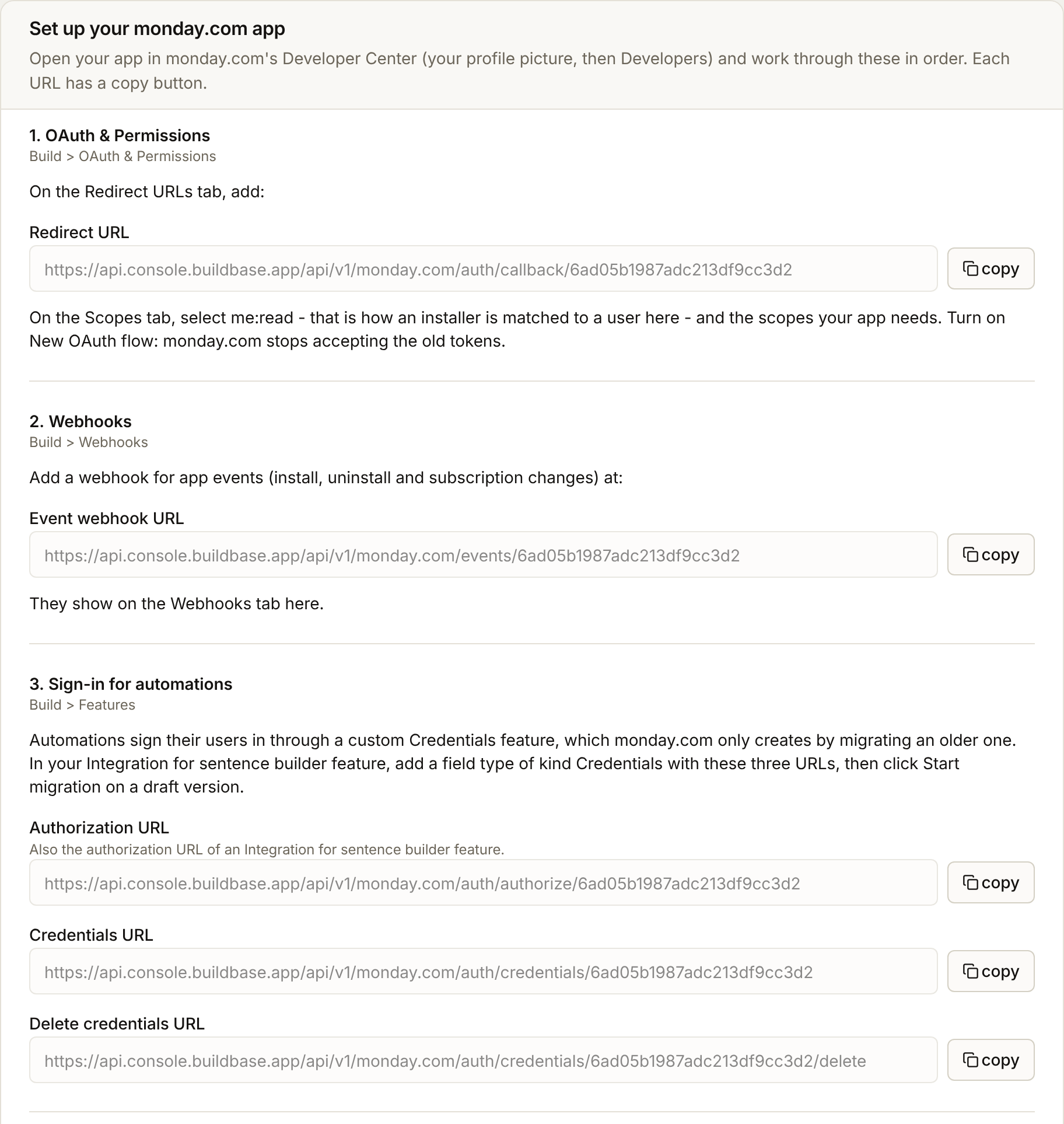
After Connect, the console opens the setup guide on the Settings tab. Each step names the place in the Developer Center, and each URL has a copy button.
| BuildBase URL | Where it goes |
|---|---|
| Redirect URL | Build > OAuth & Permissions, Redirect URLs tab |
| Event webhook URL | Build > Webhooks, as a webhook for app events |
| Authorization URL, Credentials URL, Delete credentials URL | Build > Features, in a Credentials field (step 5) |
| Action log ingest URL, Token URL | Your app server, not monday.com |
Copy the URLs from the console rather than typing them. Each one ends in your organization's ID, and the Redirect URL has to match exactly or monday.com refuses the sign-in.
4. Set the scopes and turn on the new OAuth flow
Still in Build > OAuth & Permissions, on the Scopes tab:
- Select
me:read. BuildBase reads the person's email with it to find them in your app. Without it, nobody is matched. - Select the scopes your automations need, for example
boards:readandboards:write. - Turn on New OAuth flow. monday.com is retiring the older tokens. BuildBase handles both, and moves stored older tokens to the new kind by itself.
A scope you add later reaches only new sign-ins: monday.com keeps a token's scopes for its whole life, so people who signed in before keep the old list. List your app's scopes in the console under Settings > Scopes your app needs. The next time one of those people runs an automation, BuildBase sees what their token lacks and sends them through monday.com's consent screen again, and they come back with every scope. Leave it blank to skip the check.
5. Let automations sign people in
monday.com retired the Integration for sentence builder feature for new automations, and its Authorization URL with it. Automations now sign people in through a Credentials feature. Yours has to be the custom kind, so that monday.com sends people to BuildBase. monday.com only creates that kind by migrating an older feature:
- On a draft app version, add an Integration for sentence builder feature under Build > Features, or open the one you have.
- In it, add a field type of kind Credentials. Paste the Authorization URL, Credentials URL and Delete credentials URL from the console.
- Click Start migration. The field type becomes a custom Credentials feature.
- Add that Credentials feature to your automation blocks.
Warning
The migration wizard only runs on a draft version. Running it again resets the migrated features to their original state, which discards later edits.
monday.com then lists each person's saved sign-in from the Credentials URL, and removes one through the Delete credentials URL. Removing one also revokes its tokens at monday.com, so they stop working there too. BuildBase answers both. There is nothing to build for them.
6. Try it
Install the app in a monday.com account and add one of its automations. Then check the console:
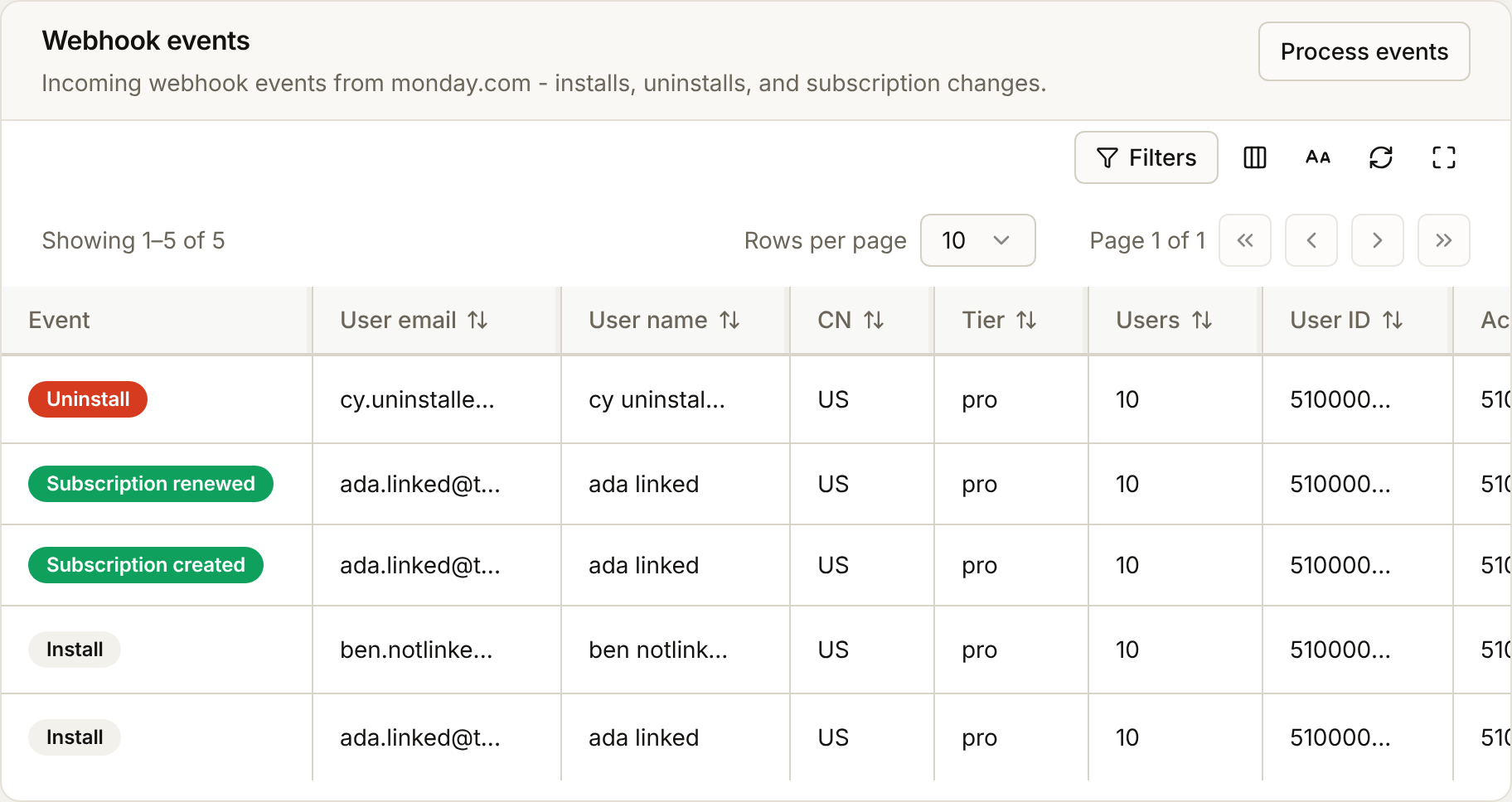
- Webhooks shows the install event. Sent means your Event forward URL took it. Resend means it was not set, or your server failed.
- Users has the installer, with a monday.com tab listing the actions their account ran.
- Activity lists the actions your server reports.
When it works, promote the version to live under Manage > App versions.
Common problems
| What you see | Why | Fix |
|---|---|---|
| monday.com says the redirect URI does not match | The Redirect URL is missing or different | Add the exact Redirect URL from the console under OAuth & Permissions |
| The person goes back to monday.com, but no user appears | No me:read scope, sign-up closed, or your plan is full | Add me:read, open sign-up, or invite the person |
| An event shows "Application event webhook not set" | No Event forward URL | Set it on the Settings tab, then Resend |
| An event shows "The application server answered 500" | Your server failed | Fix your server, then Resend |
| No events arrive at all | The Event webhook URL is not added for app events | Add it under Build > Webhooks |
| monday.com shows the app event webhook answered 401 | The Client ID or Client secret in the console is not your app's | Copy both again from General settings > App credentials, and save |
| The Token URL answers 409 | monday.com no longer accepts the stored sign-in | The person signs in again from the automation |
| A scope you added is missing from people's tokens | They signed in before you added it | List your app's scopes under Settings > Scopes your app needs |
| Every sign-in shows monday.com's consent screen | The console names a scope your app does not ask for | Add it under OAuth & Permissions > Scopes, or remove it |
Next steps
- Connect your app server - receive the signed token, get tokens, events and action reports
- How the integration works - the full flow, and what BuildBase does at each step