
Deploy hooks
Rebuild your site on Vercel, Netlify, Cloudflare Pages or Render from the BuildBase console, and see on Vercel whether each deploy succeeded.
A static site built from BuildBase content needs a rebuild to show what changed. A deploy hook is a URL your hosting provider creates for exactly that. When you start a deploy in the BuildBase console, BuildBase calls the hook and your provider starts a build.
Publishing a post does not start a deploy on its own. You start one from the banner at the top of the console, or with Deploy on a hook: Starting a deploy shows both. To rebuild on every publish instead, point a content webhook at a small function of yours that calls the hook: Delivering content shows how.
Before you start
A site on Vercel, Netlify, Cloudflare Pages or Render that builds from your BuildBase content, and a BuildBase plan that includes deploy hooks. You add hooks in the BuildBase console under Settings > Deploy hooks.
What it is for
| You want to | BuildBase does |
|---|---|
| Rebuild the site after you change content | Calls the hook you choose, from the banner's Confirm and publish or Deploy on the hook |
| Know a deploy reached your provider | Records each deploy in the history, with what the provider answered |
| Know whether a Vercel build succeeded | Receives Vercel's deploy events and marks the deploy Success, Failed or Canceled |
| Catch a hook that was deleted or pasted wrong | Says which hook refused and why, and refuses the common wrong URLs when you add one |
| Keep track of several sites or branches | Holds one hook per site or branch, each with its own title and status |
How it works
Trigger. Starting a deploy calls the hook with a POST. The provider answers that the build is queued, and BuildBase records the deploy in the history. If the hook answers with an error, nothing is recorded and the console says which hook refused and what it answered.
Report back, on Vercel. Vercel can send each deployment's result to BuildBase through an account webhook. BuildBase checks the signature against the secret you saved on the hook, ties the event to the deploy that started it, and moves the deploy from Pending to Success, Failed or Canceled. Vercel offers account webhooks on Pro and Enterprise teams.
Other providers. Netlify, Cloudflare Pages and Render start builds the same way. BuildBase does not receive their results, so their deploys read Triggered (or Queued, when Render waits for a deploy already running): the hook was called, and you check the build at the provider.
Starting a deploy
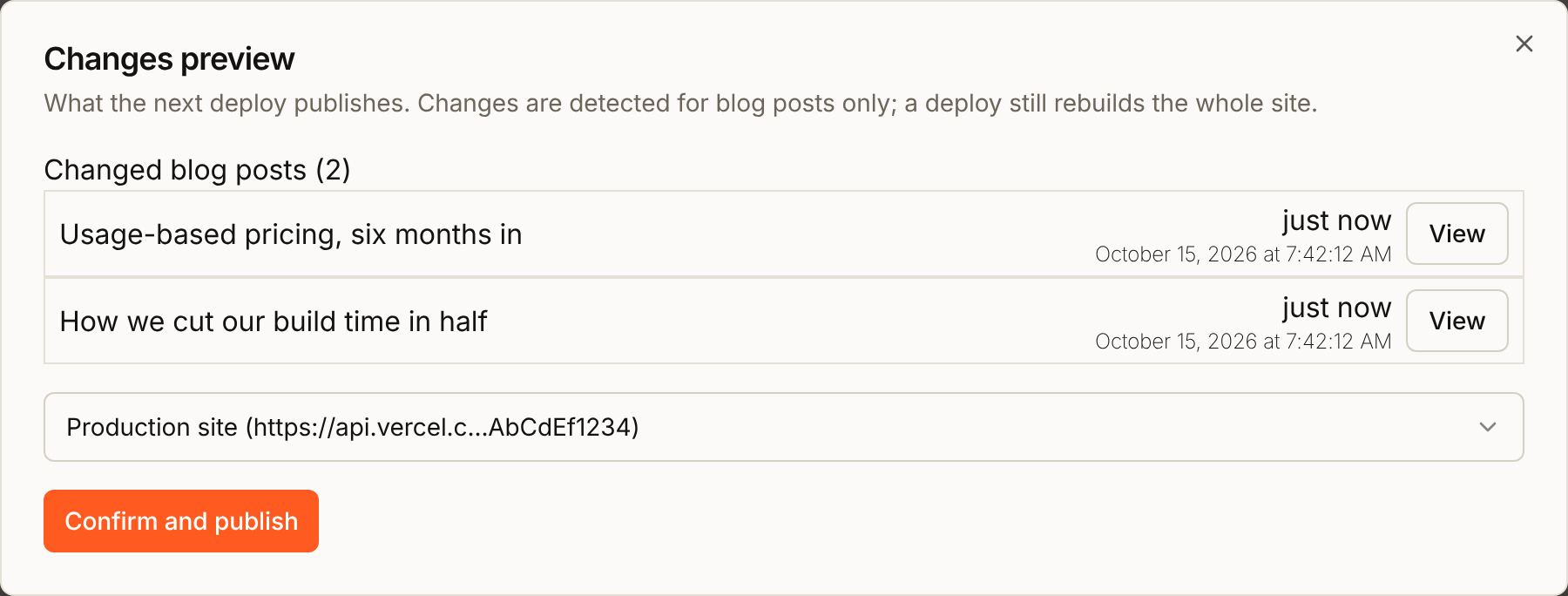
When published blog posts change, a banner at the top of the console says how many:

- Select Preview changes. The Changes preview dialog lists the posts that changed since the last deploy.
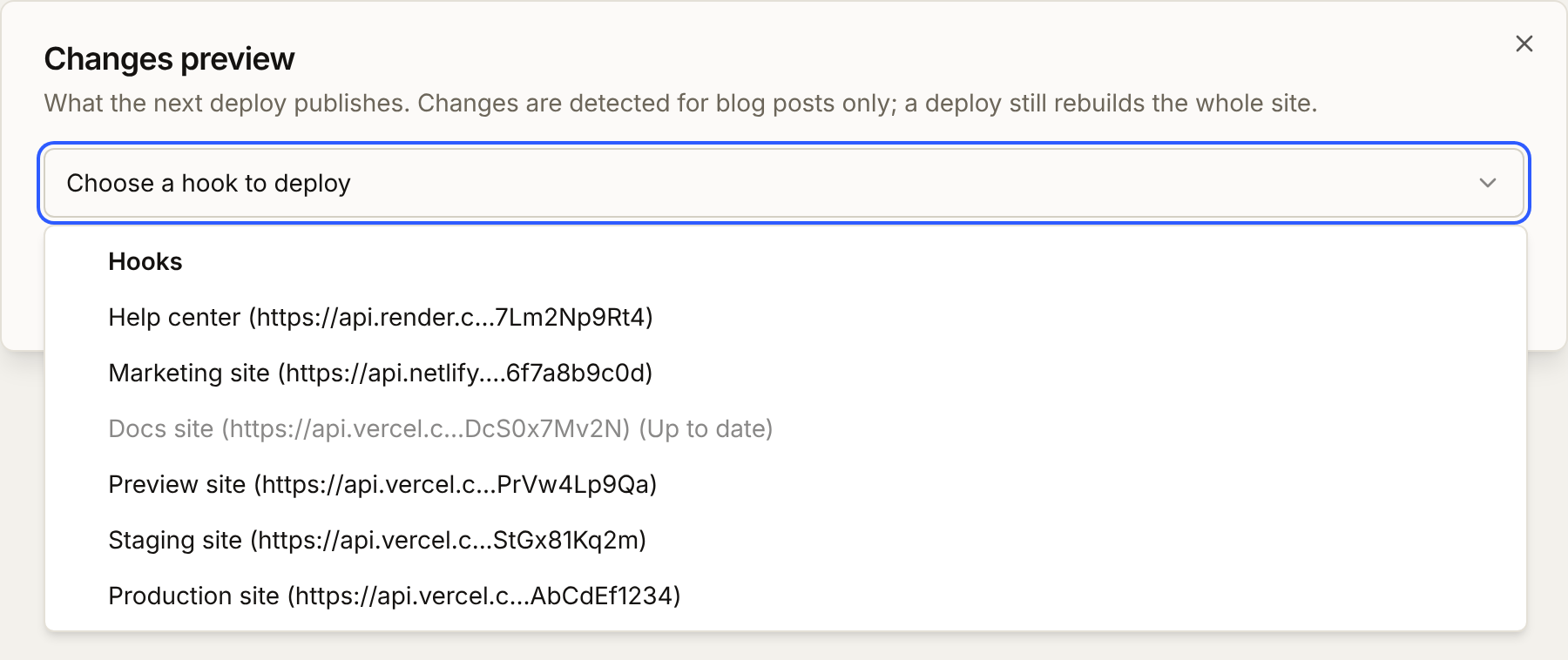
- Open the hook picker (it reads Choose a hook to deploy until you pick one) and choose the site to rebuild. A hook that already has the current content reads (Up to date) and cannot be chosen.
- Select Confirm and publish.
The banner also shows when a hook has not deployed the current content yet, for example right after you add one, or after a published post is unpublished or deleted. It then reads "A deploy hook has not published the current content yet.", and Changes preview lists no posts, only the hooks:
It shows again when a Vercel hook's latest build fails or is canceled, if the hook reports its results (the webhook in part 3 of the Vercel setup). That content never went live, so the hook goes back to the content it had before the failed build: the banner offers the new content again, and the hook is no longer marked (Up to date). The posts count as published once a deploy has started, so the banner reads "A deploy hook has not published the current content yet." and lists no posts. A build that fails on content the hook already had changes nothing, because that content is still live. Coming back to the console's tab is enough for the banner to notice.
The banner only watches blog posts, and a deploy always rebuilds the whole site. After any other change, open Settings > Deploy hooks, select Manage hooks, and select Deploy on the hook.
Two URLs, opposite directions
The most common mistake is to paste one of these where the other goes. The console refuses the status URL pasted as a deploy hook. It cannot see the opposite mistake: a deploy hook URL pasted into Vercel's Endpoint starts a new build on every event Vercel sends, so check that field yourself.
| URL | Who creates it | Who calls it | Where it goes |
|---|---|---|---|
| Deploy hook URL | Your provider | BuildBase, to build | BuildBase, Create hook > Deploy hook URL |
| BuildBase status URL | BuildBase | Vercel, with results | Vercel, Settings > Webhooks > Endpoint |
A deploy hook URL is a credential: anyone who has it can start a build of your site. Keep it out of code and screenshots. If it leaks, delete the hook at your provider and create a new one (on Render, select Regenerate Hook), then delete the old hook in BuildBase and add the new URL. On a Vercel hook that reports its results, paste the same webhook secret into Vercel webhook secret when you add it, or its deploys read Triggered from then on (Adding the secret later covers a lost one). Deleting a hook in BuildBase does not delete it at the provider.
Reading the status
Each deploy in Settings > Deploy hooks has a badge:
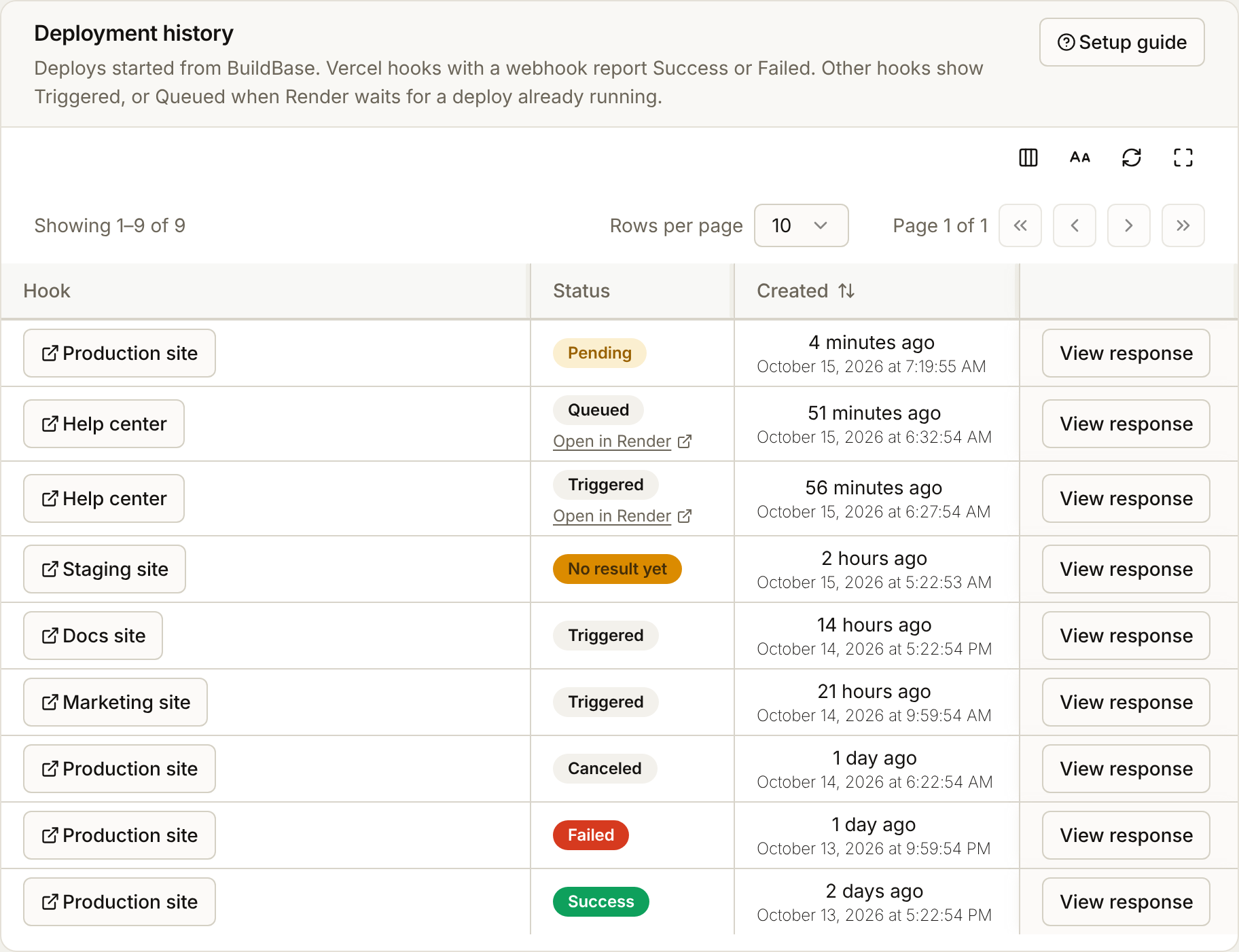
| Badge | Meaning |
|---|---|
| Triggered | The hook was called, and nothing reports back for this deploy, so check the build at the provider. A deploy started before the hook had a webhook secret stays Triggered |
| Queued | Render: another deploy of the service was running, so Render queued this one, and builds the most recent request when that one ends. The badge records Render's answer and does not change: Open in Render shows how it went |
| Pending | A deploy of a Vercel hook with a webhook secret, waiting for Vercel's result |
| No result yet | Still pending after an hour. Vercel has not reported this deploy |
| Success | Vercel reported Deployment Succeeded or Promoted |
| Failed | Vercel reported Deployment Error |
| Canceled | Vercel canceled the deployment, for example because a newer one replaced it |
A Render deploy also has an Open in Render link under its badge, which opens the deploy in your Render dashboard. View response shows what the hook answered, and with which HTTP status.
A deploy whose hook was deleted shows Deleted in the Hook column. A Vercel deploy that was still Pending when its hook was deleted can no longer hear back, and ends as No result yet: check it in Vercel.
Each hook in Manage hooks has a deploy status:
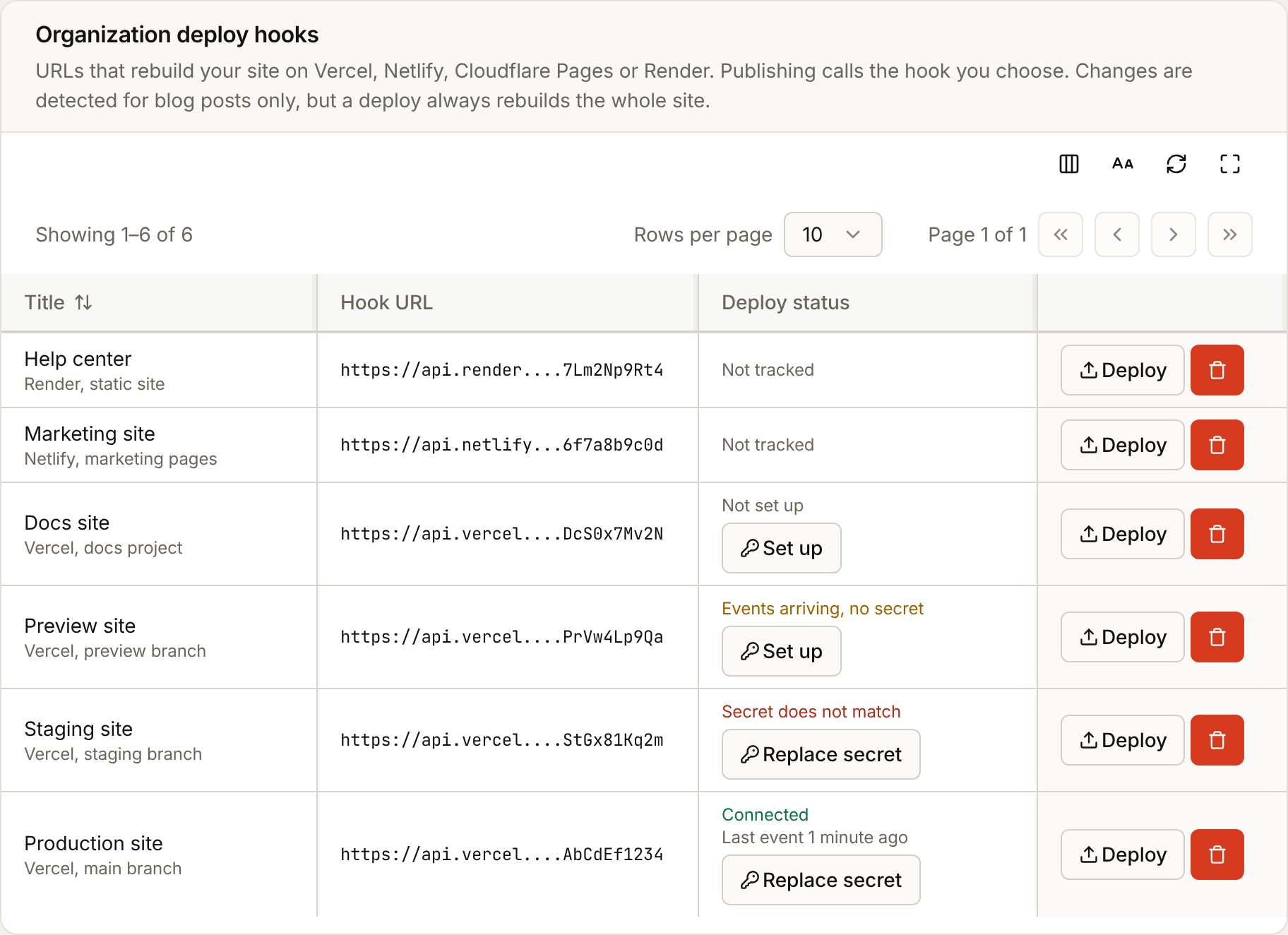
| Deploy status | Meaning, and what to do |
|---|---|
| Not tracked | Not a Vercel hook. Nothing to set up |
| Not set up | A Vercel hook with no webhook secret. Select Set up to connect one |
| Events arriving, no secret | Vercel is sending events, but BuildBase has no secret to check them with, so they are ignored. Select Set up |
| Waiting for first event | A secret is saved, or was just replaced, and no event has arrived since. Deploy once |
| Connected | The last event from Vercel was verified |
| Secret does not match | The last event was refused. Select Replace secret and paste the secret from Vercel's Webhook Created dialog |
| Some events refused | Events signed with this secret verify, but others arrive signed with another one. Usually an older Vercel webhook still posts here: delete the webhooks you no longer use in Vercel. If you replaced the webhook, select Replace secret and paste the new one |
Setup guide, at the top of Settings > Deploy hooks and of Manage hooks, has the same steps as these pages inside the console, with the BuildBase status URL to copy.
Plan limits and permissions
Your plan sets how many hooks you can add, shown beside Create hook, and how many deploys you can start a month. A deploy counts once the provider accepts the call; a hook that refuses it does not use one up. Publishing to your site is a plan feature of its own: without it, Deploy and Confirm and publish are locked.
The banner and Deploy need the deploy hooks permission on your role. The deployment history is a separate permission, so someone who can deploy may not see the history, and the other way round.
Next steps
- Set up a Vercel deploy hook - the deploy hook, the status webhook, and how to check both work
- Set up a Netlify, Cloudflare Pages or Render deploy hook - where each provider keeps its hook
- Delivering content - pull content into your build, or rebuild on every publish with a content webhook that calls the hook