
Connect your app server
Receive the signed-in monday.com user, get a working monday.com token, and send events and action results to BuildBase.
Your app server meets BuildBase in four places: two URLs it calls, and two optional ones BuildBase calls. Every request, in either direction, is a JWT signed with your monday.com app's client secret, so keep the secret on the server.
import jwt from 'jsonwebtoken';

// A working monday.com token for one person. BuildBase refreshes it.
export async function mondayToken(accountId: number, userId: number) {
  const request = jwt.sign(
    { accountId, userId, exp: Math.floor(Date.now() / 1000) + 60 },
    process.env.MONDAY_CLIENT_SECRET!
  );
  const res = await fetch(process.env.BUILDBASE_MONDAY_TOKEN_URL!, {
    method: 'POST',
    headers: { Authorization: `Bearer ${request}` },
  });
  if (res.status === 409) throw new Error('They need to sign in again');
  if (!res.ok) throw new Error(`Token URL answered ${res.status}`);
  const { data } = await res.json();
  return data.access_token as string;
}
Before you start
Connect your monday.com app in the BuildBase console first. Every URL on this page is on its Settings tab, under Your app server.
Receive the signed-in user
Set Auth callback URL on the Settings tab to a page of your app. After someone signs in from an automation, BuildBase sends them there with ?token=: a JWT signed with your client secret that names both the BuildBase user and the monday.com account. Verify it, record what you need, then send the person back to monday.com.
import { NextRequest, NextResponse } from 'next/server';
import jwt from 'jsonwebtoken';

export async function GET(req: NextRequest) {
  const token = req.nextUrl.searchParams.get('token') ?? '';
  let handoff;
  try {
    handoff = jwt.verify(token, process.env.MONDAY_CLIENT_SECRET!, {
      algorithms: ['HS256'],
    }) as MondayHandoff;
  } catch {
    return new NextResponse('Invalid hand-off', { status: 401 });
  }

  await linkMondayAccount(handoff.user.id, handoff.monday);

  // monday.com is waiting to finish setting up the automation.
  return NextResponse.redirect(handoff.redirect);
}| Field | What it is |
|---|---|
user | The BuildBase user: id, email, name, role, emailVerified, image |
monday | accountId, userId, boardId, recipeId, integrationId |
monday.token | access_token, token_type, scope, and expires_at when it expires |
redirect | Where to send the person next: back to monday.com |
The token expires in an hour, and it carries a monday.com access token, so do not log the URL. It never carries the refresh token. For a token later, use the Token URL below. With no Auth callback URL set, people go straight back to monday.com.
Get a working monday.com token
monday.com access tokens last a day. The Token URL answers with one that works now, refreshing it first when needed. The example at the top of this page calls it. The request is a JWT signed with your client secret, naming the person by accountId and userId, with an exp at most five minutes ahead.
| Status | Meaning |
|---|---|
| 200 | data holds access_token, token_type, scope, and expires_at |
| 401 | Not signed with the client secret, or exp is more than five minutes away |
| 404 | No token for that person: they never signed in, or uninstalled |
| 409 | monday.com refused the stored sign-in: they sign in again |
| 502 | monday.com could not be reached: try again |
During an automation run, monday.com's own shortLivedToken is enough. Use the Token URL for work outside a run, or that takes longer than five minutes.
Receive events
Set Event forward URL to an endpoint of yours, and BuildBase forwards every monday.com lifecycle event to it. The body is monday.com's event with BuildBase's eventId added. The authorization header is monday.com's own JWT, signed with your client secret.
import jwt from 'jsonwebtoken';

export async function POST(req: Request) {
  try {
    jwt.verify(
      req.headers.get('authorization') ?? '',
      process.env.MONDAY_CLIENT_SECRET!,
      { algorithms: ['HS256'] }
    );
  } catch {
    return Response.json({ error: 'Invalid signature' }, { status: 401 });
  }
  const { eventId, type, data } = await req.json();
  // type: install, uninstall, app_subscription_created, ...
  await recordMondayEvent(eventId, type, data);
  return Response.json({ received: true });
}
Answer with a 2xx. Any other answer is recorded on the event, and Resend on the Webhooks tab sends it again.
At the Event webhook URL, BuildBase takes an event only with monday.com's own JWT: signed with your client secret, naming your app's client ID, an account_id and a user_id under dat, and the same account and user as the event's data, when it names them. Anything else is refused before it is recorded or forwarded, so the sign-in token from the Auth callback URL, which sits in the person's browser, cannot post events.
Report what your automations did
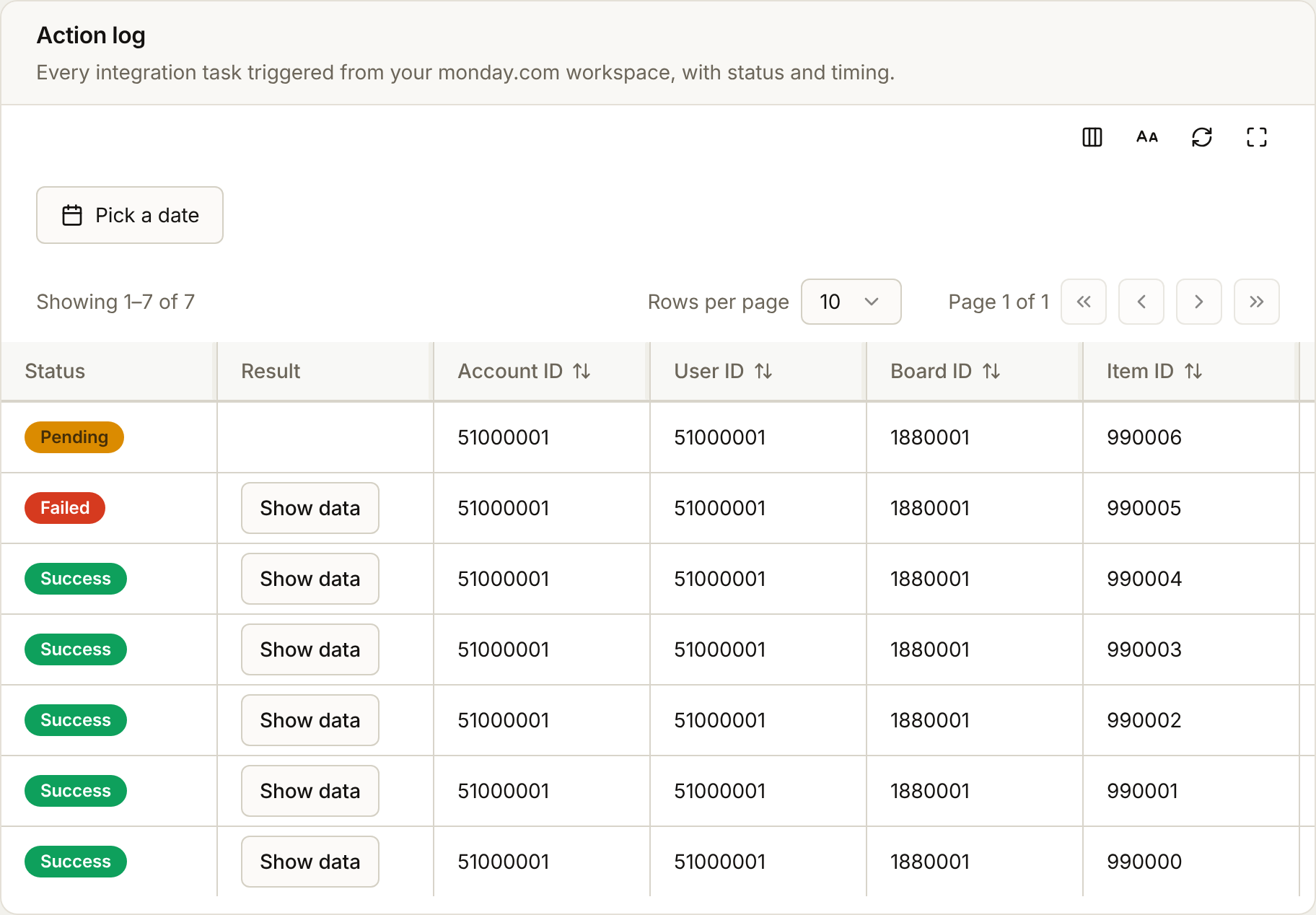
Post each action to the Action log ingest URL and it shows on the Activity tab, and on the person's monday.com tab. Posting the same actionLogId again updates it, so you can report pending first and the outcome later.
import jwt from 'jsonwebtoken';

// Signed like a Token URL request: the person the action ran for, and a
// short exp.
const signature = jwt.sign(
  {
    accountId: run.accountId,
    userId: run.userId,
    exp: Math.floor(Date.now() / 1000) + 60,
  },
  process.env.MONDAY_CLIENT_SECRET!
);

await fetch(process.env.BUILDBASE_MONDAY_ACTIONS_URL!, {
  method: 'POST',
  headers: {
    Authorization: `Bearer ${signature}`,
    'Content-Type': 'application/json',
  },
  body: JSON.stringify({
    actionLogId: run.id,
    actionTimestamp: new Date().toISOString(),
    actionType: 'create_document',
    accountId: run.accountId,
    userId: run.userId,
    boardId: run.boardId,
    itemId: run.itemId,
    recipeId: run.recipeId,
    integrationId: run.integrationId,
    status: 'success', // or 'pending', 'failed'
    result: { documentUrl },
  }),
});
Every field above is required, except result and error. Send error as a sentence when status is failed. The console shows it as written.
The signature is the same as a Token URL request: a JWT signed with your client secret, naming the person by accountId and userId, with an exp at most five minutes ahead. The body's accountId and userId must be the ones it names. The hand-off token from the Auth callback URL is not a signature here: it sits in the person's browser, so it is refused.
| Status | Meaning |
|---|---|
| 200 | Stored, or updated when the actionLogId was reported before |
| 400 | The body is missing a required field, or has one that is not listed above |
| 401 | Not signed with the client secret, no accountId and userId in the signature, or exp too far away |
| 403 | The body names a different accountId or userId than the signature |
Next steps
- Set up your monday.com app - where each key is, and where each URL goes
- Webhooks & Events - BuildBase's own events, for the rest of your app